
1. Introduction and Overview
This manual provides essential information for the safe and efficient operation of your HAHA Large Smart Vending Machine, Model DC-US1200FT-ST. This AI-powered cooler features a self-serve system designed for grab-and-go transactions in various commercial settings.
Key features include a massive 864-bottle capacity, AI-powered visual recognition for cashier-free shopping, dual 4G/WiFi connectivity, advanced anti-theft technology, and multiple cashless payment options. The machine also boasts ultra-fast air-cooling technology to maintain temperatures between 32°F and 50°F, and a powerful mobile application for remote management.
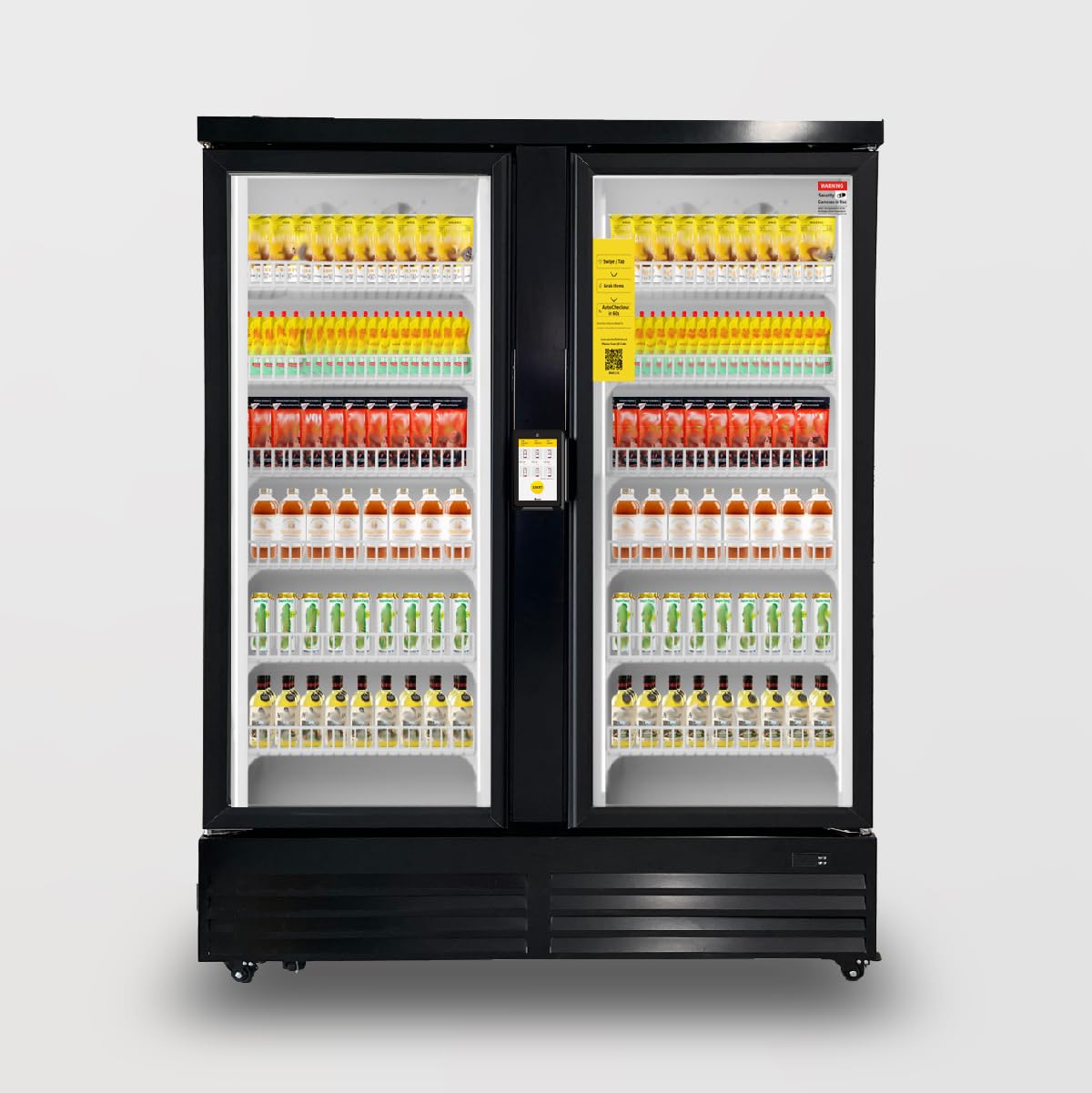
Figure 1.1: Front view of the HAHA Large Smart Vending Machine.

Figure 1.2: Illustration of AI-Powered Cooler capabilities.

Figure 1.3: Benefits of the HAHA Vending system.
2. Setup Instructions
2.1 Unpacking and Placement
Carefully unpack the vending machine. Ensure the machine is placed on a stable, level surface. The unit is freestanding. Allow adequate space around the machine for ventilation and door opening. The product dimensions are 27.9"D x 53.9"W x 79.5"H.
2.2 Power Connection
Connect the vending machine to a standard electrical outlet. The machine is electric and requires a stable power supply for optimal operation.
2.3 Initial Configuration
Connect the machine to a network using either 4G or WiFi. Download and install the HAHA Vending mobile application on your smartphone or tablet. Follow the in-app instructions to register your machine and complete the initial setup. This includes setting up payment processing and product inventory.
2.4 Shelving and Product Loading
The machine comes with 12 adjustable shelves. These shelves can be repositioned to accommodate various product sizes, including 500ml bottles and 330ml cans. Load products onto the shelves, ensuring they are stable and do not obstruct the door mechanism or internal cameras.

Figure 2.1: Internal components of the AI Suite for product recognition.
3. Operating Instructions
3.1 Customer Purchase Process
- Swipe/Tap Card: The customer initiates a purchase by swiping or tapping their credit/debit card, Apple Pay, mobile, or NFC payment device on the integrated payment terminal.
- Open Lock: The electromagnetic lock on the door will disengage, allowing the customer to open the door.
- Select Products: The customer selects desired products from the shelves. Internal cameras record all items removed.
- Close Door: The customer closes the door.
- Automatic Deduction: The system automatically identifies the taken products and deducts the corresponding fee from the customer's credit card.

Figure 3.1: Overview of the cashless payment process.
3.2 Remote Management via Mobile Application
The HAHA Vending mobile application provides comprehensive control and monitoring capabilities:
- Remote Control: Manage equipment settings and functions from anywhere.
- Data Statistics: Access real-time sales data, inventory counts, and performance metrics.
- Replenishment Order Management: The app automatically generates restocking orders based on current inventory levels, simplifying the restocking process.
- Consumer Complaint Handling: Tools for addressing customer feedback and issues.
- Anti-Theft Technology: Advanced features to ensure secure transactions and prevent product loss.
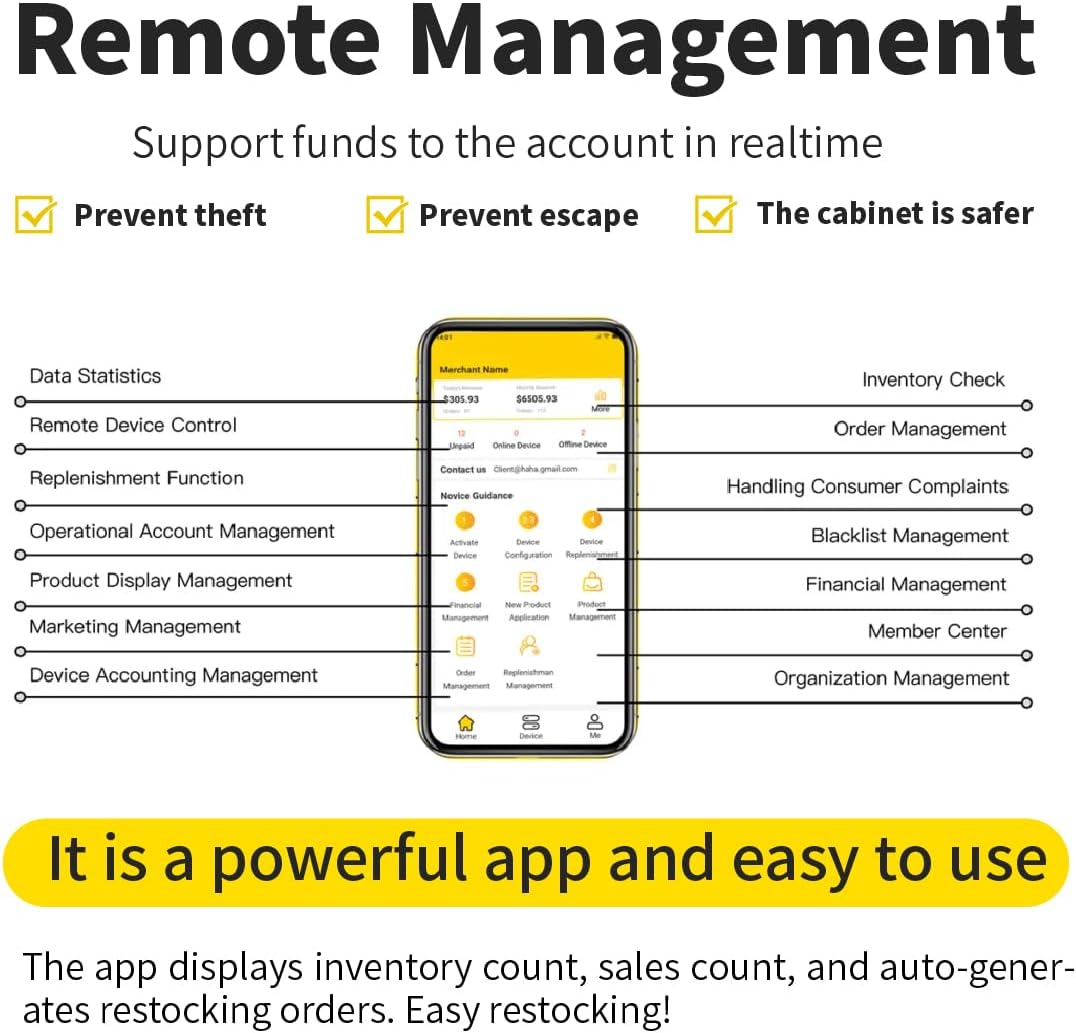
Figure 3.2: The HAHA Vending remote management application interface.

Figure 3.3: Features of the Advanced Cloud Management System.
4. Maintenance
4.1 Cleaning
Regularly clean the interior and exterior surfaces of the vending machine. Use a soft, damp cloth and mild, non-abrasive cleaning solutions. Ensure the glass doors are clean for optimal product visibility and camera performance. Avoid spraying water directly onto electrical components.
4.2 Restocking
Utilize the mobile application to monitor inventory levels and generate restocking orders. When restocking, ensure products are placed neatly and securely on the shelves. Verify that product placement does not interfere with the door's closing mechanism or the AI recognition system.
4.3 Temperature Monitoring
Periodically check the internal temperature of the machine to ensure it is within the optimal range of 32°F–50°F. This can be done via the machine's display or remotely through the mobile application. Ensure the air-cooling vents are not obstructed.
5. Troubleshooting
This section provides solutions to common issues you may encounter with your HAHA Large Smart Vending Machine.
5.1 Power Issues
- Machine is unresponsive: Check if the power cord is securely plugged into a working electrical outlet. Verify that the circuit breaker has not tripped.
- Glitch after power outage: If the machine experiences a glitch after a power outage, a restart may resolve the issue. If problems persist, contact technical support.
5.2 Payment System Malfunctions
- Card not accepted: Ensure the card is inserted or tapped correctly. Advise customers to try an alternative payment method (e.g., different credit card, Apple Pay, NFC). Some cards may not be compatible.
- Transaction errors: Check the machine's network connection (4G/WiFi). If the issue persists, contact support.
5.3 Door Not Opening/Closing
- Door not opening after payment: Ensure the payment process is fully completed and the electromagnetic lock has disengaged. Check for any physical obstructions.
- Door not closing properly: Remove any items that might be blocking the door. Ensure the door seals completely to maintain internal temperature.
5.4 Temperature Irregularities
- Temperature too high/low: Verify the temperature settings via the machine's control panel or the mobile app. Ensure the air-cooling vents are clear of obstructions.
5.5 App Connectivity Issues
- Unable to connect to app: Check the machine's 4G or WiFi connection status. Ensure your mobile device has a stable internet connection.
6. Specifications
Detailed technical specifications for the HAHA Large Smart Vending Machine (Model DC-US1200FT-ST).
| Feature | Specification |
|---|---|
| Product Dimensions (D x W x H) | 27.9" x 53.9" x 79.5" |
| Brand | Generic (Manufacturer: HAHAVENDING) |
| Capacity | 39 Cubic Feet (864 Bottle Capacity) |
| Configuration | Refrigerated Combo Vending Machine |
| Color | White |
| Special Feature | App Control |
| Installation Type | Freestanding |
| Number of Doors | 2 |
| Defrost System | Frost Free |
| Cooling Method | Air-cooled |
| Number Of Shelves | 12 |
| Adjustable Temperature Control | No (App Control for temperature) |
| Is Electric | Yes |
| Annual Energy Consumption | 2262 Kilowatt Hours Per Year |
| Model Number | DC-US1200FT-ST |
| Included Components | Smart Vending Machine |

Figure 6.1: Key specifications of the AI Vending Ultra (US1200CT).
7. Warranty and Support
Your HAHA Large Smart Vending Machine is backed by comprehensive warranty and support services to ensure long-term satisfaction and operational efficiency.
7.1 Warranty
The vending machine comes with a one-year maintenance period, during which any malfunctions or repairs are free of charge.
7.2 Technical Support
We provide lifelong technical support for your HAHA Vending Machine. Our dedicated after-sales service groups offer one-on-one support and 7*18H online assistance. Expect a response to inquiries within 10 minutes.

Figure 7.1: HAHA Vending services overview.