
1. Introduction
The EPOMAKER HE68 Lite is a compact 65% Hall Effect gaming keyboard designed for high-performance gaming and typing. It features advanced magnetic switches, adjustable actuation, rapid polling and scan rates, and customizable A-RGB lighting. This manual provides detailed instructions for setting up, operating, maintaining, and troubleshooting your keyboard.
2. Package Contents
Please verify that all items are present in your package:
- EPOMAKER HE68 Lite Gaming Keyboard
- USB-C Cable
- Keycap Puller
- User Manual (this document)

Image: The EPOMAKER HE68 Lite keyboard, USB-C cable, keycap puller, and user manual.
3. Setup
3.1 Connecting the Keyboard
- Locate the USB-C port on the back of the EPOMAKER HE68 Lite keyboard.
- Connect one end of the provided USB-C cable to the keyboard's USB-C port.
- Connect the other end of the USB-C cable to an available USB port on your computer (Windows, Mac, or Android device).
- The keyboard will automatically be recognized by your operating system.
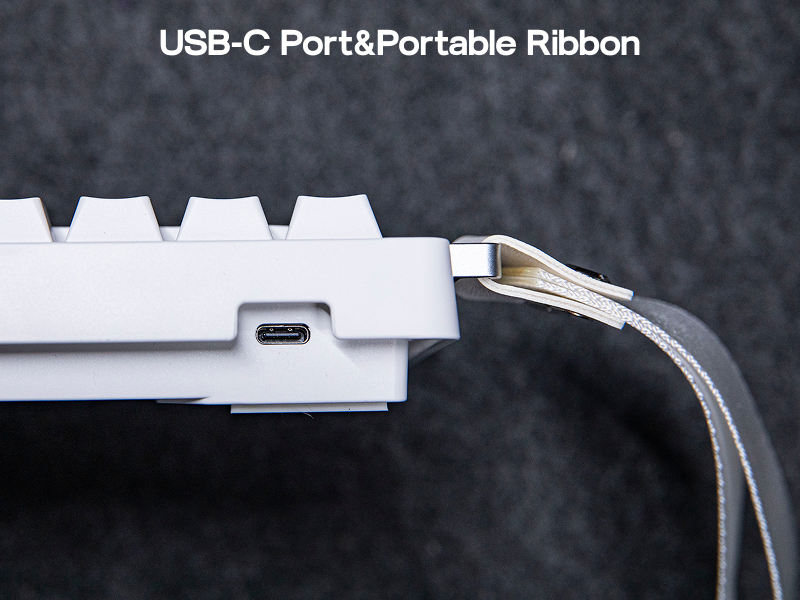
Image: The USB-C port for wired connection and the attached portable ribbon.
3.2 Software Installation (Optional)
To unlock the full customization potential of your HE68 Lite keyboard, including adjustable trigger, macros, and advanced lighting settings, download the EPOMAKER software from the official EPOMAKER website. The software is compatible with both Mac and Windows operating systems.
- Visit the official EPOMAKER website.
- Navigate to the support or downloads section.
- Download the software for the HE68 Lite model compatible with your operating system.
- Follow the on-screen instructions to install the software.

Image: The EPOMAKER software interface for Mac and Windows, showing customization options for the HE68 Lite keyboard.
4. Key Features and Operation
4.1 Hall Effect Switches and Adjustable Actuation
The HE68 Lite utilizes Hall Effect magnetic switches, offering precise and consistent key presses. The actuation point, the distance a key needs to travel to register a press, can be adjusted from 0.005mm to 3.3mm using the EPOMAKER software. This allows for fine-tuning responsiveness for different tasks, such as gaming or typing.

Image: A detailed view of a Hall Effect switch, highlighting its adjustable actuation range.
4.2 High Polling and Scan Rates
The keyboard features an 8,000 Hz polling rate and a 128,000 Hz per-key scan rate, ensuring rapid signal transmission and minimal input latency (0.125ms). This high responsiveness is crucial for competitive gaming.
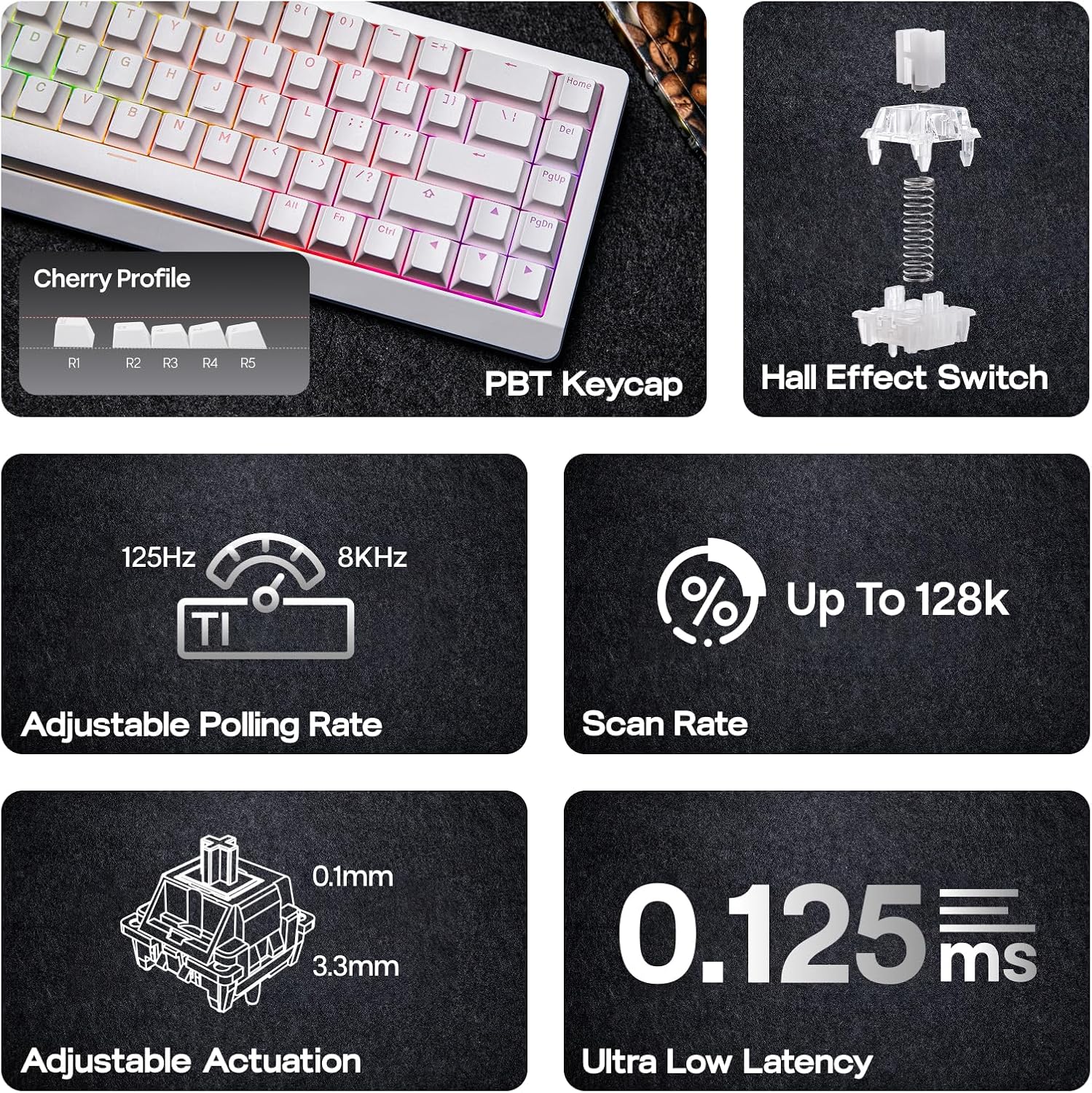
Image: Visual representation of the keyboard's technical advantages, including high polling rate, scan rate, and low latency.
4.3 A-RGB Backlighting and Shine-Through Keycaps
The HE68 Lite is equipped with A-RGB backlighting and shine-through PBT keycaps. The A-RGB system offers a two-layer lighting effect, combining captivating backlighting with dynamic effects that respond to key presses. This enhances visibility in low-light conditions and adds a visual element to your setup.

Image: The keyboard showcasing its vibrant A-RGB backlighting and the clarity of its shine-through keycaps.
4.4 Advanced Gaming Functions (Software Dependent)
The EPOMAKER software enables several advanced functions:
- Snap Key (SOCD): Prioritizes the latest key press for opposite directions, preventing character freezing in games.
- Dynamic Keystroke (DKS): Allows a single key press to trigger up to four different actions based on the key's travel distance.
- Mod Tap (MT): Assigns different functions to a key based on whether it is tapped or held.
- Macros: Record and assign complex sequences of key presses to a single key for quick execution.

Image: A visual explanation of Snap Key (SOCD) for precise directional input.

Image: A visual explanation of Dynamic Keystroke (DKS) for multi-action key presses.

Image: A visual explanation of Mod Tap (MT) for context-sensitive key functions.
4.5 Sound-Dampened Design
The keyboard incorporates a 5-layer sound-dampening design, including PRO Sandwich Foam, IXPE Switch Pad, PET Sound-Enhancement Pad, Switch Socket Pad, and Bottom Foam. This construction reduces unwanted noise and provides a satisfying, creamy typing sound.
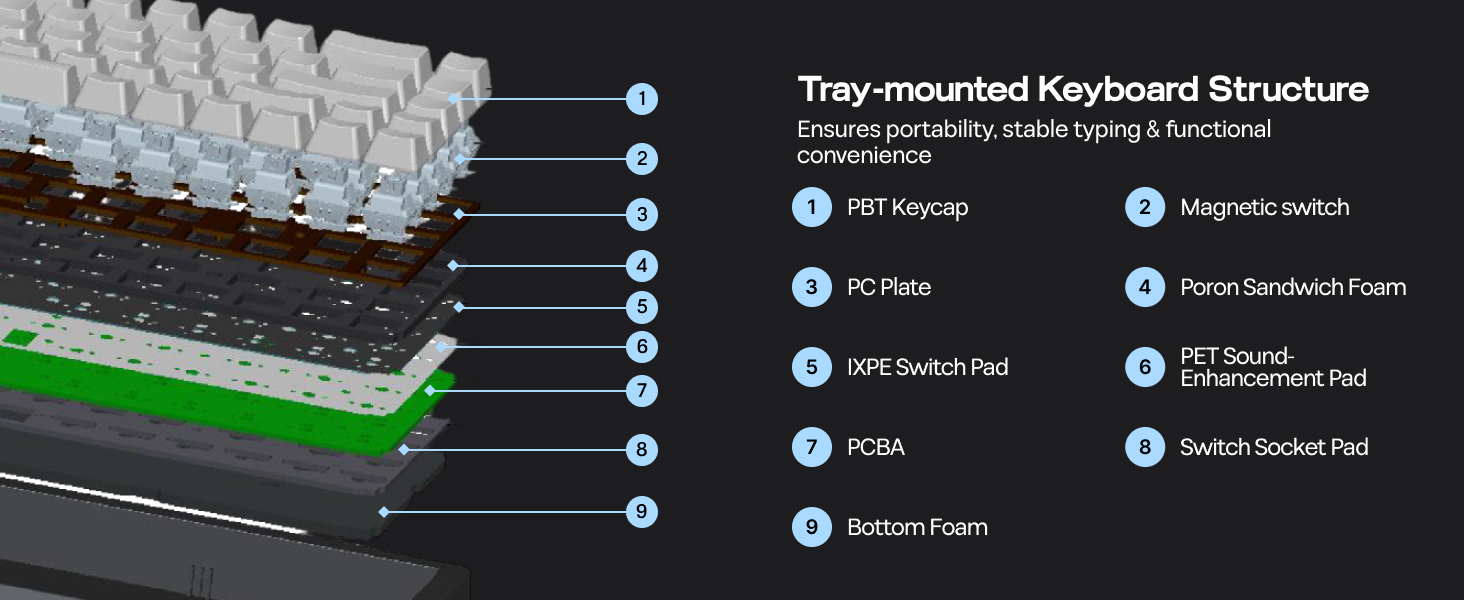
Image: Cross-section diagram detailing the internal sound-dampening layers and tray-mounted structure.
5. Maintenance
5.1 Cleaning
- Disconnect the keyboard from your computer before cleaning.
- Use the provided keycap puller to carefully remove keycaps for deeper cleaning.
- Wipe the keycaps and keyboard surface with a soft, damp cloth. Avoid harsh chemicals.
- Use compressed air to remove dust and debris from between the keys.
5.2 Hot-Swappable Switches
The HE68 Lite features hot-swappable sockets for magnetic linear switches. This allows for easy replacement or customization of switches without soldering. Ensure the keyboard is disconnected before attempting to remove or install switches.
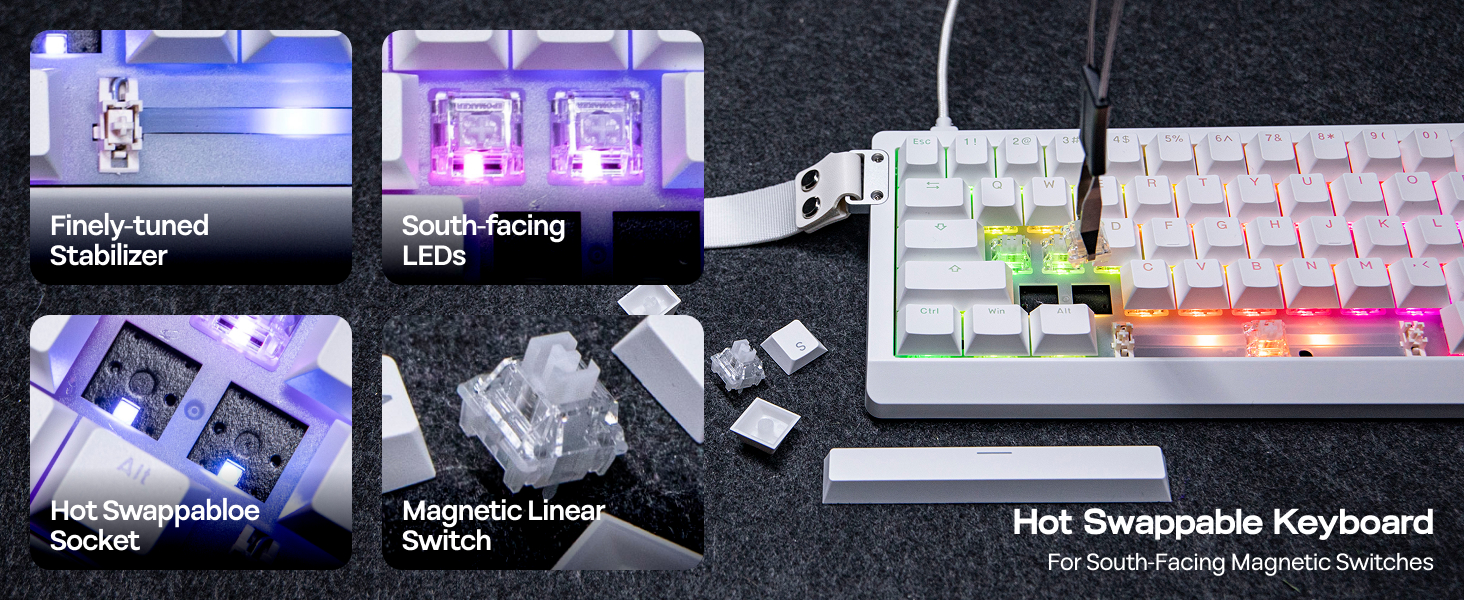
Image: Detailed view of the hot-swappable switch sockets and magnetic linear switches.
6. Troubleshooting
- Keyboard not responding:
Ensure the USB-C cable is securely connected to both the keyboard and the computer. Try a different USB port or cable. Restart your computer. - Keys not registering or double-typing:
This may indicate an issue with the Hall Effect switches. Use the EPOMAKER software to recalibrate the switches or adjust the actuation point. If a specific switch is faulty, it can be hot-swapped. - Backlighting not working or incorrect:
Check the lighting settings in the EPOMAKER software. Ensure the software is up to date. - Software issues (e.g., settings not saving, firmware update problems):
Ensure you are using the correct version of the EPOMAKER software for your operating system. Try running the software as an administrator. If firmware updates fail, consult the EPOMAKER support website for specific instructions or contact support. Note that Mac users have reported occasional difficulties with firmware updates; ensure you follow platform-specific instructions carefully. - Keyboard feels warped or unstable:
While the keyboard is designed for portability, minor case flex has been noted. Ensure it is placed on a flat, stable surface.
7. Specifications
| Model | HE68 Lite |
| Layout | 65% (68 Keys) |
| Switch Type | Hall Effect Magnetic Linear Switches |
| Actuation Point | Adjustable (0.005mm to 3.3mm) |
| Polling Rate | 8,000 Hz |
| Scan Rate | 128,000 Hz per-key |
| Latency | 0.125ms |
| Connectivity | Wired USB-C |
| Backlighting | A-RGB |
| Keycaps | Shine-Through PBT |
| Dimensions (L x W x H) | 12.7 x 4.7 x 1.6 inches (32.2cm x 12cm x 4cm) |
| Weight | 1.94 pounds (0.65 kg) |
| Compatibility | Windows, macOS, Android |

Image: The compact 65% layout and detailed dimensions of the HE68 Lite keyboard.
8. Warranty and Support
EPOMAKER products are covered by a limited warranty. For specific warranty terms and conditions, please refer to the warranty card included with your product or visit the official EPOMAKER website. For technical support, product inquiries, or warranty claims, please contact EPOMAKER customer service through their official website or the contact information provided in your product packaging.
Official EPOMAKER Website: www.epomaker.com


