
Introduction
Thank you for choosing the Tauboly L11 Mini Body Camera. This compact and portable video recorder is designed for various applications, including outdoor sports, cycling, hiking, and general recording needs. It features 1080P video resolution, motion detection, and loop recording capabilities. Please read this manual carefully to ensure proper use and optimal performance of your device.
What's in the Box
- L11 Mini Body Camera
- USB Cable
- USB Card Reader
- User Manual

Image: The Tauboly L11 Mini Body Camera, USB cable, and user manual as packaged in the box.
Product Overview
Familiarize yourself with the various components and controls of your Tauboly L11 Mini Body Camera.
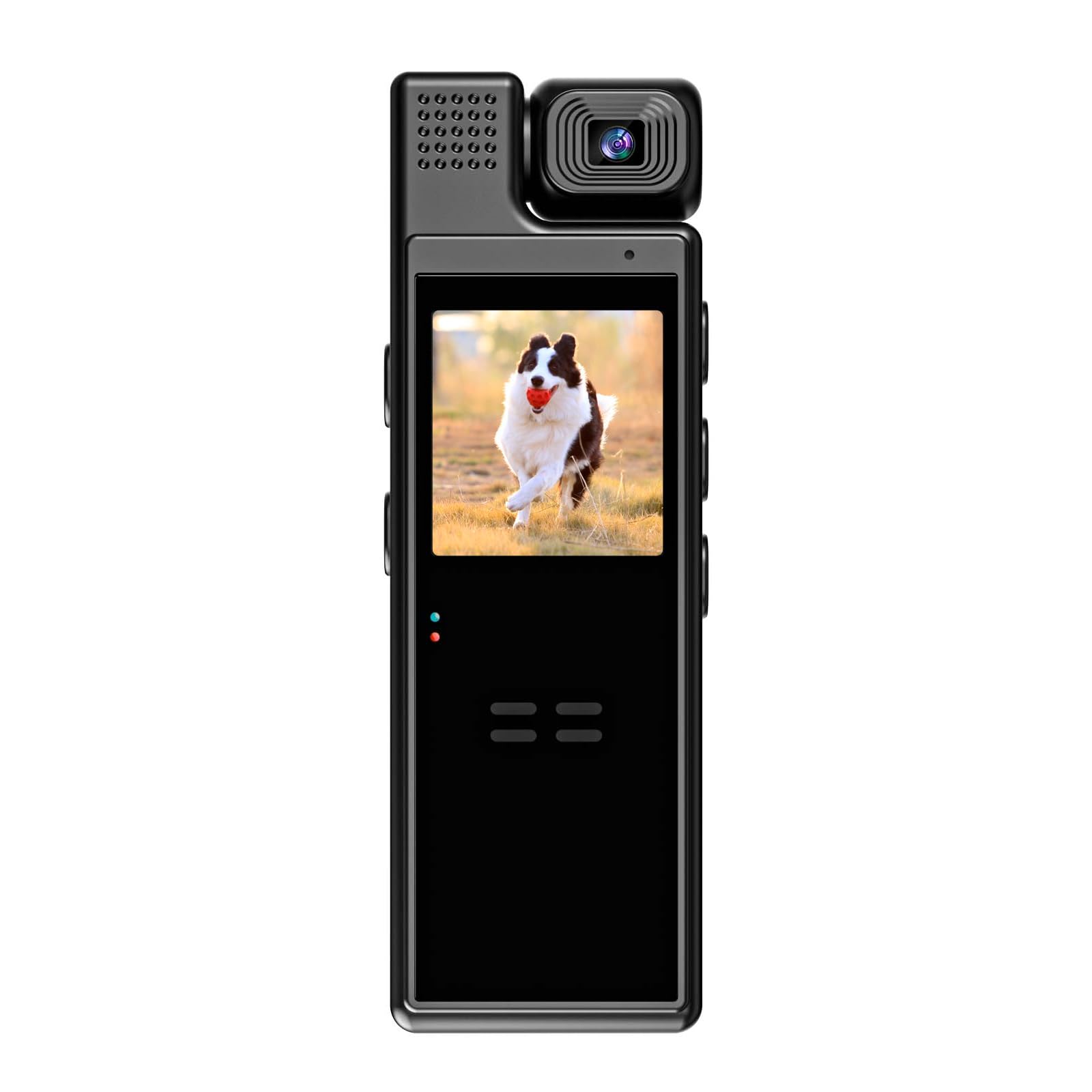
Image: Front view of the camera, highlighting the lens and body clip.

Image: Camera with its 1.3-inch color display active.

Image: Side view detailing control buttons and ports.

Image: Close-up of the rotatable lens.
Setup
1. Charging the Device
Before initial use, fully charge the camera. Connect the camera to a power source using the provided USB cable. The 1500mAh rechargeable battery provides 6-8 hours of continuous recording when fully charged. The camera supports recording while charging, allowing for extended use when connected to a portable power bank or computer.
2. Inserting a Memory Card
The camera requires a MicroSD card (not included) for storing recordings. It supports cards up to 128GB. Before inserting, ensure the MicroSD card is formatted to FAT32. Insert the card into the designated slot on the camera.
3. Adjusting the Lens
The camera lens can be manually rotated 180 degrees. After rotating the lens to your desired position, press the "next key" on the device to adjust the screen direction to match the lens orientation.
Operating Instructions
Power On/Off
Press and hold the power button to turn the camera on or off.
Video Recording
To start video recording, press the dedicated record button once. The camera will capture high-quality 1080P or 720P video at 30 frames per second. Press the button again to stop recording. All videos are automatically saved to the memory card.
Photo Capture
To take a photo, press the photo capture button once. Photos are saved in JPG format to the memory card.
Loop Recording
The camera supports loop recording with adjustable durations of 3, 5, 10, or 15 minutes. When the memory card is full, new videos will automatically overwrite the oldest footage. This function can be turned off in the camera's settings if not desired.
Motion Detection
Activate or deactivate the motion detection feature through the camera's settings. When enabled, the camera will automatically begin recording when motion is detected.
Night Vision
The camera includes built-in spotlights for night vision, providing black and white images in low-light conditions. These are non-hidden IR lights.
Auto Power-Off
Configure the auto power-off setting to OFF, 1 minute, or 3 minutes to conserve battery life when the camera is idle.
Screen Savers
Set the screen saver to OFF, 3 minutes, 5 minutes, or 10 minutes to automatically turn off the display after a period of inactivity.
Timestamp
Enable or disable the timestamp feature in the settings to include the date and time on your recordings.
Specifications
| Video Resolution | 1920x1080P, 1280x720P (optional) |
| Camera Frame Rate | 30 fps |
| Field of View | 120° |
| Display | 1.3 inches color display |
| Image Quality | 1M, 2M, 3M |
| Photo Format | JPG |
| Loop Recording Options | OFF/3Mins/5Mins/10Mins/15 Mins |
| Auto Power-Off Options | OFF/1min/3mins |
| Screen Savers Options | OFF/3mins/5mins/10mins |
| Night Vision | Black and white picture, built-in 5pcs spotlights, non-hidden IR lights |
| Motion Detection | Off, On |
| Timestamp | Off, On |
| Memory Card Support | Up to 128G MicroSD card (FAT32 format) |
| Size | 3.7 in. x 1.3 in. x 0.8 in. (97.6 mm x 31.7 mm x 18.7 mm) |
| Weight | 1.9 ounces (54 grams) |
| Battery Capacity | 1500mAh Lithium Ion |
Maintenance
- Cleaning: Use a soft, dry cloth to clean the camera body and lens. Avoid using harsh chemicals or abrasive materials.
- Storage: Store the camera in a cool, dry place away from direct sunlight and extreme temperatures.
- Battery Care: For optimal battery life, avoid fully discharging the battery frequently. Charge the camera regularly, even if not in use for extended periods.
- Firmware Updates: Check the manufacturer's website periodically for any available firmware updates to improve performance and add new features.
Troubleshooting
Camera Not Turning On
- Ensure the battery is charged. Connect the camera to a power source and allow it to charge for at least 30 minutes before attempting to power on again.
- Perform a reset by pressing the reset button (if available, refer to product overview for location) with a thin object like a paperclip.
Recording Issues (e.g., not saving, errors)
- Verify that a MicroSD card is properly inserted.
- Ensure the MicroSD card is formatted to FAT32. If not, format it using a computer.
- Check if the MicroSD card is full. If so, transfer files to a computer and format the card, or replace it with a new one.
- Try using a different MicroSD card to rule out card malfunction.
Poor Video/Image Quality
- Ensure the camera lens is clean and free from smudges or dust.
- Check lighting conditions. Optimal lighting provides the best results.
- Verify that the selected video resolution (1080P or 720P) is appropriate for your needs.
Warranty Information
This product comes with a 1-year warranty from the date of purchase. Please retain your proof of purchase for warranty claims. The warranty covers manufacturing defects but does not cover damage caused by misuse, accidents, unauthorized modifications, or normal wear and tear.
Customer Support
For further assistance, technical support, or warranty inquiries, please refer to the contact information provided on the product packaging or the official Tauboly website. Please have your product model (L11) and purchase details ready when contacting support.