
Introduction
This manual provides comprehensive instructions for the safe and effective operation, maintenance, and care of your OIJIIE Hydrogen Oxygen Facial Machine, model LB-G006. This versatile device is designed for both professional salon and personal home use, offering a range of skin care functions.
Please read this manual thoroughly before initial use to ensure proper understanding and to prevent any potential issues or injuries.
Safety Information
- Always ensure the device is unplugged before cleaning or performing any maintenance.
- Do not immerse the main unit in water or any other liquid.
- Keep the device out of reach of children.
- Use only low-concentration skincare solutions to prevent clogging of the handles and internal components.
- If you experience any discomfort or adverse reactions during use, discontinue immediately and consult a healthcare professional.
- This device is intended for cosmetic use only. Statements regarding its benefits have not been evaluated by the FDA and are not intended to diagnose, treat, cure, or prevent any disease or health condition.
Product Overview and Components
The OIJIIE Hydrogen Oxygen Facial Machine LB-G006 is equipped with a main unit, a touch screen interface, and six specialized handles, along with solution bottles and a waste water bottle.
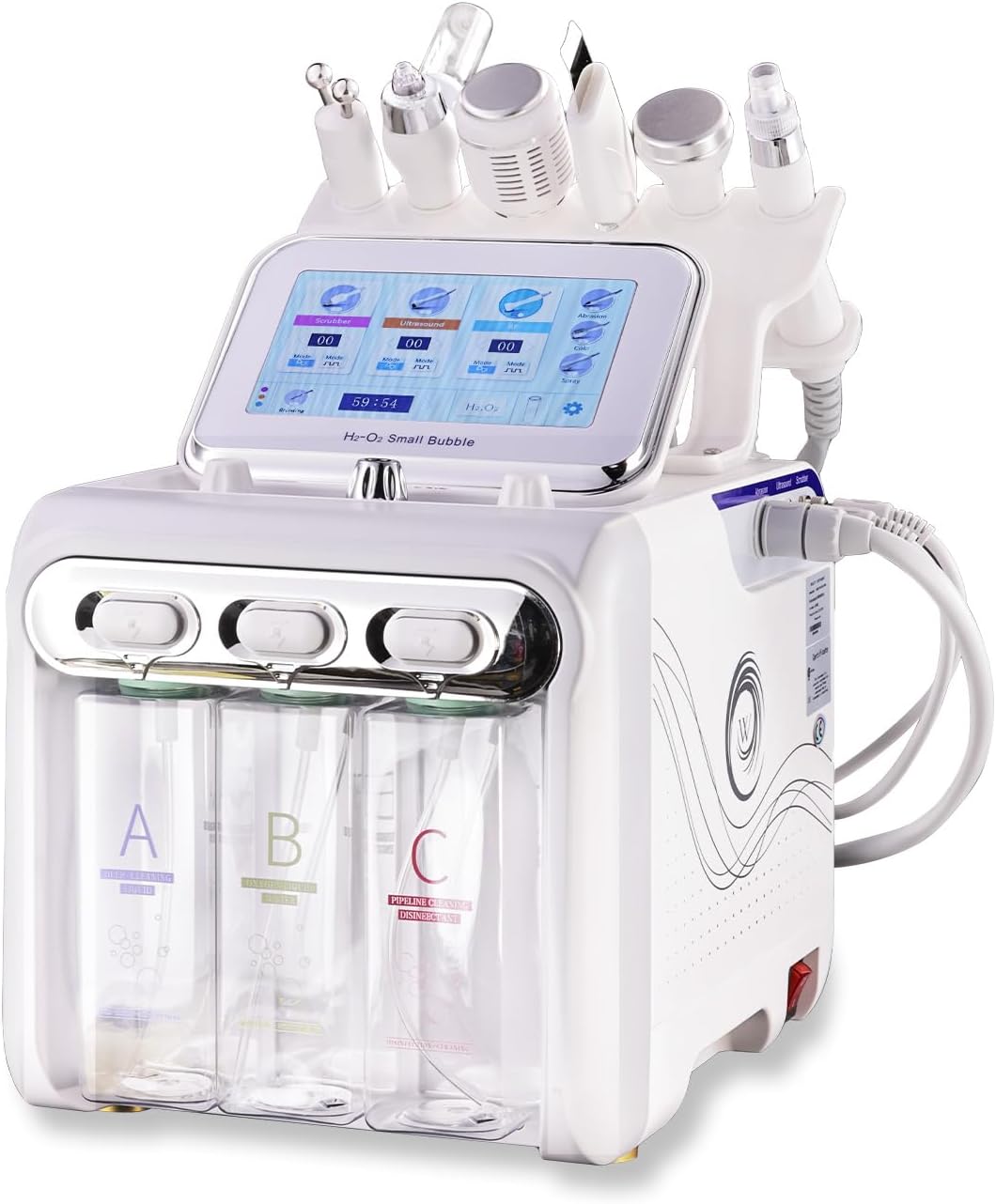
Figure 1: OIJIIE Hydrogen Oxygen Facial Machine LB-G006 main unit with handles and solution bottles.

Figure 2: The main unit surrounded by its six distinct functional handles, each designed for specific skin care applications.
Functional Handles and Their Applications:
- Abrasion Handle: Designed for deep cleansing, effectively removing blackheads, pimples, and impurities from pores, leaving skin clear and radiant.
- Spray Handle: Delivers oxygen-hydrogen-rich essence deep into the dermis to enhance moisturizing effects, hydrating and energizing the skin.
- Skin Scrubber: Utilizes ultrasonic vibrations to remove dead skin cells and blackheads, refining and smoothing the skin's texture.
- Vibration Probe: Aids in the absorption of nutrients, helping to lighten dark spots, reduce dark circles, and brighten overall skin tone.
- Bipolar Probe: Lifts and firms the skin, minimizing the appearance of fine lines for a rejuvenating effect.
- Cold Hammer: Calms and soothes the skin, reduces redness, and helps to shrink pores after treatments.

Figure 3: Illustration of the Abrasion handle for deep cleansing and the Spray handle for moisturizing.

Figure 4: Illustration of the Skin Scrubber for exfoliation and the Vibration Probe for nutrient absorption.

Figure 5: Illustration of the Bipolar Probe for skin lifting and the Cold Hammer for soothing and pore reduction.
Solution Bottles:
The machine includes three solution bottles (A, B, C) for different skincare solutions and one waste water bottle (D).

Figure 6: Labeled solution bottles (A, B, C) and the Waste Water Bottle (D) for H2O2.
Setup Instructions
- Unpacking: Carefully remove all components from the packaging. Inspect for any damage.
- Placement: Place the main unit on a stable, flat surface.
- Connect Handles: Connect each functional handle to its corresponding port on the main unit. Ensure connections are secure.
- Fill Solution Bottles: Fill bottles A, B, and C with your desired low-concentration skincare solutions. Ensure the waste water bottle (D) is empty and properly installed.
- Power Connection: Plug the power cord into the machine and then into a standard 110-volt electrical outlet.
Operating Instructions
- Prepare Skin: Cleanse your face thoroughly before beginning any treatment.
- Apply Solution/Gel: Apply a low-concentration skincare solution or conductive gel to the treatment area as required by the specific handle being used.
- Power On: Turn on the machine using the main power switch. The touch screen will illuminate.
- Select Mode and Intensity: Using the touch screen, select the desired treatment mode and adjust the intensity level according to your comfort and skin type. The machine offers ten intensity levels and four modes.
- Perform Treatment: Gently glide the selected handle over the face or body area in upward strokes, following the specific instructions for each handle's function. Avoid sensitive areas like the eyes.
- Monitor Progress: Observe your skin's reaction during the treatment. If any irritation occurs, reduce intensity or stop the treatment.
- Completion: Once the treatment is complete, turn off the machine.
Important Note: Always refer to the specific guidelines for each handle's usage to maximize effectiveness and ensure safety.
Maintenance and Care
- Cleaning After Use: After each use, clean the handles and the exterior of the machine with a soft, damp cloth. Ensure no liquid enters the internal components.
- Empty Waste Water: Regularly empty the waste water bottle (D) to prevent overflow and maintain hygiene.
- Solution Bottles: Rinse solution bottles (A, B, C) thoroughly when changing solutions or for storage.
- Storage: Store the machine and its accessories in a clean, dry place, away from direct sunlight and extreme temperatures.
- Prevent Clogging: To avoid clogging the handles and internal tubing, consistently use low-concentration skincare solutions.
Troubleshooting
| Problem | Possible Cause | Solution |
|---|---|---|
| Machine does not power on. | Power cord not properly connected; power outlet issue. | Check power cord connection. Ensure outlet is functional. |
| Handles are not dispensing solution or have weak suction. | Solution bottles empty; clogged handle/tubing; incorrect mode/intensity setting. | Refill solution bottles. Clean handles and tubing. Adjust mode and intensity on touch screen. Use low-concentration solutions. |
| Touch screen is unresponsive. | Temporary software glitch; power issue. | Turn off the machine, wait 30 seconds, then restart. If issue persists, contact support. |
| Skin irritation after use. | Intensity too high; unsuitable skincare solution; prolonged use on one area. | Reduce intensity. Use gentler solutions. Limit treatment time per area. Consult a professional if irritation persists. |
Specifications
| Model Number | LB-G006 |
| Brand | OIJIIE |
| Power Input | 110 Volts |
| Material | Acrylonitrile Butadiene Styrene (ABS) |
| Package Dimensions | 18.1 x 17.3 x 12.3 inches |
| Item Weight | 14.25 Pounds |
| Product Benefits | Anti-Aging, Moisturizing, Rejuvenating, Skin Care, Tightening |

Figure 7: Dimensions of the OIJIIE Hydrogen Oxygen Facial Machine LB-G006 and its six handles.
Warranty and Support
For any questions, technical assistance, or warranty inquiries regarding your OIJIIE Hydrogen Oxygen Facial Machine LB-G006, please contact the manufacturer or your point of purchase. Please retain your proof of purchase for warranty validation.
Legal Disclaimer: Statements regarding dietary supplements have not been evaluated by the FDA and are not intended to diagnose, treat, cure, or prevent any disease or health condition. This product is intended for cosmetic use only.