
Introduction
Thank you for choosing the HYLONE Big and Tall Office Chair. This manual provides essential information for the assembly, operation, maintenance, and troubleshooting of your new office chair. Please read these instructions carefully before use to ensure proper function and longevity of the product.
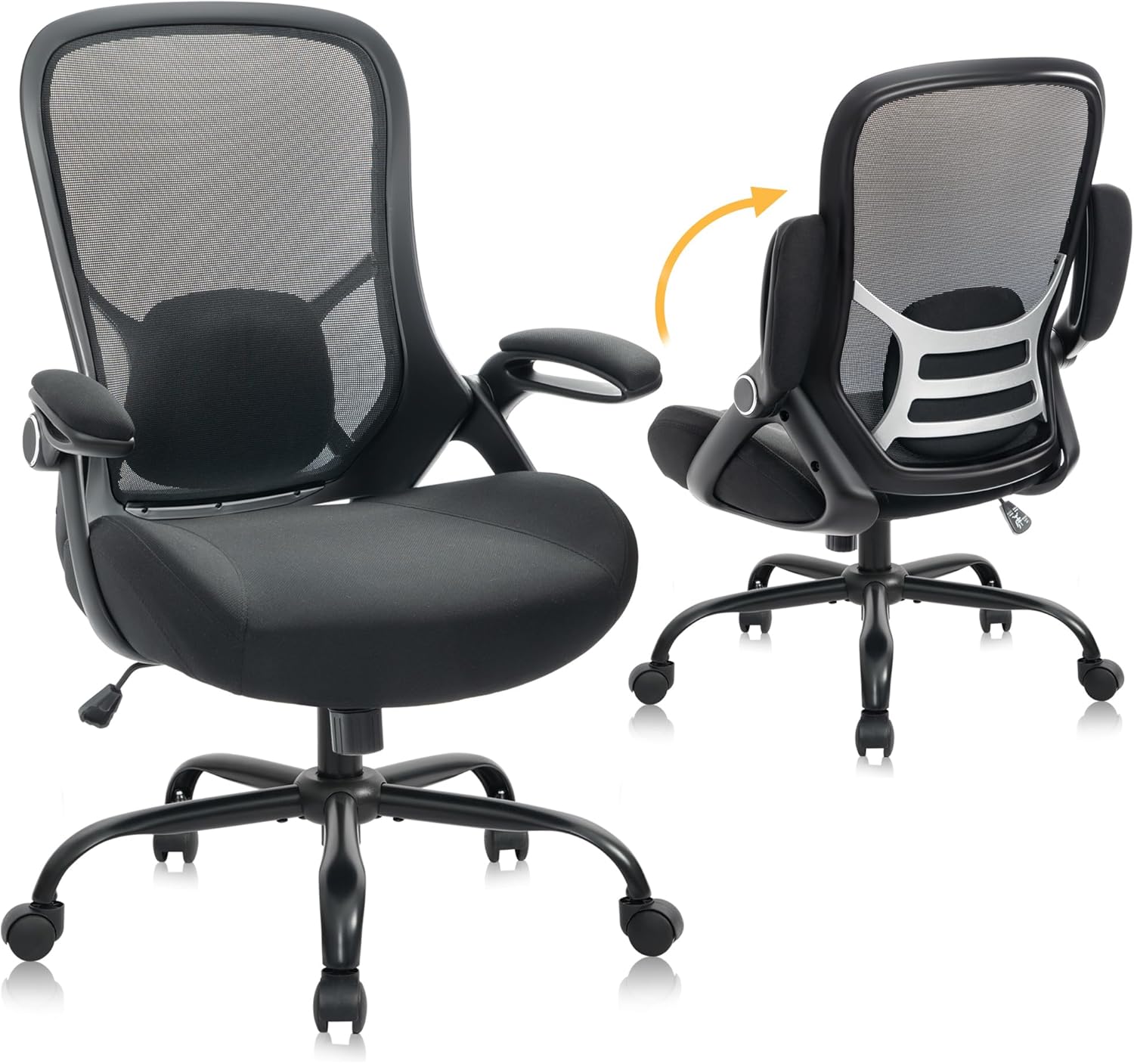
Image: The HYLONE Big and Tall Office Chair, designed for comfort and durability.
Key Features:
- Ergonomic Design: Provides comprehensive support for head, back, hips, and arms, suitable for various environments including offices, home offices, and design studios.
- Adjustable Features: Easily adjust seat height, backrest recline (90° to 120°), and flip-up armrests for personalized comfort.
- Thickened Seat: Features a 5-inch thick, streamlined seat cushion made of high-quality, resilient sponge for long-lasting comfort without deformation.
- Breathable Mesh Back: Nylon mesh back enhances breathability and durability, preventing discomfort during extended use.
- Smooth Casters & Stable Base: Equipped with durable rolling caster wheels for quiet, smooth mobility on various floor types, and a large 28-inch 5-star base for enhanced stability.
- Heavy Duty Construction: Designed to support up to 400 lbs.
Safety Information
Please adhere to the following safety guidelines to prevent injury and ensure the safe operation of your chair:
- Always follow the assembly instructions provided.
- Do not attempt to assemble or disassemble the chair while it is in use.
- Keep the chair on a stable, level surface.
- Do not exceed the maximum weight capacity of 400 pounds.
- Ensure all bolts and screws are tightened securely before use and periodically check for looseness.
- Keep children and pets away from the chair during assembly.
Setup and Assembly
The HYLONE Office Chair is designed for straightforward assembly, typically taking around 30 minutes. An Allen wrench is included for your convenience. Please ensure all parts are present before beginning assembly.
Assembly Steps:
- Unpack Components: Carefully remove all parts from the packaging and lay them out on a clean, flat surface. Verify all components against the parts list in your included manual.
- Attach Casters to Base: Insert the five caster wheels into the holes at the ends of the chair base. Push firmly until they click into place.
- Insert Gas Lift: Place the gas lift cylinder into the center hole of the assembled chair base.
- Attach Mechanism to Seat: Secure the seat mechanism to the underside of the seat cushion using the provided screws. Ensure the front of the mechanism aligns with the front of the seat.
- Attach Armrests: Fasten the armrests to the seat using the designated screws. Ensure they are oriented correctly for the flip-up function.
- Attach Backrest: Connect the backrest to the seat and armrests using the appropriate screws.
- Connect Seat Assembly to Gas Lift: Carefully place the assembled seat and backrest onto the gas lift cylinder, ensuring it is centered and stable.
- Install Lumbar Support: Position the detachable lumbar support as desired on the backrest.
- Final Check: Once assembled, sit on the chair to engage the gas lift and test all adjustment functions. Ensure all screws are tight and the chair is stable.

Image: The 100° adjustable arms can be folded up to fit under desks of various heights.

Image: Overview of multi-functional features including padded armrests, adjustable height, and portable lumbar support.
Operating Instructions
Your HYLONE office chair offers several adjustments to customize your seating experience:
- Seat Height Adjustment: Locate the lever on the right side under the seat. Pull the lever up to raise the seat. To lower the seat, remain seated and pull the lever up. Release the lever at the desired height.
- Backrest Recline (Tilt) Adjustment: The chair allows for a recline range from 90° to 120°. Pull out the lever on the left side under the seat to enable rocking. Push the lever in to lock the backrest in an upright position. A knob under the seat can be rotated to adjust the tilt tension.
- Flip-Up Armrests: The armrests can be flipped up by rotating them upwards. This allows the chair to be pushed further under a desk, saving space.
- Lumbar Support: The chair includes a detachable lumbar support. Position it along the mesh backrest to provide optimal support for your lower back. It can be adjusted for placement either behind or in front of the mesh for varied support.

Image: Multi-adjustment features including rocking function, tilt tension control, and seat height adjustment.
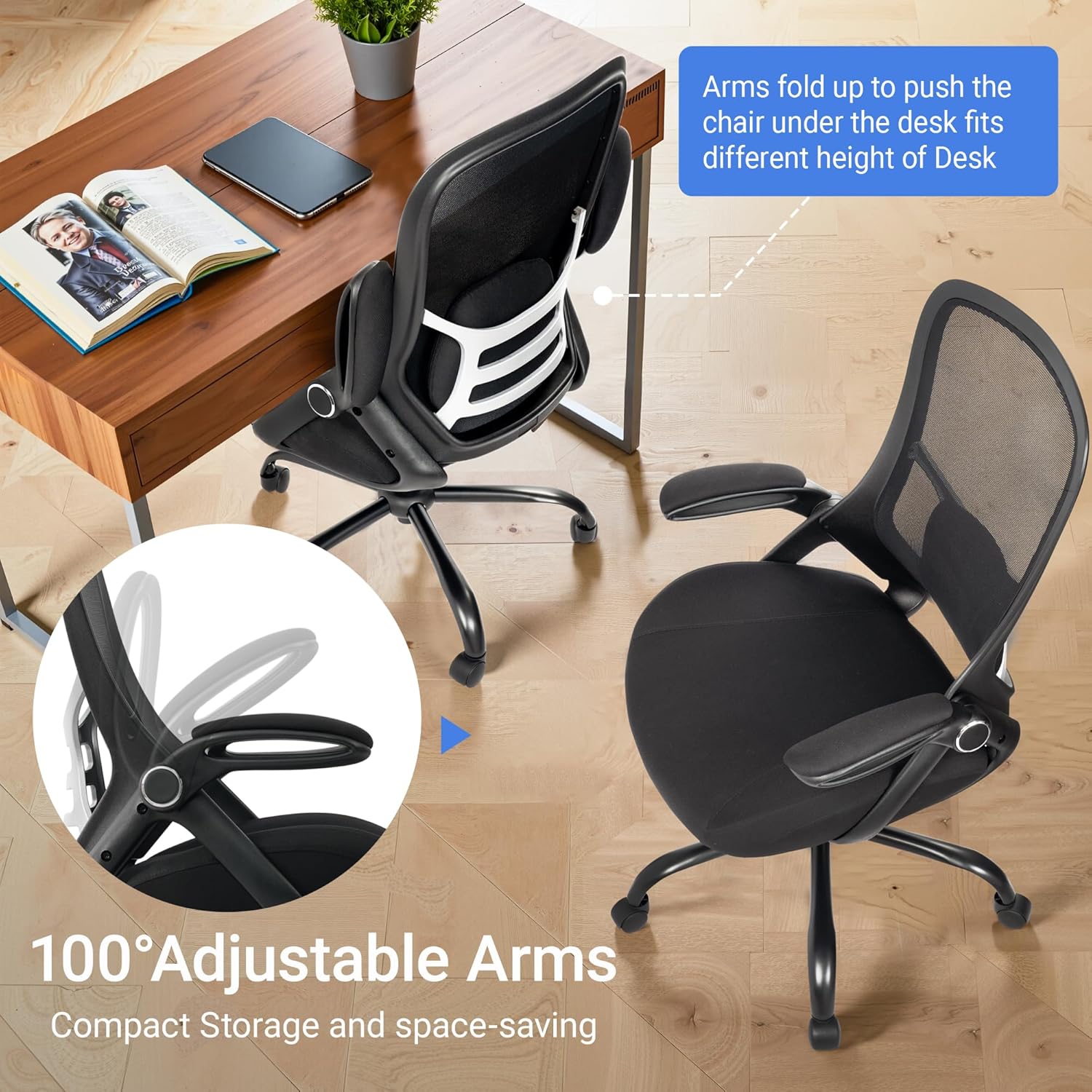
Image: The upgraded detachable lumbar support can be positioned for optimal comfort.
Maintenance
Regular maintenance will help prolong the life and appearance of your HYLONE office chair:
- Cleaning: Wipe clean with a damp cloth. Avoid harsh chemicals or abrasive cleaners that may damage the mesh or cushion material.
- Caster Care: Periodically check the caster wheels for hair or debris that may hinder smooth movement. Clean as necessary.
- Fastener Check: Regularly inspect all screws and bolts to ensure they remain tight. Re-tighten if any looseness is detected.
- Avoid Overloading: Do not exceed the maximum weight capacity of 400 pounds.

Image: Components like smooth casters and the durable base contribute to the chair's longevity and ease of maintenance.
Troubleshooting
If you encounter any issues with your HYLONE office chair, please refer to the following common solutions:
- Chair feels wobbly: Ensure all assembly screws are securely tightened. Check that the gas lift is properly seated in the base.
- Casters not rolling smoothly: Inspect casters for debris (hair, lint) and clean them. Ensure the chair is on a suitable surface.
- Seat height adjustment not working: Check if the gas lift lever is fully engaged or disengaged. Ensure no obstructions are preventing the gas lift from functioning.
- Backrest not reclining: Verify that the tilt lock lever is disengaged (pulled out). Adjust the tilt tension knob to a looser setting if the recline feels too stiff.
If problems persist after attempting these solutions, please contact HYLONE customer support for further assistance.
Specifications
| Brand | HYLONE |
| Model Number | 0016-KKL-BLACK |
| Color | Black |
| Material | Plastic, Mesh, Sponge, Wood (seat board) |
| Product Dimensions (D x W x H) | 21"D x 18"W x 40"H |
| Item Weight | 32 Pounds |
| Maximum Weight Recommendation | 400 Pounds |
| Seat Height | 19.6 Inches |
| Seat Depth | 19 Inches |
| Seat Length | 21.5 Inches |
| Adjustable Features | Adjustable Backrest (90°-120°), Adjustable Height, Flip-up Armrests |
| Assembly Required | Yes |
| Product Care Instructions | Wipe Clean |

Image: Detailed product dimensions for the HYLONE office chair.
Warranty and Support
HYLONE is committed to your satisfaction. Your office chair comes with the following support:
- 24-Month Free Parts: In the event of any issues, HYLONE offers 24 months of free replacement parts.
- Customer Support: If you have any questions, concerns, or require assistance, please email the HYLONE expert team. They aim to respond within 24 hours to ensure your satisfaction.
For further assistance, please visit the official HYLONE store or contact customer service through your purchase platform.