
1. Introduction
This manual provides essential instructions for the safe and efficient operation of your Lenyes LW-330 Smart Watch. Please read this manual thoroughly before using the device to ensure proper functionality and to prevent damage.
The Lenyes LW-330 Smart Watch combines advanced technology with a sleek design, featuring a 2.12-inch IPS HD curved screen and an aluminum alloy frame. It offers comprehensive health monitoring, Bluetooth calling, and smart notifications, making it a versatile companion for daily life and fitness activities. The device is IP68 water-resistant, ensuring durability in various conditions.
2. Safety Information
- Do not attempt to disassemble, repair, or modify the device. This may cause damage, electric shock, or fire.
- Keep the device away from extreme temperatures, direct sunlight, and high humidity.
- Avoid exposing the device to strong impacts or vibrations.
- The health monitoring features are for reference only and should not be used for medical diagnosis or treatment. Consult a medical professional for health-related concerns.
- Ensure the charging cable is connected correctly to prevent short circuits or damage.
- Keep the device out of reach of children and pets.
3. Package Contents
Verify that all items are present in the package:
- Lenyes LW-330 Smart Watch
- Charging Cable
- User Manual (this document)
4. Product Overview
Familiarize yourself with the components of your Lenyes LW-330 Smart Watch.
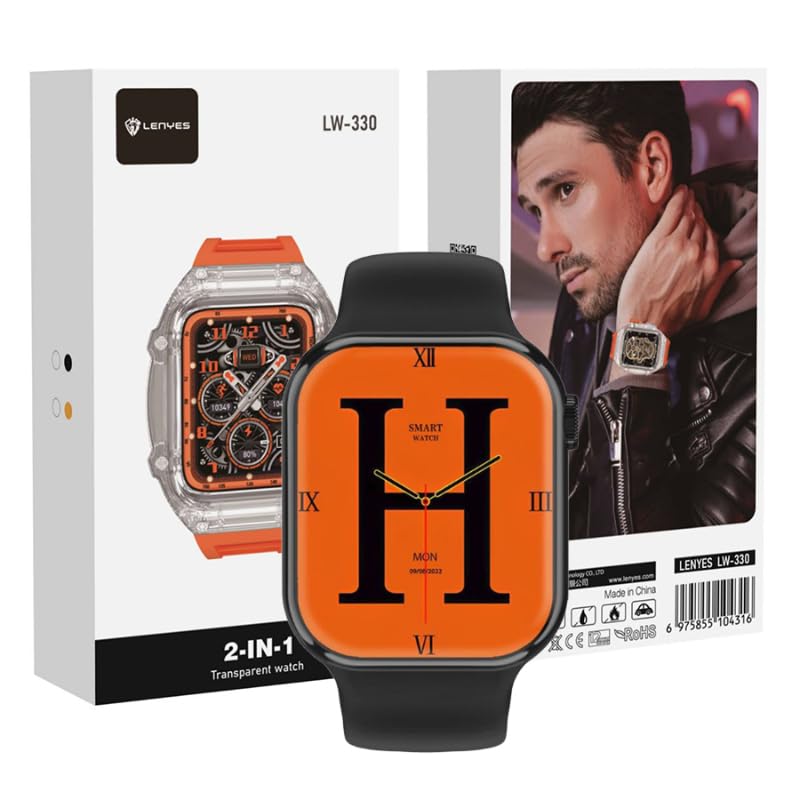
Figure 1: Front view of the Lenyes LW-330 Smart Watch, displaying an orange watch face with a large 'H' and digital time.

Figure 2: Packaging of the Lenyes LW-330 Smart Watch, highlighting the transparent watch design.

Figure 3: Side view of the Lenyes LW-330 Smart Watch packaging, featuring a lifestyle image of the watch being worn.
Key Components:
- Display Screen: 2.12-inch IPS HD curved touch screen.
- Side Button/Crown: Used for power on/off, menu navigation, and selection.
- Sensors: Located on the back for heart rate, blood pressure, and SpO2 monitoring.
- Charging Contacts: Magnetic contacts on the back for charging.
- Microphone/Speaker: For Bluetooth call functionality.
5. Setup
5.1. Charging the Device
Before first use, fully charge your smartwatch.
- Connect the magnetic charging cable to the charging contacts on the back of the watch.
- Connect the USB end of the cable to a standard USB power adapter (5V/1A recommended) or a computer USB port.
- The watch display will show a charging indicator. Allow approximately 2 hours for a full charge.
5.2. App Installation
To unlock the full features of your smartwatch, download and install the companion application on your smartphone.
- Scan the QR code provided in the watch packaging or search for the designated app name (refer to packaging or watch display for app name) in your phone's app store (App Store for iOS, Google Play Store for Android).
- Download and install the application.
- Open the app and follow the on-screen instructions to create an account and set up your profile.
5.3. Pairing with Your Phone
Ensure your phone's Bluetooth is enabled before pairing.
- Open the companion app on your smartphone.
- Navigate to the 'Device' or 'Add Device' section within the app.
- The app will search for available devices. Select 'LW-330' from the list of found devices.
- Confirm the pairing request on both your phone and the smartwatch if prompted.
- Once paired, the watch will synchronize data with the app.
6. Operating Instructions
6.1. Power On/Off
- Power On: Press and hold the side button for a few seconds until the screen lights up.
- Power Off: Press and hold the side button, then select 'Power Off' on the screen, or navigate to the 'Settings' menu and choose 'Power Off'.
6.2. Screen Navigation
- Swipe Up/Down: Scroll through menus or notifications.
- Swipe Left/Right: Access different widgets or quick functions.
- Tap: Select an item or confirm an action.
- Press Side Button: Return to the home screen or access the main menu.
6.3. Health Monitoring
The LW-330 offers various health tracking features:
- Heart Rate: Navigate to the heart rate interface and the watch will automatically measure your heart rate.
- Blood Pressure: Access the blood pressure function to initiate a measurement.
- Blood Oxygen (SpO2): Select the SpO2 feature for blood oxygen level readings.
- Sleep Tracking: Wear the watch during sleep to monitor sleep patterns. Data is viewable in the app.
Note: These measurements are for general wellness and fitness purposes only. They are not intended for medical use.
6.4. Bluetooth Calling & Notifications
- Bluetooth Calls: Once paired, you can make and receive calls directly from your watch. Access the dialer or answer incoming calls on the watch screen.
- Notifications: Enable app notifications in the companion app to receive alerts for messages, calls, and other applications on your watch.
6.5. Sports Modes
The watch supports multiple sports modes to track your workouts.
- Swipe to the 'Sports' or 'Workout' menu.
- Select your desired activity (e.g., running, walking, cycling).
- The watch will begin tracking your activity data, such as duration, calories burned, and heart rate.
- End the workout by following the on-screen prompts.
6.6. Other Features
- Music Control: Control music playback on your phone (play, pause, skip tracks).
- Camera Remote: Use your watch as a remote shutter for your phone's camera.
- Weather: View real-time weather updates after synchronization with the app.
7. Maintenance
7.1. Cleaning
- Wipe the watch screen and strap with a soft, dry, lint-free cloth.
- For stubborn stains, slightly dampen the cloth with water. Do not use harsh chemicals or abrasive cleaners.
- Ensure the charging contacts are clean and dry before charging.
7.2. Water Resistance (IP68)
The LW-330 is IP68 water-resistant, meaning it can withstand immersion in water up to 1.5 meters for up to 30 minutes. It is suitable for daily use, such as hand washing, rain, and shallow swimming. However, it is not recommended for hot showers, saunas, or diving, as steam and high water pressure can compromise the seals.
7.3. Storage
When not in use for extended periods, store the watch in a cool, dry place. Charge the watch periodically (e.g., every 3 months) to maintain battery health.
8. Troubleshooting
If you encounter issues with your smartwatch, refer to the following common problems and solutions:
| Problem | Solution |
|---|---|
| Watch does not turn on | Ensure the watch is fully charged. Press and hold the side button for at least 10 seconds. |
| Cannot pair with phone | Ensure Bluetooth is enabled on your phone. Make sure the watch is charged and within range. Restart both the watch and your phone. Clear previous pairing records on your phone. |
| Inaccurate health data | Ensure the watch is worn snugly on your wrist, not too tight or too loose. Keep the sensor clean. Avoid excessive movement during measurement. Remember, data is for reference only. |
| Notifications not received | Check if notifications are enabled in the companion app and in your phone's system settings for the app. Ensure the watch is connected via Bluetooth. |
| Screen is unresponsive | Restart the watch. If the issue persists, ensure the screen is clean and dry. |
9. Specifications
| Feature | Detail |
|---|---|
| Brand | Lenyes |
| Model Name | LW-330 |
| Screen Size | 2.12 inches |
| Operating System | iOS, Android compatible |
| Connectivity Technology | Bluetooth |
| Special Features | Blood Pressure Monitor, SpO2 Monitor, Sleep Monitor, Heart Rate Monitor, Bluetooth Calls |
| Water Resistance | IP68 |
| Item Shape | Rectangular |
| Shipping Dimensions | 20.1 x 11.2 x 7.2 cm |
| Item Weight | 330 grams (shipping) |
10. Warranty and Support
Information regarding product warranty and customer support is typically provided with your purchase documentation or on the manufacturer's official website. Please refer to those resources for details on warranty coverage, service centers, and contact information for technical assistance.