
1. Introduction
Thank you for choosing the Generic GB85904 App-Controlled Vibrating Prostate Massager. This device is designed to provide a versatile and customizable intimate experience. Please read this manual thoroughly before first use to ensure proper operation, safety, and maintenance.
2. Safety Information
- Material Safety: The device is crafted from body-safe materials. Clean thoroughly before and after each use.
- Lubrication: Always use a water-based lubricant with this device. Oil-based lubricants may damage the material.
- Discontinue Use: If you experience any discomfort, pain, or irritation, discontinue use immediately. Consult a healthcare professional if symptoms persist.
- Storage: Keep out of reach of children. Store in a clean, dry place away from direct sunlight and extreme temperatures.
- Water Resistance: This device is designed to be water-resistant for cleaning. Do not submerge for extended periods or expose to high-pressure water.
- Charging: Use only the provided charging cable. Do not use the device while charging.
3. Package Contents
Please check the package to ensure all items are present:
- 1 x GB85904 App-Controlled Vibrating Prostate Massager
- 1 x USB Charging Cable
- 1 x User Manual
4. Setup
4.1 Charging the Device
- Locate the charging port on the device.
- Connect the USB charging cable to the device and plug the other end into a standard USB power adapter (not included) or a computer USB port.
- The indicator light will illuminate or flash during charging.
- Once fully charged (typically 2-3 hours), the indicator light will change or turn off. Disconnect the charger.
4.2 App Installation and Pairing
- Scan the QR code provided in the package or search for the companion app name (refer to packaging) in your device's app store (iOS or Android).
- Download and install the app.
- Ensure your device is fully charged and powered on.
- Enable Bluetooth on your smartphone.
- Open the app and follow the on-screen instructions to search for and pair with your GB85904 device.
- Once paired, the app will display a connected status.
5. Operating Instructions
The GB85904 offers both manual control and app control for its functions.
5.1 Manual Control
The device features physical buttons for basic operation:
- Power Button: Press and hold for 3 seconds to turn on/off. A short press cycles through vibration modes.
- Rotation Button: (If present, refer to device for specific button layout) A short press cycles through rotation modes.
5.2 App Control
The app provides full control over the device's 9 vibration modes and 3 rotation modes, along with additional features:
- Mode Selection: Browse and select from 9 distinct vibration patterns and 3 rotation patterns.
- Intensity Adjustment: Adjust the intensity of vibrations and rotations directly within the app.
- Customization: Create and save your own custom patterns (if supported by the app).
- Remote Control: The app allows for remote control functionality, enabling operation from a distance.
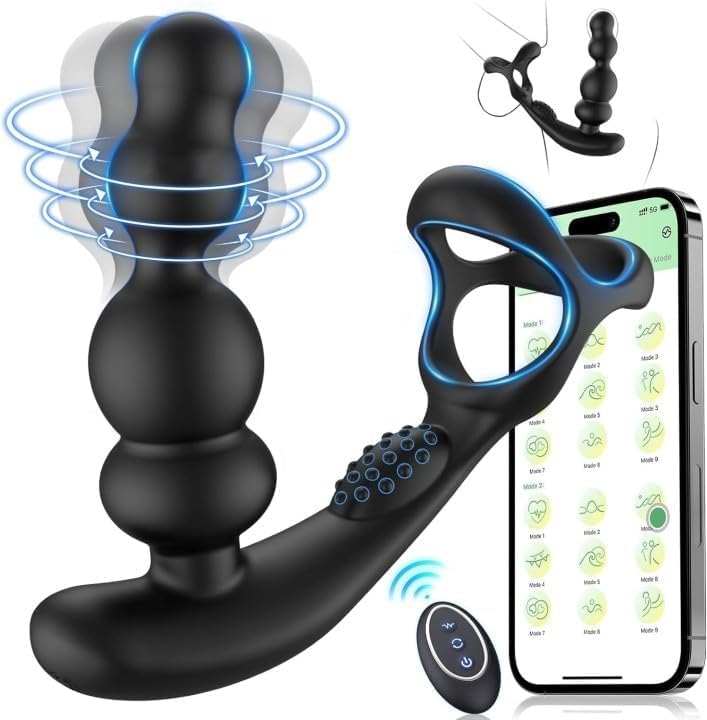
This image displays the GB85904 App-Controlled Vibrating Prostate Massager. The device is black with blue accents, highlighting its features. The top section illustrates a 360-degree rotation capability with circular blue lines. The main body features two bulbous sections, indicating internal vibration. To the right, a separate component, possibly a remote or app interface representation, shows various vibration patterns (wavy lines) and rotation patterns (swirls), indicating the 9 vibration modes and 3 rotation modes. The overall design suggests an ergonomic shape for comfortable use.
6. Maintenance and Cleaning
6.1 Cleaning
- Always clean the device thoroughly before and after each use.
- Wash the device with warm water and a mild, antibacterial soap.
- Rinse thoroughly to remove all soap residue.
- Dry completely with a lint-free cloth or allow to air dry.
- Do not use cleaners containing alcohol, petroleum, or acetone, as these can damage the material.
6.2 Storage
- Store the device in a clean, dry, and cool place.
- Keep it away from direct sunlight and extreme temperatures.
- Avoid storing with other materials that might react with or damage the device's surface.
7. Troubleshooting
| Problem | Possible Cause | Solution |
|---|---|---|
| Device does not turn on | Low battery; Device not charged | Charge the device fully. Ensure the charging cable is properly connected. |
| Cannot connect to app | Bluetooth off; Device not powered on; App not updated; Device out of range | Ensure Bluetooth is enabled on your phone. Turn on the device. Update the app to the latest version. Bring the device closer to your phone. |
| Weak vibrations/rotations | Low battery | Recharge the device. |
| Device stops unexpectedly | Low battery; Overheating protection | Recharge the device. Allow the device to cool down before resuming use. |
8. Specifications
- Model: GB85904
- Material: Body-safe silicone (or similar, based on product description)
- Vibration Modes: 9
- Rotation Modes: 3
- Control: App-controlled, Remote control, Manual buttons
- Charging: USB Rechargeable
- Manufacturer: Matiska
- ASIN: B0F7LXTSP4
9. Warranty and Support
For warranty information and customer support, please refer to the contact details provided on the product packaging or the retailer's website where the product was purchased. Keep your proof of purchase for any warranty claims.