Introduction
This user manual provides detailed instructions for setting up, operating, maintaining, and troubleshooting your AWOW Mini PC AK11. Please read this manual thoroughly before using the device to ensure optimal performance and longevity.

Figure 1: AWOW Mini PC AK11. This image displays the compact design of the mini PC, highlighting its various ports on the front and rear for comprehensive connectivity.
Package Contents
Please verify that all items are present in the package:
- AWOW Mini PC AK11
- Power Adapter
- HDMI Cable
- VESA Mount Bracket with Screws
- User Manual (this document)
Setup
Follow these steps to set up your AWOW Mini PC:
- Connect to Display: Use the provided HDMI cable to connect the Mini PC to your monitor or TV. The device supports 4K@60Hz output via HDMI 2.0 and DisplayPort 1.4.
- Connect Peripherals:
- Connect your keyboard and mouse to the available USB ports (USB 3.2 x2, USB 2.0 x2).
- If using wired internet, connect an Ethernet cable to the Gigabit Ethernet port.
- For audio, connect speakers or headphones to the 2-in-1 audio jack.

Figure 2: Multiple Device Connection. This diagram illustrates the various ports on the AWOW Mini PC, including USB 3.2, USB 2.0, HDMI, DisplayPort, RJ45 Ethernet, DC 12V power input, and audio jack, along with examples of connected devices like speakers, IP cameras, monitors, and keyboards.
- Connect Power: Plug the power adapter into the DC 12V port on the Mini PC, then plug the adapter into a power outlet.
- Power On: Press the power button located on the front of the Mini PC. The power indicator light will illuminate.
- Initial Setup: Follow the on-screen instructions to complete the operating system setup (if applicable).
Operating Instructions
Your AWOW Mini PC is designed for efficient performance in various tasks. Here are key operational aspects:
Performance and Multitasking
Equipped with an Intel N150 quad-core processor and 8GB DDR4 RAM, the Mini PC handles daily tasks such as office work, 4K video streaming, and light multitasking efficiently. The 256GB PCIe 3.0 SSD ensures quick boot-ups and application loading.
Display Configuration
The Mini PC supports dual 4K displays at 60Hz via HDMI 2.0 and DisplayPort 1.4. You can configure extended desktop or mirrored display modes for enhanced productivity or entertainment.

Figure 3: 4K High-Definition Output. This image shows the AWOW Mini PC connected to a large monitor, illustrating its capability to deliver sharp 4K@60Hz video output, supported by Intel UHD Graphics and integrated Wi-Fi 5 and Gigabit Ethernet.
Connectivity
- Wireless: Dual-band 802.11ac WiFi (2.4GHz/5GHz) for high-speed internet access and Bluetooth 5.2 for wireless peripheral connections.
- Wired: A dedicated Gigabit Ethernet port provides stable and reliable wired network connections.
Storage Expansion
The internal storage can be expanded up to 4TB total by adding a 2TB M.2 SSD and a 2TB 2.5" SATA drive. This allows for ample space for work files, media libraries, and applications.
Maintenance
To ensure the longevity and optimal performance of your AWOW Mini PC, follow these maintenance guidelines:
- Keep Clean: Regularly clean the exterior of the Mini PC with a soft, dry cloth. Avoid using liquid cleaners or aerosols. Ensure ventilation vents are free from dust and obstructions to prevent overheating.
- Software Updates: Keep your operating system and drivers updated to the latest versions. This improves security, performance, and compatibility.
- Proper Shutdown: Always shut down the Mini PC properly through the operating system. Avoid sudden power disconnections, which can lead to data corruption or system instability.
- Environmental Conditions: Operate the Mini PC in a well-ventilated area, away from direct sunlight, excessive heat, humidity, or extreme cold.
- Data Backup: Regularly back up important data to an external drive or cloud storage to prevent data loss.
Troubleshooting
This section addresses common issues you might encounter with your AWOW Mini PC. If the problem persists, please contact AWOW customer support.
| Problem | Possible Cause | Solution |
|---|---|---|
| No display on monitor. | Loose cable connection, incorrect input source, monitor off. |
|
| Mini PC does not power on. | No power, faulty power adapter. |
|
| No internet connection (Wi-Fi/Ethernet). | Incorrect network settings, driver issues, router problem. |
|
| System runs slowly or freezes. | Too many applications running, insufficient RAM, overheating. |
|
Specifications
Detailed technical specifications for the AWOW Mini PC AK11 (N150/8+256 model):
| Feature | Specification |
|---|---|
| Model | AK11 (N150/8+256) |
| Processor | Intel N150 Quad-Core (4 threads, up to 3.4GHz) |
| Graphics | Intel UHD Graphics (supports AV1/H.265/VP9 10-bit decoding) |
| RAM | 8GB DDR4 3200MHz (LPDDR4) |
| Internal Storage | 256GB PCIe 3.0 SSD |
| Storage Expansion | Up to 2TB M.2 SSD + 2TB 2.5" SATA drive |
| Video Output | HDMI 2.0 (4K@60Hz), DisplayPort 1.4 (4K@60Hz) - Dual Display Support |
| Wireless Connectivity | 802.11ac Wi-Fi (2.4GHz/5GHz, up to 1.73Gbps), Bluetooth 5.2 |
| Wired Connectivity | Gigabit Ethernet (RJ45) |
| USB Ports | 2 x USB 3.2, 2 x USB 2.0 |
| Audio | 2-in-1 Audio Jack |
| Operating System | OS (as per product specifications) |
| Dimensions (LxWxH) | 4.9 x 4.9 x 1.7 inches (12.4 x 12.4 x 4.3 cm) |
| Weight | 1.74 pounds (0.79 kg) |
| Color | Black |
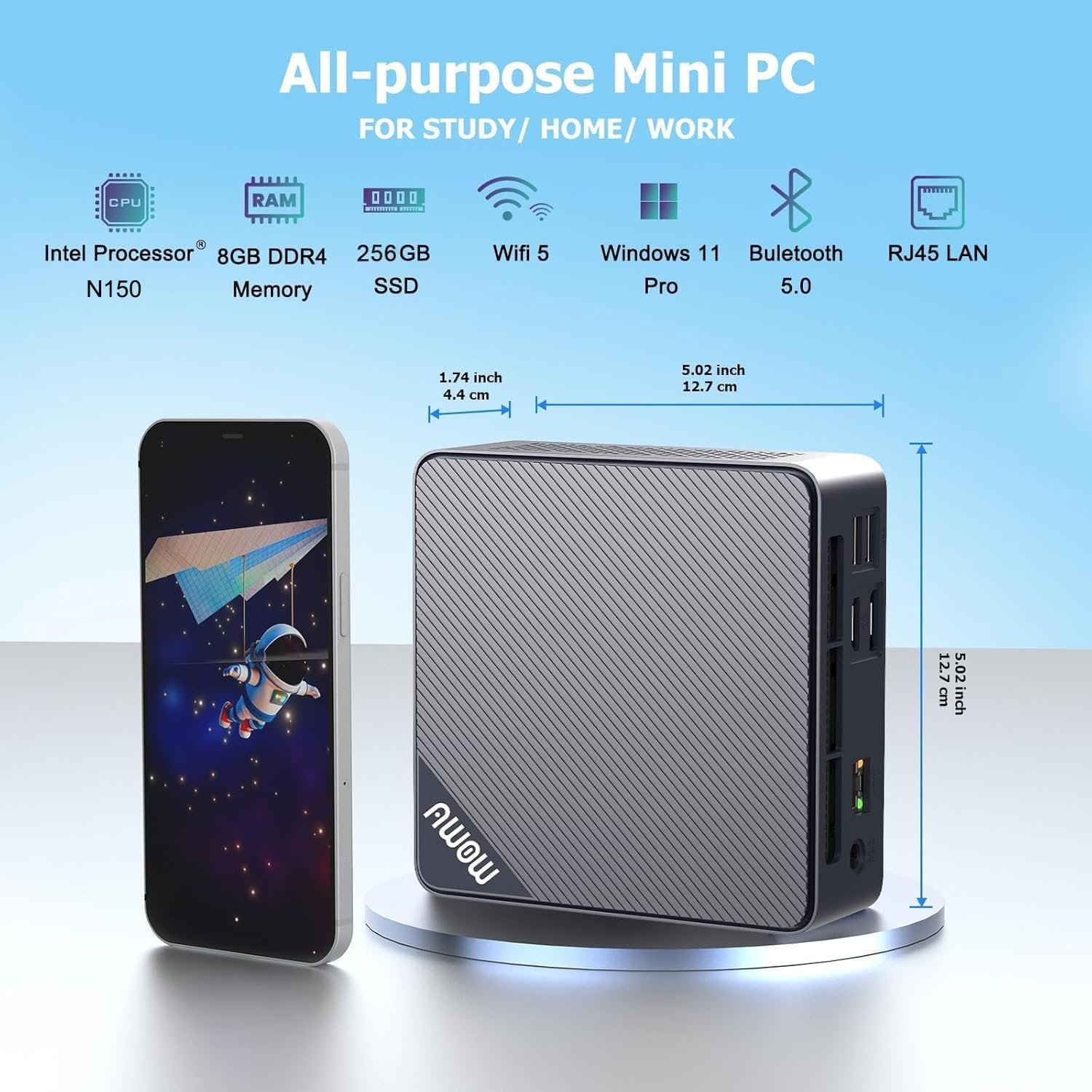
Figure 4: AWOW Mini PC Dimensions. This image provides a visual representation of the mini PC's compact size, showing its dimensions in both inches and centimeters, making it easy to understand its small footprint.
Warranty and Support
AWOW is committed to providing excellent customer service and technical support for your Mini PC.
- After-Sales Service: AWOW offers comprehensive after-sales service.
- Technical Support: 24/7 technical support is available from experienced computer experts to assist with any technical issues.
- Customer Service Hours: Local customer service is available during business hours (9:00 am to 5:00 pm EST).
- OEM Customization: Pre-sales services for OEM customization are also available.
For support, please refer to the contact information provided on the official AWOW website or your purchase documentation.


