
Introduction
This manual provides essential information for the safe and effective use of MPK 16-Pin Microneedling Pen Cartridges. These cartridges are specifically designed for compatibility with Dr. Pen M8 and M7S microneedling devices. Please read all instructions carefully before use to ensure proper application and to maintain product integrity.
Product Overview

A single MPK 16-Pin Microneedling Cartridge, designed for precision and effectiveness.

The cartridge features an upgraded 3-slot design for a tight, stable connection and a backflow prevention valve to protect the device.
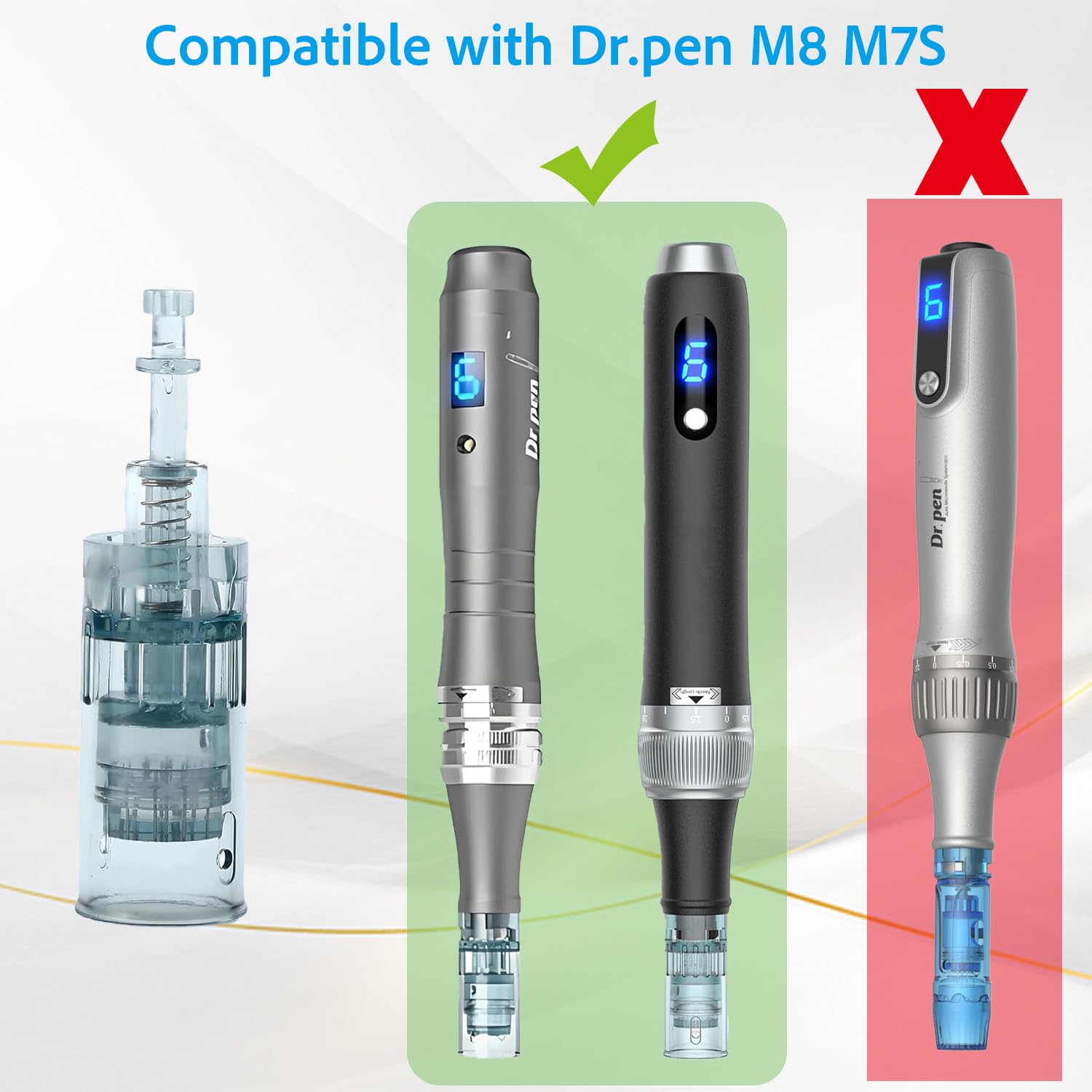
These cartridges are compatible with Dr. Pen M8 and M7S models, ensuring a secure fit and proper function.

A pack of ten 16-pin cartridges, each individually sealed for sterility and single-use application.
Key Features:
- Designed for Dr. Pen M8 and M7S models.
- 16-Pin needle configuration.
- Needle length: 0.26mm.
- Easy-to-use for home applications.
- Features a 3-slot design for stable connection.
- Includes a backflow prevention valve for device protection.
Setup
- Preparation: Ensure your Dr. Pen M8 or M7S device is clean and fully charged or connected to power.
- Unpack Cartridge: Carefully open one individually sealed cartridge package. Do not use if the package is opened or damaged.
- Attach Cartridge: Align the 3-slot connection of the cartridge with the corresponding slots on the Dr. Pen device. Gently push and twist the cartridge clockwise until it locks securely into place.
- Remove Protective Cap: Carefully remove the white protective cap from the needle tip.
Video demonstrating the attachment of the microneedling cartridge to a Dr. Pen M8 device.
Short video showing the secure fit of the cartridge on a Dr. Pen, highlighting its perfect compatibility.
Operating Instructions
- Cleanse Skin: Thoroughly cleanse the treatment area and apply a suitable serum or glide product.
- Adjust Needle Depth: Rotate the adjustment ring on your Dr. Pen device to select the desired needle depth. The MPK 16-Pin cartridges have a fixed needle length of 0.26mm, but the device allows for depth adjustment based on your treatment needs.
- Power On: Turn on your Dr. Pen device. Select the appropriate speed setting.
- Begin Treatment: Gently glide the pen over the skin in small sections, using light pressure. Avoid dragging or applying excessive force.
- Post-Treatment: After completing the treatment, turn off the device.
Maintenance
- Single-Use Only: MPK Microneedling Pen Cartridges are designed for single-use only. Reusing cartridges can lead to contamination and compromise treatment effectiveness.
- Disposal: After each use, safely detach the used cartridge from the device and dispose of it in a sharps container or according to local regulations for medical waste.
- Device Cleaning: After removing the cartridge, clean the Dr. Pen device according to its specific instruction manual.
- Storage: Store unused cartridges in their original, sealed packaging in a cool, dry place, away from direct sunlight and moisture. Keep out of reach of children.
Troubleshooting
Common Issues:
- Cartridge Not Attaching Securely: Ensure the cartridge is correctly aligned with the 3-slot design on the Dr. Pen device. Twist firmly until it clicks into place. If it still doesn't fit, verify that you have the correct cartridge type for your specific Dr. Pen model (M8 or M7S).
- Excessive Discomfort or Pain: While some sensation is normal, excessive pain may indicate incorrect needle depth or technique. Ensure your skin is properly numbed if necessary, and adjust the needle depth on your device to a shallower setting. Always use a gentle gliding motion.
- Needles Not Extending: Check if the cartridge is fully seated and locked onto the device. Ensure the device is powered on and the needle depth is adjusted correctly. If the issue persists, the cartridge may be faulty and should be replaced.
- Device Malfunction: If the Dr. Pen device itself is not functioning correctly, refer to the device's own instruction manual for troubleshooting or contact the device manufacturer's support.
Specifications
| Attribute | Detail |
|---|---|
| Model Number | M8-16P |
| Needle Configuration | 16 Pin |
| Needle Length | 0.26mm (fixed on cartridge) |
| Compatibility | Dr. Pen M8, Dr. Pen M7S |
| Package Dimensions | 6.54 x 3.78 x 0.59 inches |
| Item Weight | 1.76 ounces |
| Sterilization | Sterile EO Gas, Non-Pyrogen |
| Usage | Disposable, Single-Use Only |
Warranty & Support
MPK Microneedling Pen Cartridges are disposable, single-use items. As such, they do not come with a separate warranty. For any issues related to the microneedling device itself (Dr. Pen M8 or M7S), please refer to the warranty information provided with your specific device or contact the device manufacturer directly for support.
For questions regarding the MPK cartridges, please contact the seller through the platform where the purchase was made.