
1. Introduction
This manual provides essential instructions for the safe and efficient operation of your MWUCAIXIA Dual Induction Infrared Electric Stove. Please read this manual thoroughly before use and retain it for future reference.
The MWUCAIXIA Dual Induction Infrared Electric Stove is a versatile countertop burner featuring two independent cooking zones: one induction zone and one infrared (ceramic/halogen) zone. It offers precise temperature control, safety features, and a sleek design suitable for various cooking needs.
2. Safety Instructions
To prevent injury or damage, always observe the following safety precautions:
- Electrical Safety: Ensure the power supply matches the voltage requirements (110-220V). Do not immerse the appliance in water or other liquids. Avoid using damaged power cords.
- Surface Temperature: The cooking surface, especially the infrared zone, becomes very hot during and after operation. An "H" indicator will display when the surface temperature is high to prevent accidental burns. Do not touch hot surfaces.
- Ventilation: Ensure adequate ventilation around the appliance. Do not block the cooling fan vents located on the underside.
- Child Lock: Utilize the child lock function to prevent accidental operation by children.
- Cookware: Use only compatible cookware. For the induction zone, use magnetic induction cookware. For the infrared zone, most heat-resistant cookware is suitable.
- Overheat Protection: The stove is equipped with an overheat protection system that will automatically shut down the unit if it detects excessive temperatures.
- Placement: Place the stove on a stable, flat, heat-resistant surface. Maintain a safe distance from walls and other appliances.
3. Product Overview
The MWUCAIXIA Dual Induction Infrared Electric Stove features two distinct cooking zones and a touch control panel for easy operation.
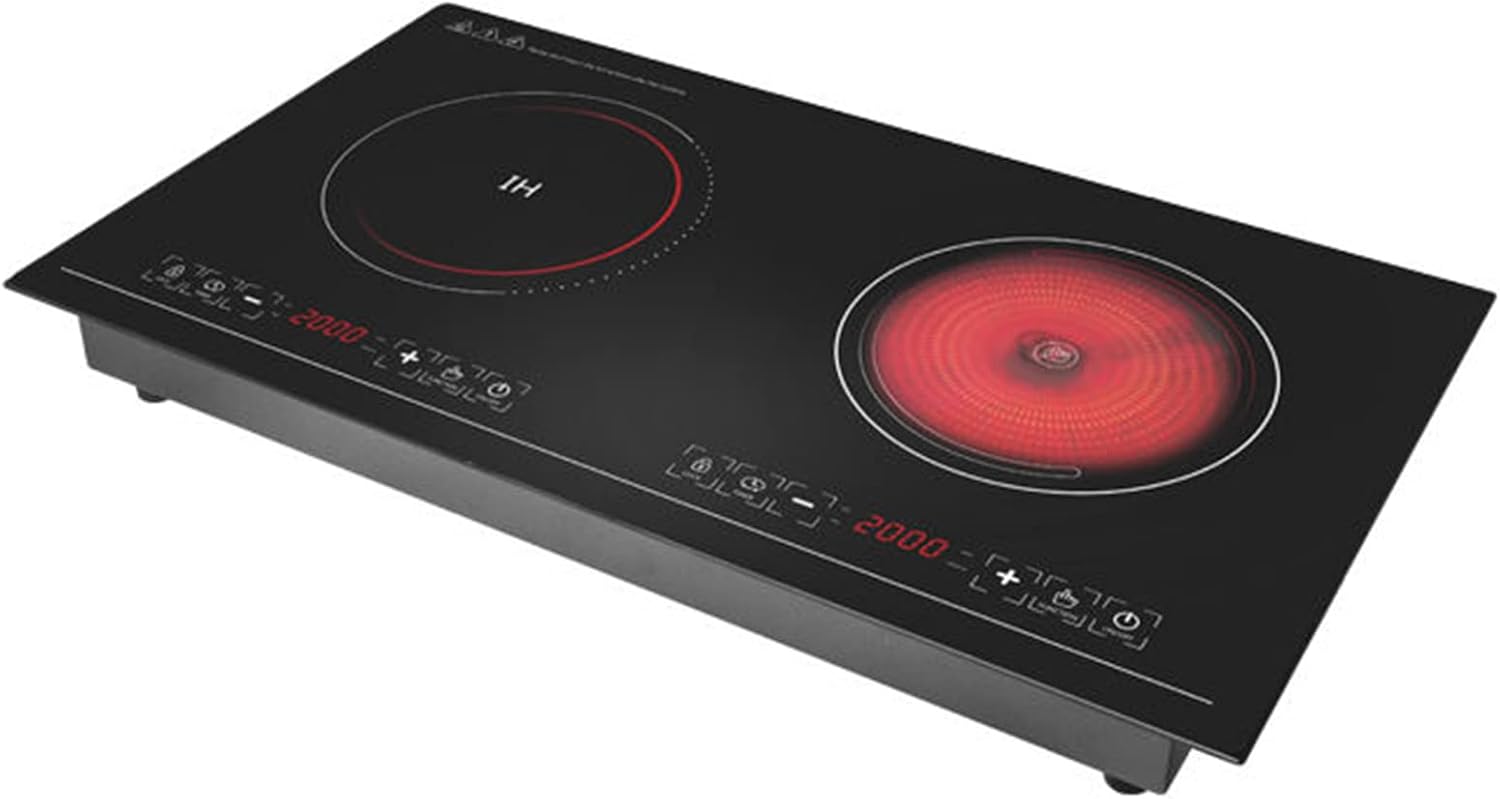
Image 3.1: Top view of the MWUCAIXIA Dual Induction Infrared Electric Stove, showing the two cooking zones and integrated touch control panel.

Image 3.2: The stove's sleek design, highlighting its dual functionality as an induction cooker and infrared cooker.
3.1 Components
- Left Cooking Zone: Induction heating zone (marked "IH").
- Right Cooking Zone: Infrared (ceramic/halogen) heating zone.
- Control Panel: Touch-sensitive controls for power, temperature/power level adjustment, timer, and child lock.
- LED Display: Digital display for power/temperature settings and timer.
- Cooling Vents: Located on the underside for heat dissipation.

Image 3.3: Detailed view of product components including touch control, fast cooling fan, non-slip mat, and internal heating plate.
4. Setup and Installation
The MWUCAIXIA Dual Induction Infrared Electric Stove can be used as a freestanding unit or integrated into a countertop.
4.1 Freestanding Use
- Unpack the appliance and remove all packaging materials.
- Place the stove on a stable, level, and heat-resistant surface. Ensure there is sufficient space around the unit for proper ventilation.
- Plug the power cord into a grounded electrical outlet.
4.2 Built-in Installation
For built-in installation, consult a qualified electrician or installer. Ensure the countertop cutout dimensions match the appliance specifications (740mm x 418mm). Proper ventilation must be maintained beneath and around the unit.
5. Operating Instructions
The stove features intuitive touch controls for each cooking zone.

Image 5.1: Close-up of the touch control panel, showing buttons for power, temperature/power adjustment, child lock, and timer.
5.1 Basic Operation
- Power On: Place appropriate cookware on the desired cooking zone. Touch the power button (⏻) for the respective zone to turn it on.
- Adjust Power/Temperature: Use the '+' and '-' buttons to increase or decrease the power level or temperature setting. The LED display will show the current setting. The total power ranges from 200W to 4200W.
- Power Off: Touch the power button (⏻) again to turn off the cooking zone.

Image 5.2: Illustration of both cooking zones operating simultaneously. The left induction zone and right infrared zone can be used independently or together. When both are active, the total power output is 3200W (Left 2100W, Right 2100W, combined max 3200W).
5.2 Timer Function
To set a cooking timer:
- With a cooking zone active, touch the timer button (often indicated by a clock icon).
- Use the '+' and '-' buttons to set the desired cooking time.
- The cooking zone will automatically turn off once the set time has elapsed.
5.3 Child Lock Function
To activate the child lock:
- Touch and hold the child lock button (often indicated by a lock icon) for a few seconds.
- The control panel will lock, preventing accidental changes to settings or activation.
- To deactivate, touch and hold the child lock button again until it unlocks.
6. Compatible Cookware
6.1 Induction Zone (Left)
The induction cooking zone requires cookware with a magnetic base. Compatible materials include:
- Cast iron
- Magnetic stainless steel
- Enameled iron
- Steel
If no compatible cookware is detected within 30 seconds of activation, the induction burner will automatically turn off.
6.2 Infrared Zone (Right)
The infrared cooking zone is compatible with most heat-resistant cookware, including:
- Ceramic
- Glass
- Stainless steel
- Cast iron
- Aluminum (with flat bottom)
7. Cleaning and Maintenance
Regular cleaning ensures the longevity and optimal performance of your stove.

Image 7.1: The integrated crystal black glass panel is designed for easy cleaning. Always ensure the surface is cool before cleaning.
- Before Cleaning: Always unplug the appliance and allow it to cool completely. The "H" indicator will disappear when the surface is safe to touch.
- Cleaning the Surface: Wipe the crystal black glass surface with a soft, damp cloth and a mild detergent. For stubborn stains, use a non-abrasive ceramic hob cleaner. Dry thoroughly with a clean cloth.
- Avoid Abrasives: Do not use abrasive cleaners, scouring pads, or harsh chemicals, as these can scratch or damage the surface.
- Cooling Vents: Periodically check and clean the cooling vents to ensure they are free from dust and debris. Use a soft brush or vacuum cleaner.
8. Troubleshooting
If you encounter issues with your stove, refer to the following common problems and solutions:
| Problem | Possible Cause | Solution |
|---|---|---|
| Stove does not turn on. | No power supply; power cord not properly plugged in. | Check power connection and wall outlet. Ensure the power button is pressed. |
| Induction zone not heating. | Incompatible cookware; cookware not centered; small diameter cookware. | Use magnetic induction cookware. Center the cookware. Ensure cookware base covers a sufficient area of the zone. |
| "H" indicator displayed. | Cooking surface is hot. | This is normal. Allow the stove to cool down. Do not touch the surface. |
| Stove shuts off unexpectedly. | Overheat protection activated; no cookware detected (induction zone). | Allow the unit to cool. Ensure cookware is compatible and properly placed. |
| Controls are unresponsive. | Child lock is active; control panel is wet. | Deactivate child lock. Wipe the control panel dry. |
If the problem persists after attempting these solutions, please contact customer support.
9. Specifications

Image 9.1: Dimensional drawing of the MWUCAIXIA Dual Induction Infrared Electric Stove, showing length, width, and height.
| Feature | Detail |
|---|---|
| Model | B0F7LB4YXY |
| Brand | MWUCAIXIA |
| Type | Dual Induction Infrared Electric Stove (Built-in/Freestanding) |
| Power (Total) | 4200W (Max) |
| Power Range | 200W - 4200W |
| Voltage | 110-220V |
| Control Type | Touch Control with LED Display |
| Material | Crystal Black Glass Surface, Stainless Steel Housing |
| Dimensions (L x W x H) | 740mm x 418mm x 70mm |
| Weight | 11 kg (Single gross weight) |
| UPC | 760575975409 |
10. Warranty and Support
Your MWUCAIXIA Dual Induction Infrared Electric Stove comes with a warranty card. Please refer to the warranty card for specific terms and conditions.
For any questions, technical assistance, or support regarding your product, please contact MWUCAIXIA customer service. Contact details are typically provided on the warranty card or product packaging.
Included in the package:
- Induction Cooktop x 1
- Warranty Card x 1
- Use Manual x 1 (This document)
- Waterproof Bag (for protection during transport) x 1