
1. Product Overview
The VASAGLE Electric Height-Adjustable Desk LSD154WB01 is designed to enhance your workspace with ergonomic flexibility and smart features. This desk allows you to effortlessly switch between sitting and standing positions, promoting a healthier work routine. It includes a flexible monitor stand, a convenient drawer, and a USB-C charging port.
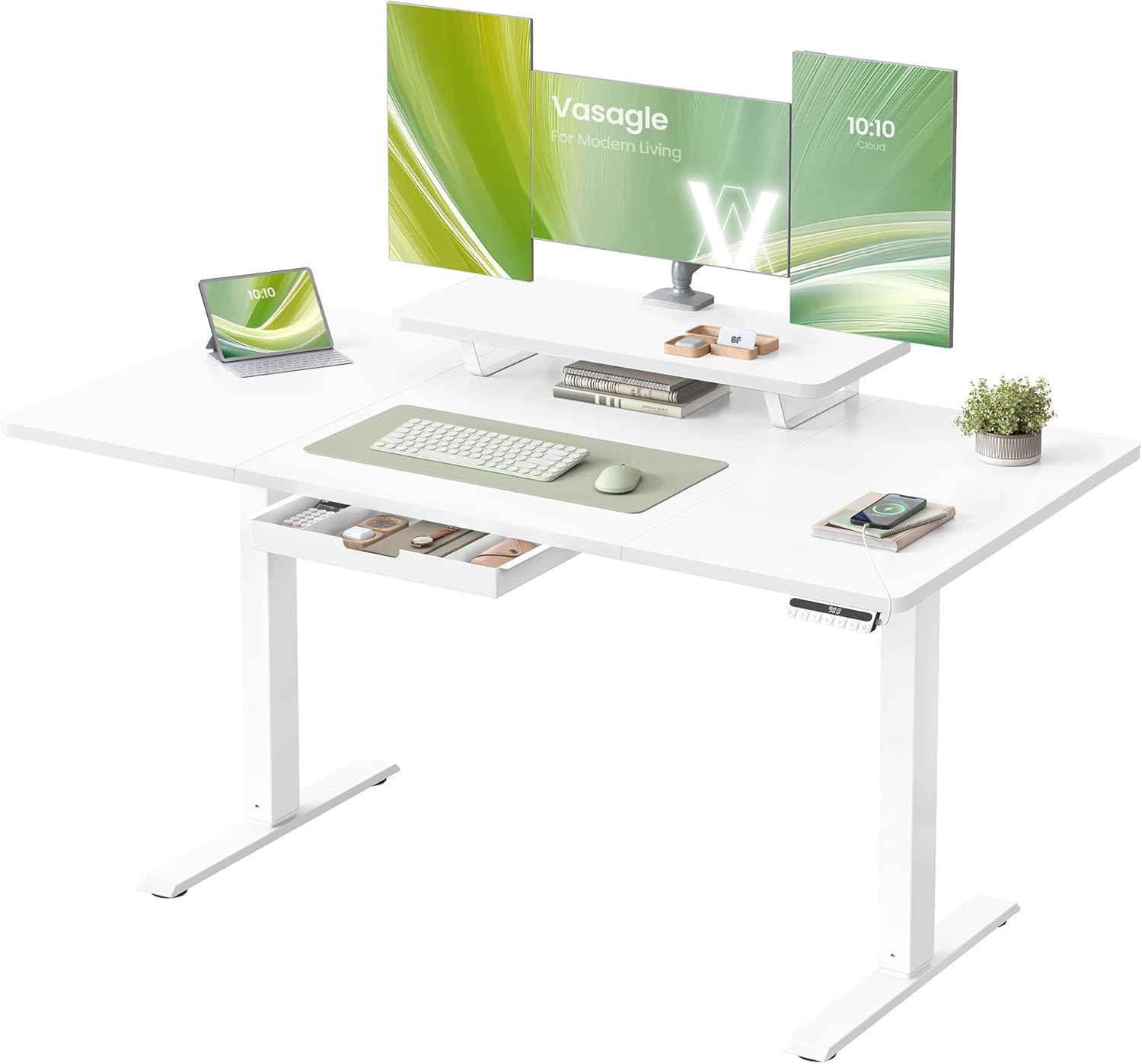
Image 1: Main product view of the white electric height-adjustable desk with monitor stand and drawer.
Key Features:
- Flexible Storage: Mount the monitor stand anywhere on the tabletop to free up desk space. The drawer can be installed under the tabletop or under the monitor stand for small item storage.
- Spacious Desktop: The 140 x 70 cm tabletop is 10 cm deeper than traditional desks, providing ample space for multiple screens and office essentials.
- Healthy Working Posture: Electrically adjustable height from 72 to 120 cm, allowing seamless transitions between sitting and standing. Features 3 programmable height presets and a sit reminder function.
- Strong, Quiet, and Stable: Metal frame with T-shaped legs supports up to 70 kg. Operates quietly with less than 48 dB noise level, ensuring a focused environment. Adjustable feet provide stability on uneven floors.
- USB-C Port: Integrated USB-C port for convenient fast charging of devices.
2. Safety Information
- Read all instructions carefully before assembly and use.
- Keep children and pets away from the desk during operation to prevent injury.
- Ensure all screws and bolts are securely tightened before use. Periodically check and re-tighten as necessary.
- Do not overload the desk. The maximum static load capacity is 70 kg.
- Avoid placing liquids directly on the control panel or near electrical components.
- Use only the provided power adapter.
- If the desk malfunctions or makes unusual noises, discontinue use immediately and contact customer support.
3. Package Contents
Please check that all components are present and undamaged before beginning assembly. Refer to the assembly diagram for a complete list of parts.

Image 2: Visual guide to the assembly process, showing the tabletop, frame, drawer, and other accessories.
4. Assembly Instructions
Assembly is straightforward with numbered parts and illustrated instructions. Follow these general steps:
- Step 1: Assemble the Tabletop. Connect the tabletop sections as instructed in the manual.
- Step 2: Assemble the Table Frame. Attach the legs and crossbars to form the desk frame.
- Step 3: Attach the Tabletop to the Frame. Secure the assembled tabletop to the electric frame.
- Step 4: Install the Drawer and Monitor Stand. Decide on the preferred placement for the drawer (under tabletop or monitor stand) and install it. Attach the monitor stand.
- Step 5: Connect Electronics. Plug in the power cable and ensure all electrical connections are secure.
For detailed, step-by-step instructions, please refer to the included assembly manual.
5. Operating Instructions
5.1. Height Adjustment
Use the control panel to adjust the desk height. The desk can be adjusted from 72 cm (sitting) to 120 cm (standing).

Image 3: Illustration of sit-stand functionality, showing the desk at 72 cm (sitting) and 120 cm (standing), with a close-up of the control panel.
- Up/Down Buttons (▲ / ▼): Press and hold to continuously adjust the desk height. Release to stop at the desired height.
- Memory Presets (1, 2, 3): To save a height, adjust the desk to your desired position, then press the 'M' button (or gear icon) followed by the number button (1, 2, or 3). To recall a saved height, simply press the corresponding number button.
5.2. Sit Reminder
The sit reminder feature encourages you to change your posture regularly. Press the bell icon button on the control panel to activate or deactivate this function. When active, the desk will remind you to stand up after a set period of sitting.

Image 4: A user stretching at the desk, with a bell icon indicating the sit reminder feature, prompting a change in posture.
5.3. Child Lock
To prevent accidental adjustments, activate the child lock by pressing and holding the lock icon button on the control panel. Repeat the action to deactivate it.
5.4. USB-C Charging Port
The integrated USB-C port allows for convenient and fast charging of compatible devices directly from your desk.
6. Features and Design Details
6.1. Flexible Storage Options
The desk offers versatile storage solutions to keep your workspace organized.

Image 5: Comparison showing two options for mounting the drawer: under the tabletop for extra storage or under the monitor stand for small items.
- Monitor Stand: Can be positioned anywhere on the desktop. Provides an elevated surface for monitors and additional storage underneath for books or documents.
- Drawer: Can be mounted either directly under the main tabletop or beneath the monitor stand, offering flexible organization for small office supplies.
- Practical Hook: A hook is included for hanging bags or headphones, keeping them off the desk surface.

Image 6: Detailed view of the desk's features: elevated monitor stand, storage space under the shelf, flexible drawer, spacious worktop, and practical hook.
6.2. Spacious Desktop
The desk provides an expansive work surface for all your needs.
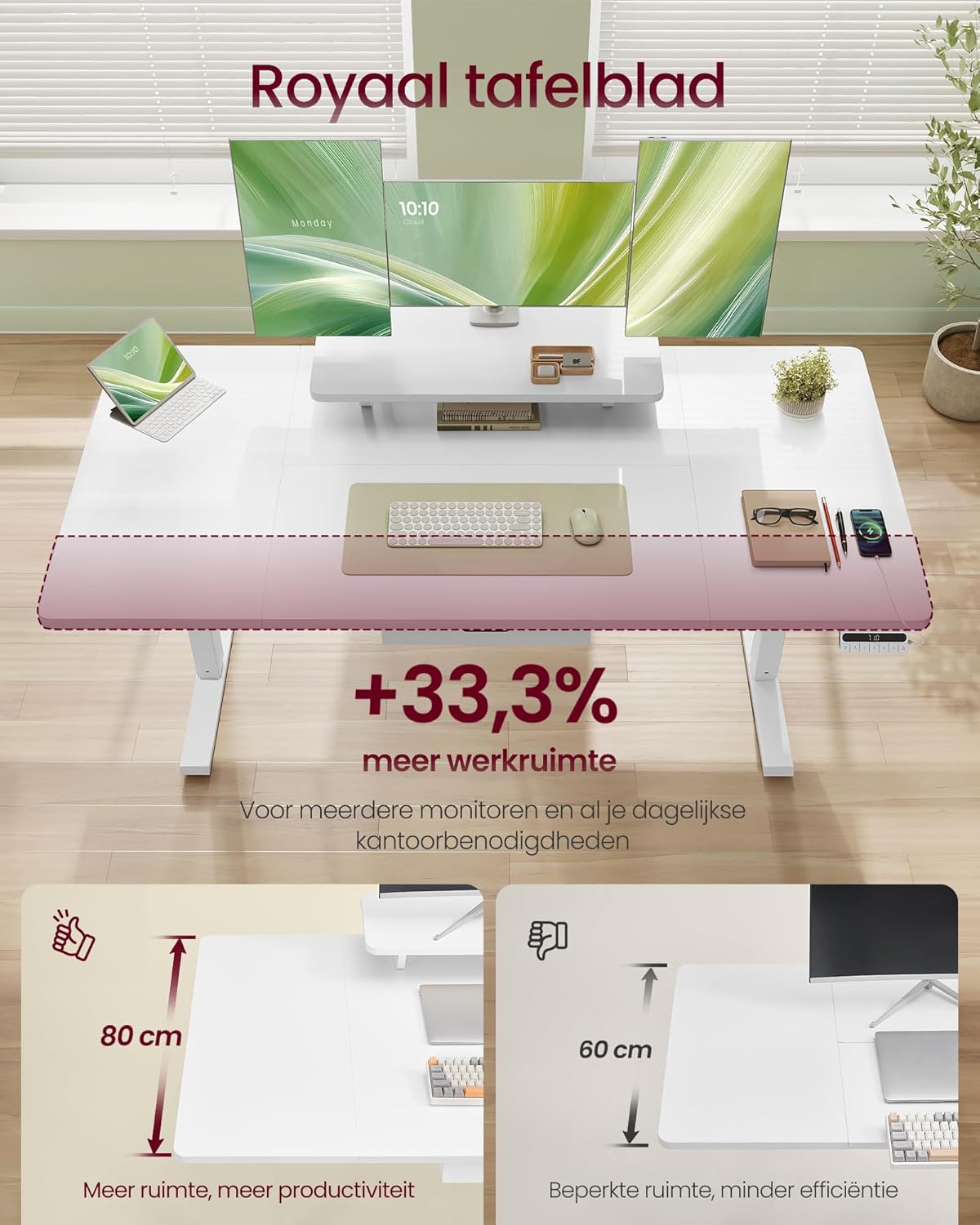
Image 7: Highlighting the spacious 140x70 cm desktop, showing it's 10 cm deeper than traditional desks, offering 33.3% more workspace for multiple monitors and daily office needs.
6.3. Robust and Quiet Operation
The desk is built for durability and a peaceful working environment.

Image 8: Demonstrating the desk's stability and quiet operation, highlighting 20 mm/s adjustment speed and a noise level of less than 48 dB, comparable to a quiet library.
7. Maintenance
- Cleaning: Wipe the desk surface with a soft, damp cloth. Avoid harsh chemicals or abrasive cleaners.
- Inspection: Periodically check all screws and connections to ensure they remain tight.
- Cable Management: Ensure cables are neatly organized and not pinched by moving parts of the desk.
8. Troubleshooting
- Desk not moving: Check if the power cable is securely plugged in. Ensure the child lock is not activated.
- Uneven height: If the desk appears uneven, check the adjustable feet at the bottom of the legs and adjust them to level the desk.
- Unusual noises: If you hear grinding or unusual noises, stop operation immediately and inspect for any obstructions or loose parts. Contact customer support if the issue persists.
- Control panel unresponsive: Try unplugging the desk from the power outlet for 30 seconds, then plug it back in to reset the system.
9. Specifications

Image 9: Technical diagram showing desk dimensions (140x70 cm, height 72-120 cm), maximum static load capacity of 70 kg, and dimensions of the monitor stand and drawer.
| Feature | Specification |
|---|---|
| Model Number | LSD154WB01 |
| Desktop Dimensions | 140 x 70 cm |
| Height Adjustment Range | 72 - 120 cm |
| Max. Static Load Capacity | 70 kg |
| Adjustment Speed | 20 mm/s |
| Noise Level | < 48 dB |
| Power Source | Electric (AC adapter included) |
| USB-C Port | Yes, for fast charging |
| Item Weight | 24.3 kg |
| Package Dimensions | 79 x 51 x 22 cm |
10. Warranty and Support
For warranty information or technical support, please refer to the documentation included with your purchase or contact VASAGLE customer service directly. Keep your purchase receipt for warranty claims.