
Introduction
Thank you for choosing the SWBSLL 5600Pa Automatic Window Cleaning Robot D1334. This manual provides essential information for the safe and efficient operation, maintenance, and troubleshooting of your device. Please read it thoroughly before first use and keep it for future reference.
Safety Information
To ensure safe operation and prevent damage, please observe the following safety precautions:
- Always connect the safety rope and secure it to a sturdy anchor point before operating the robot, especially on high windows.
- Ensure the power cord is securely connected and the robot is powered during operation. The built-in backup battery provides emergency power for approximately 20-25 minutes in case of power interruption, allowing safe retrieval.
- Do not use the robot on cracked or damaged glass surfaces.
- Keep hands and loose clothing away from the moving parts of the robot during operation.
- Do not spray water directly onto the robot's body.
- Store the robot in a dry, cool place when not in use.
- This appliance is not intended for use by persons (including children) with reduced physical, sensory or mental capabilities, or lack of experience and knowledge, unless they have been given supervision or instruction concerning use of the appliance by a person responsible for their safety.

Image Description: The SWBSLL Window Cleaning Robot demonstrating its safety features. It shows the robot adhering to a window with strong suction, a 4-meter safety rope attached for fall prevention, and an illustration of its smart frame detection capability.
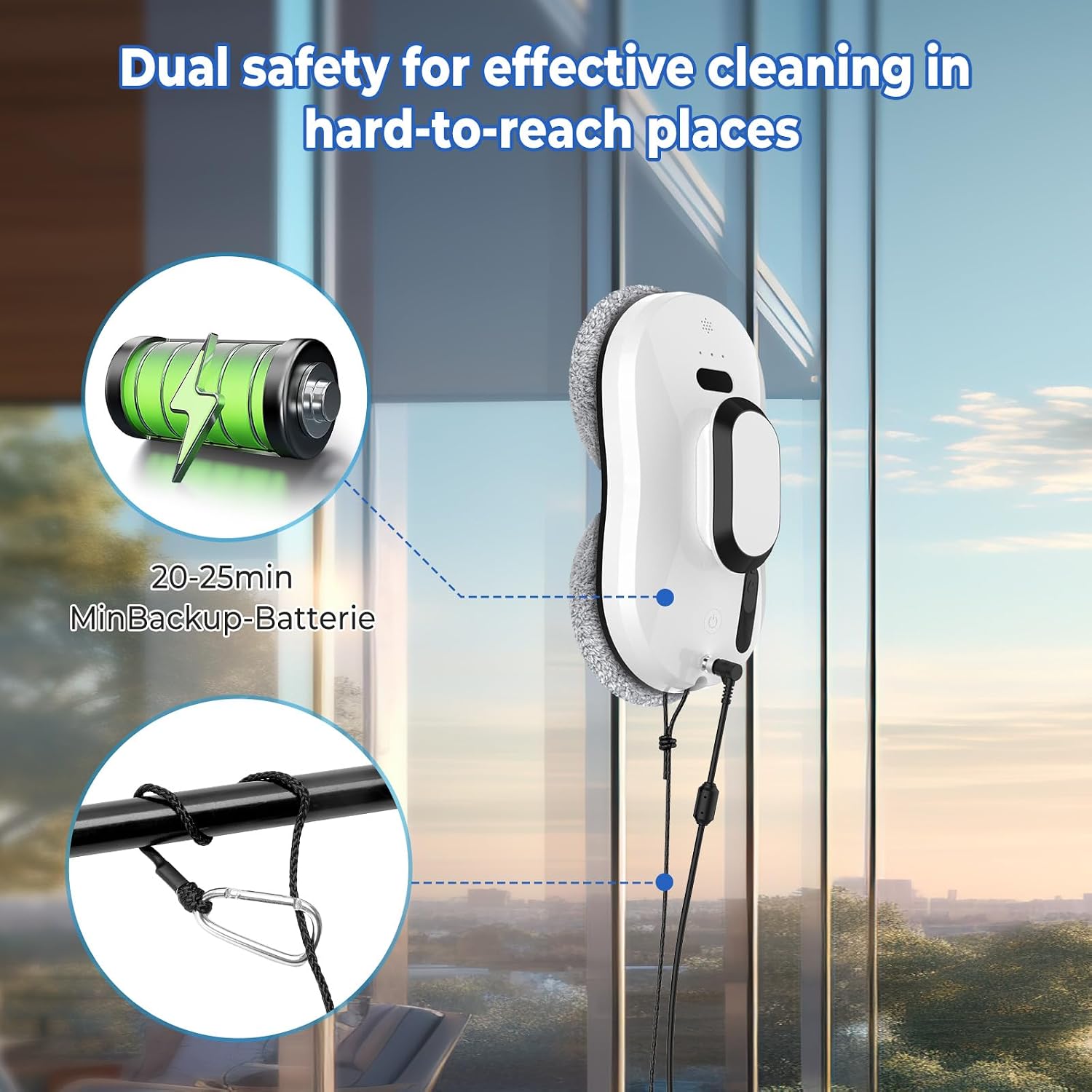
Image Description: This image illustrates the dual safety mechanisms of the SWBSLL Window Cleaning Robot. It highlights the internal backup battery, providing 20-25 minutes of emergency power, and the robust safety rope with a carabiner for secure attachment, ensuring the robot's stability during operation.
Product Overview
The SWBSLL D1334 is an automatic window cleaning robot designed for efficient and thorough cleaning of smooth surfaces like glass, mirrors, and tiles. It features powerful suction, intelligent navigation, and an automatic water spray function.
Key Features:
- 5600Pa Suction Power: Ensures firm adherence to surfaces and effective dirt removal.
- Automatic Water Spray: Integrated 40ml water tank for continuous surface hydration.
- 3 Cleaning Modes: Z-path, Left-to-Right, and Top-to-Bottom for comprehensive coverage.
- Intelligent Navigation: Automatic edge detection and path adaptation.
- Remote Control: Convenient operation from a distance.
- Safety System: Backup battery (20-25 min) and 4.5-meter safety rope.
- Rotating Cleaning Pads: Utilizes 5-layer fine fiber cloths for effective scrubbing.

Image Description: This image highlights the "Rotating Cleaning Robot" feature, showing the two circular cleaning pads. It also lists the types of debris the robot effectively cleans, including dust, sand, water stains, general dirt, and bird droppings, emphasizing the 5-layer fine fiber cloth.

Image Description: A visual comparison between a rotary cleaning robot (like the SWBSLL D1334) and a square cleaning robot. The rotary robot is depicted with circular motions for powerful and effective cleaning with suction, while the square robot is shown with linear movements, suggesting less efficient cleaning, especially at edges.
Setup
- Attach Cleaning Pads: Securely attach the microfibre cleaning pads to the bottom of the robot. Ensure they are clean and dry before each use.
- Fill Water Tank: Open the water tank cap (usually located on the side or top) and fill it with clean water or a recommended window cleaning solution. Close the cap tightly.
- Connect Power: Plug the power adapter into a wall outlet and connect the power cable to the robot. Ensure the connection is secure.
- Attach Safety Rope: Securely attach the safety rope to the designated attachment point on the robot. Then, fasten the other end of the safety rope to a sturdy, immovable object indoors, such as a heavy piece of furniture or a window frame anchor.
- Place Robot on Surface: Hold the robot firmly against the window or desired smooth surface. Press the power button on the robot or the remote control to activate the suction. The robot should adhere firmly to the surface.
Video Description: This video demonstrates the setup and basic operation of the SWBSLL Window Cleaning Robot. It shows a user connecting the power cable, filling the water tank, attaching the safety rope, placing the robot on a window, and operating it with a remote control. Key features like automatic cleaning, natural spraying, multi-functional use (windows, tiles), and the UPS anti-fall system are highlighted.
Operating Instructions
Powering On/Off:
- To power on, press the power button on the robot or the remote control. The robot will activate its suction and adhere to the surface.
- To power off, press the power button again. The robot will release suction. Carefully remove it from the surface.
Using the Remote Control:
The remote control allows you to select cleaning modes and manually direct the robot.
- Start/Stop: Use the 'OK' button to start or pause cleaning.
- Cleaning Modes:
- Z-path: For general cleaning, moving in a Z-shaped pattern.
- Left-to-Right: Cleans horizontally from left to right.
- Top-to-Bottom: Cleans vertically from top to bottom.
- Manual Control: Use the directional arrows to guide the robot manually.
- Automatic Spray: Press the spray button to activate the automatic water spray function.

Image Description: This image details the three intelligent cleaning paths of the SWBSLL Window Cleaning Robot: "Up to down," "Left to down," and "Right to down," showing their respective patterns. It also includes a collage of various types of dirt (rain stains, mud, sand, wall plaster, bird poop, oil stains) that the robot can clean, and provides the robot's dimensions (15cm x 12cm x 30cm).
Maintenance
Cleaning Pads:
- After each use, remove the cleaning pads from the robot.
- Wash the pads with mild detergent and water. They can typically be machine washed.
- Allow the pads to air dry completely before reattaching them or storing.
- Replace worn-out pads with new ones (10 microfibre cloths are included).
Robot Body Cleaning:
- Wipe the exterior of the robot with a soft, damp cloth.
- Do not use abrasive cleaners or solvents.
- Ensure no water enters the internal components.
Water Tank:
- Empty any remaining water from the tank after each use.
- Rinse the tank with clean water periodically to prevent residue buildup.
Troubleshooting
| Problem | Possible Cause | Solution |
|---|---|---|
| Robot does not adhere to the surface. |
|
|
| Robot leaves streaks. |
|
|
| Robot stops unexpectedly. |
|
|
Specifications
- Brand: SWBSLL
- Model Name: D1334
- Recommended Surfaces: Glass
- Special Feature: Smart Mapping
- Color: White
- Suction Power: 5600Pa
- Water Tank Capacity: 40ml
- Backup Battery Life: Approx. 20-25 minutes
- Safety Rope Length: 4.5 meters
- Dimensions: Approximately 30cm (Length) x 15cm (Width) x 12cm (Height) (Inferred from image)
Warranty and Support
For warranty information and customer support, please refer to the documentation provided with your purchase or contact the retailer. Keep your proof of purchase for any warranty claims.
For technical assistance or further inquiries, please visit the official SWBSLL website or contact their customer service department.