
TCL 75C6K
TCL PREMIUM 4K QD-Mini LED TV 75" C6K User Manual
Model: 75C6K
Product Overview
The TCL PREMIUM 4K QD-Mini LED TV 75" C6K is a state-of-the-art television featuring Google TV, Dolby Vision IQ, and ATMOS. It includes a built-in subwoofer, HDR10+, dual-band Wi-Fi, Bluetooth, 144Hz VRR, and HDMI 2.1 connectivity. This model supports distance voice command with Google Assistant, ALLM, and boasts a borderless design for an immersive viewing experience.

Image: Front view of the TCL 75" C6K QD-Mini LED TV, showcasing its slim design and vibrant display.
Setup Guide
1. Unpacking and Placement
Carefully remove the TV and all accessories from the packaging. It is recommended to have at least two people for handling the 75-inch model due to its size and weight. Ensure the TV is placed on a stable, level surface or securely mounted to a wall.

Image: A diagram illustrating recommended viewing distances for various TV sizes, including the 75-inch model at approximately 2.3 meters for optimal experience.
For the 75" C6K TV, an ideal viewing distance is approximately 2.3 meters (7.5 feet) to fully appreciate the 4K resolution.
2. Connecting Devices
Identify the various input and output ports on your TV. Connect your external devices such as gaming consoles, Blu-ray players, sound systems, and cable/satellite boxes to the appropriate ports.
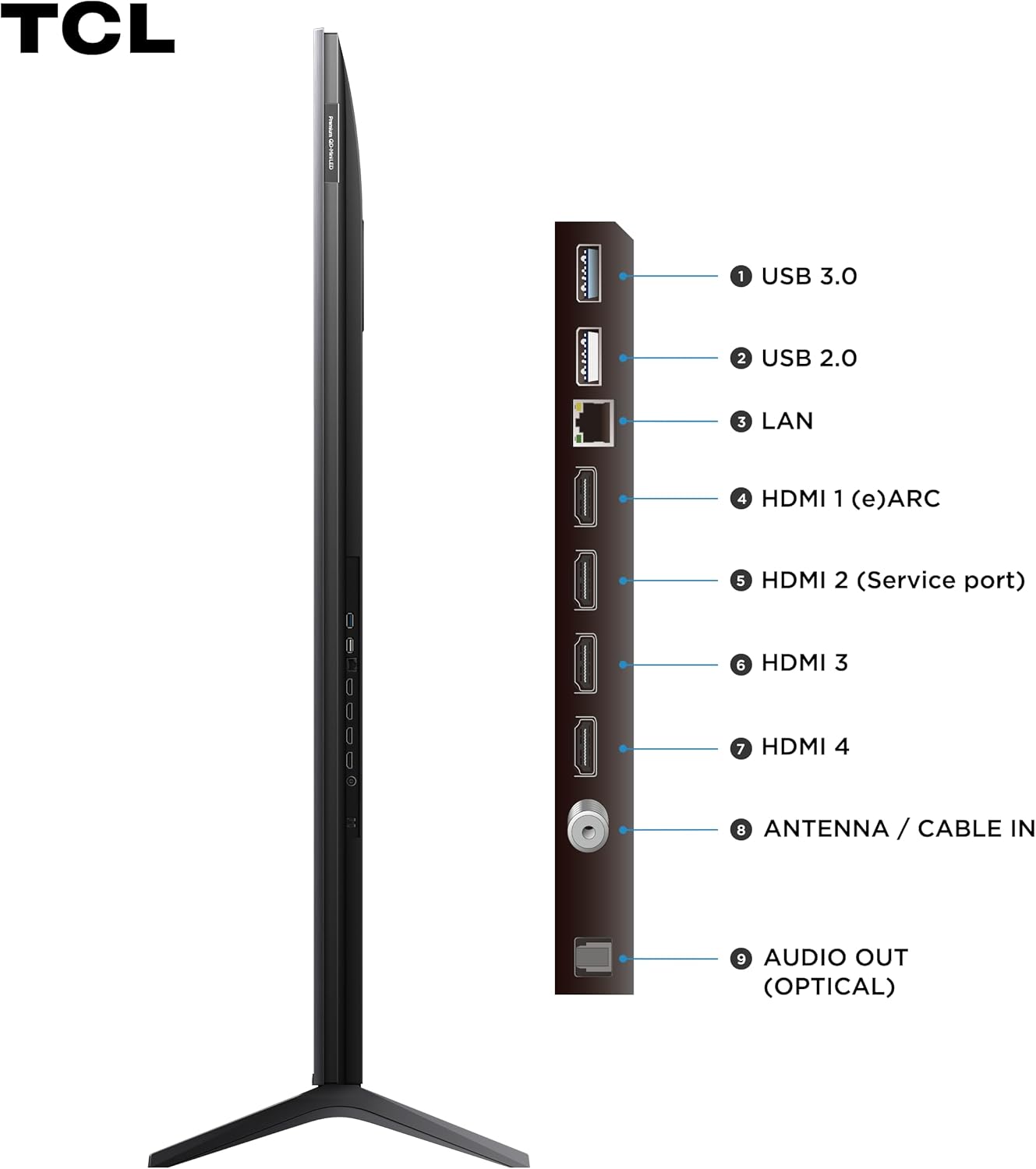
Image: Side view of the TCL C6K TV displaying its connectivity panel, including USB, LAN, HDMI, Antenna/Cable IN, and Optical Audio Out ports.
- USB 3.0 / USB 2.0: For connecting USB storage devices.
- LAN: For wired internet connection.
- HDMI 1 (eARC), HDMI 2 (Service port), HDMI 3, HDMI 4: For connecting high-definition devices. HDMI 1 supports eARC for enhanced audio return channel.
- Antenna / Cable IN: For connecting an antenna or cable TV signal.
- AUDIO OUT (OPTICAL): For connecting to external audio systems via optical cable.
3. Power Connection
Once all devices are connected, plug the TV's power cord into a wall outlet. Press the power button on the TV or the remote control to turn on the TV.
4. Initial Setup (Google TV)
Upon first power-on, the TV will guide you through the initial setup process for Google TV. This includes:
- Language selection.
- Connecting to your Wi-Fi network (dual-band Wi-Fi supported).
- Signing in with your Google account to access Google TV features, apps, and Google Assistant.
- Scanning for available TV channels (if using an antenna/cable).
Operating Instructions
1. Basic Operations
- Power On/Off: Use the power button on the remote control or the TV.
- Input Selection: Press the "Input" or "Source" button on the remote to switch between connected devices (HDMI, USB, TV).
- Volume Control: Use the volume up/down buttons on the remote.
- Channel Navigation: Use the channel up/down buttons for broadcast TV.
2. Smart TV Features (Google TV)
Your TCL C6K TV runs on Google TV, providing a personalized and intuitive smart TV experience.

Image: A user interacting with the Google TV interface on the TCL C6K, showing various streaming apps and content recommendations.
- Google Assistant: Use voice commands via the remote control or distance voice command to search for content, control smart home devices, and get information.
- Chromecast built-in: Cast content directly from your smartphone, tablet, or computer to the TV.
- App Access: Download and stream from popular services like YouTube, Prime Video, Disney+, Apple TV, Spotify, and more from the Google Play Store.
- Google Meet & Photos: Utilize integrated Google services for video calls and photo viewing.
3. Picture and Display Settings
The TCL C6K features advanced display technologies for superior image quality.

Image: A visual summary of the TCL C6K's key features, highlighting its 4K resolution, QD-Mini LED technology, and various performance enhancements.
- 4K QD-Mini LED: Experience stunning clarity, vibrant colors, and deep blacks with Quantum Dot and Mini LED technology.
- Dolby Vision IQ & HDR10+: Enjoy enhanced contrast, brightness, and color detail in compatible content. Dolby Vision IQ intelligently optimizes picture quality based on room lighting.
- AiPQ Pro Processor: This intelligent processor enhances image quality through AI-driven algorithms for clarity, color, HDR, contrast, and motion.
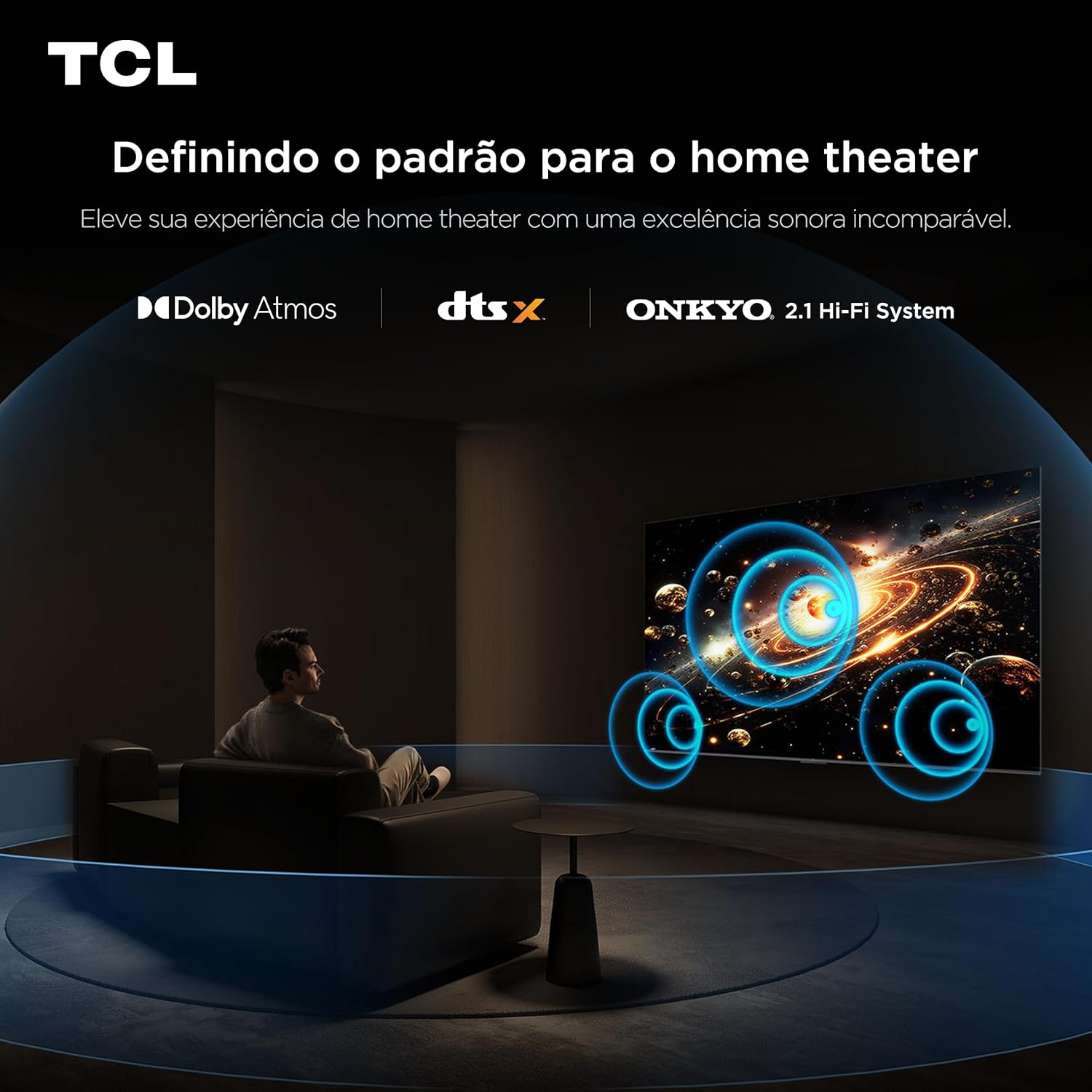
Image: A detailed graphic of the AiPQ Pro processor, illustrating its capabilities in AI Clarity, AI Color, AI HDR, AI Contrast, and AI Motion for optimized picture performance.
- 144Hz VRR & 120Hz Game Accelerator: For gamers, Variable Refresh Rate (VRR) up to 144Hz (or emulated 288Hz) and the 120Hz Game Accelerator ensure smooth, tear-free gameplay with low input lag (ALLM).
4. Audio Settings
The TCL C6K delivers powerful and immersive audio.

Image: A visual representation of the immersive audio experience provided by the TCL C6K's ONKYO 2.1 Hi-Fi System, with sound waves emanating from the TV.
- Dolby Atmos: Experience multi-dimensional sound that moves around you, creating a truly cinematic audio experience.
- DTS:X: Enjoy virtualized 3D audio that places you in the center of the action.
- ONKYO 2.1 Hi-Fi System with Subwoofer: Integrated ONKYO speakers and a dedicated subwoofer provide rich, powerful, and clear sound with enhanced bass.
Maintenance
- Screen Cleaning: Gently wipe the screen with a soft, lint-free cloth. For stubborn marks, use a screen-specific cleaning solution applied to the cloth, not directly to the screen.
- TV Body Cleaning: Use a soft, dry cloth to clean the TV's frame and back. Avoid abrasive cleaners or solvents.
- Software Updates: Ensure your TV is connected to the internet to receive automatic software updates. These updates improve performance, add new features, and enhance security. You can also manually check for updates in the TV's settings menu.
Troubleshooting
| Problem | Possible Cause / Solution |
|---|---|
| No Power |
|
| No Picture / Black Screen |
|
| No Sound |
|
| Wi-Fi Connection Issues |
|
| Remote Control Not Working |
|
Specifications
| Feature | Detail |
|---|---|
| Brand | TCL |
| Model | 75C6K |
| Screen Size | 75 inches |
| Display Technology | QD-Mini LED, VA Panel |
| Resolution | 4K (3840 x 2160) |
| Refresh Rate | 120 Hz (Native), 144Hz VRR, 288Hz VRR (Emulated) |
| Operating System | Google TV, Android |
| HDR Support | Dolby Vision IQ, HDR10+ |
| Processor | AiPQ Pro Processor |
| Audio System | Dolby Atmos, DTS:X, ONKYO 2.1 Hi-Fi System with Subwoofer |
| Connectivity | Dual-band Wi-Fi, Bluetooth, HDMI 2.1, USB 3.0, USB 2.0, LAN, Optical Audio Out, Antenna/Cable IN |
| Dimensions (Product) | 6.5 x 167 x 95.9 cm (Depth x Width x Height) |
| Weight (Product) | 33.2 kg |
| Included Components | 01 Televisor 75", 01 Remote Control, 1 P2/RCA Adapter Cable |
Warranty Information
This TCL 75C6K TV comes with a 1-year manufacturer's warranty from the date of purchase, covering defects in materials and workmanship. Please retain your proof of purchase for warranty claims. For detailed warranty terms and conditions, refer to the warranty card included with your product or visit the official TCL support website.
Customer Support
For further assistance, technical support, or service inquiries, please visit the official TCL website or contact TCL customer service. You can find contact information and frequently asked questions on the TCL Brand Store on Amazon or the TCL global support portal.
Related Documents - 75C6K
 |
TCL C6K Series Smart TV Operation Manual Comprehensive operation manual for the TCL C6K series Smart TV, covering setup, features, settings, troubleshooting, and specifications. Learn how to use Google TV, connect devices, and optimize your viewing experience. |
 |
TCL 75C6K 75-inch QD-Mini LED Google TV Specifications Detailed specifications for the TCL 75C6K 75-inch QD-Mini LED Google TV, covering its operating system, connectivity, picture and sound features, smart TV capabilities, dimensions, and VESA mount compatibility. Includes information from TCL Electronics Australia. |
 |
The Good Guys Bonus E-Gift Card for TCL C7K & C6K TVs Get details on The Good Guys promotion offering bonus e-gift cards with eligible TCL C7K and C6K Google TV purchases. Learn about the promotion period, eligible models, and how to claim your gift card. |
 |
TCL C6K 55C6K 55-inch 4K UHD Smart TV - QD-Mini LED, Metallic Explore the detailed specifications of the TCL C6K 55C6K, a 55-inch 4K Ultra HD Smart TV featuring QD-Mini LED technology, a metallic design, and advanced connectivity options. Discover its smart features, energy efficiency, and performance capabilities. |
 |
TCL 55C6K 55-inch QD-Mini LED Google TV Specifications and Features Detailed specifications and features for the TCL 55C6K 55-inch QD-Mini LED Google TV, including picture quality, smart TV functions, connectivity, sound, and dimensions. Learn about its Google TV operating system, HDR support, and advanced technologies. |
 |
TCL 55C7K 55" Premium QD-Mini LED Google TV Specifications Detailed specifications for the TCL 55C7K 55-inch Premium QD-Mini LED Google TV, covering basic information, picture, sound, connectivity, smart TV features, media formats, dimensions, and accessories. |
Ask a question about this manual
Ask about setup, troubleshooting, compatibility, parts, safety, or missing instructions. Manuals+ will review the question and use this page’s manual context to help answer it.