1. Introduction
This manual provides essential information for the safe and efficient installation, operation, and maintenance of your Traco Power TXN 150-112 Switching Power Supply. Please read this manual thoroughly before using the product and retain it for future reference.
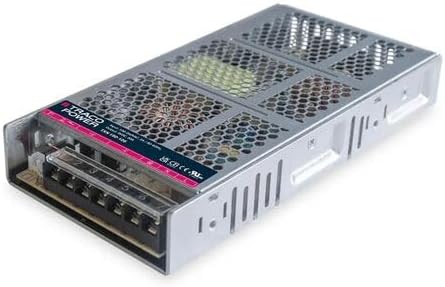
Figure 1: Traco Power TXN 150-112 Switching Power Supply. This image shows the compact, enclosed metal case design with ventilation holes and the input/output terminal block clearly visible.
2. Important Safety Instructions
Failure to follow these safety instructions may result in electric shock, fire, or serious injury. Always observe local and national electrical codes.
- Qualified Personnel Only: Installation and servicing must be performed by qualified personnel.
- Disconnect Power: Always disconnect the AC input power before making any connections or performing maintenance.
- Proper Grounding: Ensure the power supply is properly grounded to prevent electric shock.
- Ventilation: Do not obstruct ventilation openings. Ensure adequate airflow around the unit to prevent overheating.
- Environmental Conditions: Do not expose the unit to moisture, rain, or excessive dust. Operate within specified temperature and humidity ranges.
- Correct Wiring: Use appropriate wire gauges for input and output connections to handle the specified current.
- Overload Protection: Do not exceed the rated output power or current.
3. Product Overview
3.1. Description
The Traco Power TXN 150-112 is a high-performance switching power supply designed for industrial and scientific applications. It provides a stable 12 VDC output with a maximum current of 12.5 A, delivering a total power of 150 W. The unit features an enclosed metal case for durability and protection.
3.2. Key Features
- Output Voltage: 12 VDC
- Output Current: 12.5 A
- Output Power: 150 W
- Input Voltage Range: 90 VAC to 264 VAC
- Enclosed Metal Case Design
4. Setup and Installation
4.1. Mounting
Mount the power supply in a location that allows for adequate ventilation and prevents exposure to excessive heat, moisture, or corrosive substances. Ensure the mounting surface is stable and capable of supporting the unit's weight (approximately 6.99 pounds).
- Identify suitable mounting points on the power supply chassis.
- Secure the unit using appropriate screws or mounting hardware (not included) to a flat, stable surface.
- Maintain a minimum clearance of 1 inch (2.5 cm) around all sides for proper airflow.
4.2. Wiring Connections
Refer to the terminal block on the unit for correct wiring. Ensure all connections are secure and properly insulated.
- AC Input (90-264 VAC): Connect the AC line, neutral, and ground wires to the designated input terminals. Observe correct polarity.
- DC Output (12 VDC, 12.5 A): Connect the positive (+) and negative (-) load wires to the corresponding output terminals.
- Grounding: Ensure the protective earth (PE) terminal is securely connected to a reliable earth ground.
- Wire Gauge: Use appropriate wire gauges capable of handling the maximum input and output currents to prevent overheating.
5. Operating Instructions
Once the power supply is securely mounted and all wiring connections are verified as correct and safe, you can proceed with operation.
- Initial Power-Up: Apply AC input power to the unit. The power supply should begin operating, providing 12 VDC output.
- Output Verification: Use a multimeter to verify the output voltage at the DC output terminals before connecting your load.
- Load Connection: Connect your DC load to the output terminals. Ensure the load's current draw does not exceed 12.5 A.
- Monitoring: Periodically monitor the power supply for any signs of abnormal operation, such as excessive heat or unusual noises.
6. Maintenance
Regular maintenance ensures optimal performance and longevity of your power supply.
- Cleaning: Periodically clean the exterior of the unit and ventilation openings to remove dust and debris. Use a soft, dry cloth. Do not use liquid cleaners.
- Inspection: Regularly inspect all wiring connections for tightness and signs of wear or damage. Check for any discoloration or bulging components.
- Ventilation: Ensure that the area around the power supply remains clear and that ventilation is not obstructed.
- Environmental Check: Verify that the operating environment remains within the specified temperature and humidity limits.
7. Troubleshooting Common Issues
If you encounter problems with your power supply, refer to the following troubleshooting guide:
| Problem | Possible Cause | Solution |
|---|---|---|
| No output voltage | No AC input power; Blown fuse; Incorrect wiring | Check AC source and connections; Replace fuse (if accessible and cause identified); Verify wiring per Section 4.2 |
| Output voltage too low/unstable | Overload condition; Faulty load; Input voltage too low | Reduce load current; Disconnect load and test power supply; Verify input voltage is within range |
| Unit overheating | Insufficient ventilation; Overload condition; High ambient temperature | Ensure proper airflow; Reduce load; Operate within specified temperature range |
| Unusual noise | Loose components; Internal fault | Disconnect power immediately and contact support. Do not attempt to repair. |
If the problem persists after following these steps, contact customer support.
8. Technical Specifications
| Parameter | Value |
|---|---|
| Model | TXN 150-112 |
| Input Voltage Range | 90 VAC to 264 VAC |
| Output Voltage | 12 VDC |
| Output Current | 12.5 A |
| Output Power | 150 W |
| Number of Outputs | 1 |
| Enclosure Type | Enclosed Metal Case |
| Item Weight | 6.99 pounds (3.17 kg) |
| Manufacturer | Traco Power |
| ASIN | B0F7JWHTBY |
9. Warranty and Customer Support
This Traco Power product is covered by a standard manufacturer's warranty against defects in materials and workmanship. For specific warranty terms and conditions, please refer to the documentation provided with your purchase or visit the official Traco Power website.
For technical assistance, troubleshooting, or warranty claims, please contact your authorized Traco Power distributor or customer support channel. When contacting support, please have your product model (TXN 150-112) and purchase information readily available.


