
Introduction
This manual provides essential instructions for the safe and efficient operation of your PLPFUDVDZZ 3KW Online Uninterruptible Power Supply (UPS). Please read this manual thoroughly before installation and use, and retain it for future reference.
The PLPFUDVDZZ 3KW Online UPS is designed to provide reliable backup power and protection for your electronic equipment, ensuring continuous operation during power fluctuations or outages. It features automatic voltage adjustment and a compact design for versatile applications.
Setup
1. Unpacking and Inspection
Carefully unpack the UPS and inspect it for any shipping damage. If any damage is found, do not install the unit and contact your supplier.
2. Placement
Place the UPS in a clean, dry, and well-ventilated area. Ensure adequate clearance around the unit for proper airflow. Avoid direct sunlight, heat sources, and excessive humidity.
3. Connections
The PLPFUDVDZZ UPS is designed for easy installation and is plug-and-play. Refer to the diagram below for connection points.

Image Description: Rear view of the PLPFUDVDZZ 3KW Online UPS, highlighting various connection ports and components. These include the RS232 interface, USB interface, Output Block, Heat Sink, Input Protection Switch, Utility Input, and Output Terminal Block.
3.1. Utility Input Connection
Connect the UPS to a grounded 220V AC power outlet using the provided power cord. Ensure the input voltage is within the specified range (110-300VAC).
3.2. Output Connections
Connect your equipment to the output receptacles on the rear panel of the UPS. Do not overload the UPS beyond its rated capacity.
3.3. External Battery Connection (if applicable)
This model supports external batteries. Connect external batteries according to the manufacturer's guidelines. The system requires a 96V battery voltage, typically achieved with 8 batteries in series, and supports up to 3 such groups in parallel.
3.4. Communication Ports
Use the RS232 or USB interface to connect the UPS to a computer for monitoring and management software (if available).
Operating
1. Initial Power-Up
After all connections are secure, press the 'ON' button on the front panel to power on the UPS. The display will illuminate, indicating the UPS status.
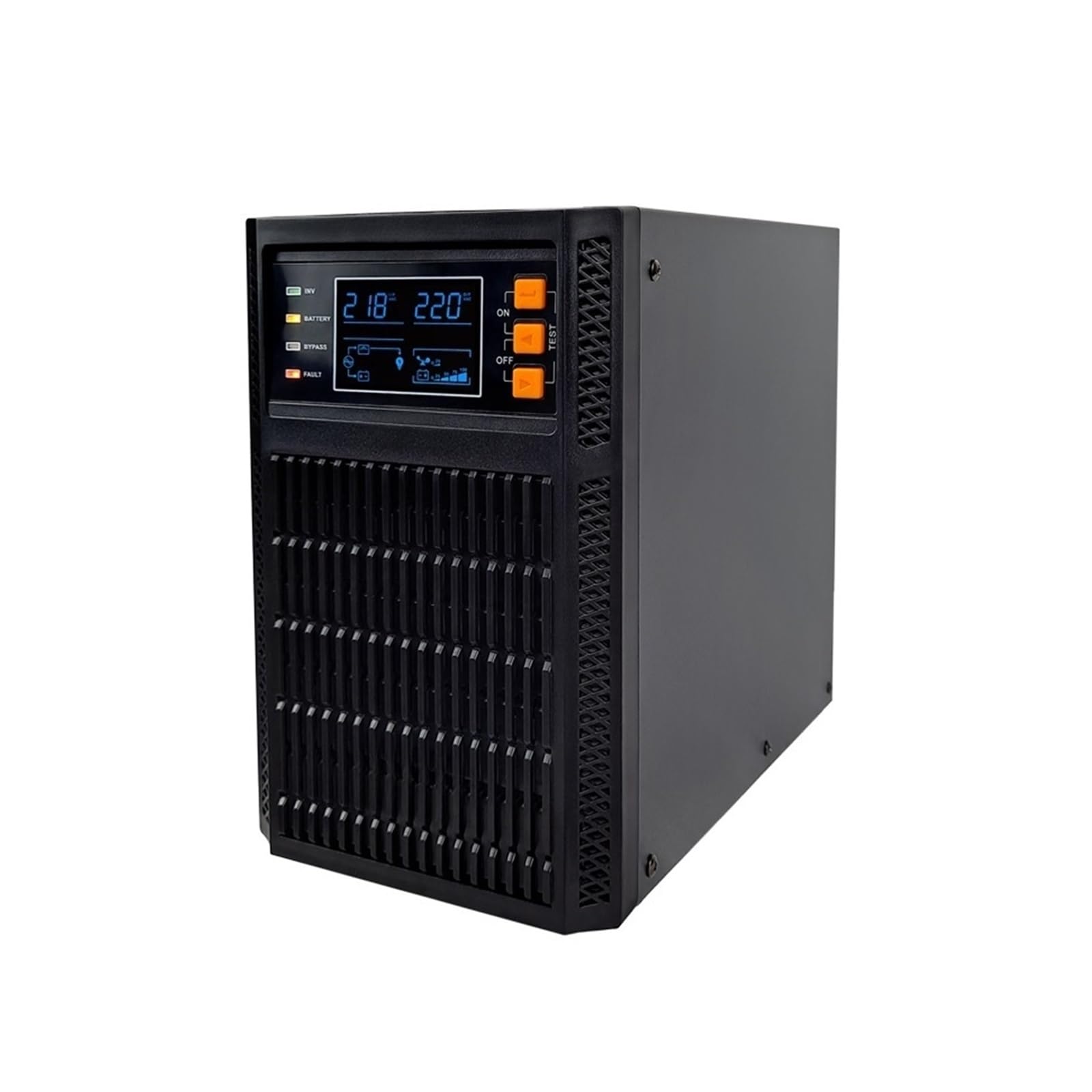
Image Description: Front view of the PLPFUDVDZZ 3KW Online UPS, showing the digital display panel and control buttons. The display shows input/output voltage, battery status, and operational mode indicators (INV, BATTERY, BYPASS, FAULT). Control buttons include ON, OFF, and TEST.
2. Display Indicators
The front panel display provides real-time information about the UPS status:
- INV: Indicates the inverter is active.
- BATTERY: Shows battery charge level and status.
- BYPASS: Indicates the UPS is operating in bypass mode.
- FAULT: Alerts to a system error or malfunction.
3. Automatic Voltage Adjustment
The UPS features automatic voltage adjustment to ensure stable power delivery to connected devices, protecting them from voltage fluctuations.
4. Shutting Down the UPS
To turn off the UPS, press the 'OFF' button on the front panel. Ensure all connected equipment is properly shut down before turning off the UPS.
Maintenance
1. General Care
Keep the UPS clean and free from dust. Use a soft, dry cloth for cleaning. Do not use liquid or aerosol cleaners.
2. Battery Maintenance
The UPS contains internal batteries and supports external battery packs. For optimal battery life, ensure the UPS is operated within recommended temperature ranges. Periodically perform a battery self-test using the 'TEST' button on the front panel to check battery health.
For external batteries, ensure they are properly connected and maintained according to their specific instructions. The system requires a 96V external battery voltage, typically achieved by connecting 8 batteries in series. Up to 3 such groups can be connected in parallel.
3. Ventilation
Ensure that the ventilation openings on the UPS are not blocked to prevent overheating.
Troubleshooting
1. Common Issues and Solutions
- UPS does not turn on: Check the power cord connection to the utility input and ensure the input protection switch is not tripped. Verify the utility power source.
- UPS beeps continuously: This usually indicates a low battery condition or an overload. Check connected equipment load and allow batteries to charge.
- "FAULT" indicator is lit: Refer to the specific fault code (if displayed) and consult the manufacturer's support for assistance. Disconnect all equipment and power cycle the UPS.
- No power output: Ensure the UPS is turned on and not in bypass mode due to an internal fault. Check output connections.
If problems persist, contact customer support.
Product Specifications
The following specifications apply to the PLPFUDVDZZ 3KW Online UPS (Model: PLPFUDVDZZ):

Image Description: A text-based image detailing the technical specifications of the UPS. It lists Model: C-3KL (external battery), Input Voltage Range: 110-300VAC, Input Frequency Range: 50/60±6HZ, Output Voltage: 208/220/230/240VAC 1%, Output Frequency Range: 50-60HZ 0.1%, Output waveform: pure sine wave, Conversion time: 0 seconds switching, Appearance size: 395*144*225MM, Weight: 8KG, Battery Voltage: 96V, Number of batteries: Select the number of external batteries according to the use, External battery voltage: 96V, 8 batteries in series as 1 group, Support 3 groups in parallel.
- Model: PLPFUDVDZZ (C-3KL external battery)
- Input Voltage Range: 110-300VAC
- Input Frequency Range: 50/60±6HZ
- Output Voltage: 208/220/230/240VAC ±1%
- Output Frequency Range: 50-60HZ ±0.1%
- Output Waveform: Pure Sine Wave
- Conversion Time: 0 seconds switching
- Appearance Size: 395 x 144 x 225 MM
- Item Weight: 17.64 pounds (8 KG)
- Battery Voltage (External): 96V
- External Battery Configuration: 8 batteries in series per group, supports 3 groups in parallel.
Warranty and Customer Support
For warranty information, please refer to the documentation included with your purchase or visit the official PLPFUDVDZZ website. For technical support or service inquiries, please contact your vendor or the manufacturer directly.