
1. Introduction
Thank you for choosing the FCNGEVBH DC8-100V Battery Capacity Indicator. This digital meter is designed to accurately display battery voltage and capacity for various battery types, including Lead-Acid, Lithium, and LiFePO4. It is suitable for use in applications such as cars and motorcycles. This manual provides detailed instructions for the proper installation, operation, and maintenance of your device.
2. Product Overview
2.1 Key Features
- Wide Voltage Range: Operates within DC 8-100V.
- Digital Display: Clear LCD screen shows both voltage and battery capacity percentage.
- Battery Type Compatibility: Supports Lead-Acid, Lithium, and LiFePO4 batteries.
- High Accuracy: Provides precise measurements for reliable monitoring.
- Compact Design: Easy to integrate into various systems.
2.2 Components
The FCNGEVBH DC8-100V Battery Capacity Indicator consists of the main display unit and connecting wires. Refer to the images below for visual identification of components.

Figure 1: Front view of the Battery Capacity Indicator. The display shows voltage (e.g., 18.0V) and battery percentage (e.g., 100%) with a graphical battery icon. Two buttons, 'SET' and a power symbol, are visible on the right side.

Figure 2: Angled view of the indicator, showing the 'SET' button and the power button. These buttons are used for configuration and display control.

Figure 3: Rear view of the indicator, illustrating the pluggable connector for power input. Red and black wires are connected, indicating positive and negative terminals respectively.
3. Specifications
| Parameter | Value |
|---|---|
| Model Number | 6133A DC8-100V |
| Operating Voltage Range | DC 8-100V |
| Display Type | Digital LCD |
| Accuracy Class | High |
| Operating Temperature | -10°C to 70°C |
| Dimensions | Approximately 11.00cm x 7.00cm x 2.00cm |
| Item Weight | 50 Grams |
4. Setup and Installation
Follow these steps for proper installation of your battery capacity indicator:
- Identify Wiring: The indicator comes with a red wire and a black wire. The red wire is for the positive (+) terminal, and the black wire is for the negative (-) terminal of the battery or power source.
- Connect Power: Connect the red wire to the positive (+) terminal of your DC power source (battery) and the black wire to the negative (-) terminal. Ensure the voltage is within the DC 8-100V operating range.
- Secure Connection: Ensure all connections are secure and properly insulated to prevent short circuits. The pluggable connector (refer to Figure 3) allows for quick and easy connection/disconnection.
- Mounting: Mount the indicator in a suitable location where the display is easily visible and protected from environmental elements.
Warning: Incorrect wiring can damage the device or the battery. Always verify polarity before connecting.
5. Operation
Once properly installed and powered on, the indicator will display the current battery voltage and capacity percentage.
5.1 Display Reading
- The large numerical value indicates the current voltage (e.g., "18.0V").
- The percentage value (e.g., "100%") and the graphical battery bar indicate the remaining battery capacity.
- A lightning bolt icon may appear during charging (refer to Figure 4).
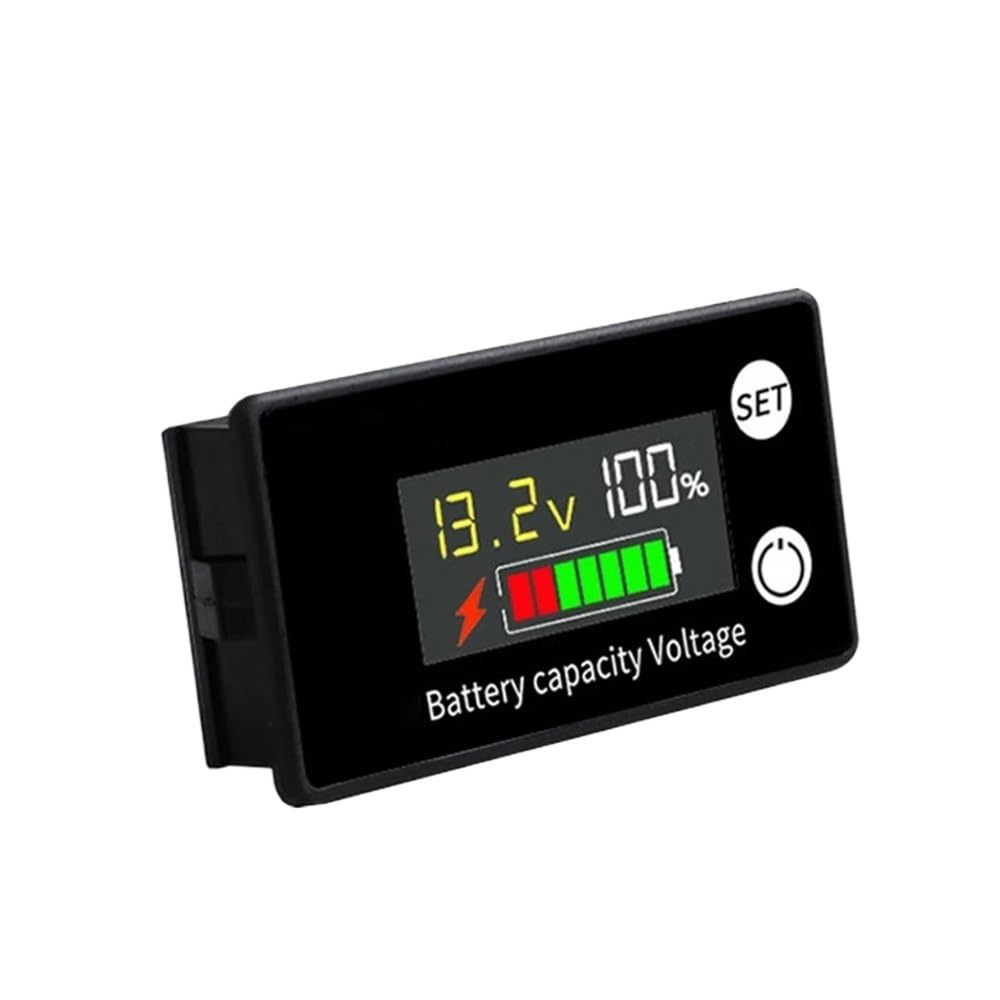
Figure 4: Battery Capacity Indicator displaying charging status. A lightning bolt icon is visible next to the battery graphic, indicating that the battery is currently being charged.
5.2 Button Functions
- "SET" Button: This button is typically used to enter configuration mode or cycle through display options. Consult specific product documentation or experiment carefully to understand its full functionality for setting battery type or voltage thresholds.
- Power Button (Circle Icon): This button may be used to turn the display on/off or to cycle through different display modes (e.g., voltage only, percentage only, or both).
6. Maintenance
To ensure the longevity and accurate performance of your FCNGEVBH Battery Capacity Indicator, follow these maintenance guidelines:
- Cleaning: Gently wipe the display and casing with a soft, dry cloth. Avoid using abrasive cleaners or solvents, which can damage the screen or plastic.
- Environmental Conditions: Operate the device within the specified temperature range of -10°C to 70°C. Avoid exposure to extreme temperatures, direct sunlight for prolonged periods, or high humidity.
- Connection Integrity: Periodically check the wiring connections to ensure they remain secure and free from corrosion.
7. Troubleshooting
If you encounter issues with your battery capacity indicator, refer to the following common problems and solutions:
- No Display:
- Check if the power wires are correctly connected to the battery terminals (red to positive, black to negative).
- Ensure the battery voltage is within the DC 8-100V operating range.
- Verify that the power source is providing voltage.
- Incorrect Readings:
- Confirm that the indicator is configured for the correct battery type (if adjustable via the "SET" button).
- Ensure connections are secure and there is no resistance causing voltage drop.
- Test the battery voltage with a separate voltmeter to compare readings.
- Display Flickering:
- Check for loose connections or intermittent power supply.
- Ensure the operating voltage is stable and within the specified range.
If problems persist, contact customer support for further assistance.
8. Warranty and Support
This FCNGEVBH product is designed for reliability and performance. For warranty information or technical support, please refer to the product packaging or contact the manufacturer directly through their official channels. Keep your purchase receipt for warranty claims.
For further assistance, you may visit the FCNGEVBH support page or contact their customer service department.