
Introduction
This manual provides comprehensive instructions for the assembly, operation, and maintenance of your HapGIFT HAP002 Gaming Chair. Designed for comfort and durability, this ergonomic chair features massage lumbar support, an adjustable headrest, height adjustment, and a retractable footrest. Please read this manual thoroughly before assembly and use to ensure proper function and safety.
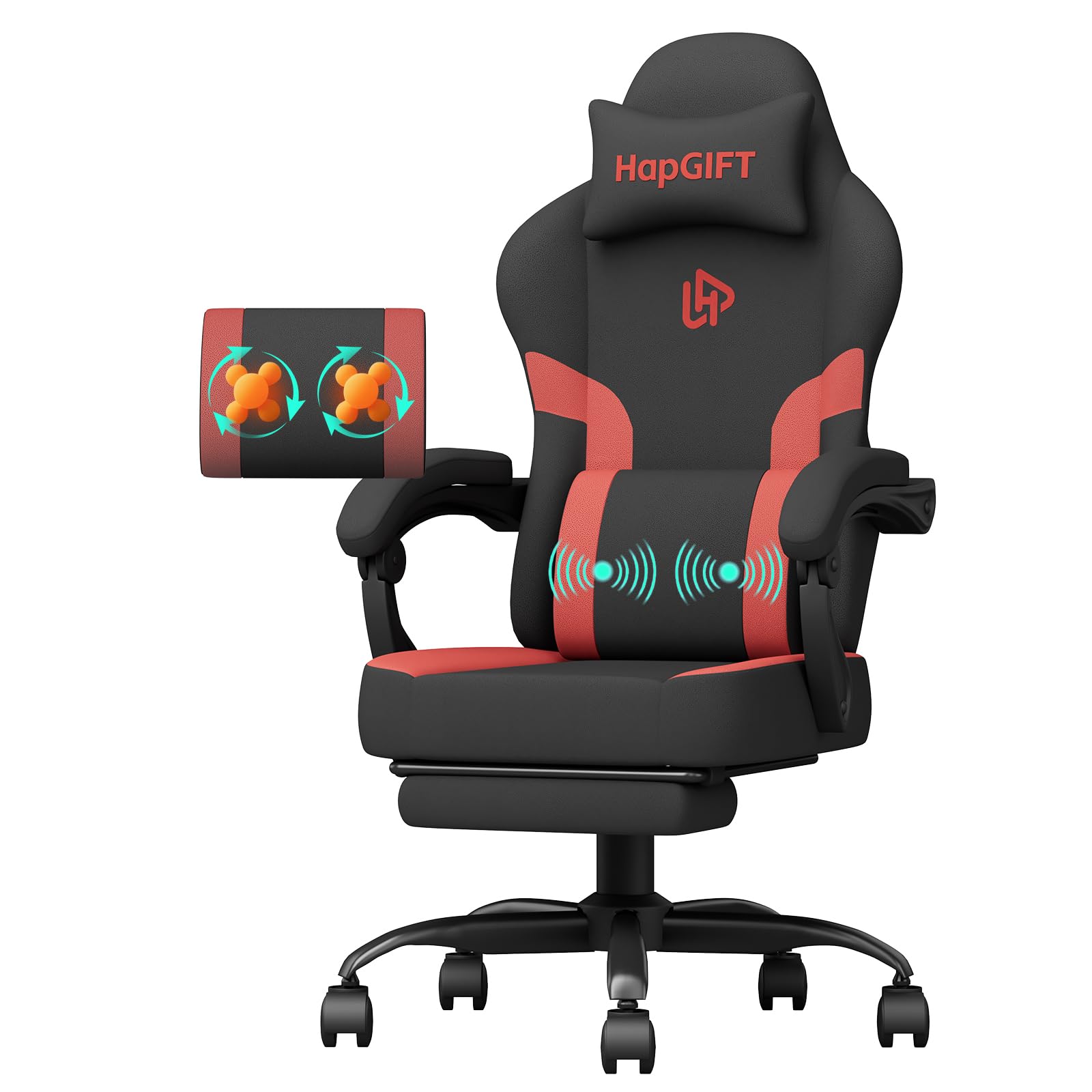
The HapGIFT HAP002 Gaming Chair in a typical home office environment.
Safety Information
Always assemble the chair according to the provided instructions. The chair weighs approximately 40 pounds (18.1 kg) and may require assistance to move or lift. Do not exceed the maximum weight capacity of 300 pounds (136 kg). Ensure all bolts are securely tightened before use. Keep small parts away from children. Avoid standing on the chair or using it as a step stool. Do not use abrasive cleaners on the fabric.
Package Contents
Before beginning assembly, verify that all components listed below are present and undamaged. Refer to the detailed instruction manual included in the package for a complete list of parts and hardware.
- Chair Backrest
- Seat Cushion with Footrest Mechanism
- Armrests (2)
- Five-Star Base
- Casters (5)
- Gas Lift Cylinder with Cover
- Mechanism Plate
- Headrest Pillow
- Massage Lumbar Pillow (USB powered)
- Assembly Hardware (bolts, washers, Allen key)

All components of the HapGIFT HAP002 Gaming Chair laid out for assembly.
Setup and Assembly
A detailed instruction manual and all necessary accessories are provided for easy assembly. Follow the step-by-step guide included in your package. For a visual aid, please refer to the assembly video below.
Official seller video demonstrating the accessories and installation steps for a gaming chair.
Key Assembly Steps:
- Attach the casters to the five-star base.
- Insert the gas lift cylinder into the center of the base.
- Secure the mechanism plate to the underside of the seat cushion using the provided bolts.
- Attach the armrests to the seat cushion.
- Connect the backrest to the seat cushion using the designated bolts.
- Place the assembled seat onto the gas lift cylinder.
- Attach the headrest and massage lumbar pillow using their straps.
Operating Instructions
Height Adjustment
To adjust the chair's height, locate the lever on the right side beneath the seat. Pull the lever upwards while lifting your weight off the seat to raise the chair. To lower the chair, pull the lever upwards while remaining seated.
Recline Function
To recline the backrest, pull the lever on the left side beneath the seat upwards. Lean back to your desired angle (90° to 135°) and release the lever to lock it in place. To return to an upright position, pull the lever and lean forward slightly.

The HapGIFT HAP002 Gaming Chair offers reclining adjustment from 90° to 135°.
Footrest Operation
The chair features a retractable footrest located beneath the seat. To extend it, pull the footrest outwards. Flip the padded section upwards for support. To retract, flip the padded section down and push the footrest back under the seat.

The retractable footrest provides additional leg support for relaxation.
Massage Function
The lumbar pillow includes a massage function. Connect the USB cable from the lumbar pillow to a compatible USB power source (e.g., computer, power bank). Use the integrated control to turn the massage function on or off.

The massage lumbar support helps relieve back discomfort during long sitting periods.
Maintenance
Cleaning
The PU leather fabric is soft, comfortable, and easy to clean. Wipe it gently with a damp cloth. Avoid using harsh chemicals or abrasive cleaners, as these can damage the material. For spills, blot immediately with a clean, dry cloth.
General Care
- Regularly check and tighten all bolts to ensure stability.
- Avoid exposing the chair to direct sunlight for prolonged periods to prevent fading and material degradation.
- Do not place heavy objects on the chair's armrests or backrest.
Troubleshooting
Chair is Wobbly
Check all assembly bolts and ensure they are securely tightened. Verify that the five-star base and gas lift cylinder are correctly installed.
Height Adjustment Not Working
Ensure the gas lift lever is fully engaged. If the issue persists, the gas lift cylinder may need replacement.
Massage Function Not Activating
Verify that the USB cable is securely connected to a working power source. Check the on/off switch on the cable. Try a different USB port or power source.
Specifications
| Feature | Specification |
|---|---|
| Brand | HapGIFT |
| Model Number | HAP002 |
| Color | Black Red |
| Maximum Weight Recommendation | 300 Pounds (136 kg) |
| Item Weight | 40 Pounds (18.1 kg) |
| Product Dimensions | 9.84"D x 30.7"W x 22.83"H (25cm D x 78cm W x 58cm H) |
| Material | PU Leather, High-Density Foam, Metal Frame |
| Reclining Angle | 90° to 135° |
| Swivel | 360° |
| Casters | 360° Swivel |

Detailed dimensions and weight capacity of the HapGIFT HAP002 Gaming Chair.
Warranty and Support
HapGIFT chairs are designed and certified by professional institutions to ensure safety and durability. We provide free replacement or repair within one year of purchase. If problems arise, such as missing parts, product damage, or other unsatisfactory issues, our professional after-sales service team will offer replacement parts as needed. We want all of our customers to feel 100% satisfied. If you have any questions or suggestions, please do not hesitate to contact us.
