
HFFFXRCY SML-III-3.5KW-WiFi
HFFFXRCY SML-III-3.5KW-WiFi Hybrid Solar Inverter User Manual
Model: SML-III-3.5KW-WiFi
1. Introduction
This manual provides essential instructions for the safe and efficient operation, installation, and maintenance of your HFFFXRCY SML-III-3.5KW-WiFi Hybrid Solar Inverter. Please read this manual thoroughly before installation and use, and retain it for future reference.
The HFFFXRCY SML-III-3.5KW-WiFi is a 3.5KW hybrid solar inverter designed for 24V DC systems, featuring a pure sine wave output, an integrated MPPT solar charge controller, and a wide PV input range. It is capable of generating power directly from PV to supply loads, even without a battery, offering high PV to AC efficiency.
2. Safety Instructions
- Installation must be performed by qualified personnel.
- Ensure all wiring is correctly connected and securely fastened to prevent electrical hazards.
- Do not attempt to disassemble or repair the inverter yourself. Refer to qualified service personnel.
- Keep the inverter away from flammable materials, moisture, and direct sunlight.
- Ensure adequate ventilation around the inverter to prevent overheating.
- Always disconnect all power sources (PV, battery, AC input) before performing any maintenance or wiring.
3. Product Overview
3.1 Key Features
- Pure sine wave inverter output.
- Integrated MPPT solar charge controller.
- Wide PV input voltage range (120-500VDC).
- Capable of operating without a battery, supplying load directly from PV.
- High PV to AC conversion efficiency.
- Built-in Wi-Fi module for monitoring (specific to SML-III-3.5KW-WiFi model).
3.2 Inverter Components
The HFFFXRCY SML-III-3.5KW-WiFi Hybrid Solar Inverter features a robust design with clearly labeled connection points and an intuitive display.

Figure 1: Front and Top View of the HFFFXRCY SML-III-3.5KW-WiFi Hybrid Solar Inverter. This image displays the main unit with its blue and white casing, featuring a digital display and control buttons on the top panel, and ventilation grilles along the sides.
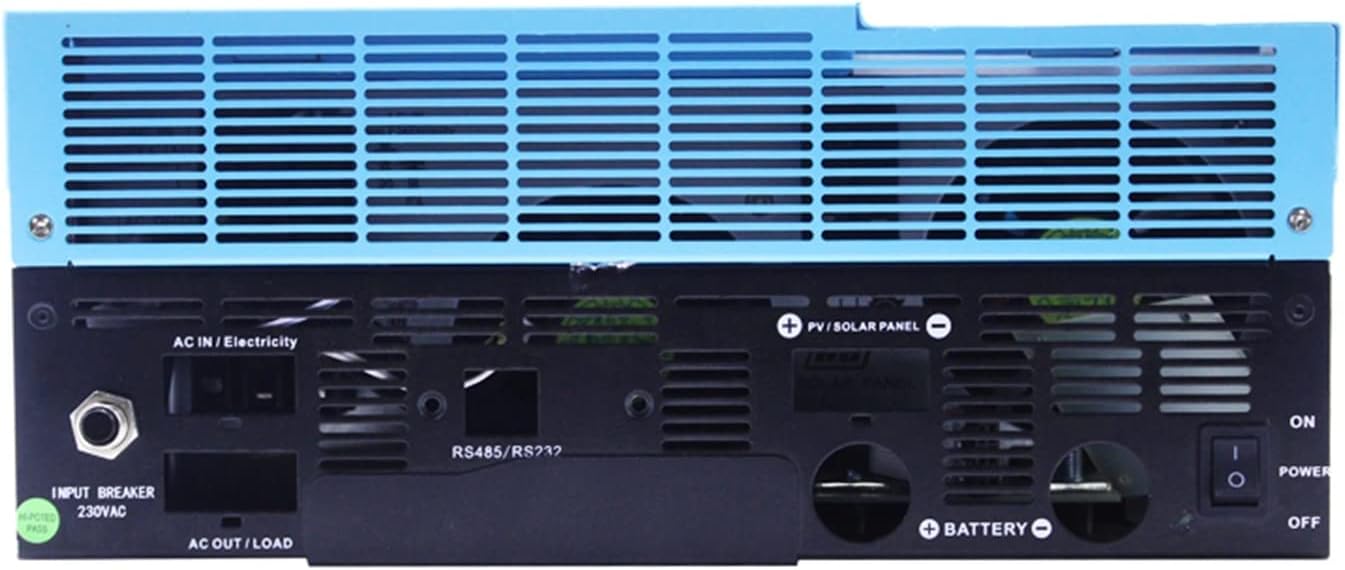
Figure 2: Rear Panel Connections of the HFFFXRCY SML-III-3.5KW-WiFi Hybrid Solar Inverter. This view shows the various input and output terminals, including AC input, AC output/load, PV/solar panel input, battery connections, RS485/RS232 communication ports, an input breaker, and the power switch.

Figure 3: Multiple Views of the HFFFXRCY SML-III-3.5KW-WiFi Hybrid Solar Inverter. This composite image provides a comprehensive look at the inverter from different angles, including the front panel with its display, a top-down perspective, and a detailed view of the rear connection panel.
4. Setup and Installation
4.1 System Connection Diagram
The inverter can be integrated into various solar power systems. Below is a typical connection diagram illustrating how the inverter connects to solar panels, batteries, the utility grid, a generator, and household appliances.

Figure 4: Hybrid Solar Inverter System Connection Diagram. This diagram illustrates the flow of power from solar panels, a generator, and the utility grid to the inverter, which then supplies power to home appliances and charges battery packs. It shows the inverter as the central control unit for power management.
4.2 PV Module Selection Guidelines
Proper selection of PV modules is crucial for optimal inverter performance and safety. Adhere to the following parameters:
- The Open Circuit Voltage (Voc) of PV modules must not exceed the maximum PV array open circuit voltage of the inverter.
- The Open Circuit Voltage (Voc) of PV modules should be higher than the minimum battery voltage.
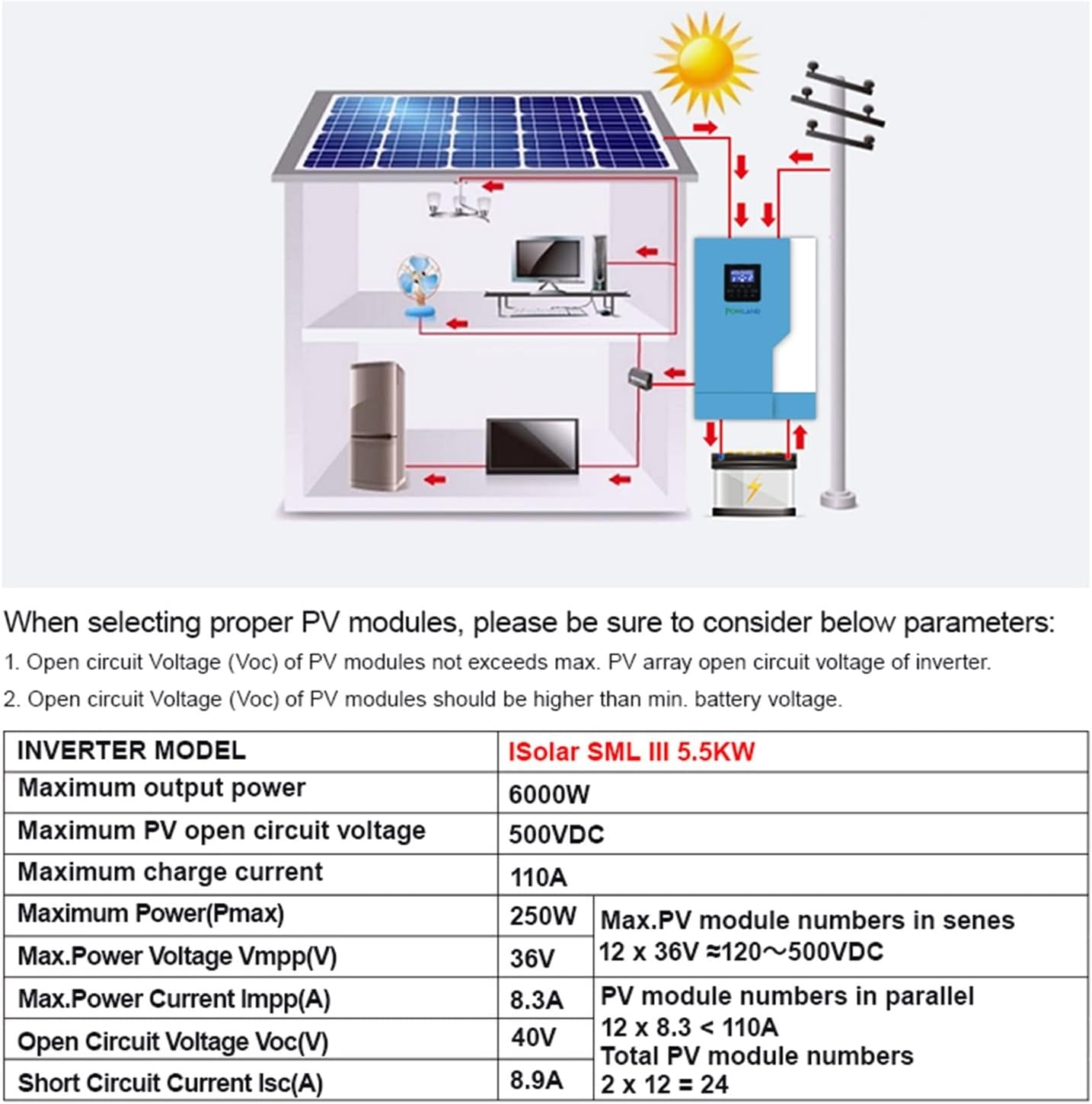
Figure 5: PV Module Selection Parameters and System Diagram. This image provides a visual representation of a solar power system integrated into a home, showing solar panels connected to the inverter, which then powers household appliances. Below the diagram, a table outlines critical parameters for selecting PV modules, including maximum output power, open circuit voltage, charge current, and recommended module numbers for series and parallel configurations.
Refer to the specifications table in Section 7 for detailed electrical parameters relevant to PV module selection.
5. Operation
5.1 Initial Power-Up
- Ensure all connections (PV, battery, AC input/output) are secure and correct.
- Switch on the battery breaker (if applicable).
- Switch on the PV array breaker (if applicable).
- Switch on the AC input breaker (if applicable).
- Turn on the inverter's power switch located on the rear panel.
- Observe the display for system status and any error codes.
5.2 Display and Settings
The inverter features a digital display for monitoring system parameters and configuring settings. Detailed instructions for navigating the menu and adjusting parameters are typically found in the full product manual. Common parameters include battery type, charging current, output voltage, and operating mode.
5.3 Wi-Fi Monitoring
The SML-III-3.5KW-WiFi model includes a Wi-Fi module for remote monitoring. Refer to the dedicated Wi-Fi module manual or the full product manual for instructions on connecting to your network and using the monitoring application.
6. Maintenance
- Regular Cleaning: Keep the inverter's ventilation openings clear of dust and debris to ensure proper airflow and prevent overheating. Use a soft, dry cloth for cleaning.
- Connection Checks: Periodically inspect all electrical connections for tightness and signs of corrosion. Tighten any loose connections.
- Environmental Conditions: Ensure the inverter is operating within its specified temperature and humidity ranges.
- Battery Inspection: If using batteries, regularly check their terminals for corrosion and ensure they are properly charged and maintained according to the battery manufacturer's guidelines.
7. Specifications
The following table outlines the key technical specifications for the HFFFXRCY SML-III-3.5KW-WiFi Hybrid Solar Inverter:
| Parameter | Value |
|---|---|
| Model | SML-III-3.5KW-WiFi |
| Rated Power | 3.5KW (3500W) |
| Battery Voltage | 24VDC |
| AC Output Voltage | 220V AC |
| PV Input Voltage Range | 120-500VDC |
| Maximum MPPT Charge Current | 100A |
| Waveform | Pure Sine Wave |
| PV to AC Efficiency | High (specific value not provided, but stated as "much higher") |
| Item Weight | 1.76 ounces (Note: This seems incorrect for an inverter, likely a packaging weight. Refer to product packaging for actual unit weight.) |
| Package Dimensions | 0.39 x 0.39 x 0.39 inches (Note: This seems incorrect for an inverter, likely a packaging dimension. Refer to product packaging for actual unit dimensions.) |
Note: The weight and package dimensions provided in the source data appear to be placeholder or incorrect values for a device of this type. Please refer to the product packaging or manufacturer's official documentation for accurate physical specifications.
8. Troubleshooting
This section provides general guidance for common issues. For detailed troubleshooting, consult the comprehensive product manual or contact customer support.
- No Power Output: Check all input power sources (PV, battery, AC grid) and ensure they are connected and active. Verify the inverter's power switch is ON. Check for blown fuses or tripped breakers.
- Inverter Not Charging Batteries: Ensure PV panels are receiving sufficient sunlight and are correctly connected. Verify battery connections and health. Check MPPT settings on the inverter.
- Error Codes on Display: Refer to the full product manual for a list of specific error codes and their corresponding solutions.
- Overheating: Ensure the inverter has adequate ventilation and is not installed in an enclosed space. Clean any dust from ventilation grilles.
9. Warranty and Support
For warranty information, technical support, or service inquiries, please contact HFFFXRCY customer service through your purchase channel or the official HFFFXRCY website. Keep your purchase receipt and product serial number handy when contacting support.
Ask a question about this manual
Ask about setup, troubleshooting, compatibility, parts, safety, or missing instructions. Manuals+ will review the question and use this page’s manual context to help answer it.