
022-80174-00
022 80174 00 OEM Oxygen Sensor Instruction Manual
Model: 022-80174-00
Introduction
This manual provides essential information for the proper handling, installation, and maintenance of the 022-80174-00 OEM Oxygen Sensor. This sensor is specifically designed as a replacement part for Mahle ArcticPro 1234yf AC Machines equipped with Neutronics Refrigerant Identifiers. Understanding the function and replacement procedure of this component is crucial for maintaining the optimal performance of your AC system.
Product Overview
The 022-80174-00 Oxygen Sensor is a critical component that enables your 1234yf AC machine or refrigerant identifier to accurately detect oxygen levels. This detection is vital for the proper recovery and addition of refrigerant to the internal tank. The sensor is an OEM replacement, ensuring compatibility and reliable performance with the specified equipment.
- OEM Replacement: Designed for ACX 1234yf machines with Neutronics refrigerant identifiers.
- Compatibility Note: This sensor is not compatible with IDX refrigerant identifiers.
- Origin: Made in America.
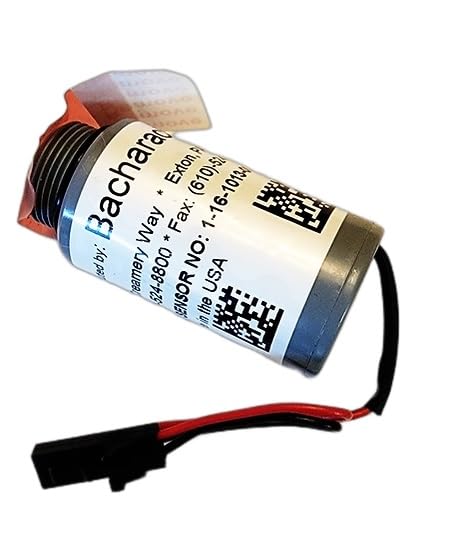
Figure 1: The 022-80174-00 Oxygen Sensor, showing the Bacharach branding and part number. This view highlights the sensor's cylindrical body and electrical connector.
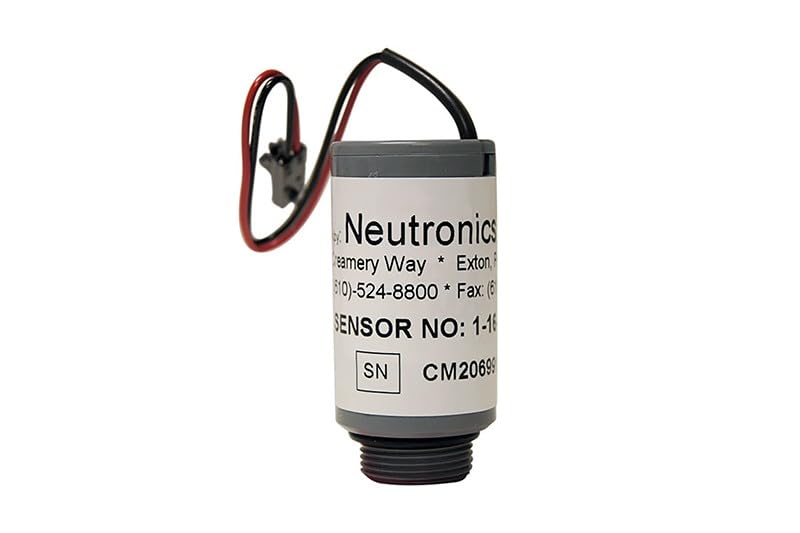
Figure 2: The 022-80174-00 Oxygen Sensor, displaying the Neutronics branding. This image provides another perspective of the sensor, emphasizing its compact design and wiring.
What's in the Box
Upon opening the product packaging, you will find the following item:
- One (1) Replacement Oxygen Sensor (Model: 022-80174-00)
Setup and Installation
This oxygen sensor is a replacement part. Installation should only be performed by qualified personnel familiar with the specific Mahle ArcticPro 1234yf AC machine or Neutronics Refrigerant Identifier. Always refer to the service manual of your specific equipment for detailed, step-by-step instructions.
- Safety First: Before beginning any work, ensure the AC machine or identifier is powered off and disconnected from all power sources. Allow any pressurized systems to depressurize safely according to manufacturer guidelines.
- Locate Old Sensor: Identify the existing oxygen sensor within your Mahle ArcticPro 1234yf AC machine or Neutronics Refrigerant Identifier. Its location will vary by model.
- Disconnect: Carefully disconnect the electrical connector and unscrew the old oxygen sensor from its housing. Be mindful of any residual refrigerant or oil.
- Install New Sensor: Gently screw the new 022-80174-00 Oxygen Sensor into place. Ensure it is securely fastened but do not overtighten.
- Reconnect: Reconnect the electrical connector to the new sensor, ensuring a firm and proper connection.
- System Check: After installation, follow your equipment's manufacturer guidelines for system restart and calibration. This may involve running diagnostic checks to confirm the new sensor is functioning correctly.
Important: Improper installation can lead to equipment malfunction or damage. If you are unsure about any step, consult a certified technician.
Operation
The 022-80174-00 Oxygen Sensor operates continuously within your Mahle ArcticPro 1234yf AC machine or Neutronics Refrigerant Identifier to monitor oxygen levels in the refrigerant. This monitoring is essential for the safe and efficient recovery and charging processes. The sensor's data allows the machine to prevent contamination and ensure the purity of the refrigerant.
Your 1234yf machine or identifier is designed to provide advance notice when the oxygen sensor is nearing the end of its operational lifespan. Pay attention to any alerts or error messages displayed by your equipment, as these indicate the need for sensor replacement.
Maintenance
The 022-80174-00 Oxygen Sensor is a consumable component with a finite lifespan. It does not require routine user maintenance beyond replacement when it reaches the end of its service life. The lifespan of the sensor is dependent on usage and environmental factors.
- Monitoring: Regularly check your AC machine or refrigerant identifier for any warnings or indicators related to the oxygen sensor.
- Replacement: When the machine indicates that the oxygen sensor is nearing or has reached the end of its lifespan, prompt replacement is required to ensure continued proper operation of the equipment.
Troubleshooting
The primary issue related to the oxygen sensor is its expiration, which directly impacts the functionality of your AC machine or identifier.
| Problem | Possible Cause | Solution |
|---|---|---|
| AC machine or identifier unable to recover or add refrigerant. | Expired or faulty oxygen sensor. | Replace the oxygen sensor with a new 022-80174-00 sensor. Ensure proper installation as per the Setup and Installation section. |
| Error messages related to oxygen sensor or gas detection. | Sensor nearing end-of-life or has failed. | Monitor machine alerts. If persistent, replace the oxygen sensor. |
If issues persist after replacing the sensor, consult the service manual for your specific AC machine or contact the equipment manufacturer for further assistance.
Specifications
| Attribute | Detail |
|---|---|
| Model Number | 022-80174-00 |
| Product Dimensions (L x W x H) | 2.6 x 1.89 x 1.1 inches |
| Item Weight | 1 Ounces |
| Manufacturer | Generic |
| Country of Origin | USA |
| Output Type | NPN |
| Specific Uses | Automotive, gas level monitoring |
| Interchangeable Part Numbers | Compatible with Mahle: 022-80174-00, 022 80174 00, 0228017400; Compatible with Robinair: 16916; Compatible with CPS: RIXOS; Compatible with Mastercool: 69HVAC-YFAS; Compatible with Neutronics / Bacharach: 1-16-1013-00-2 |
Support and Warranty
For technical support, questions regarding compatibility, or warranty information, please contact the seller or the manufacturer directly. Retain your proof of purchase for any warranty claims.
Manufacturer: Generic
Model: 022-80174-00
Ask a question about this manual
Ask about setup, troubleshooting, compatibility, parts, safety, or missing instructions. Manuals+ will review the question and use this page’s manual context to help answer it.