
XXGJOALD ayong66
Vacuum Cleaner Dock Charger Circuit Board User Manual
Model: ayong66 | Brand: XXGJOALD
Product Overview
This document provides essential information for the XXGJOALD CDZ11RR Dock Charger Circuit Board, a replacement power board designed for specific Roborock vacuum cleaner charging piles. This circuit board is a critical component responsible for power management and intelligent control within the charging dock.
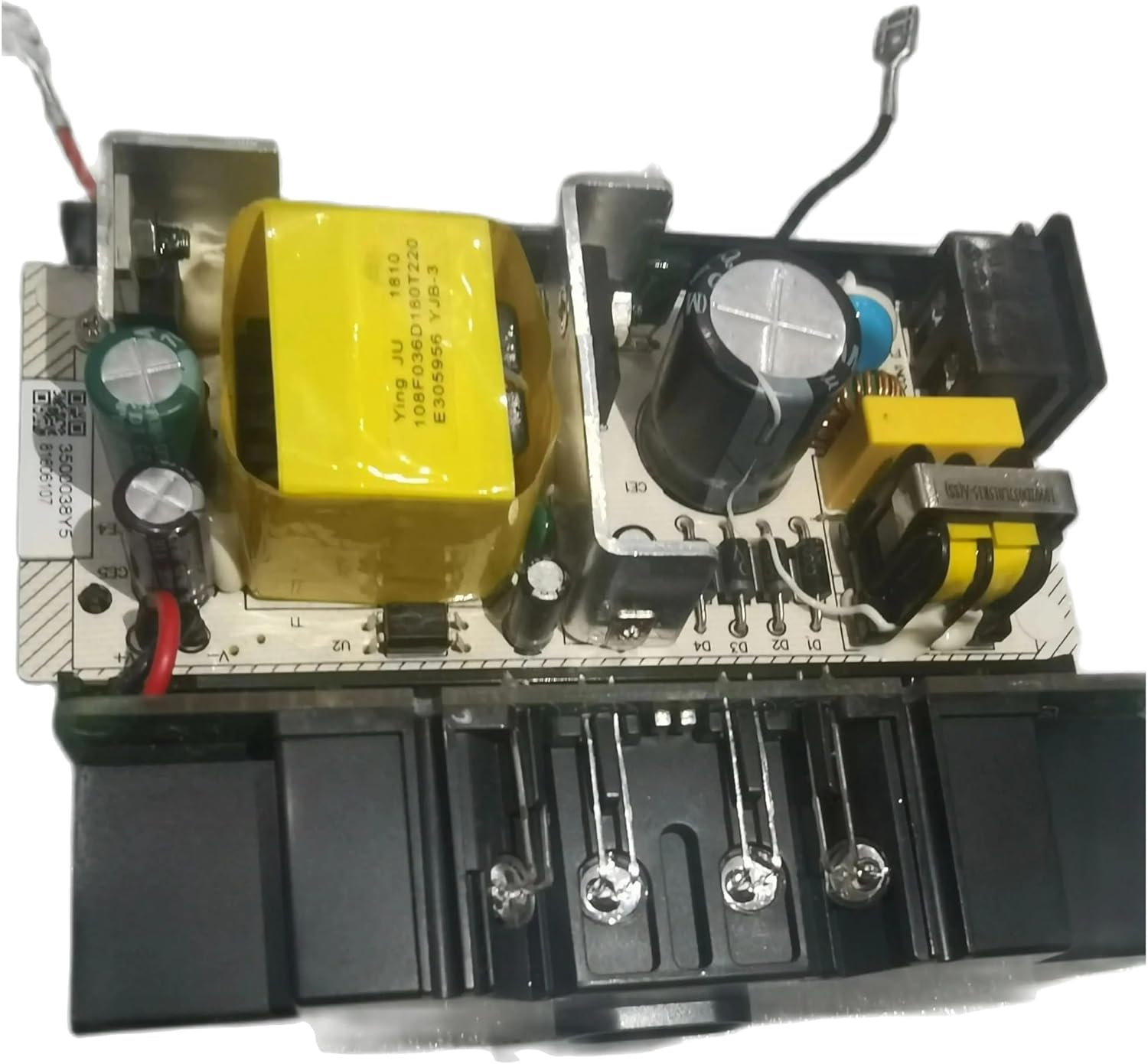
Image: Top-down view of the CDZ11RR Dock Charger Circuit Board, showing the main transformer and various electronic components.
Compatibility
The CDZ11RR Dock Charger Circuit Board is specifically designed to be compatible with the following Roborock vacuum cleaner models and their charging piles:
- Roborock S7 Maxv Ultra
- Roborock Q7 Max
- Roborock Q7

Image: The circuit board with an overlay indicating compatibility with S7 Maxv Ultra, Q7 Max, and Q7 models.
Key Features
- Intelligent Control: Provides precise control over start-stop functions, speed regulation, and intelligent sensing to adapt to various operational scenarios.
- Stable Power Supply: Ensures good power management and stable conversion voltage for consistent and reliable component operation.
- Safety Protection: Incorporates multiple protection mechanisms, including rapid power failure in case of abnormalities, to ensure the safety of all components.
- Condition Monitoring: Capable of real-time measurement of motor, power, and other parameters, providing timely feedback on the working status.
Package Contents
Upon opening the package, you should find the following item:
- 1x CDZ11RR Dock Charger Circuit Board
Installation Guide
This circuit board is a replacement part. Installation should be performed by individuals with appropriate technical knowledge. Always prioritize safety.
- Safety First: Before beginning any installation, ensure the Roborock charging dock is completely disconnected from the power outlet. Verify there is no residual power.
- Access the Dock: Carefully open the charging dock casing to expose the internal components. Refer to your specific Roborock model's service manual for precise instructions on disassembling the dock.
- Identify the Old Board: Locate the existing circuit board that needs replacement. Note the orientation and connection points of all wires and connectors. Taking photos before disconnection can be helpful.
- Disconnect Wires: Carefully disconnect all wires and ribbon cables from the old circuit board. Be gentle to avoid damaging the connectors or wires.
- Remove Old Board: Unscrew or unclip the old circuit board from its mounting points within the dock.
- Install New Board: Position the new CDZ11RR circuit board in the same orientation as the old one. Secure it using the original screws or clips.
- Reconnect Wires: Reconnect all wires and ribbon cables to the new circuit board, ensuring each connection matches the original configuration. Double-check all connections for proper seating.
- Reassemble Dock: Carefully close and reassemble the charging dock casing, ensuring all screws are tightened and the casing is securely closed.
- Test Functionality: Plug the charging dock back into a power outlet. Observe if the dock powers on correctly and if the vacuum cleaner can charge properly.

Image: An angled view of the circuit board, highlighting various connection points and components that need to be carefully handled during installation.

Image: Side view of the circuit board, showing the power input socket and various output connectors, crucial for correct wiring.

Image: Bottom view of the circuit board, illustrating the main wire connections for power and data, which must be correctly attached.
If you are unsure about any step, it is recommended to seek professional assistance to avoid damage to the product or injury.
Care and Maintenance
To ensure the longevity and optimal performance of your CDZ11RR Dock Charger Circuit Board, follow these general maintenance guidelines:
- Keep Dry: Electronic components are sensitive to moisture. Ensure the charging dock and its internal components remain dry at all times.
- Avoid Physical Damage: Protect the circuit board from impacts, drops, or excessive force that could damage its components or solder joints.
- Dust Prevention: Periodically clean the interior of the charging dock to prevent dust accumulation on the circuit board, which can lead to overheating or short circuits. Use compressed air or a soft brush.
- Proper Ventilation: Ensure the charging dock is placed in an area with adequate ventilation to prevent heat buildup, which can stress electronic components.
Troubleshooting
If you encounter issues after replacing the circuit board, consider the following:
- Dock Not Powering On:
- Check if the power cable is securely connected to both the wall outlet and the charging dock.
- Verify all internal connections to the new circuit board are firm and correctly oriented.
- Ensure the power outlet is functional by testing it with another device.
- Vacuum Not Charging:
- Confirm the vacuum cleaner is properly seated on the charging contacts of the dock.
- Inspect the charging contacts on both the dock and the vacuum for dirt or damage. Clean if necessary.
- Re-check all internal wiring connections to the circuit board, especially those related to power output.
- Unusual Noises or Smells:
- Immediately disconnect the charging dock from power.
- Do not attempt to use the dock. Contact customer support for assistance.
For persistent issues, refer to the Roborock vacuum cleaner's original manual or contact XXGJOALD customer support.
Specifications
| Attribute | Detail |
|---|---|
| Model Number | ayong66 |
| ASIN | B0F78V3ZXJ |
| Item Weight | 1.76 ounces |
| Package Dimensions | 0.39 x 0.39 x 0.39 inches |
| Manufacturer | ayong66 |
| Date First Available | May 2, 2025 |
Warranty and Support
For warranty information or technical support regarding your XXGJOALD CDZ11RR Dock Charger Circuit Board, please contact the manufacturer or your point of purchase. Ensure you have your product model number (ayong66) and ASIN (B0F78V3ZXJ) ready when contacting support.
For general inquiries or to find more products, visit the XXGJOALD brand page on Amazon or their official website if available.
Note: This product is a replacement part. Any warranty claims may be subject to the terms and conditions of the original product manufacturer or the seller of this replacement part.
no relevant documents
Ask a question about this manual
Ask about setup, troubleshooting, compatibility, parts, safety, or missing instructions. Manuals+ will review the question and use this page’s manual context to help answer it.