
B0F78PT5X3
Portable Dual 8-inch Bluetooth Speaker System User Manual
Model: B0F78PT5X3
Introduction
Thank you for purchasing the Portable Dual 8-inch Bluetooth Speaker System. This manual provides essential information for the safe and efficient operation of your speaker system. Please read this manual thoroughly before using the product and retain it for future reference.

Image: The Portable Dual 8-inch Bluetooth Speaker System, showcasing its main unit with integrated pull rod, two wireless microphones, and a remote control. The speaker features dual 8-inch drivers with colorful LED rings.
Important Safety Instructions
- Do not expose the speaker to rain or moisture.
- Do not block any ventilation openings.
- Do not install near any heat sources such as radiators, heat registers, stoves, or other apparatus (including amplifiers) that produce heat.
- Only use attachments/accessories specified by the manufacturer.
- Refer all servicing to qualified service personnel.
- Keep the speaker away from strong magnetic fields.
Setup Guide
Unpacking
Carefully remove all components from the packaging. Ensure all items listed below are present:
- Portable Dual 8-inch Bluetooth Speaker System
- Wireless Microphones (x2)
- Remote Control
- Power Adapter
- User Manual
Initial Charging
Before first use, fully charge the speaker's internal 12V/9Ah battery. Connect the power adapter to the speaker's charging port and plug it into a standard wall outlet. The charging indicator will show the charging status.
Positioning the Speaker
Place the speaker on a stable, flat surface. For optimal sound dispersion, position it in an open area, away from obstructions. The integrated pull rod and wheels allow for easy transport.

Image: A visual representation highlighting key structural and component advantages of the speaker, such as its durable plastic shell, protective iron mesh covers for the speakers, the 12V/9Ah battery, and the four 8-inch speaker drive units.
Operating Instructions
Powering On/Off
Locate the power button on the control panel. Press and hold to turn the speaker ON or OFF.
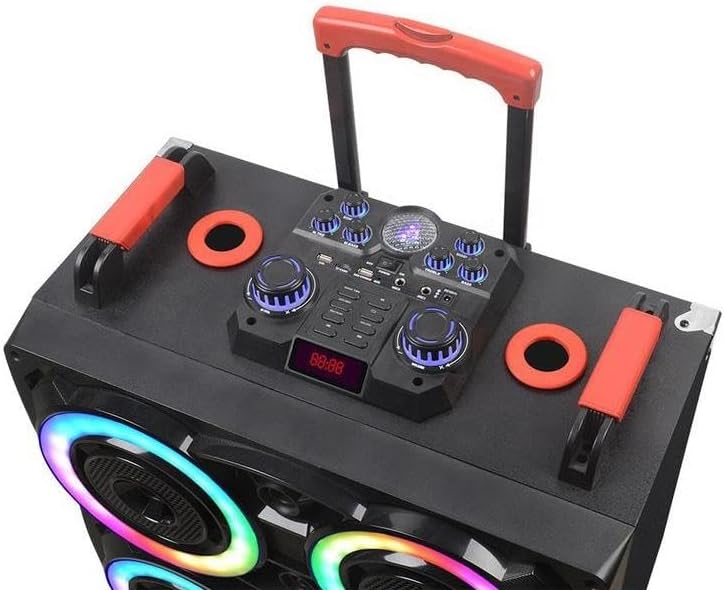
Image: A detailed view of the speaker's top control panel, showing the various input ports, volume knobs, mode selection buttons, and the digital display for controlling audio playback and settings.
Bluetooth Connectivity
- Turn on the speaker. It will automatically enter Bluetooth pairing mode.
- On your device (smartphone, tablet, etc.), enable Bluetooth and search for available devices.
- Select "Portable Speaker" (or similar name) from the list.
- Once connected, you will hear a confirmation sound. The Bluetooth range is approximately 10 meters.
Using Wireless Microphones
The speaker system includes two wireless microphones. Turn on the microphones, and they will automatically connect to the speaker. Adjust microphone volume using the dedicated knob on the control panel.
Remote Control Operation
The included remote control allows for convenient adjustments of volume, track selection, mode switching, and light effects from a distance.
Light Effects
The speaker is equipped with seven-color RGB lights. Use the control panel or remote to cycle through different lighting modes or turn them off.

Image: The speaker highlighting its capabilities for "KARAOKE CINEMA" with features like "Heavy Bass" and "Colorful Lamp" effects, indicating its suitability for entertainment purposes.
Maintenance and Care
- Cleaning: Use a soft, dry cloth to clean the speaker's exterior. Do not use abrasive cleaners or solvents.
- Storage: When not in use for extended periods, store the speaker in a cool, dry place, away from direct sunlight and extreme temperatures.
- Battery Care: To prolong battery life, avoid fully discharging the battery frequently. Recharge the speaker regularly, even if not in use.
Troubleshooting
| Problem | Possible Cause | Solution |
|---|---|---|
| No power | Battery is depleted. | Connect the speaker to a power source and charge the battery. |
| No sound | Volume is too low; incorrect input mode; device not connected. | Increase volume; select correct input mode (e.g., Bluetooth); ensure device is paired. |
| Bluetooth disconnection | Device is out of range; interference. | Move device closer to the speaker (within 10m); avoid obstacles. |
| Microphone not working | Microphone is off; battery low in microphone. | Ensure microphone is turned on; replace microphone batteries if applicable. |
Specifications
| Feature | Detail |
|---|---|
| Brand | Generic |
| Model | B0F78PT5X3 |
| Speaker Size | Dual 8-inch (x4 speakers total) |
| Power Output | 80W |
| Connectivity | Bluetooth 5.0 |
| Bluetooth Range | <10 meters |
| Battery | 12V/9Ah |
| Lighting | Seven-color RGB lights |
| Dimensions (L x W x H) | 22.83 x 25.98 x 13.77 inches |
| Material | Plastic |
| Color | Black |
| Country of Origin | China |

Image: A diagram illustrating the speaker's physical dimensions and key technical specifications such as power output, speaker unit size, battery capacity, and various functions like USB, TWS, Bluetooth, FM, TF card, and remote control.
Warranty and Support
For warranty information and technical support, please contact the manufacturer or the retailer from whom you purchased this product. Please retain your proof of purchase for any warranty claims.
Manufacturer: Sellvia
no relevant documents
Ask a question about this manual
Ask about setup, troubleshooting, compatibility, parts, safety, or missing instructions. Manuals+ will review the question and use this page’s manual context to help answer it.