
Mr. Shrinkwrap MSW-AIE-300C
Mr. Shrinkwrap AIE-300C Impulse Heat Sealer User Manual
Model: MSW-AIE-300C
1. Introduction
Thank you for choosing the Mr. Shrinkwrap AIE-300C Impulse Heat Sealer. This manual provides essential information for the safe and efficient operation, maintenance, and troubleshooting of your new heat sealer. Designed for versatility, this sealer creates impeccable air and watertight seals on plastic materials up to 12 mil thick, making it ideal for diverse packaging needs.
Please read this manual thoroughly before operating the device and keep it for future reference.
2. Safety Instructions
- Always ensure the power cord is fully inserted into a grounded electrical outlet.
- Do not operate the sealer with wet hands or in damp environments.
- Keep hands and fingers clear of the sealing bar during operation, as it generates heat.
- Unplug the unit from the power source when not in use or before cleaning and maintenance.
- Do not attempt to modify or repair the sealer yourself. Contact qualified personnel for service.
- Keep the sealer away from flammable materials.
- This appliance is not intended for use by persons (including children) with reduced physical, sensory or mental capabilities, or lack of experience and knowledge, unless they have been given supervision or instruction concerning use of the appliance by a person responsible for their safety.
3. Package Contents
Upon opening the package, please verify that all components are present and undamaged. Typical contents include:
- Mr. Shrinkwrap AIE-300C Impulse Heat Sealer with Cutter
- Power Cord
- Instruction Manual (this document)
- Spare heating element and PTFE strip (may vary by package)
If any items are missing or damaged, please contact Mr. Shrinkwrap customer support immediately.
4. Setup
- Unpacking: Carefully remove the heat sealer from its packaging. Retain packaging for future storage or transport.
- Placement: Place the sealer on a stable, flat, and heat-resistant surface. Ensure there is adequate ventilation around the unit.
- Power Connection: Plug the power cord into the power inlet on the back of the sealer, then plug the other end into a standard grounded electrical outlet (110-120V AC).
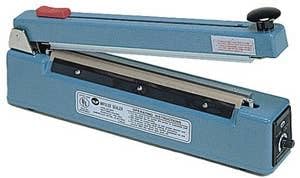
Figure 1: The Mr. Shrinkwrap AIE-300C Impulse Heat Sealer. This image shows the blue-colored sealing unit with the upper arm raised, revealing the sealing bar and the integrated cutter mechanism. The heat adjustment knob is visible on the right side.
5. Operating Instructions
- Adjusting Heat Setting: Locate the heat adjustment knob on the side of the sealer. Turn the knob to select the appropriate heat setting for your material thickness. Start with a lower setting for thinner materials (e.g., 2-4 mil) and gradually increase for thicker materials (up to 12 mil). A test seal on a scrap piece of material is recommended to find the optimal setting.
- Positioning Material: Place the material to be sealed flat across the sealing bar. Ensure the area to be sealed is smooth and free of wrinkles.
- Sealing: Press down firmly on the upper arm of the sealer. The red indicator light will illuminate, indicating the heating element is active. Hold the arm down until the light extinguishes (typically 1-3 seconds, depending on the heat setting). Continue to hold the arm down for an additional 1-2 seconds after the light goes out to allow the seal to cool and set properly.
- Using the Cutter: If your model includes a cutter, after making a seal, slide the cutter blade across the sealed material to trim off excess film. Ensure the material is taut for a clean cut.
- Removing Sealed Material: Release the upper arm and carefully remove the sealed material. Inspect the seal for consistency and strength.
Important: This is an impulse sealer. It only heats when the arm is pressed down. Continuous pressing or excessively high heat settings can damage the heating element or the material being sealed.
6. Maintenance
- Cleaning: Disconnect the power cord before cleaning. Use a soft, dry cloth to wipe down the exterior of the sealer. Do not use abrasive cleaners or solvents. Ensure the sealing bar and PTFE strip are clean and free of debris.
- Replacing Heating Element and PTFE Strip: Over time, the heating element wire and the protective PTFE (Teflon) strip will wear out.
- Unplug the sealer.
- Carefully remove the old PTFE strip and heating element.
- Install the new heating element, ensuring it is properly seated in the terminals.
- Apply the new PTFE strip smoothly over the heating element, ensuring no wrinkles or air bubbles.
- Cutter Blade Replacement: If the cutter becomes dull, it can be replaced. Refer to the specific instructions provided with your replacement blade kit or contact customer support.
7. Troubleshooting
| Problem | Possible Cause | Solution |
|---|---|---|
| No power / Indicator light not on | Not plugged in; Power outlet issue; Internal fuse blown | Check power cord connection; Test outlet with another device; Contact support for fuse replacement. |
| Poor seal / Material not sealing | Heat setting too low; Insufficient pressure; Worn heating element/PTFE strip; Material too thick | Increase heat setting; Apply more firm pressure; Replace heating element/PTFE strip; Ensure material is within 12 mil thickness. |
| Material melts / Burns through | Heat setting too high; Holding arm down too long | Decrease heat setting; Reduce holding time after indicator light extinguishes. |
| Uneven seal | Material not flat; Worn heating element/PTFE strip; Debris on sealing bar | Ensure material is flat; Replace heating element/PTFE strip; Clean sealing bar. |
If you encounter issues not listed here or if the suggested solutions do not resolve the problem, please contact Mr. Shrinkwrap customer support.
8. Specifications
- Model: MSW-AIE-300C
- Sealing Length: 12 inches (300mm)
- Sealing Width: 2mm
- Max Material Thickness: Up to 12 mil (0.3mm)
- Product Dimensions: 20 x 10 x 6 inches
- Item Weight: 12 Pounds
- Manufacturer: Mr. Shrinkwrap
9. Warranty and Support
Each Mr. Shrinkwrap AIE-300C Impulse Heat Sealer undergoes rigorous testing at our West Coast facility and includes a reliable warranty, ensuring unparalleled performance. For specific warranty terms and conditions, please refer to the documentation included with your purchase or contact Mr. Shrinkwrap directly.
For orders, inquiries, technical support, or assistance with your product, please contact our dedicated team:
- Phone: 800-847-5290
- Seller: Mr. Shrinkwrap (via Amazon.com)
Our experienced technicians are available to provide dedicated support.