Introduction
This manual provides essential information for the proper setup, operation, maintenance, and troubleshooting of your Samsung Galaxy XCover7 Pro. Please read this manual thoroughly before using your device to ensure optimal performance and longevity.

Figure 1: Front and back view of the Samsung Galaxy XCover7 Pro smartphone.
Setup
1. Package Contents
Verify that your package contains the following items:
- Samsung Galaxy XCover7 Pro device
- SIM Tray Ejector
- USB Cable
- Lithium Ion Battery (pre-installed or separate)
2. Battery Installation (if separate)
The Galaxy XCover7 Pro features a replaceable battery. If your battery is not pre-installed:
- Carefully remove the back cover of the device.
- Align the battery with the contacts inside the battery compartment.
- Gently press the battery into place until it is securely seated.
- Reattach the back cover, ensuring it clicks into place.
3. SIM and eSIM Setup
The device supports Dual SIM functionality (1 Nano SIM + 1 eSIM).
Nano SIM Card Installation:
- Locate the SIM card tray on the side of the device.
- Insert the SIM tray ejector tool into the small hole next to the tray and push gently until the tray pops out.
- Place your Nano SIM card onto the tray with the gold contacts facing down.
- Carefully reinsert the tray into the device.
eSIM Activation:
eSIM activation typically involves scanning a QR code provided by your carrier or entering activation details manually through the device settings. Refer to your mobile carrier for specific eSIM activation instructions.
4. Initial Power On and Configuration
- Press and hold the Power button (located on the side) until the Samsung logo appears.
- Follow the on-screen prompts to complete the initial setup, including language selection, Wi-Fi connection, Google account setup, and security settings (fingerprint, PIN, pattern).
Operating Instructions
1. Basic Device Functions
- Power On/Off: Press and hold the Power button. Select "Power off" or "Restart".
- Volume Control: Use the Volume Up and Volume Down buttons on the side of the device.
- Touchscreen Navigation: Swipe, tap, pinch-to-zoom, and long-press to interact with the display. The touchscreen is designed to be sensitive enough for use with gloves or when wet.

Figure 2: The sensitive touchscreen allows operation even with gloves or when wet.
2. Rugged Features
The Galaxy XCover7 Pro is built for demanding environments:
- Durability: MIL-STD-810H tested for resistance against drops and environmental conditions.
- Water and Dust Resistance: IP68 rated, protecting against dust, dirt, sand, and immersion in up to 5 feet of water for up to 30 minutes.
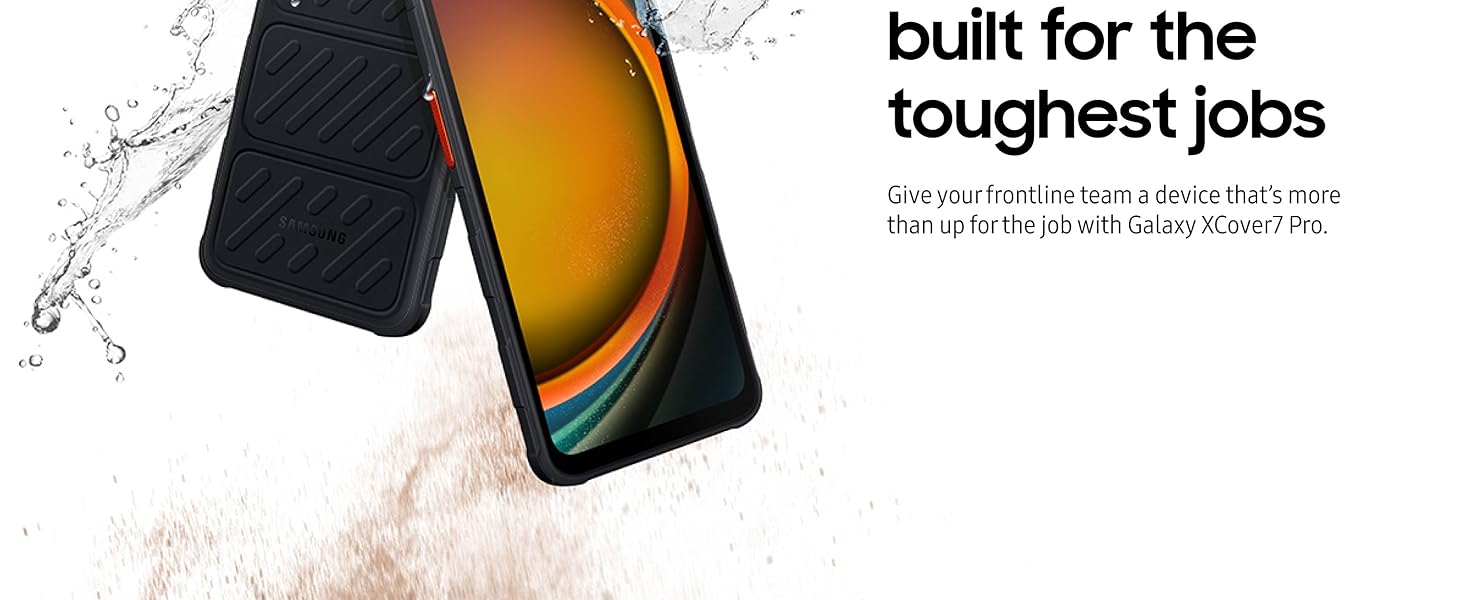
Figure 3: The device is designed to withstand exposure to water and sand.
3. Connectivity
- 5G and Wi-Fi 6E: Enjoy high-speed wireless data networks for efficient communication and data transfer.
- Bluetooth & NFC: For connecting accessories and contactless payments.

Figure 4: The device supports 5G connectivity for faster data speeds.
4. Battery Management
The 4350 mAh battery provides extended usage. Its replaceable design allows for quick swaps to maintain productivity.

Figure 5: The 4350mAh battery ensures long operational hours.
5. Customizable Hot Keys
Utilize the programmable hot keys to quickly access frequently used functions or applications, such as push-to-talk or scanner features.

Figure 6: Hot keys can be configured for functions like push-to-talk.
6. Samsung DeX
Connect your Galaxy XCover7 Pro to an external display (like a PC monitor) to experience a desktop-like environment, enhancing productivity for tasks requiring a larger screen.

Figure 7: Samsung DeX allows for a desktop experience by connecting to an external screen.
7. Circle to Search with Google
Quickly search for information by circling an object on your screen. This feature leverages Google's search capabilities for instant results.

Figure 8: Use Circle to Search with Google for quick information retrieval.
Maintenance
1. Cleaning Your Device
To maintain the device's IP68 rating and overall condition:
- After exposure to water, rinse the device with clean fresh water and dry thoroughly with a clean, soft cloth.
- For general cleaning, wipe the screen and body with a soft, lint-free cloth. Avoid abrasive materials or harsh chemicals.
2. Battery Care
- To maximize battery lifespan, avoid extreme temperatures.
- If using multiple batteries, ensure they are stored in a cool, dry place.
- Use only Samsung-approved chargers and batteries.
3. Software Updates
Your Galaxy XCover7 Pro is designed to receive 7 OS upgrades and 7 years of security updates. Regularly check for and install software updates to ensure optimal performance, security, and access to new features.
- Go to Settings.
- Tap Software update.
- Tap Download and install.
Troubleshooting
If you encounter issues with your device, try the following solutions:
- Device not powering on: Ensure the battery is properly installed and charged. Connect the device to a charger for at least 10 minutes before attempting to power on again.
- Connectivity issues (Wi-Fi/5G):
- Toggle Wi-Fi or Mobile Data off and on.
- Restart your device.
- Check router or network settings.
- Touchscreen unresponsive: Restart the device. Ensure the screen is clean and dry.
- Applications crashing: Clear the app's cache or data in Settings > Apps. If the issue persists, uninstall and reinstall the app.
- Slow performance: Close unused applications, clear cache, or restart the device. Consider freeing up storage space.
For more complex issues, refer to the Samsung support website or contact customer service.
Specifications
| Feature | Detail |
|---|---|
| Model Name | XCover7 Pro |
| Item Model Number | SM-G766UZKFN14 |
| Product Dimensions | 6.64 x 3.15 x 0.4 inches |
| Item Weight | 2.62 ounces (74.2 Grams) |
| Operating System | Android 15, OneUI 7.0 |
| CPU Speed | 2.4 GHz |
| Screen Size | 6.6 Inches |
| Resolution | 1080 x 2408 (FHD+) |
| Refresh Rate | 120 Hz |
| RAM Memory Installed Size | 6 GB |
| Memory Storage Capacity | 128 GB (expandable up to 2 TB via MicroSD) |
| Battery Capacity | 4350 Milliamp Hours (Replaceable) |
| Phone Talk Time | 7 Hours |
| Connectivity Technologies | Bluetooth, NFC, USB, Wireless (5G, Wi-Fi 6E) |
| Special Features | Dual SIM, Fingerprint Sensor, Push-to-Talk, Rugged Body, Water Resistant (IP68), MIL-STD-810H |
| Color | Black |
| What's in the box | SIM Tray Ejector, USB Cable |
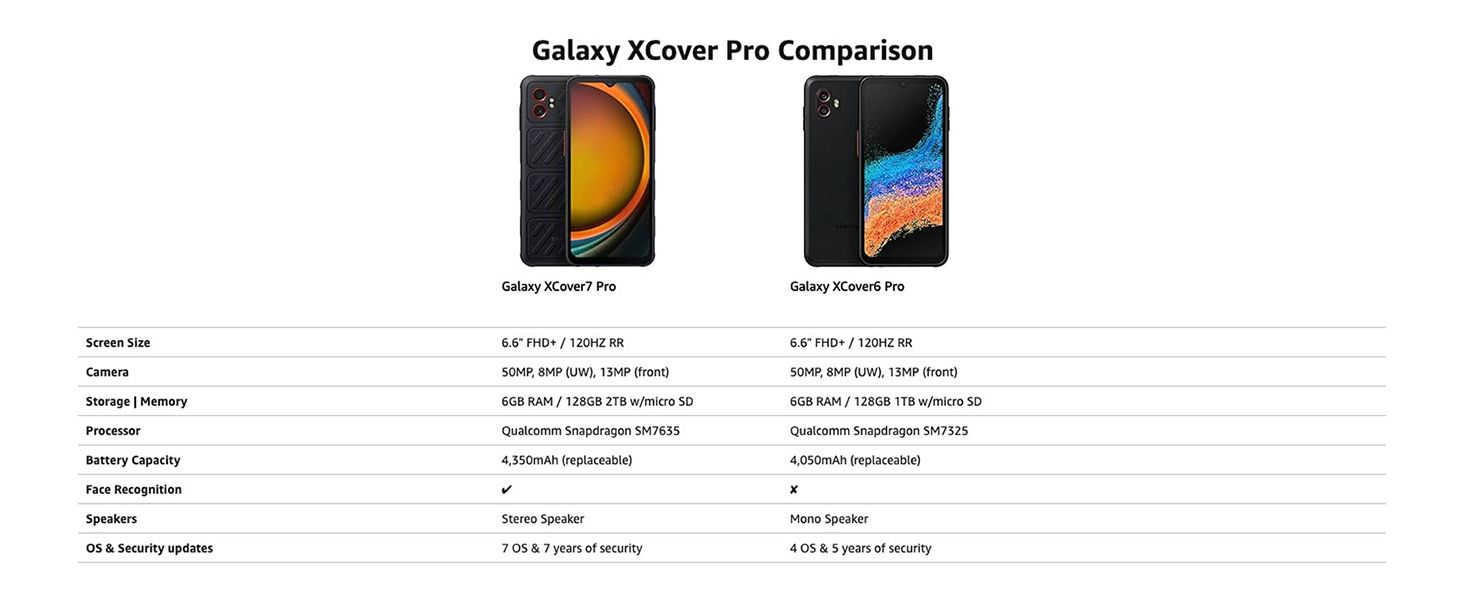
Figure 9: A comparison of key specifications between the Galaxy XCover7 Pro and XCover6 Pro.
Warranty Information
Samsung provides a limited warranty for its products. For detailed information regarding the warranty period, coverage, and terms and conditions for your Samsung Galaxy XCover7 Pro, please refer to the warranty card included with your product or visit the official Samsung website. The device is supported with 7 OS upgrades and 7 years of security updates from its release date.
Customer Support
For further assistance, technical support, or service inquiries, please contact Samsung Customer Service or visit the official Samsung support website:
- Samsung Support Website: www.samsung.com/us/support/
- Refer to your product packaging for regional contact numbers.


