
1. Important Safety Instructions
Please read this manual carefully before operating the dehumidifier and retain it for future reference. Failure to follow these instructions may result in electric shock, fire, or serious injury.
- Always connect the unit to a grounded power outlet with the correct voltage.
- Do not operate the dehumidifier if the power cord or plug is damaged.
- Ensure the unit is placed on a stable, level surface to prevent tipping.
- Maintain at least 20 cm (8 inches) clearance around the unit for proper airflow.
- Do not insert objects into the air inlet or outlet.
- Unplug the unit before cleaning or performing any maintenance.
- Do not use the unit in areas where flammable gases or liquids are stored.
- This appliance is not intended for use by persons (including children) with reduced physical, sensory or mental capabilities, or lack of experience and knowledge, unless they have been given supervision or instruction concerning use of the appliance by a person responsible for their safety.
- If the unit has been transported horizontally, allow it to stand upright for at least 6 hours before plugging it in.
2. Product Overview
The Kresico KD121-200801 is an efficient electric dehumidifier designed to reduce humidity levels in your home, basement, bedroom, or bathroom. It features a powerful compressor for effective moisture removal and quiet operation.
Key Features:
- Reliable Dehumidification: Equipped with an advanced Kresico*TCL compressor, offering 20% higher efficiency than traditional compressors. It has a dehumidification capacity of 12 L/24h, suitable for rooms up to 25 m² or 122 m³.
- Quiet Operation: Operates at a low noise level of 35 dB, ensuring a peaceful environment. The innovative centrifugal air duct system and DC motor contribute to stable and quiet performance.
- Energy-Saving 'One-Time' Mode: This mode automatically shuts off the unit when the desired humidity is reached, preventing frequent on/off cycles and reducing energy consumption. Additional AUTO and CONTINUOUS modes are available.
- Flexible Drainage: Features a 1.5L removable water tank with a visual water level indicator and overflow protection. The unit automatically stops when the tank is full. A 1m drain hose is included for continuous drainage.
- Portable Design: Includes a retractable handle and 360-degree swivel wheels for easy movement between rooms.
Product Components:

Figure 2.1: Kresico 12L/Day Electric Dehumidifier, front view. The dehumidifier features a sleek, compact design suitable for various room settings.

Figure 2.2: Detailed view of the dehumidifier's dimensions (19.5 x 28 x 38.6 cm), highlighting its portable design with a retractable handle and smooth-rolling wheels.
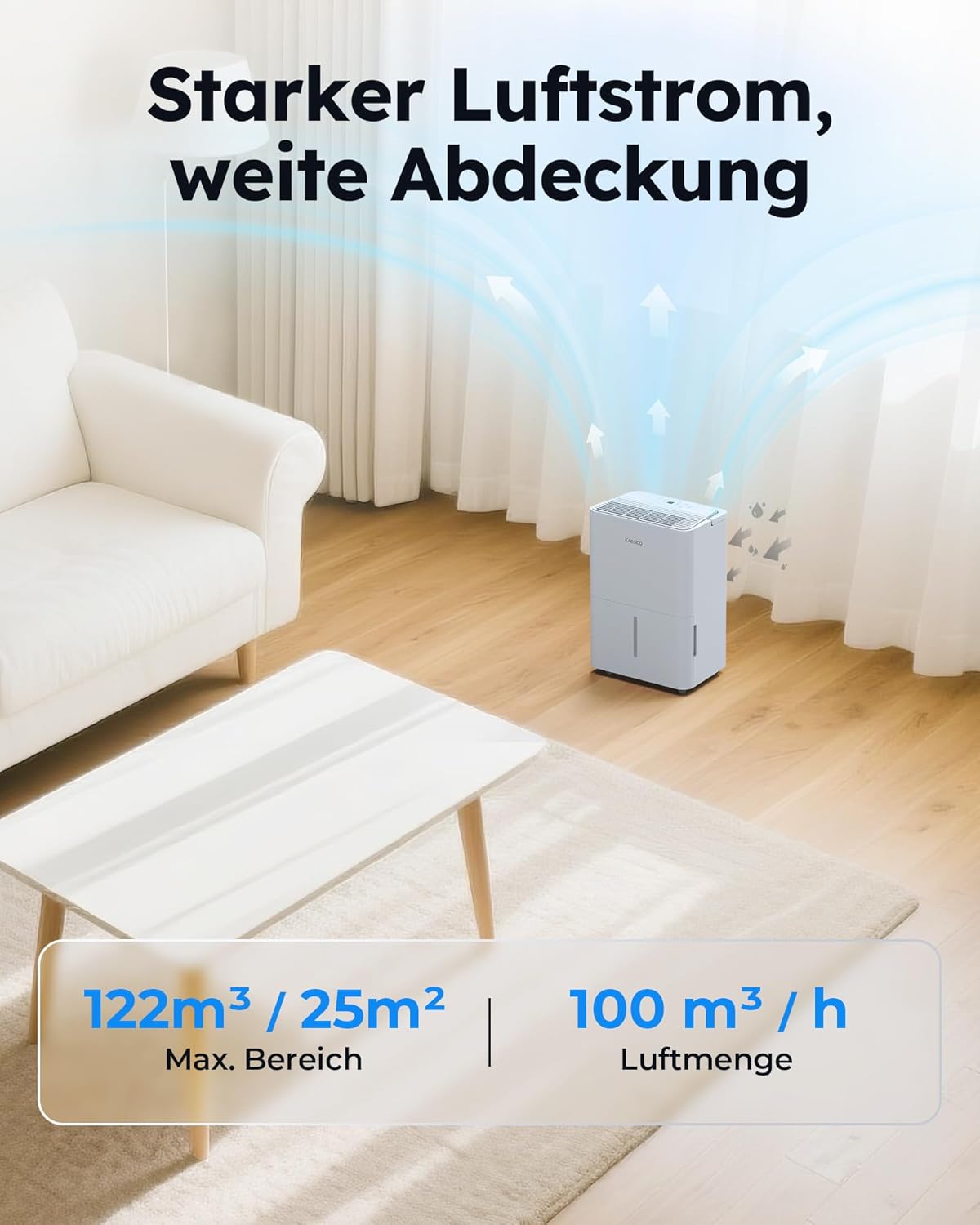
Figure 2.3: The dehumidifier effectively circulates air to cover areas up to 25m² or 122m³, ensuring efficient moisture removal.
3. Setup
3.1 Unpacking and Placement
- Carefully remove the dehumidifier from its packaging. Retain the packaging for future storage or transport.
- Place the unit upright on a firm, level surface. If the unit was laid on its side during transport, allow it to stand upright for at least 6 hours before plugging it in.
- Ensure there is at least 20 cm (8 inches) of space around the unit to allow for proper air circulation. Do not block the air inlet or outlet.
3.2 Power Connection
Plug the power cord into a grounded electrical outlet. Ensure the voltage matches the specifications of the unit.
3.3 Drainage Options
Your Kresico dehumidifier offers two drainage methods:

Figure 3.1: The dehumidifier offers flexible drainage options: a removable 1.5L water tank with overflow protection or continuous drainage via a 1m hose.
3.3.1 Manual Drainage (Water Tank)
- The unit will collect condensed water in the internal 1.5L water tank.
- When the tank is full, the 'Tank Full' indicator will illuminate, and the unit will automatically stop operating.
- Carefully remove the water tank, empty it, and reinsert it firmly into the unit. The dehumidifier will resume operation.
3.3.2 Continuous Drainage
- Locate the continuous drainage outlet on the back or side of the unit.
- Connect the provided 1m drain hose to the outlet. Ensure the connection is secure to prevent leaks.
- Route the other end of the hose to a suitable drain (e.g., floor drain, large bucket). Ensure the hose is sloped downwards to allow water to flow out by gravity. Do not allow the hose to be kinked or blocked.
- With continuous drainage enabled, the water tank will not fill, and the unit will operate continuously without needing to be emptied manually.
4. Operating Instructions
4.1 Control Panel Overview

Figure 4.1: The intuitive control panel allows for easy operation with a digital display showing current humidity and various mode selections.
- POWER Button: Turns the unit On or Off.
- MODE Button: Cycles through available operating modes (AUTO, CONTINUOUS, One-Time).
- Humidity Setting Buttons (Up/Down Arrows): Adjusts the desired humidity level.
- TIMER Button: Sets the auto-on or auto-off timer.
- Display: Shows current humidity level, timer settings, and error codes.
- Indicators: Lights for 'Tank Full', 'Cont.' (Continuous), 'Auto', 'One-Time', 'Comfort'.
4.2 Power On/Off
Press the POWER button to turn the dehumidifier on or off.
4.3 Mode Selection
Press the MODE button to cycle through the following modes:
- AUTO Mode: The unit automatically adjusts its operation based on the ambient humidity to maintain a comfortable level.
- CONTINUOUS Mode: The unit runs continuously regardless of the humidity level. Ideal for very damp conditions or laundry drying.
- One-Time Mode: An energy-saving mode where the unit operates until the set humidity is reached, then powers off to prevent frequent cycling.

Figure 4.2: The 'One-Time Mode' feature helps reduce energy consumption by preventing frequent on/off cycles once the desired humidity is reached.
4.4 Setting Desired Humidity
In AUTO or One-Time mode, use the Up/Down Arrow buttons to set your desired humidity level (e.g., 40% - 60% is generally recommended for comfort).
4.5 Timer Function
Press the TIMER button to set an auto-on or auto-off timer. Use the Up/Down Arrow buttons to adjust the desired time in hours.
4.6 Quiet Operation
The Kresico dehumidifier is designed for quiet operation, producing only 35 dB of noise, which is quieter than a normal conversation.

Figure 4.3: This image illustrates the low noise level of the dehumidifier, comparable to a whisper, ensuring a comfortable environment.
5. Maintenance
Regular maintenance ensures optimal performance and extends the lifespan of your dehumidifier.
5.1 Cleaning the Air Filter
The air filter should be cleaned every two weeks or more frequently depending on usage and air quality.
- Turn off the dehumidifier and unplug it from the power outlet.
- Locate the air filter (usually at the back or side of the unit).
- Remove the filter.
- Clean the filter with a vacuum cleaner or wash it with warm, soapy water. Rinse thoroughly and allow it to air dry completely before reinserting.
- Reinstall the dry filter and plug the unit back in.
5.2 Cleaning the Water Tank
Clean the water tank regularly to prevent mold and mildew growth.
- Turn off and unplug the unit.
- Remove the water tank.
- Wash the tank with warm water and a mild detergent. Rinse thoroughly.
- Dry the tank completely before placing it back into the dehumidifier.
5.3 Storage
If storing the dehumidifier for an extended period:
- Empty and clean the water tank.
- Clean the air filter.
- Unplug the unit and coil the power cord neatly.
- Cover the unit to protect it from dust.
- Store the unit in an upright position in a cool, dry place.
6. Troubleshooting
Before contacting customer support, please refer to the following troubleshooting guide for common issues.
| Problem | Possible Cause | Solution |
|---|---|---|
| Dehumidifier does not turn on. | No power supply. Water tank is full or not properly inserted. | Check power cord and outlet. Empty and reinsert the water tank correctly. |
| No water collected. | Ambient humidity is too low. Temperature is too low. Air filter is clogged. Unit is in continuous drainage mode. | Increase desired humidity setting. Ensure room temperature is above 5°C (41°F). Clean the air filter. Check if continuous drainage hose is properly connected or if manual drainage is desired. |
| Unit is noisy. | Unit is not on a level surface. Air filter is clogged. Obstruction in fan. | Place unit on a flat, stable surface. Clean the air filter. Turn off and unplug, then check for obstructions. |
| Poor dehumidification performance. | Room size too large. Doors/windows open. Air filter clogged. Temperature too low. | Ensure unit is suitable for room size. Close all doors and windows. Clean the air filter. Ensure room temperature is adequate. |
7. Specifications
| Feature | Specification |
|---|---|
| Brand | Kresico |
| Model Number | KD121-200801 |
| Color | White |
| Product Dimensions (L x W x H) | 19.5 x 28 x 38.6 cm |
| Weight | 9.7 Kilograms |
| Dehumidification Capacity | 12 L/day |
| Power | 235 Watts |
| Water Tank Capacity | 1.5 L |
| Automatic Shut-off Function | Yes (when tank is full) |
| Special Feature | Innovative and energy-efficient operation |
| Recommended Floor Area | Up to 25 m² |
| Operating Mode | Intermittent (also AUTO, CONTINUOUS, One-Time) |
8. Warranty and Support
Kresico stands behind the quality of its products. This dehumidifier comes with:
- 10-Year Warranty: For the compressor.
- 1-Year Exchange: Instead of repair, for qualifying issues within the first year.
- Lifetime Spare Parts Service: Ensuring long-term usability and support.
For technical assistance, warranty claims, or spare parts inquiries, please contact Kresico customer support through the retailer where the product was purchased or visit the official Kresico website for contact information.


