
1. Introduction
This manual provides instructions for the installation, operation, and maintenance of the McAuley Labels GoDEX RT730i+ 4-inch Thermal Label Printer. The RT730i+ is a versatile desktop barcode printer designed for various labeling tasks, offering 300 DPI resolution, a color display, and multiple connectivity options including USB and Ethernet.

Image 1.1: McAuley Labels GoDEX RT730i+ Thermal Label Printer. This image displays the compact design of the printer, highlighting its label output slot and integrated color display.
The printer supports both direct thermal and thermal transfer printing methods, ensuring compatibility with a wide range of label materials and applications. Its robust construction is suitable for retail, healthcare, office, and industrial environments.
2. Safety Information
Please read all safety instructions before operating the printer to prevent damage and ensure safe use.
- Always connect the printer to a grounded power outlet.
- Do not expose the printer to water or excessive humidity.
- Keep the printer away from heat sources and direct sunlight.
- Ensure proper ventilation around the printer.
- Do not attempt to open or repair the printer yourself. Refer to qualified service personnel.
- Unplug the printer before cleaning or performing maintenance.
3. Initial Setup
3.1 Unpacking
Carefully remove the printer and all accessories from the packaging. Verify that all components are present:
- GoDEX RT730i+ Printer
- Power Adapter and Cable
- USB Cable
- Quick Start Guide
3.2 Connecting Power
- Connect the power cable to the power adapter.
- Plug the power adapter into the printer's power input port.
- Plug the power cable into a grounded electrical outlet.
3.3 Driver Installation
Before connecting the printer to your computer via USB, install the necessary printer drivers. Drivers are typically provided on a CD included with the printer or can be downloaded from the McAuley Labels support website. Follow the on-screen instructions for driver installation.

Image 3.1: GoDEX RT730i+ printer with its top cover open. This view shows the internal components, including the print head assembly and media loading area, essential for setup and maintenance.
4. Operating Modes: Direct Thermal vs. Thermal Transfer
The GoDEX RT730i+ supports two primary printing methods:
- Direct Thermal: This method uses heat-sensitive paper that darkens when heated by the print head. No ribbon is required. Ideal for short-term labeling applications like shipping labels.
- Thermal Transfer: This method uses a ribbon (wax, wax/resin, or resin) that is melted onto the label material by the print head. This produces durable, long-lasting prints resistant to smudging and fading. Suitable for product labels, asset tags, and outdoor applications.
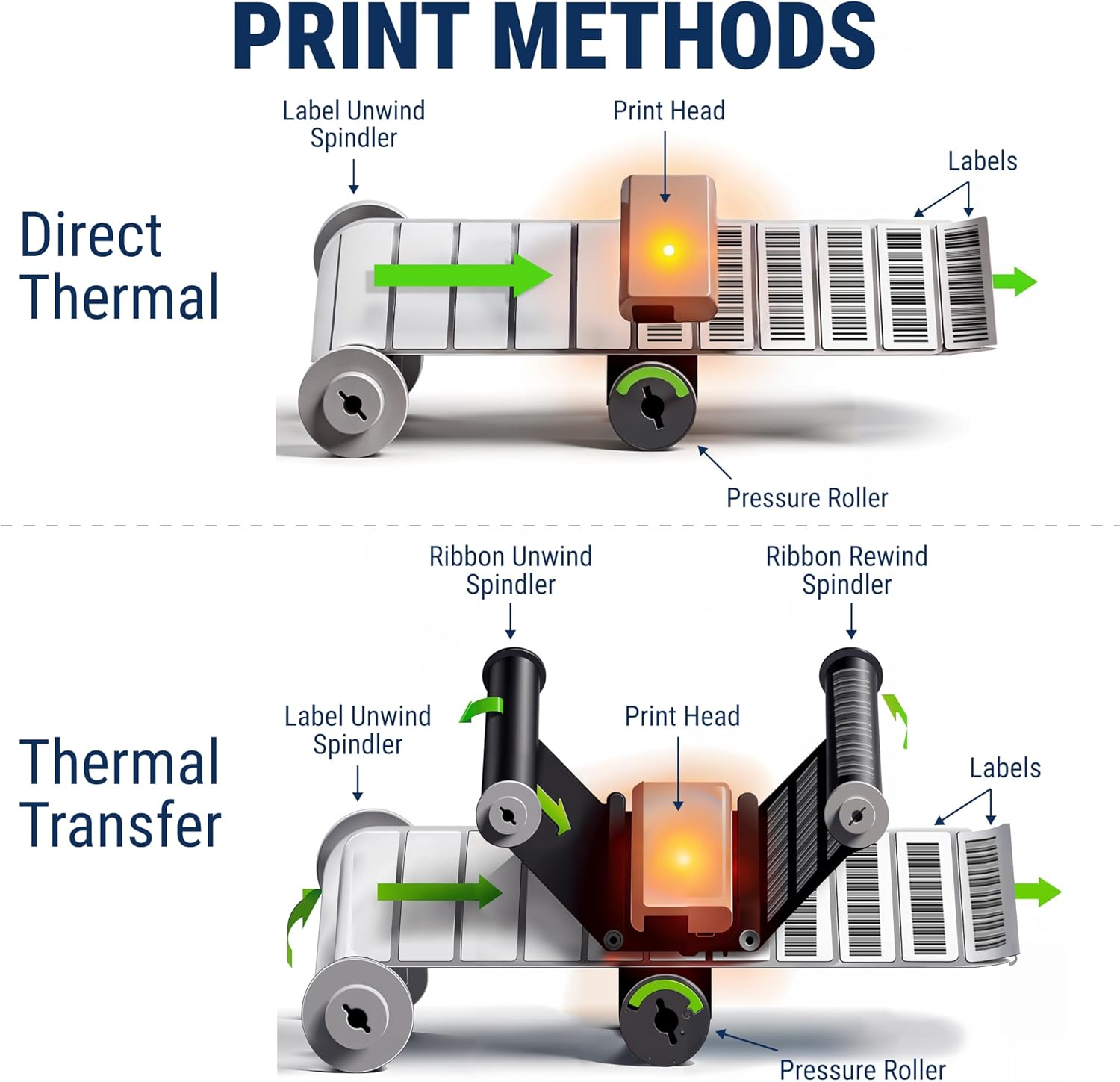
Image 4.1: Diagram illustrating the mechanics of Direct Thermal and Thermal Transfer print methods. The top diagram shows direct thermal printing with labels passing under the print head. The bottom diagram shows thermal transfer printing, where a ribbon is used in conjunction with labels and the print head.
5. Loading Labels and Ribbons
5.1 Loading Labels
- Open the printer's top cover.
- Adjust the label guides to match the width of your labels.
- Insert the roll of labels onto the label spindle, ensuring the labels feed correctly under the print head.
- Close the top cover.
5.2 Loading Ribbon (for Thermal Transfer)
- Open the printer's top cover.
- Place the ribbon roll onto the ribbon supply spindle.
- Thread the ribbon through the print mechanism, ensuring the coated side faces the labels.
- Attach the leading edge of the ribbon to the take-up spindle.
- Rotate the take-up spindle clockwise until the ribbon is taut.
- Close the top cover.
6. Connectivity
The GoDEX RT730i+ offers multiple interface options for seamless integration into your existing systems:
- USB 2.0 (Type B): Standard connection for direct communication with a computer.
- Serial Port (RS232): For legacy system compatibility.
- Ethernet 10/100 Mbps: For network connectivity, allowing multiple users to access the printer.
- USB Host (Type A) x3: For connecting external devices such as keyboards or barcode scanners.
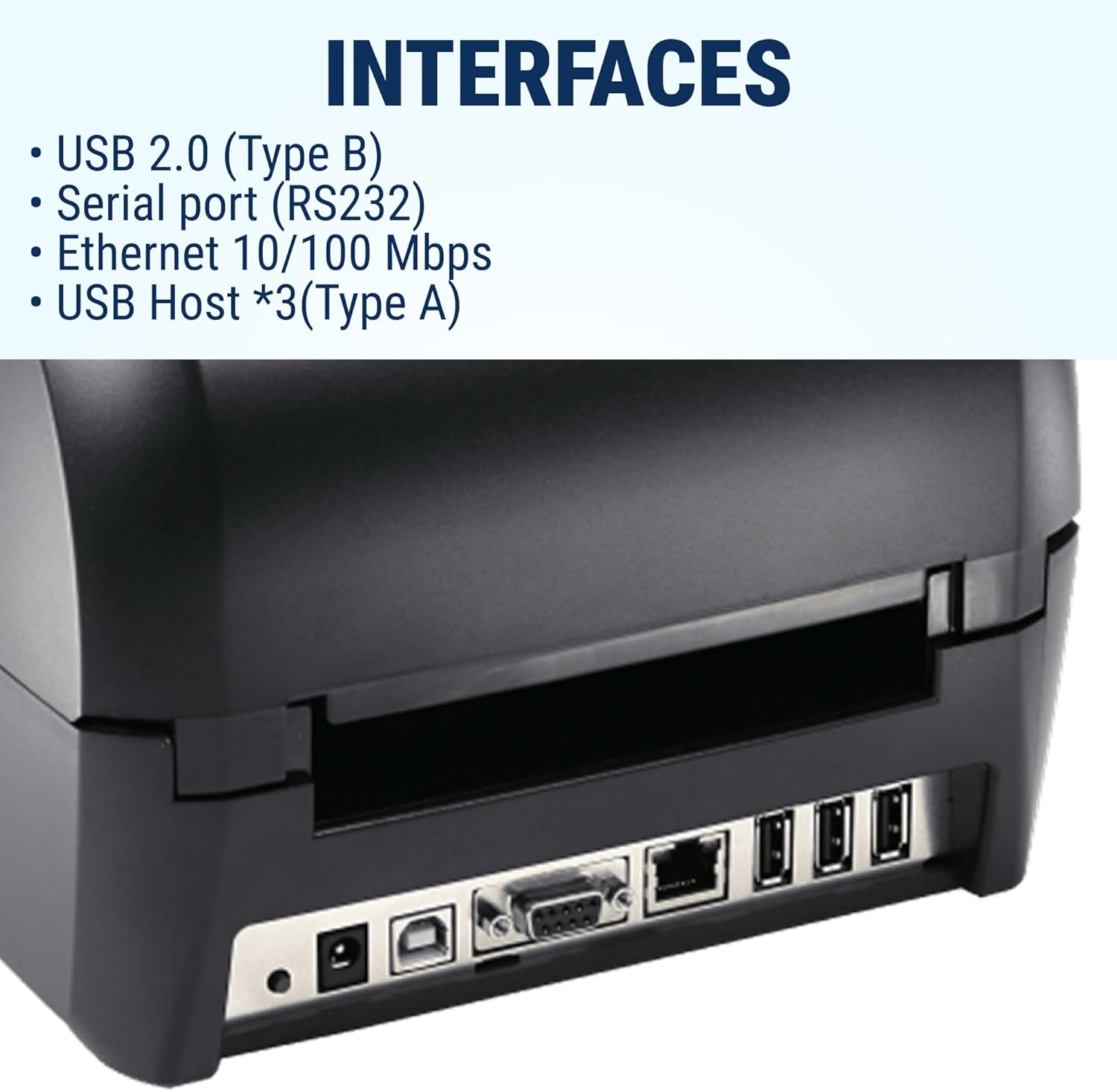
Image 6.1: Rear view of the GoDEX RT730i+ printer, clearly displaying its various interface ports including USB, Serial (RS232), Ethernet, and multiple USB Host ports.
7. Printing Resolution
The GoDEX RT730i+ features a 300 DPI (dots per inch) print resolution. This resolution provides clear and crisp output for barcodes, text, and graphics, making labels easily scannable and readable. Higher DPI options (e.g., 600 DPI) are available on other models for applications requiring extremely fine detail or micro text.

Image 7.1: A visual comparison of label print quality at 203 DPI, 300 DPI, and 600 DPI. The 300 DPI example shows clear text and barcode readability, while 600 DPI offers even finer detail.
8. Control Panel
The printer is equipped with a color TFT LCD display and navigation buttons for easy operation and configuration. The control panel allows users to access printer settings, calibrate media, and perform various functions without needing a computer.
- Color TFT LCD: Displays printer status, menus, and settings.
- Navigation Buttons: Used to navigate through menus and adjust settings.
- Power On/Off Button: Controls the printer's power.
- Calibration Button: Initiates media calibration for accurate label detection.
- FEED Key: Advances a single label or performs a test print.

Image 8.1: Front view of the GoDEX RT730i+ printer, focusing on its control panel. The image highlights the color TFT LCD screen and the surrounding navigation buttons, including the power and feed buttons.
9. Maintenance
Regular maintenance ensures optimal printer performance and extends its lifespan.
9.1 Cleaning the Print Head
The print head should be cleaned regularly, especially if print quality degrades. Use a lint-free cloth moistened with isopropyl alcohol. Gently wipe the print head from center to edge. Allow it to dry completely before use.
9.2 Cleaning Rollers
Clean the platen roller and other rubber rollers with isopropyl alcohol to remove adhesive residue and dust. This helps prevent media jams and ensures smooth feeding.
9.3 General Cleaning
Wipe the exterior of the printer with a soft, damp cloth. Do not use abrasive cleaners or solvents.
10. Troubleshooting
This section addresses common issues you might encounter.
- No Power: Ensure the power cable is securely connected to the printer and a working electrical outlet. Check the power adapter.
- Poor Print Quality: Clean the print head. Ensure the correct media type and ribbon (if thermal transfer) are used. Calibrate the printer for the loaded media. Check print head pressure settings.
- Labels Not Feeding: Verify labels are loaded correctly and the media guides are adjusted. Check for media jams. Ensure the correct media sensor type is selected in printer settings.
- Connectivity Issues: For USB, ensure drivers are installed and the cable is connected. For Ethernet, check network cable, IP address settings, and network connectivity.
- Printer Not Responding: Restart the printer. Check for error messages on the display.
11. Specifications
Detailed technical specifications for the GoDEX RT730i+ printer:

Image 11.1: A table detailing the technical specifications of the GoDEX RT730i+ printer, including print method, resolution, speed, dimensions, and connectivity options.
| Feature | Specification |
|---|---|
| Print Method | Thermal Transfer / Direct Thermal |
| Resolution | 300 dpi (12 dots/mm) |
| Print Speed | Up to 5 ips (127 mm/s) |
| Print Width | 4.16" (105.7 mm) |
| Print Length | Min. 0.12" (3 mm); Max. 125.98" (3200 mm) |
| Processor | 32 Bit RISC CPU |
| Memory | Flash: 128 MB; SDRAM: 128 MB |
| Interfaces | USB 2.0 (Type B), Serial port (RS232), Ethernet 10/100 Mbps, USB Host *3 (Type A) |
| Ribbon Types | Wax, wax/resin, resin |
| Ribbon Length | 984" (300 m) |
| Ribbon Width | Min. 1.18" (30 mm) - Max. 4.33" (110 mm) |
| Ribbon Diameter | 2.67" (68 mm) |
| Control Panel | Color TFT LCD with navigation button, Power on/off button, Calibration button, Control key: FEED |
| Product Dimensions | 1 x 1 x 1 inches (approximate, as per product data) |
| Color | Black |
| Manufacturer | Godex |
12. Warranty and Support
The McAuley Labels GoDEX RT730i+ printer is backed by McAuley Labels' expert service and support. For warranty information, technical assistance, or to inquire about supplies (ribbons, labels, custom needs), please contact McAuley Labels directly through their official channels or website.