
Introduction
Thank you for choosing the Kviflon 52-inch Ceiling Fan with Lights, Model 8922. This modern, low-profile flush mount ceiling fan is designed to provide efficient air circulation and versatile lighting for your living space. It features 5 reversible blades, 3 CCT dimmable LED lights, and 6 fan speeds, all controllable via a remote or a dedicated mobile application. Please read this manual thoroughly before installation and operation to ensure safe and optimal performance.
Safety Information
- Always turn off power at the circuit breaker before beginning installation or performing any maintenance.
- All electrical wiring must be performed by a qualified electrician and conform to local codes and regulations.
- Ensure the mounting structure can support the weight of the fan (approximately 15 kg / 33 lbs).
- Do not connect the fan to a dimmer switch or a fan gear switch; use a conventional on/off wall switch if not using the remote or app.
- Keep hands and objects clear of the fan blades during operation.
- This fan is designed for indoor use only.
Package Contents
Verify that all components are present before beginning installation:

Image: Overview of included components and fan dimensions.
- Fan Motor Assembly
- Screw Bag (includes mounting hardware)
- Fan Blades (5 pieces)
- Lampshade
- Receiver
- Remote Control
- Instructions Manual
- Ceiling Plate
- Attachment Bracket
Specifications
| Brand | Kviflon |
| Model Name/Number | 8922 |
| Product Dimensions | 52"D x 52"W x 9.45"H |
| Blade Length | 23 inches |
| Number of Blades | 5 |
| Material | Metal, Plastic (ABS blades, Acrylic lampshade) |
| Installation Type | Flush Mount |
| Motor Type | DC Motor |
| Number of Speeds | 6 |
| Noise Level | Less than 30 dB |
| Light Power | 24W LED |
| Color Temperature | 3000K (Warm), 4500K (Natural), 6000K (Cool) |
| Dimmable | Yes (20% to 100% brightness) |
| Voltage | 110-265V |
| Control Method | Remote Control, Mobile App Control, Wall Switch (on/off only) |
| Timer Function | 2-hour (fan only) |
| Reversible Blades | Yes (Summer/Winter mode) |

Image: Quiet operation of the fan, rated at less than 30dB.
Installation
Follow these steps for proper installation. It is recommended to have a qualified electrician perform the installation.
Pre-Installation Checks
- Ensure the power is OFF at the circuit breaker.
- Confirm all package contents are present.
- Note: The screws for the blades are pre-installed on the motor.
Mounting the Fan

Image: The fan is designed for flush mounting, suitable for ceilings between 6.5 to 10 feet.
- Attach the mounting bracket to the ceiling junction box. Ensure it is securely fastened and can support the fan's weight.
- Connect the electrical wires from the ceiling to the fan's wiring according to the provided wiring diagram in the full instruction manual.
- Secure the fan motor assembly to the mounting bracket. A safety hook is included to assist with this step, allowing one person to manage the installation more easily.
- Install the fan blades onto the motor assembly. (Tip: It is often easier to install the fan blades and light fixtures first, then install the fan to the ceiling.)
- Attach the lampshade to the fan motor assembly.
Wall Control Compatibility

Image: Compatible wall switch types. Only standard on/off switches are supported.
This fan is compatible with conventional on/off wall switches for basic light control. Do NOT connect this fan to a dimmer switch or a fan gear speed control switch, as this can damage the fan's motor or electronics.
Installation Video Guide
Video: Detailed installation guide for the Kviflon 52-inch ceiling fan.
Operation
Your Kviflon ceiling fan can be controlled using the included remote control or a mobile application.
Remote Control Functions
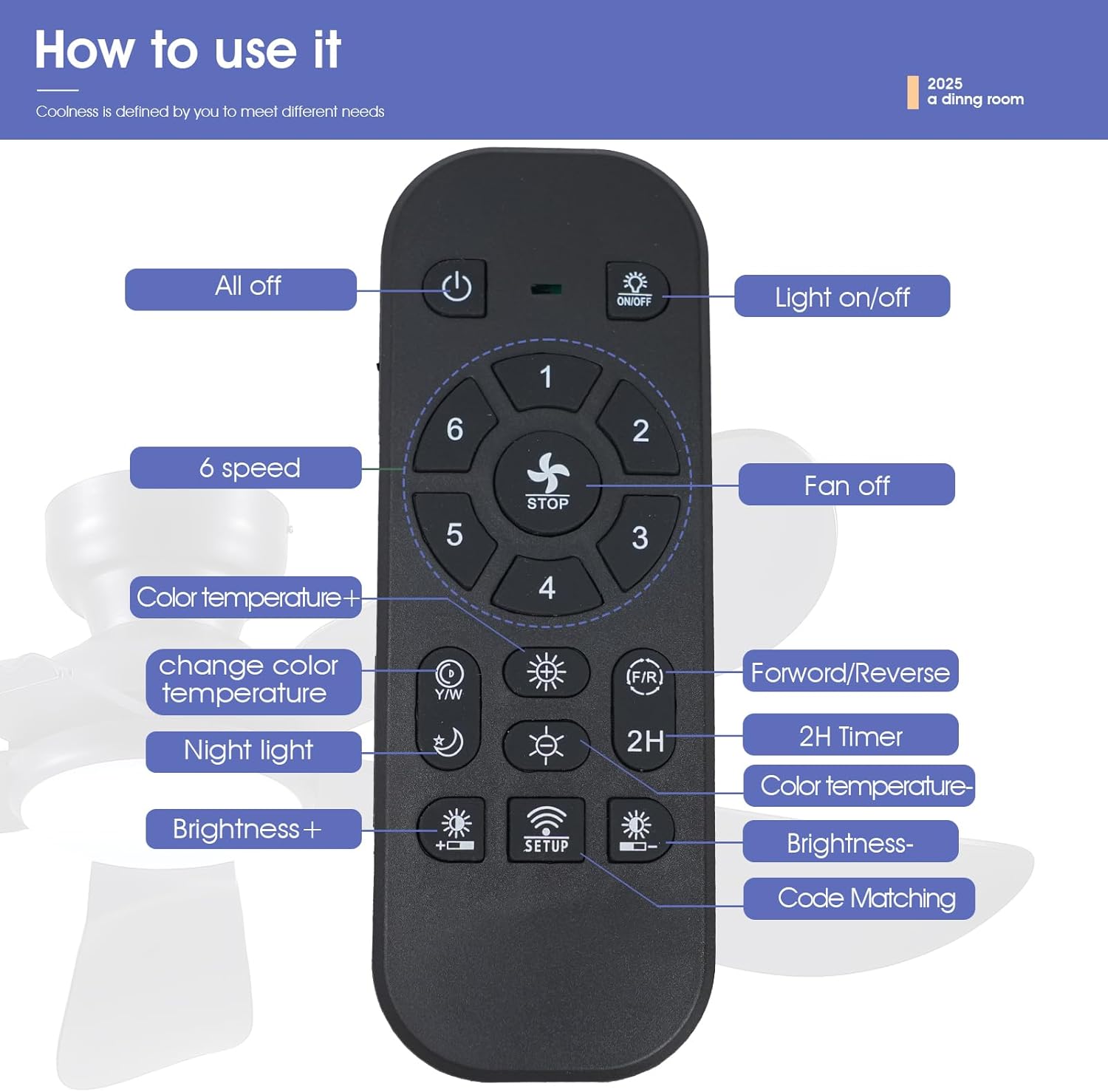
Image: Remote control layout and button functions.
- Power On/Off: Turns the entire unit on or off.
- Light On/Off: Controls the LED light independently.
- Fan Off: Stops the fan blades.
- Fan Speed (1-6): Adjusts the fan speed from gentle (1-2) to strong (5-6).
- Color Temperature (+/-): Cycles through 3000K (Warm), 4500K (Natural), and 6000K (Cool) light.
- Brightness (+/-): Adjusts light brightness from 20% to 100%.
- Night Light: Activates a low-brightness, warm light setting.
- Forward/Reverse (F/R): Changes the direction of blade rotation for summer or winter mode.
- 2H Timer: Sets the fan to turn off automatically after 2 hours.
- Code Matching (SETUP): Used for pairing the remote with the fan.
Mobile App Control

Image: Steps for connecting the fan to the mobile app.
- Download the "FanLamp Pro" app. Scan the QR code in the image above or visit http://www.jasonghost.com/fanlamppro/.
- Turn on Bluetooth on your mobile phone.
- Open the "FanLamp Pro" app and enter the main page.
- Press the "+" icon to add a new fan lamp.
- Enter the control page after creating the device.
- Click the pair button several times within 5 seconds after the fan is powered on. If the fan light flashes or beeps, it means the phone has been paired successfully.
Fan Speed and Airflow

Image: Six adjustable fan speeds for various comfort levels.
The fan offers 6 speed settings to suit your preference:
- Speeds 1-2: Gentle airflow, ideal for sleeping or quiet environments.
- Speeds 3-4: Moderate airflow for comfortable leisure activities.
- Speeds 5-6: Strong airflow for fitness or rapid cooling.
Reversible Air Circulation

Image: Reversible motor function for year-round comfort.
The reversible DC motor allows for year-round use:
- Summer Mode (Forward): Blades rotate counter-clockwise, pushing air downwards to create a cooling breeze.
- Winter Mode (Reverse): Blades rotate clockwise, drawing air upwards to circulate warm air trapped near the ceiling, helping to reduce heating costs.
Dimmable LED Light with Color Temperature Adjustment

Image: Adjustable light color temperature and brightness.
The integrated LED light offers versatile illumination:
- 3 Color Temperatures: Switch between 3000K (warm white), 4500K (natural white), and 6000K (cool white) to match your mood or activity.
- Dimmable Brightness: Adjust the light intensity from 20% to 100%.
Product in Use Video
Video: Demonstrates the Kviflon ceiling fan in various room settings, showcasing its aesthetic and functional aspects.
App Control Method Video
Video: Guide on how to use the mobile application to control the fan and light functions.
Maintenance
Regular maintenance ensures the longevity and optimal performance of your ceiling fan.
- Cleaning: Dust the fan blades and motor housing periodically with a soft, damp cloth. Do not use abrasive cleaners or solvents.
- Blade Inspection: Check the fan blades for any cracks or damage. Ensure they are securely attached.
- Tighten Screws: Periodically check all screws on the fan and mounting hardware to ensure they are tight. Loose screws can cause noise or wobbling.
- Light Source: The LED light source is integrated and not user-replaceable. If the light fails, contact customer support.
- Power Off: Always turn off the power at the circuit breaker before cleaning or performing any maintenance.
Troubleshooting
If you encounter issues with your fan, refer to the following common problems and solutions:
| Problem | Possible Cause | Solution |
|---|---|---|
| Fan does not start | No power; Loose wiring; Remote/App not paired | Check circuit breaker; Ensure all connections are secure; Re-pair remote/app (see Operation section). |
| Light does not work | No power; Loose wiring; LED failure | Check circuit breaker; Ensure all connections are secure; If LED is faulty, contact customer support. |
| Fan makes excessive noise | Loose screws; Unbalanced blades; Obstruction | Tighten all screws on blades and mounting; Ensure blades are balanced; Check for any objects interfering with blade rotation. |
| Remote control not working | Dead batteries; Not paired; Signal interference | Replace batteries; Re-pair remote with fan; Ensure no obstructions between remote and fan receiver. |
| Fan wobbles | Loose mounting; Unbalanced blades | Ensure mounting bracket is securely fastened; Check blade screws; Balance blades if necessary (balancing kit not included). |
Warranty and Support
Kviflon is committed to providing high-quality products. For any questions, technical assistance, or warranty claims, please contact Kviflon customer support. Keep your purchase receipt as proof of purchase.
For more information or to contact support, please visit the official Kviflon store or contact your retailer.


