Introduction
Welcome to your ULANZI D200H U-Studio Stream Controller Keyboard. This manual will guide you through the setup, operation, and maintenance of your device, designed to streamline your workflow for content creation, office tasks, and live streaming. The D200H combines a powerful macro keyboard with a versatile 7-in-1 docking station, offering unparalleled control and connectivity.

What's Included
Upon unboxing your ULANZI D200H, please ensure all the following items are present:
- ULANZI D200H U-Studio Stream Controller Keyboard
- 2-in-1 Charging Cable (Micro-B to USB-C)
- User Manual

Setup Guide
Initial Connection
Follow these steps to set up your ULANZI D200H for the first time:
- Connect the D200H to your computer: Use the provided USB cable to connect the D200H to an available USB port on your computer. The device features a HOST port and Type-C USB ports for connection.
- Download and install software: Visit the official ULANZI website (www.ulanzi.com/pages/downloads) to download and install the Ulanzi Deck and Lightmaster software.
- Launch and customize: Launch the Ulanzi Deck software and follow the on-screen tutorial to customize your settings, assign functions to keys, and configure profiles.

Operating Instructions
Key Functions and Customization
The ULANZI D200H is equipped with 14 LCD keys and 13 customizable macro keys. Each key can be assigned specific functions, macros, or application shortcuts through the Ulanzi Deck software. The LCD keys provide visual feedback, displaying custom icons or information relevant to their assigned function.

Workflow Enhancement
The D200H is designed to integrate seamlessly into various digital workflows:
Content Creation
Streamline your creative process by instantly opening menus, selecting tools, merging layers, picking tracks, and importing files. The D200H supports popular applications such as Adobe Photoshop (Ps), Premiere Pro (Pr), After Effects (Ae), DaVinci Resolve, and CapCut.
Office Assistant
Enhance your productivity with one-tap actions to launch applications, start calls, share screens, switch windows, and open files. The device is compatible with AI tools like ChatGPT, Deepseek, Microsoft Excel, and other office applications.

Streaming Control
Take full control of your live streams with single-tap commands to start streaming, switch scenes, send presets, and manage lighting and sound. The D200H supports popular streaming platforms such as OBS, Twitch, and YouTube.
Integrated Docking Station
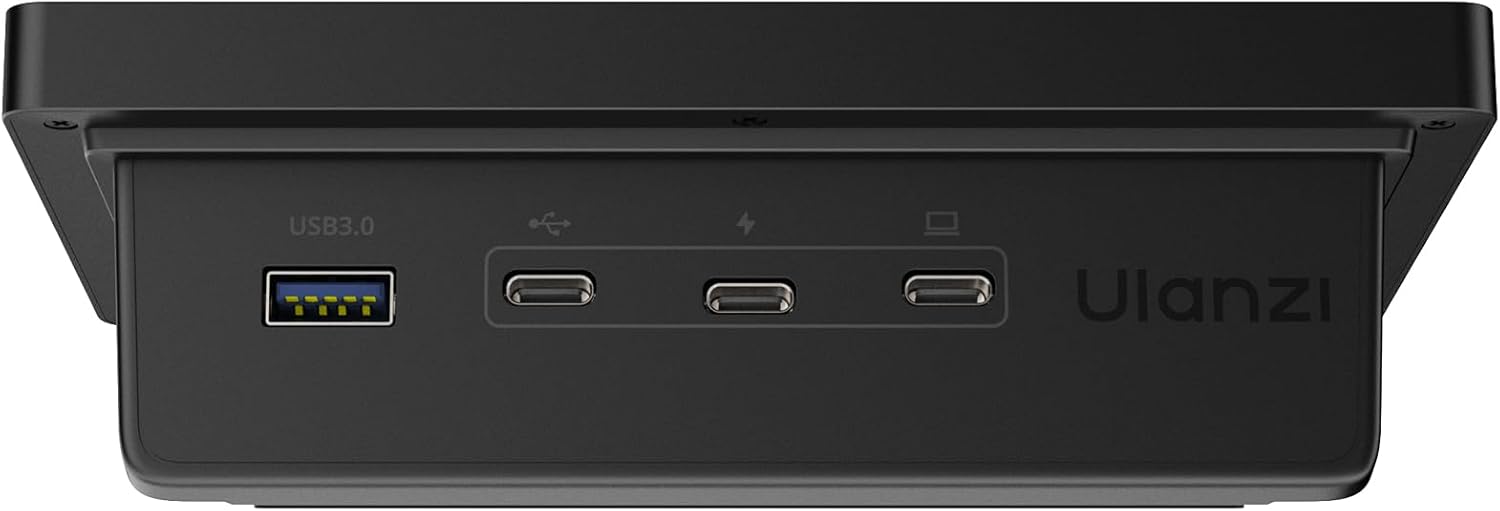
The ULANZI D200H features a comprehensive 7-in-1 docking station, expanding your connectivity options:
- 2 x USB-C 3.0 (5Gbps): High-speed data transfer for modern devices.
- 2 x USB-A 3.0 (5Gbps): Connect traditional USB peripherals.
- 1 x PD 100W (Power Delivery): Fast charging for compatible laptops and devices.
- 1 x Host Port: Main connection to your computer.
- 2 x SD/TF 3.0 (UHS-II 104MB/S) Card Readers: Rapid data transfer from memory cards.



Lighting Control
Utilize the Lightmaster software to take full control of compatible Ulanzi lights, including models like K6500, VL-200Bi, VL-120C, VL-120Bi, EC65, AL60, and AL120. You can also control Philips Hue bulbs (Bluetooth remote required). Adjust brightness, color, and effects instantly to set the mood and perfect your shot.
Maintenance
To ensure the longevity and optimal performance of your ULANZI D200H, follow these general maintenance guidelines:
- Cleaning: Keep the device clean by wiping it with a soft, dry, lint-free cloth. Avoid abrasive cleaners, solvents, or harsh chemicals that could damage the surface or electronic components.
- Environment: Protect the device from extreme temperatures, high humidity, and direct sunlight. Operate it in a well-ventilated area.
- Cable Management: Ensure all cables are connected securely and are not under strain or bent sharply, which can lead to damage over time.
Troubleshooting
If you encounter issues with your ULANZI D200H, refer to the following common solutions:
- Device Not Recognized: Ensure the USB cable is securely connected to both the D200H and your computer. Try a different USB port or cable. Verify that the Ulanzi Deck software is installed and running. Restart the software and/or your computer.
- Keys Not Responding: Check the Ulanzi Deck software for proper configuration of the keys. Ensure the correct profile is active. Restart the software.
- Software Issues: Ensure your Ulanzi Deck and Lightmaster software are updated to the latest version. Visit the ULANZI website for updates and support resources.
- Power Delivery Not Working: Confirm that the power adapter connected to the PD port is functioning correctly and provides sufficient wattage for your connected devices.
For further assistance, consult the Ulanzi Studio Marketplace for video tutorials and the Ulanzi Creator Community for additional support.
Specifications
| Feature | Detail |
|---|---|
| Brand | ULANZI |
| Model | D200H |
| Product Dimensions | 6.06 x 3.54 x 1.97 inches (154 x 90 x 50 mm) |
| Item Weight | 1.26 pounds (570g) |
| Connectivity Technology | USB |
| Hardware Interface | USB 3.0 Type C |
| System Supported | Windows 10 and later / macOS 10.13 and later |

Support and Warranty
Software and Community Support
ULANZI is committed to continuously improving your experience. The ULANZI Studio Marketplace provides easy access to a rich collection of apps, presets, icon packs, and companion software, with regular updates to enhance functionality.
Additionally, you can engage with the ULANZI Creator Community to access fresh creative resources, share original content, and participate in open-source projects.
Warranty Information
For detailed warranty information regarding your ULANZI D200H, please refer to the warranty card included with your product packaging. You may also visit the official ULANZI website for the most current warranty terms and conditions.
Contact Information
For technical support, product inquiries, or to provide feedback, please visit the official ULANZI website at www.ulanzi.com.


