
1. Introduction
Thank you for choosing the coolid C3 Mini Projector. This manual provides essential information for setting up, operating, and maintaining your projector. Please read it thoroughly before use to ensure optimal performance and longevity of the device.

Image 1.1: The coolid C3 Mini Projector and its remote control, displaying a projected screen with various streaming applications.
2. Product Overview
2.1 Key Features
- Auto Focus & Auto Keystone Correction: Provides automatic image clarity and geometric correction.
- True 1920x1080 Resolution with 4K Support: Delivers Full HD visuals and decodes 4K Ultra HD video.
- High Brightness & Contrast: Features 1400 lumens and a 10,000:1 contrast ratio for vivid images.
- WiFi 6 & Bi-directional Bluetooth 5.4: Ensures fast wireless connectivity and versatile audio transmission.
- Built-in Android 11 OS: Offers a smart projector experience with pre-installed apps and 1GB RAM/8GB storage.
- Flexible Installation: Supports 180° image rotation, tripod, ceiling, and tabletop mounting.
- Digital Zoom: Adjusts screen size from 30% to 120%.
2.2 Package Contents
- coolid C3 Mini Projector
- Power Cord
- Remote Control
- User Manual (this document)

Image 2.1: Overview of the coolid C3 Mini Projector's multiple connectivity ports.
3. Setup Guide
3.1 Placement
The coolid C3 Mini Projector offers flexible placement options:
- Tabletop: Place the projector on a stable, flat surface.
- Tripod: Utilize the standard 1/4-inch screw hole on the bottom for tripod mounting.
- Ceiling Mount: Securely mount the projector to the ceiling using compatible hardware (not included).
The 180° rotatable design allows projection onto walls, ceilings, or floors. Ensure the projection surface is clear and flat for the best image quality.

Image 3.1: The projector's 180° rotation capability for versatile projection angles.
3.2 Power Connection
- Connect the power cord to the DC input port on the projector.
- Plug the other end of the power cord into a suitable power outlet.
- Press the power button on the projector or remote control to turn on the device.
4. Operating Instructions
4.1 Initial Setup
Upon first power-on, the projector will guide you through initial setup steps, including language selection and network configuration.
4.2 Navigation
Use the included remote control to navigate the Android 11 operating system. The remote supports both standard navigation and a voice mouse function for easier interaction with applications.

Image 4.1: Using the smart remote control with voice mouse for app navigation.
4.3 Accessing Applications
The projector runs on Android 11 OS and comes with pre-installed applications like Netflix, YouTube, Hulu, Spotify, and Plex. You can access these directly from the home screen. Additional applications can be downloaded from the integrated app store.
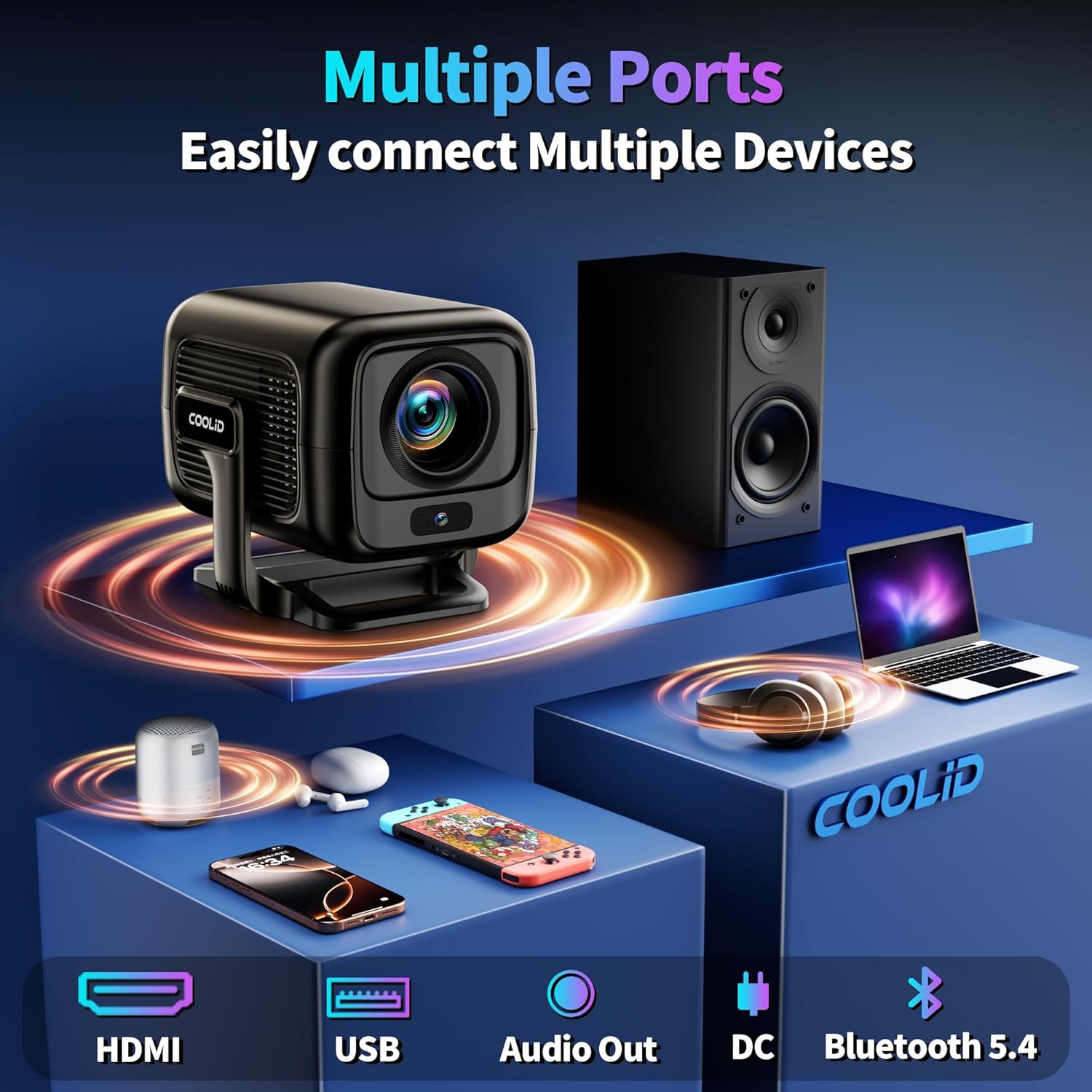
Image 4.2: Integrated applications available on the coolid C3 Mini Projector.
5. Connectivity
5.1 Wi-Fi Connection
The projector supports WiFi 6 dual-band technology (2.4GHz and 5GHz) for stable and fast internet access.
- Go to Settings > Network & Internet.
- Select your desired Wi-Fi network.
- Enter the password if prompted and connect.

Image 5.1: High-speed WiFi 6 and Bluetooth 5.4 connectivity.
5.2 Bluetooth Connection
The projector features bi-directional Bluetooth 5.4, allowing connection to external audio devices or using the projector as a Bluetooth speaker.
- Go to Settings > Connected Devices > Bluetooth.
- Enable Bluetooth and search for available devices.
- Select your Bluetooth speaker or headphones to pair.

Image 5.2: Bluetooth 5.4 connection for audio output or input.
5.3 Wired Connections (HDMI, USB)
The projector includes HDMI and USB ports for connecting various devices:
- HDMI: Connect gaming consoles, laptops, TV boxes, or other HDMI-enabled devices.
- USB: Connect USB drives for media playback or external peripherals.

Image 5.3: Multi-device connectivity options for the projector.
6. Image and Audio Settings
6.1 Auto Focus and Auto Keystone Correction
The projector automatically adjusts focus and corrects trapezoidal distortion for a clear, rectangular image. This feature operates automatically upon startup or movement.

Image 6.1: Automatic trapezoidal correction in action.
6.2 Digital Zoom
Adjust the screen size without moving the projector using the digital zoom function. This can be found in the image settings menu and allows adjustment from 30% to 120%.
6.3 Display Settings
The projector supports native 1920x1080 Full HD resolution and 4K video decoding. It features 1400 lumens brightness and a 10,000:1 contrast ratio. The optimal aspect ratio is 16:9.

Image 6.2: Key display specifications of the projector.
6.4 Audio Output
The projector has built-in 360° surround sound speakers. For enhanced audio, connect external Bluetooth speakers or headphones as described in Section 5.2.
7. Maintenance
7.1 Cleaning the Lens
Gently wipe the projector lens with a soft, lint-free cloth specifically designed for optical surfaces. Avoid using abrasive materials or harsh chemicals.
7.2 Cleaning the Exterior
Use a soft, dry cloth to clean the projector's exterior. Do not use liquid cleaners directly on the device.
7.3 Storage
When not in use for extended periods, store the projector in a cool, dry place, away from direct sunlight and extreme temperatures. Use the original packaging or a protective case to prevent dust accumulation and damage.
8. Troubleshooting
If you encounter issues with your coolid C3 Mini Projector, refer to the following common problems and solutions:
| Problem | Possible Cause | Solution |
|---|---|---|
| Projector powers off and restarts frequently. | Overheating, unstable power supply, software glitch. | Ensure adequate ventilation around the projector. Use a stable power source. Perform a factory reset if the issue persists. |
| Image is blurry or out of focus. | Auto focus malfunction, projector too close/far from screen. | Ensure the projector is placed within the recommended distance. If auto focus fails, try restarting the device. |
| Image is distorted (not rectangular). | Auto keystone correction malfunction. | Ensure the projector is on a stable surface. Restart the device to re-trigger auto keystone. |
| No image or signal. | Incorrect input source, loose cable connection. | Verify the correct input source is selected. Check all cable connections (HDMI, USB). |
| No sound or low volume. | Volume too low, external audio device not connected properly, internal speaker issue. | Increase volume on projector and connected devices. Check Bluetooth connection for external speakers. |
| Projector freezes or becomes unresponsive. | Software error, insufficient memory. | Restart the projector by unplugging and re-plugging the power cord. Close unnecessary applications. |
| Loud buzzing sound from projector. | Fan obstruction, internal component issue. | Ensure fan vents are clear. If the sound persists, contact customer support. |
9. Specifications
| Feature | Specification |
|---|---|
| Brand | coolid |
| Model | C3 |
| Hardware Interface | HDMI, USB |
| Compatible Devices | Gaming Console, Laptop, Smartphone, Tablet, Television |
| Special Features | Portable, Auto Focus, Auto Keystone Correction, Built-in Android 11 OS |
| Display Type | LED |
| Image Brightness | 1400 Lumens (200 lm ANSI) |
| Image Contrast Ratio | 10000:1 |
| Aspect Ratio | 16:9 |
| Display Resolution | 1920 x 1080 (Native Full HD) |
| Supported Resolution | Up to 3840 x 2160 (4K) |
| Connectivity Technology | HDMI, Wi-Fi 6 (2.4GHz/5GHz), Bluetooth 5.4 |
| Form Factor | Portable |
| Mounting Type | Tabletop Mount, Tripod, Ceiling Mount |
| Product Dimensions | 24.2 x 11.1 x 15.9 cm |
| Weight | 1.1 kg |
10. Warranty and Support
10.1 Warranty Information
The coolid C3 Mini Projector comes with a Two Years warranty service from the date of purchase. This warranty covers manufacturing defects and malfunctions under normal use. Please retain your proof of purchase for warranty claims.
10.2 Return Policy
A 30-Day Return Policy is available for this product. Please refer to your retailer's specific return guidelines for details.
10.3 Technical Support
For technical assistance or any questions regarding your projector, please contact our 7/24-Hour Technical After-Sales Service Team. Contact information can typically be found on the product packaging or the official coolid website.

Image 10.1: coolid's commitment to customer service and product warranty.