
1. Important Safety Information
Please read all instructions carefully before using the Vminno MG-101 Steam Cleaner. Failure to follow these instructions may result in electric shock, fire, or serious injury.
- Hot Steam Hazard: The steam cleaner produces high-temperature steam (up to 226°F / 130°C). Avoid direct contact with steam to prevent burns. Always wear heatproof gloves when handling hot parts or accessories.
- Electrical Safety: Do not immerse the appliance in water or other liquids. Ensure hands are dry before plugging or unplugging the unit. Use only with a properly grounded outlet.
- Water Tank: Only fill the water tank with clean tap water. Do not add detergents, chemicals, or aromatic oils to the water tank, as this can damage the unit and void the warranty.
- Children and Pets: Keep the appliance out of reach of children and pets. Do not leave the steam cleaner unattended while in operation.
- Maintenance: Unplug the appliance from the power outlet and allow it to cool completely before performing any maintenance or cleaning.
- Damaged Cord: Do not operate the appliance with a damaged cord or plug. If the appliance is not working as it should, has been dropped, damaged, left outdoors, or dropped into water, return it to a service center.
2. Product Components
The Vminno MG-101 Steam Cleaner comes with the following components:
- 1x Steam Cleaner Unit
- 1x Extension Tube
- 1x Large Nylon Brush
- 1x Copper Nozzle
- 2x Copper Brushes
- 2x Nylon Brushes
- 4x Sealing Rings
- 1x Heatproof Gloves
- 1x Power Cord
- 1x User Manual (this document)
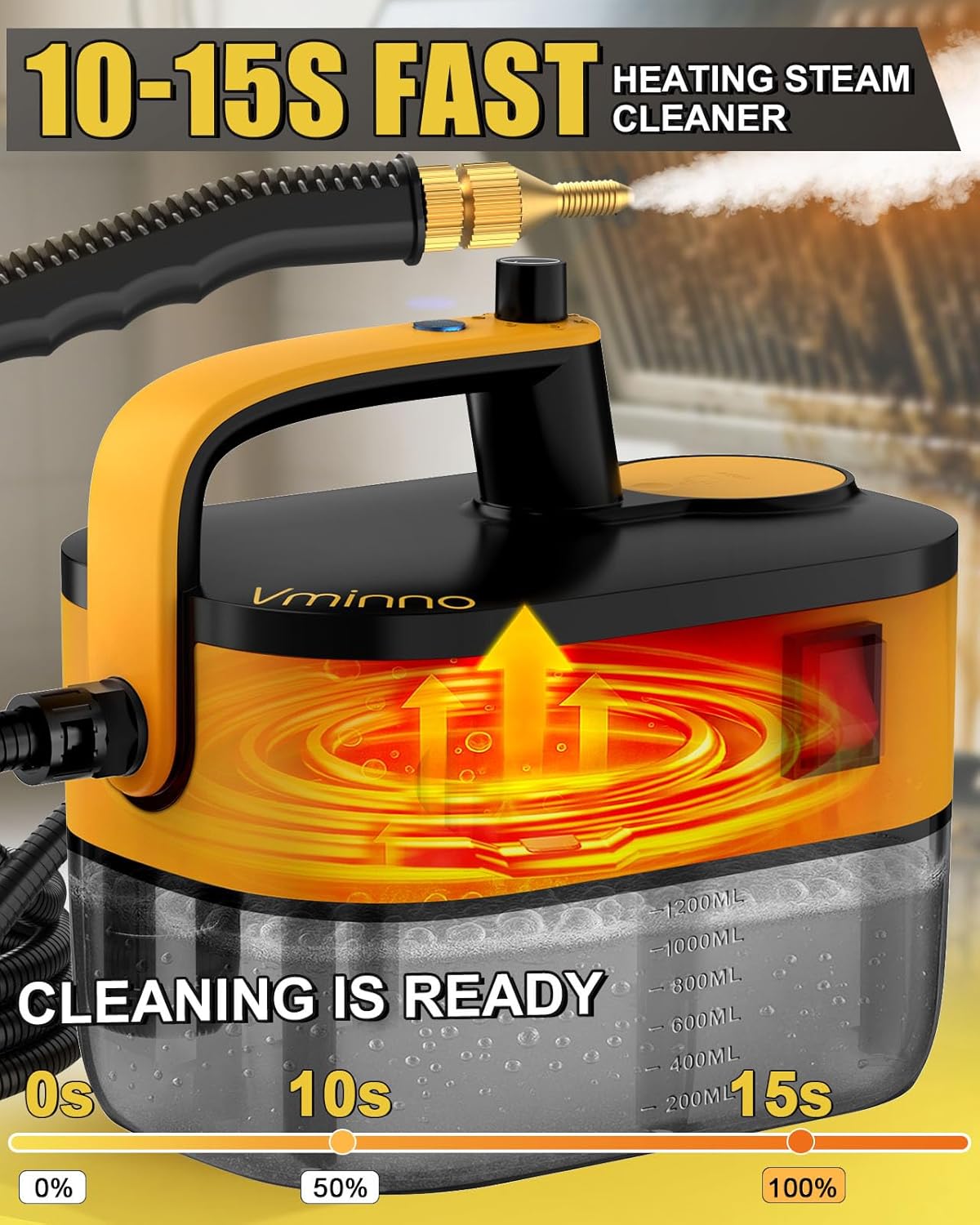
Image: Vminno MG-101 Steam Cleaner and its included 11-piece accessory kit.
3. Setup Instructions
- Unpack: Carefully remove all components from the packaging.
- Fill Water Tank: Unscrew the water tank cap. Using a measuring cup, fill the 1.2L transparent water tank with clean tap water. Do not overfill. The tank has graduated lines for easy tracking.
- Secure Cap: Tightly screw the water tank cap back on to prevent leaks.
- Attach Accessory: Select the appropriate cleaning accessory (e.g., brush, nozzle) for your task and securely attach it to the steam hose or extension tube. Ensure all connections are firm.
- Connect Power: Plug the power cord into a grounded electrical outlet (120 Volts).
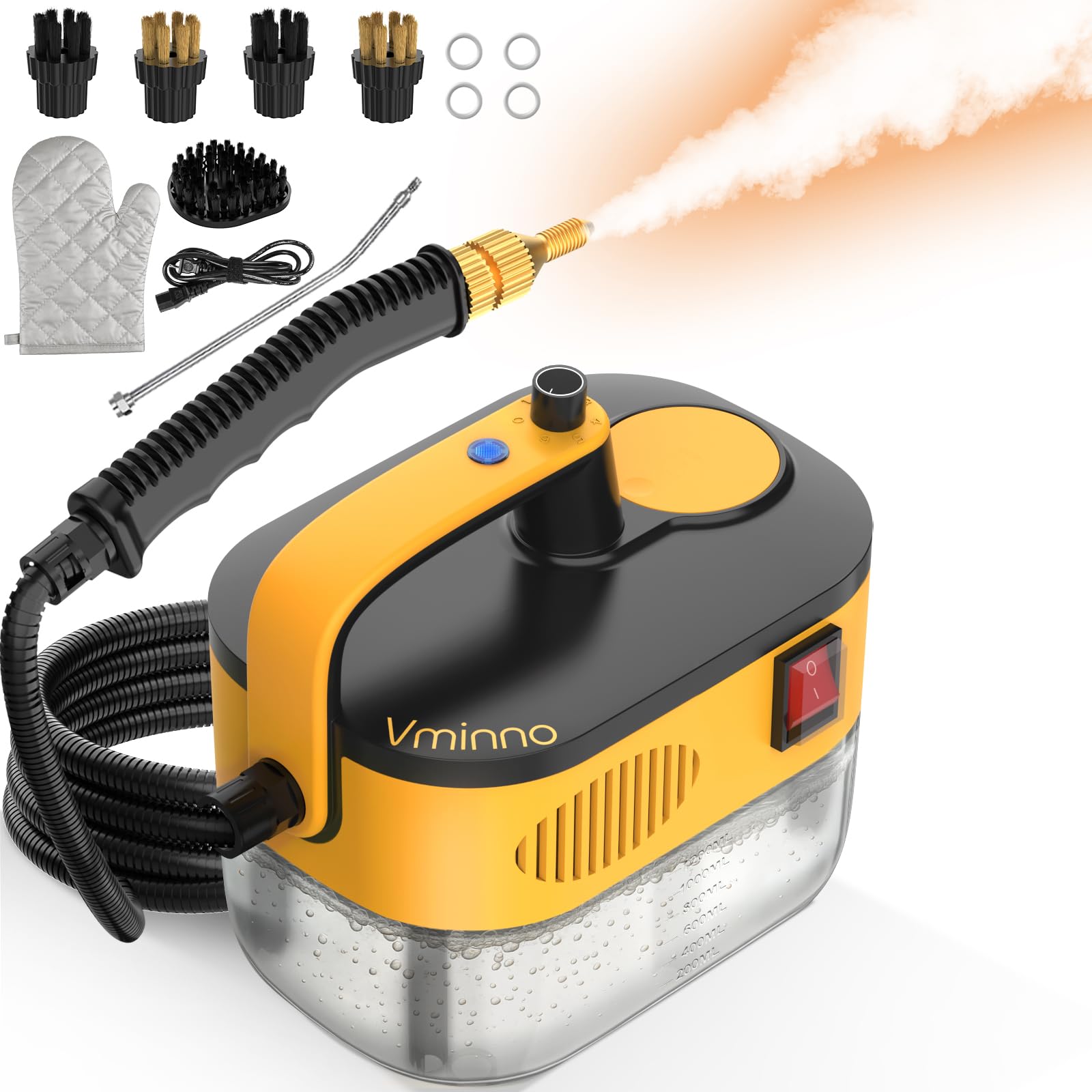
Image: The Vminno MG-101 Steam Cleaner's water tank with fill lines and a visual representation of its rapid heating process, indicating steam readiness in 10-15 seconds.
4. Operating Instructions
- Power On: Once plugged in, the steam cleaner will begin heating. The unit heats up in approximately 15 seconds.
- Steam Ready Indicator: Wait for the indicator light (if present, or listen for the heating sound to subside) to confirm the steam is ready.
- Adjust Steam Level: The unit features 6-level adjustable pressurized steam. Use the control dial or button to select the desired steam intensity for your cleaning task.
- Begin Cleaning: Direct the attached accessory towards the surface to be cleaned. Press the steam trigger to release steam. Move the accessory slowly over the surface.
- Continuous Steam: The 1.2L tank allows for extended cleaning sessions without frequent refills.
- Refilling Water: If the water level is low, unplug the unit and allow it to cool slightly before carefully refilling the tank. Do not open the cap while the unit is pressurized or hot.
- Power Off: After cleaning, release the steam trigger, unplug the power cord, and allow the unit to cool down completely before storing.
Video: Demonstration of the Vminno MG-101 Steam Cleaner's 1.2L tank, 15-second heating time, and 6-gear adjustable steam settings in action. This video illustrates the product's quick readiness and variable steam output for different cleaning needs.
5. Maintenance and Storage
- Cleaning the Unit: After each use, ensure the unit is unplugged and completely cool. Wipe the exterior with a damp cloth. Do not use abrasive cleaners or solvents.
- Emptying Water Tank: It is recommended to empty any remaining water from the tank after each use to prevent mineral buildup.
- Descaling: Depending on water hardness, mineral deposits may accumulate. If steam output decreases, descaling may be necessary. Consult the manufacturer for recommended descaling procedures or solutions.
- Accessory Care: Clean accessories with water and mild soap. Allow them to dry completely before storing.
- Storage: Store the steam cleaner and its accessories in a cool, dry place, away from direct sunlight and out of reach of children.
6. Troubleshooting Guide
| Problem | Possible Cause | Solution |
|---|---|---|
| No steam or low steam output. |
|
|
| Water leaking from connections. |
|
|
| Unit not turning on. |
|
|
7. Product Specifications
- Brand: Vminno
- Model Name: MG-101
- Wattage: 2500 Watts
- Heat Time: 15 Seconds
- Maximum Temperature: 226°F (130°C)
- Water Tank Volume: 1.2 Liters (41 Fluid Ounces)
- Power Source: Corded Electric
- Voltage: 120 Volts
- Item Weight: 3.5 Pounds
- Included Components: Steam Cleaner, Extension Tube, Large Nylon Brush, Copper Nozzle, 2x Copper Brushes, 2x Nylon Brushes, 4x Sealing Rings, Heatproof Gloves, Power Cord, Manual.
- Surface Recommendation: Hard Floor, Tile, Grout, Sofa, Window, Car, Furniture, Upholstery, Fabric, Sink, Countertop, Wall, Kitchen and Bath Surfaces.
8. Warranty and Customer Support
For warranty information or customer support, please refer to the contact details provided on the product packaging or the official Vminno website. Keep your purchase receipt as proof of purchase for warranty claims.
For technical assistance or inquiries, please contact Vminno customer service.