
1. Introduction
This instruction manual provides essential information for the proper installation, operation, and maintenance of the YSVQHHDV TP.MS3553.PB782 3MS553A0 TV Motherboard. This component is designed as a replacement part for compatible display equipment, offering enhanced performance, smart features, and improved compatibility. Please read this manual thoroughly before proceeding with any installation or operation.
2. Product Overview
The YSVQHHDV TP.MS3553.PB782 3MS553A0 is a three-in-one TV motherboard designed to integrate various functions into a single unit. It aims to improve the processing speed and picture quality of your television. This motherboard supports a range of smart features and offers broad compatibility with different devices and software. It incorporates energy-saving technology to reduce power consumption and enhance overall stability and reliability.

Figure 2.1: Main chip area of the motherboard, displaying the model numbers TP.MS3553.PB782 and 3MS553A0, along with other integrated circuits and a heat sink.

Figure 2.2: Identification sticker on the motherboard, providing manufacturing and serial details.
3. Specifications
| Feature | Detail |
|---|---|
| Model Number | TP.MS3553.PB782 3MS553A0 |
| Brand | YSVQHHDV |
| Compatible Equipment Style | Display Equipment |
| Power Rating | 48W (Small Interface variant) |
| Flash Memory | 8 MByte |
| Voltage Range | 36V-40.8V / 600mA |
| Item Weight | 1.76 ounces (approx. 50 grams) |
| Package Dimensions | 0.39 x 0.39 x 0.39 inches (approx. 1 x 1 x 1 cm) |
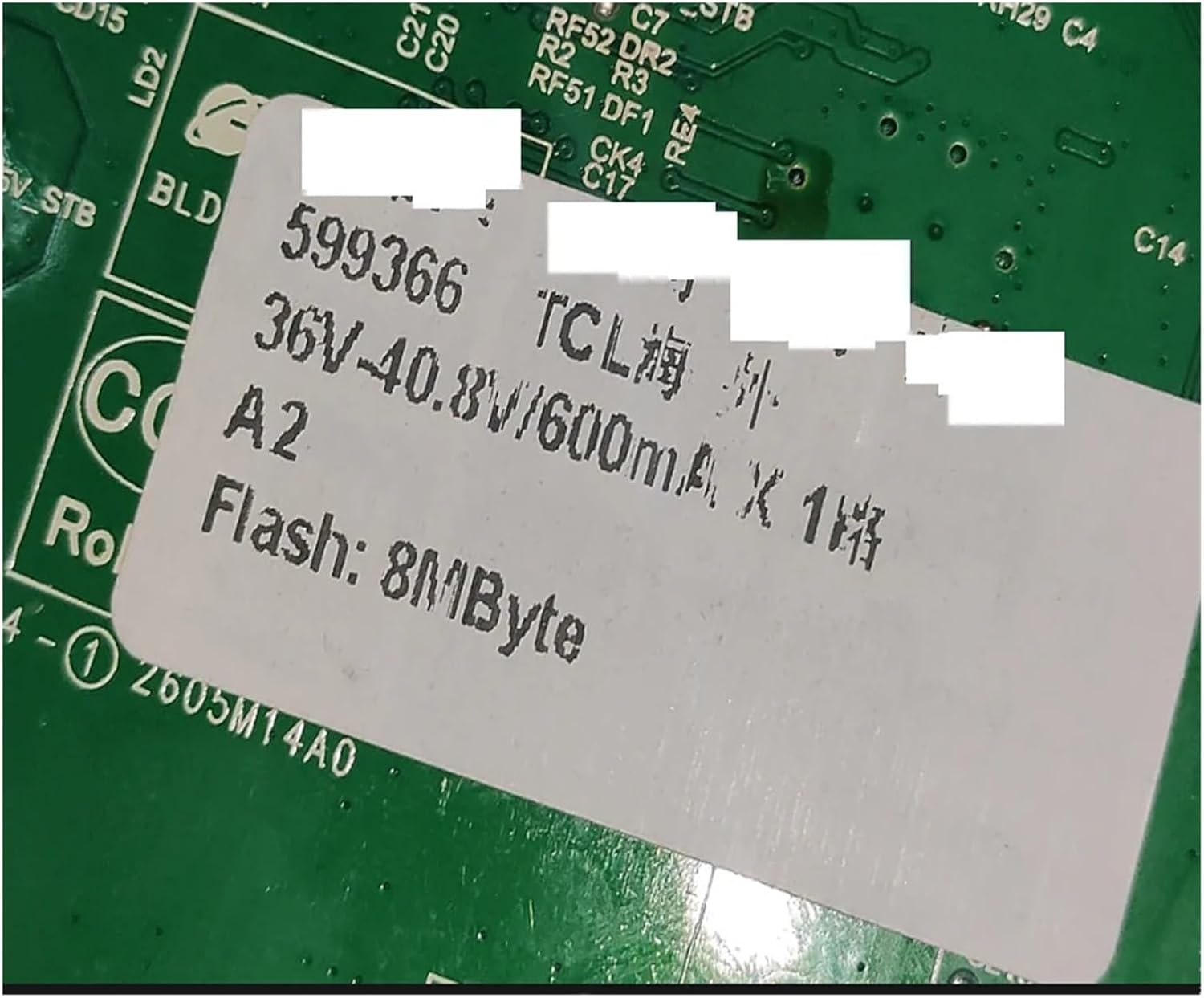
Figure 3.1: Specification sticker detailing voltage, current, and flash memory capacity.
4. Installation
Installation of a TV motherboard requires technical expertise and should ideally be performed by a qualified technician. Incorrect installation can lead to damage to the motherboard or the television. Always ensure the TV is disconnected from the power source before beginning any installation.
- Safety First: Disconnect the television from the main power supply and allow it to discharge for several minutes before touching any internal components.
- Access the Motherboard: Carefully remove the back panel of your television to access the existing motherboard. Refer to your TV's specific service manual for detailed instructions on panel removal.
- Disconnect Cables: Document or photograph the connections before disconnecting all cables (power, data, display, etc.) from the old motherboard.
- Remove Old Motherboard: Unscrew and carefully remove the old motherboard from its mounting points.
- Install New Motherboard: Position the YSVQHHDV TP.MS3553.PB782 3MS553A0 motherboard in the same location and secure it with the appropriate screws.
- Reconnect Cables: Reconnect all cables to their corresponding ports on the new motherboard, ensuring a secure and correct fit. Double-check all connections against your documentation or photographs.
- Initial Power-Up: Before fully reassembling the TV, connect it to power and perform a brief test to ensure basic functionality.
- Reassemble TV: Once functionality is confirmed, disconnect power, reattach the back panel, and secure all screws.
Disclaimer: The manufacturer is not responsible for any damage caused by improper installation. Professional installation is highly recommended.

Figure 4.1: Rear view of the motherboard, illustrating the layout of ports and connections relevant for installation.
5. Operation
Once the motherboard is correctly installed, the television should power on and function as expected. The operation of the TV will primarily depend on the TV's original firmware and user interface. This motherboard provides the core processing and connectivity for the TV's functions.
- Initial Boot: Upon first power-up after installation, the TV may take slightly longer to boot as it initializes the new hardware.
- Firmware Updates: If your TV supports online firmware updates, it is recommended to check for and install any available updates after motherboard replacement to ensure optimal performance and compatibility.
- Input Selection: Use your TV's remote control to select desired input sources (HDMI, AV, USB, etc.) as you normally would.
- Smart Features: Access your TV's smart features and applications through its native interface. The new motherboard enhances the underlying processing power for these functions.
6. Maintenance
The YSVQHHDV TP.MS3553.PB782 3MS553A0 TV Motherboard is designed for long-term reliability and generally requires minimal maintenance. However, adhering to general electronic device care practices can prolong its lifespan.
- Keep Clean: Ensure the television's ventilation openings are free from dust and obstructions to prevent overheating. Periodically clean the exterior of the TV with a soft, dry cloth.
- Avoid Liquids: Do not expose the TV or its internal components to liquids.
- Stable Environment: Operate the TV in a stable environment, avoiding extreme temperatures, high humidity, or direct sunlight.
- Power Surges: Consider using a surge protector to safeguard the TV and its internal components, including the motherboard, from electrical surges.
7. Troubleshooting
If you encounter issues after installing the YSVQHHDV TP.MS3553.PB782 3MS553A0 TV Motherboard, refer to the following common troubleshooting steps. For complex issues, professional assistance is recommended.
| Problem | Possible Cause | Solution |
|---|---|---|
| TV does not power on. | Loose power connection, faulty power supply, incorrect motherboard installation. |
|
| No picture or distorted image. | Loose display cable, incorrect display settings, incompatible panel. |
|
| No sound. | Loose audio connections, incorrect audio settings. |
|
| Smart features not working. | Network connectivity issues, outdated firmware. |
|
8. Warranty and Support
For warranty information and technical support regarding your YSVQHHDV TP.MS3553.PB782 3MS553A0 TV Motherboard, please refer to the purchase documentation or contact your retailer. Keep your proof of purchase for any warranty claims.
For additional models or specific inquiries not covered in this manual, please contact the manufacturer or authorized service provider.