
1. Introduction
This manual provides detailed instructions for the operation and maintenance of your SLEVIO TIMER SS-FT31 Gym Timer Clock. Please read this manual thoroughly before use to ensure proper function and longevity of the device.

Figure 1: SLEVIO TIMER SS-FT31 Gym Timer Clock
2. Product Features
- Magnetic Design: Features a built-in magnetic spine for secure attachment to metal surfaces. The case is wrapped in non-slip rubber.
- Clear Digital Display: Large LED digital display with an anti-glare lens for visibility in various lighting conditions.
- Long Battery Life: Up to 30 hours of operation on a single charge, with a low battery reminder function.
- Portable: Compact dimensions (6.9 x 2.3 x 0.98 inches) allow for easy transport.
- Multiple Functions: Includes 11 distinct modes for various timing needs.
- Adjustable Settings: Volume control and brightness adjustment for display.

Figure 2: Magnetic attachment of the timer to a metal surface.
3. Package Contents
Verify that all items are present in the package:
- SLEVIO TIMER SS-FT31 Gym Timer Clock
- Remote Control
- USB Type-C Charging Cable
- Hand Lanyard
- Storage Pouch
- User Manual

Figure 3: Items included in the product package.
4. Setup
4.1 Initial Charging
Before first use, fully charge the timer using the provided USB Type-C cable and a compatible power adapter. The timer has a low battery reminder function.
4.2 Remote Control Battery Installation
The remote control requires 2 AAA batteries (not included). Open the battery compartment on the back of the remote and insert the batteries, observing polarity.
4.3 Mounting
The timer can be placed on a flat surface or magnetically attached to any metal (steel) surface. Ensure the surface is clean and stable for secure attachment.

Figure 4: The compact size allows for easy portability.
5. Operating Modes
The SLEVIO TIMER SS-FT31 offers 11 functions accessible via the device buttons or the remote control. The main buttons on the device are START/STOP, MODE, EDIT/SET, UP, and DOWN.
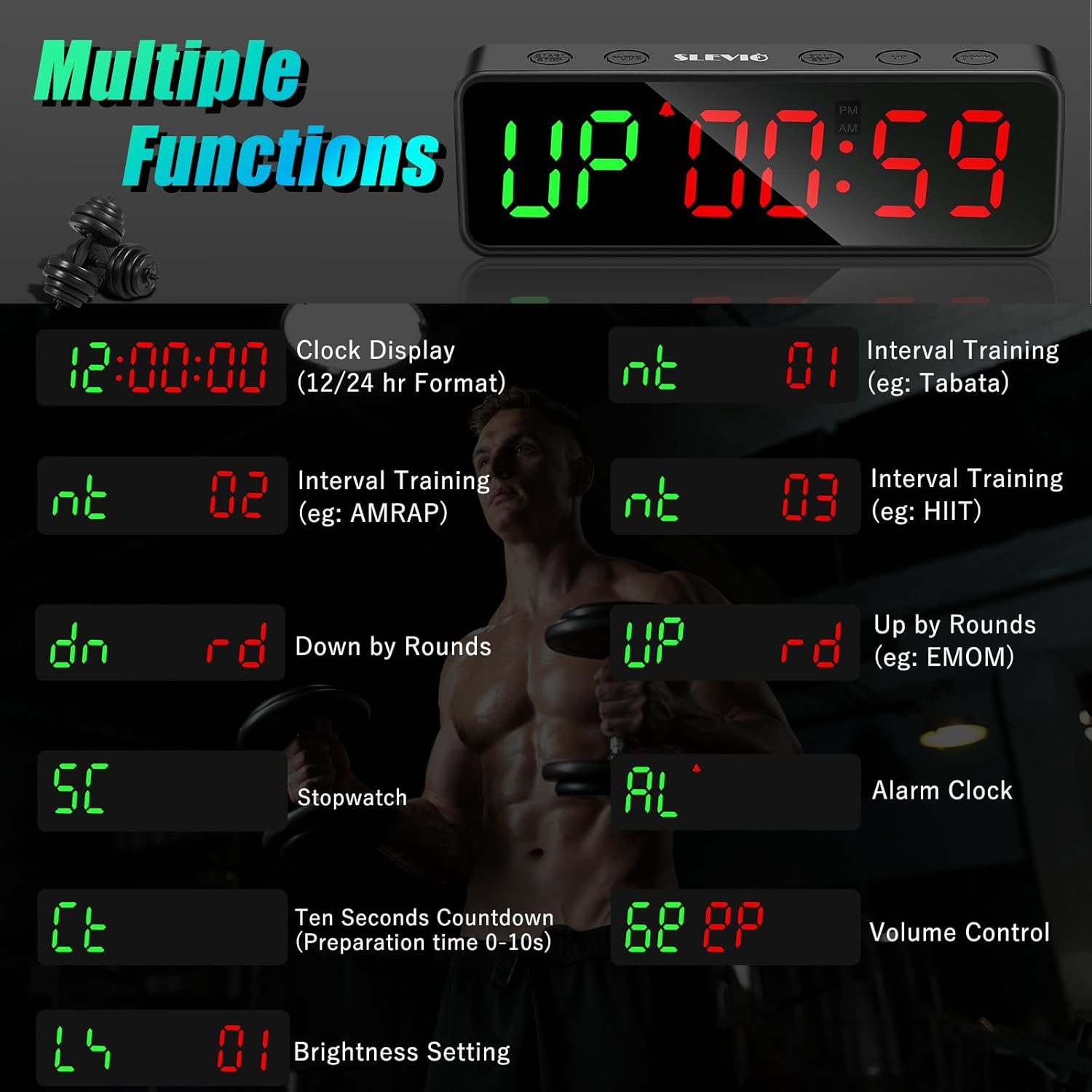
Figure 5: Overview of the timer's multiple functions.
5.1 Clock Display (cL)
Displays the current time in 12-hour or 24-hour format. Use the 'Clock' button on the remote to switch between time display and other functions.
5.2 Custom Interval Timer (nt)
Allows for setting up to 3 custom interval training groups (P1, P2, P3). Each group can be configured for work time, rest time, and number of rounds. Examples include Tabata, CrossFit, and HIIT Training.
5.3 Count Up by Round (UP rd)
This mode counts up time, typically used for EMOM (Every Minute On the Minute) workouts. It tracks rounds automatically.
5.4 Count Down by Round (dn rd)
This mode counts down time, tracking rounds. Useful for structured workouts with set durations.
5.5 Stopwatch (sc)
Functions as a standard stopwatch, measuring elapsed time.
5.6 Alarm Clock (AL)
Set an alarm to sound at a specific time.
5.7 Ten Seconds Countdown (CT)
A preparation countdown from 10 seconds before a timer starts.
5.8 Volume Control (beep)
Adjust the volume of the timer's beeps and alerts to suit your environment.
5.9 Brightness Adjustment (L)
Adjust the display brightness to optimize visibility in different lighting conditions.
6. Remote Control Usage
The included remote control allows for convenient operation of all timer functions from a distance. Buttons on the remote correspond to the functions described above, including mode selection, setting adjustments, and start/stop controls.
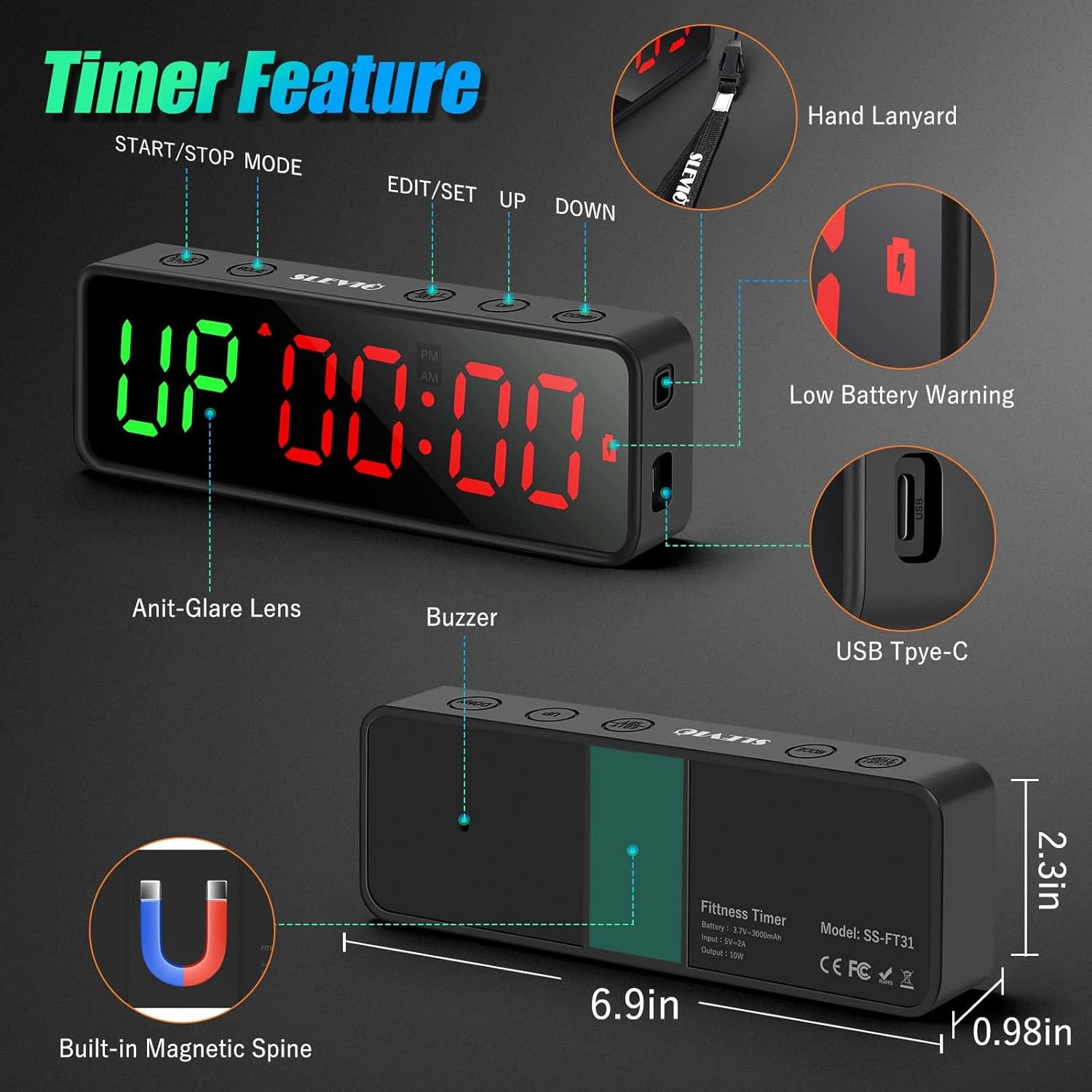
Figure 6: Timer features and remote control layout.
7. Magnetic Mounting
The timer features a strong magnetic spine, allowing it to be securely attached to any metal surface, such as gym racks, treadmills, or other steel equipment. This provides flexibility in placement for optimal viewing during workouts.
Video 1: Demonstration of the timer's magnetic attachment feature.
8. Maintenance
8.1 Cleaning
Wipe the timer with a soft, dry cloth. Do not use abrasive cleaners or solvents, as these may damage the display or casing.
8.2 Storage
When not in use, store the timer in its provided storage pouch in a cool, dry place away from direct sunlight and extreme temperatures.
9. Troubleshooting
- Timer not turning on: Ensure the battery is charged. Connect to the USB-C charging cable.
- Remote control not working: Check if the AAA batteries are correctly installed and have sufficient charge. Ensure there are no obstructions between the remote and the timer.
- Display not visible: Adjust the brightness setting using the remote control. Ensure the anti-glare lens is clean.
- Beep volume too low/high: Adjust the volume setting using the remote control.
10. Specifications
| Feature | Detail |
|---|---|
| Model Number | SS-FT31 |
| Color | Matte Black |
| Material | Plastic |
| Product Dimensions | 7"D x 2.7"W x 1.7"H |
| Item Weight | 10.8 ounces |
| Screen Size | 2.3 Inches |
| Battery | 1 D battery (included) |
| Number of Settings | 14 (referring to modes and sub-settings) |
11. Warranty and Support
The SLEVIO TIMER SS-FT31 Gym Timer Clock comes with a 12-month warranty from the date of purchase. For warranty claims, technical support, or any inquiries, please contact SLEVIO TIMER customer service through the retailer where the product was purchased.