
Introduction
Thank you for choosing the HOMRELEXA Cross Legged Office Chair. This manual provides essential information for the safe assembly, operation, and maintenance of your new chair. Please read these instructions carefully before use and retain them for future reference.
This chair is designed to offer versatile sitting positions, including cross-legged, kneeling, meditation, and standard sitting, promoting comfort and improved circulation during extended periods of use.

Image: The HOMRELEXA Cross Legged Office Chair in black, showcasing its unique design with a separate footrest/kneeling platform and a backrest.
Safety Information
- Weight Capacity: This chair is designed to support a maximum weight of 400 pounds (181 kg). Do not exceed this limit.
- Assembly: Ensure all components are securely fastened before use. Regularly check for loose screws or parts.
- Movement: Use caution when moving the chair, especially on uneven surfaces. The wheels are designed for smooth surfaces.
- Children: Keep children away from the chair during assembly. Do not allow children to play on or around the chair unsupervised.
- Stability: Avoid leaning excessively to one side or standing on the chair, as this may cause instability.
Package Contents
Verify that all components listed below are present in the package. If any parts are missing or damaged, please contact customer support.
- Main Seat Cushion with Gas Lift Mechanism
- Backrest
- Footrest/Kneeling Platform with Wheels
- Chair Base (Star Base with Wheels)
- Assembly Hardware (Screws, Washers)
- Installation Tools (Hex Key)
- Instruction Manual
Assembly Instructions
Assembly typically takes approximately 15 minutes. No additional tools are required beyond what is provided.
- Attach Wheels to Chair Base: Insert the five casters into the holes at the ends of the chair base until they click securely into place.
- Insert Gas Lift: Place the gas lift cylinder into the center hole of the assembled chair base.
- Attach Main Seat: Carefully place the main seat cushion onto the top of the gas lift cylinder. Ensure it is seated firmly.
- Attach Backrest: Secure the backrest to the main seat using the provided screws and hex key. Ensure it is tightly fastened.
- Attach Footrest/Kneeling Platform: Connect the footrest/kneeling platform to the main seat assembly according to the diagram in the included manual, using the designated hardware. Ensure it is stable and can rotate freely.

Image: A side view of the HOMRELEXA Cross Legged Office Chair, illustrating its two-tiered design and back support.
Operating Instructions
The HOMRELEXA Cross Legged Office Chair offers various adjustments and sitting positions for optimal comfort and ergonomic support.
- Height Adjustment: To adjust the seat height, pull the lever located under the main seat upwards while applying or releasing weight from the seat. Release the lever at the desired height. The chair offers 4.7 inches of adjustable height.
- 360° Swivel: Both the main seat and the footrest/kneeling platform can rotate 360 degrees independently, allowing for easy movement and position changes.
- Multiple Sitting Positions: Utilize the two-tiered design to comfortably switch between cross-legged, kneeling, meditation, or standard sitting positions. The lower platform is designed to support your legs in various configurations.

Image: A diagram highlighting the 360-degree swivel, 4.7-inch height adjustment, and smooth, quiet wheels of the chair.

Image: A person sitting in a standard upright position at a desk, demonstrating the chair's use for conventional work.

Image: A person sitting cross-legged in a meditation pose on the chair, illustrating its suitability for various comfortable positions.
Maintenance
- Cleaning: The chair features premium PU leather, which is waterproof and stain-resistant. Wipe clean with a damp cloth and mild soap. Avoid harsh chemicals or abrasive cleaners.
- Casters: Periodically check the wheels for hair or debris that may hinder smooth movement. Clean as needed.
- Hardware: Every few months, inspect all screws and bolts to ensure they remain tight. Retighten if necessary.
- Storage: Store the chair in a dry environment away from direct sunlight to prevent material degradation.

Image: A close-up view of the chair's PU leather material, emphasizing its skin-friendly, breathable, and easy-to-clean characteristics.
Troubleshooting
| Problem | Possible Cause | Solution |
|---|---|---|
| Chair does not adjust height | Gas lift not engaged or faulty. | Ensure the lever is fully pulled up. If the issue persists, contact customer support. |
| Wheels do not roll smoothly | Debris caught in casters or casters are loose. | Remove any debris from the wheels. Ensure casters are fully inserted into the base. |
| Chair feels unstable | Loose hardware or uneven assembly. | Check and tighten all screws and bolts. Ensure the chair is assembled correctly on a flat surface. |
Specifications
| Feature | Detail |
|---|---|
| Brand | HOMRELEXA |
| Model Name | PTY01-B |
| Color | Black |
| Product Dimensions | 37.4"D x 27.6"W x 34"H |
| Maximum Weight Recommendation | 400 Pounds |
| Style | CloudCush Comfort |
| Special Features | Adjustable Height, Back Support, Ergonomic, Foot Rest, Wide Comfy Seat |
| Material | Premium PU Leather, Foam Fill |
| Item Weight | 30.8 pounds |
| Assembly Instructions | Included |
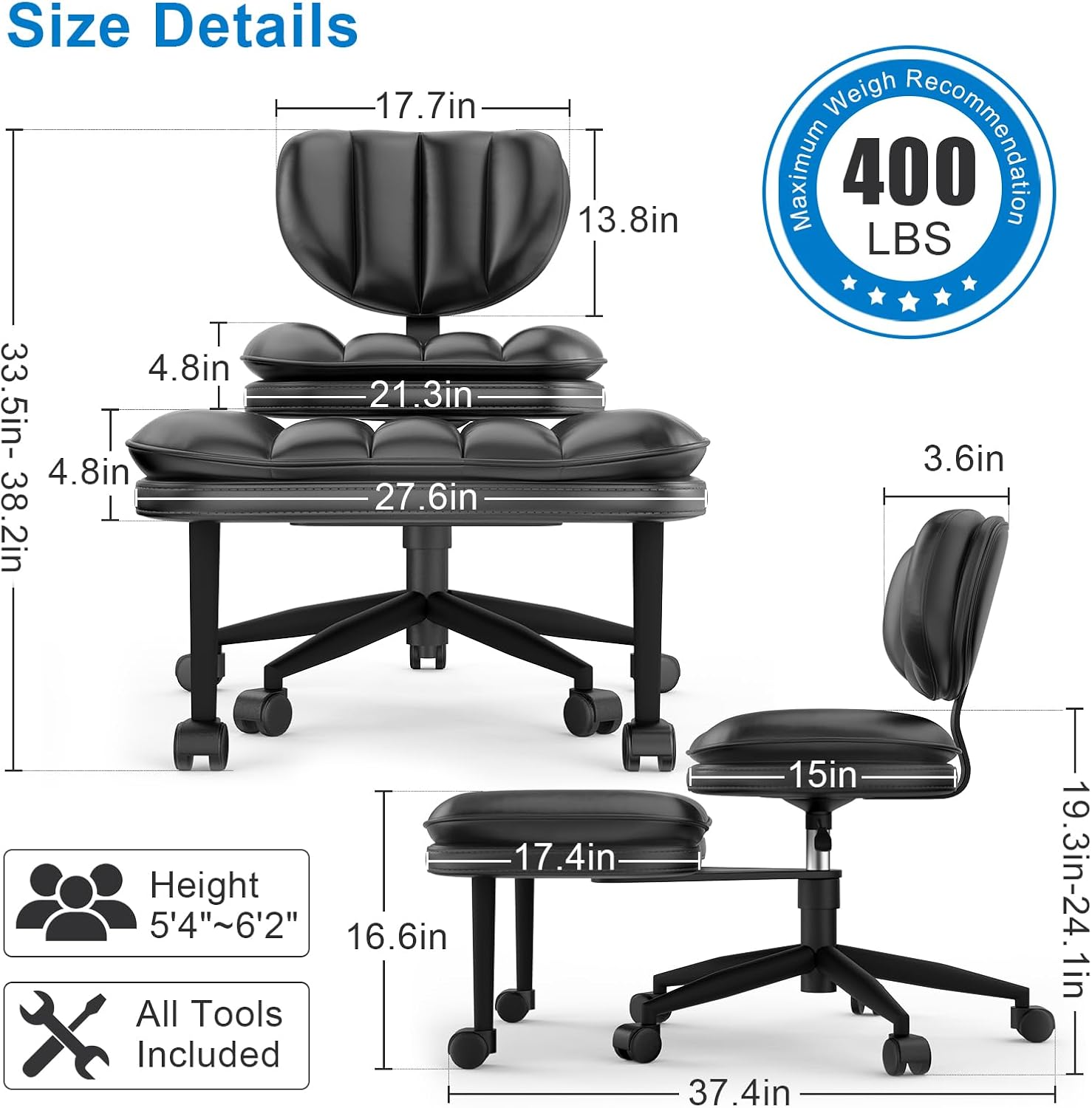
Image: A detailed diagram illustrating the dimensions of the chair and its 400 lbs maximum weight recommendation.
Warranty and Support
This product comes with a manufacturer's warranty. For specific warranty details, please refer to the documentation included with your purchase or visit the official HOMRELEXA website. For any questions, missing parts, or support needs, please contact HOMRELEXA customer service.
Contact Information: Please refer to the contact details provided on the product packaging or the HOMRELEXA official website.


