
1. Introduction
Thank you for choosing the KISLOT Leather Power Recliner Chair, Model 5005. This manual provides essential information for the safe and efficient assembly, operation, and maintenance of your new recliner. Please read all instructions carefully before use and retain this manual for future reference.
Important Safety Information
- Always follow assembly instructions carefully.
- Do not exceed the maximum weight recommendation of 350 pounds (158 kg).
- Keep children and pets away from the recliner's moving parts.
- Ensure the power cord is not pinched or damaged.
- Unplug the recliner from the power outlet before cleaning or maintenance.
2. Package Contents
Before beginning assembly, ensure all parts are present. If any parts are missing or damaged, please contact customer support.
- Recliner Backrest
- Recliner Seat Base with Armrests
- Power Adapter and Cable
- Instruction Manual (this document)
3. Setup & Assembly
Assembly of the KISLOT Power Recliner Chair is designed to be straightforward and typically takes one person approximately 15-30 minutes with no tools required.
- Unpack Components: Carefully remove all parts from the packaging. Place them on a soft, clean surface to prevent damage.
- Attach Backrest: Align the metal brackets on the backrest with the corresponding slots on the seat base. Slide the backrest down firmly until it clicks securely into place.
- Connect Power: Locate the power cable from the recliner and connect it to the power adapter. Plug the power adapter into a standard electrical outlet.
- Test Functionality: Once assembled and plugged in, test the reclining function using the control panel on the side of the chair.

Image: KISLOT Leather Power Recliner Chair, Model 5005, shown in a living room. The chair is brown, made of faux leather, and is partially reclined, demonstrating its comfortable position.
4. Operating Instructions
Your KISLOT Power Recliner is designed for ease of use, offering smooth electric reclining and convenient charging ports.
Power Reclining Function
The recliner features a power motor for smooth and quiet reclining motion. The control panel is located on the side of the chair.
- Recline: Press and hold the recline button (usually indicated by an arrow pointing outwards or a reclining chair icon) to extend the footrest and recline the backrest. Release the button at your desired position. The chair can recline up to 135 degrees.
- Return to Upright: Press and hold the upright button (usually indicated by an arrow pointing inwards or an upright chair icon) to retract the footrest and bring the backrest to its original position.

Image: A detailed view of the recliner's control panel, showing the electric buttons for reclining and the integrated USB and Type-C charging ports.
USB and Type-C Charging Ports
The recliner is equipped with built-in USB and Type-C charging ports, allowing you to conveniently charge your electronic devices while relaxing.
- Locate the USB and Type-C ports on the control panel.
- Plug your device's charging cable into the appropriate port.
- Ensure the recliner is plugged into a power outlet for the charging ports to function.
Video: This video demonstrates the smooth power reclining function and the convenient built-in USB charging ports of the KISLOT Wall Hugger Recliner Chair. It shows a user reclining and plugging in a phone.
Wall Hugger Feature
The wall hugger design allows the recliner to be placed close to a wall, requiring only 3.1 inches of clearance. When reclining, the seat slides forward, maintaining a minimal gap between the backrest and the wall, making it ideal for smaller spaces or RVs.
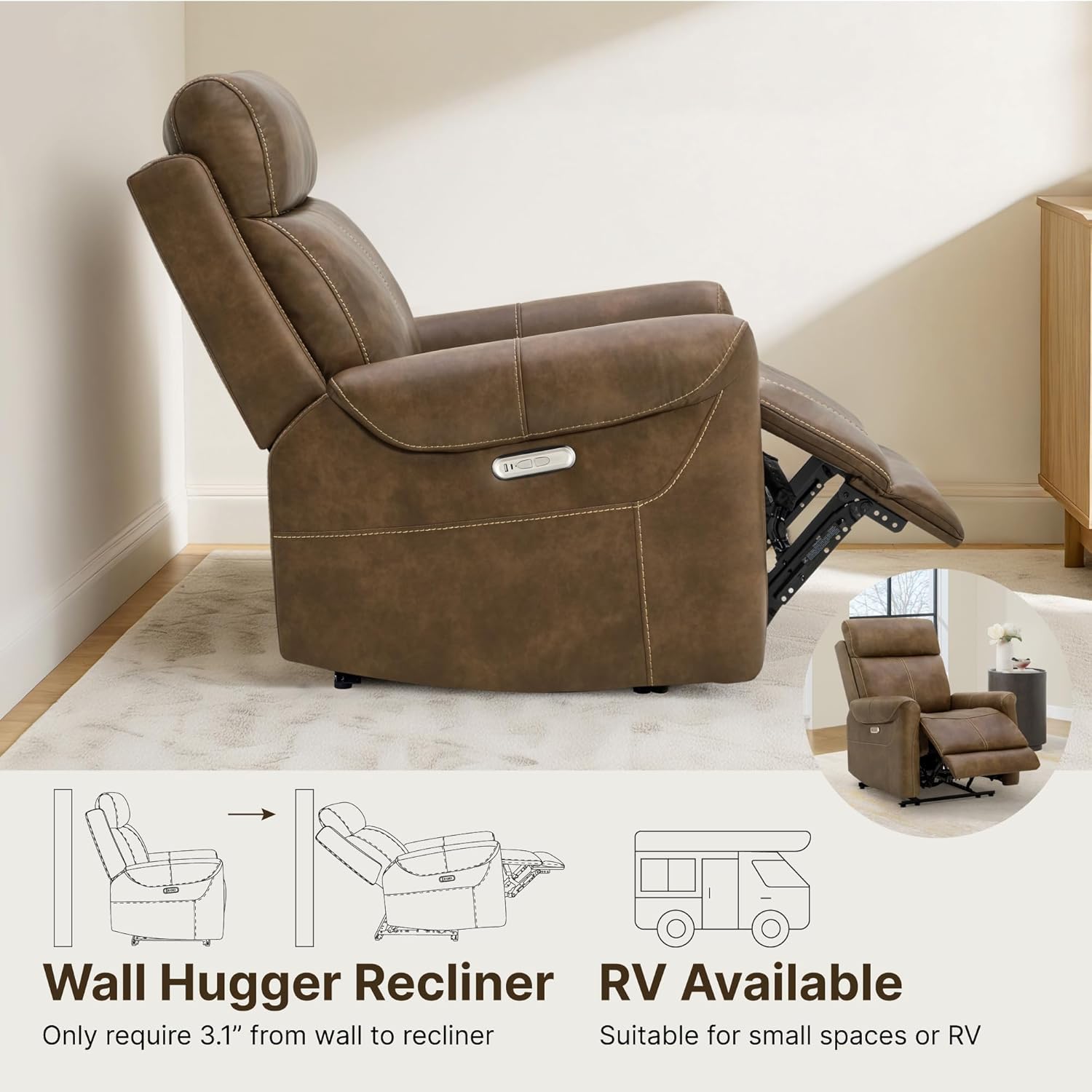
Image: A diagram illustrating the KISLOT recliner's wall hugger capability, showing how it reclines forward to save space, requiring only 3.1 inches from the wall.
5. Maintenance & Care
Proper care will extend the life and appearance of your recliner.
- Cleaning: For general cleaning, spot clean with a damp cloth. Avoid harsh chemicals or abrasive cleaners, as these can damage the faux leather.
- Spills: Blot spills immediately with a clean, dry cloth. Do not rub.
- Dusting: Regularly dust the recliner with a soft, dry cloth.
- Mechanism: Periodically check all bolts and screws to ensure they are tight. Do not lubricate the reclining mechanism unless specifically instructed by customer support.
6. Troubleshooting
If you encounter any issues with your recliner, please refer to the following common problems and solutions:
| Problem | Possible Cause | Solution |
|---|---|---|
| Recliner does not recline. | Not plugged in; power outlet not working; power adapter damaged; loose connection. | Ensure power cord is securely plugged into both the recliner and a working electrical outlet. Check the power adapter for damage. Try a different outlet. |
| Recliner makes unusual noises. | Loose hardware; obstruction in mechanism. | Check all visible bolts and screws and tighten if necessary. Ensure no objects are obstructing the reclining mechanism. |
| USB/Type-C ports not charging. | Recliner not powered; device cable faulty; device not compatible. | Verify the recliner is powered on. Try a different charging cable or device. |
If the problem persists after attempting these solutions, please contact KISLOT customer support for assistance.
7. Specifications
Key specifications for the KISLOT Leather Power Recliner Chair, Model 5005:
| Feature | Detail |
|---|---|
| Brand | KISLOT |
| Model Name | KISLOT Power Recliner Chair |
| Model Number | 5005 |
| Color | Brown |
| Material | Faux Leather, Foam, Wood |
| Product Dimensions (D x W x H) | 38.6"D x 31.5"W x 41.7"H |
| Item Weight | 85.1 Pounds (38.6 kg) |
| Maximum Weight Recommendation | 350 Pounds (158 kg) |
| Reclining Position Count | 3 Position (up to 135 degrees) |
| Included Components | USB Charging Ports, Type-C Charging Ports |
| Assembly Required | Yes (approx. 15-30 minutes) |
| Special Features | Adjustable Backrest, Ergonomic, Foot Rest, Reclining, Space Saving (Wall Hugger) |

Image: A technical diagram illustrating the precise dimensions of the KISLOT Power Recliner Chair, including height, width, depth, and recline measurements.
8. Warranty & Support
For warranty information or technical support, please refer to the purchase documentation or contact KISLOT customer service directly. Keep your proof of purchase for any warranty claims.