
1. Introduction
Welcome to your new ECEVT 11 Cu.Ft Commercial Beverage Refrigerator. This manual provides essential information for the safe and efficient operation of your appliance. Please read it thoroughly before use and retain it for future reference. This refrigerator is designed for commercial use, offering ample storage and display capabilities for various beverages and food items.
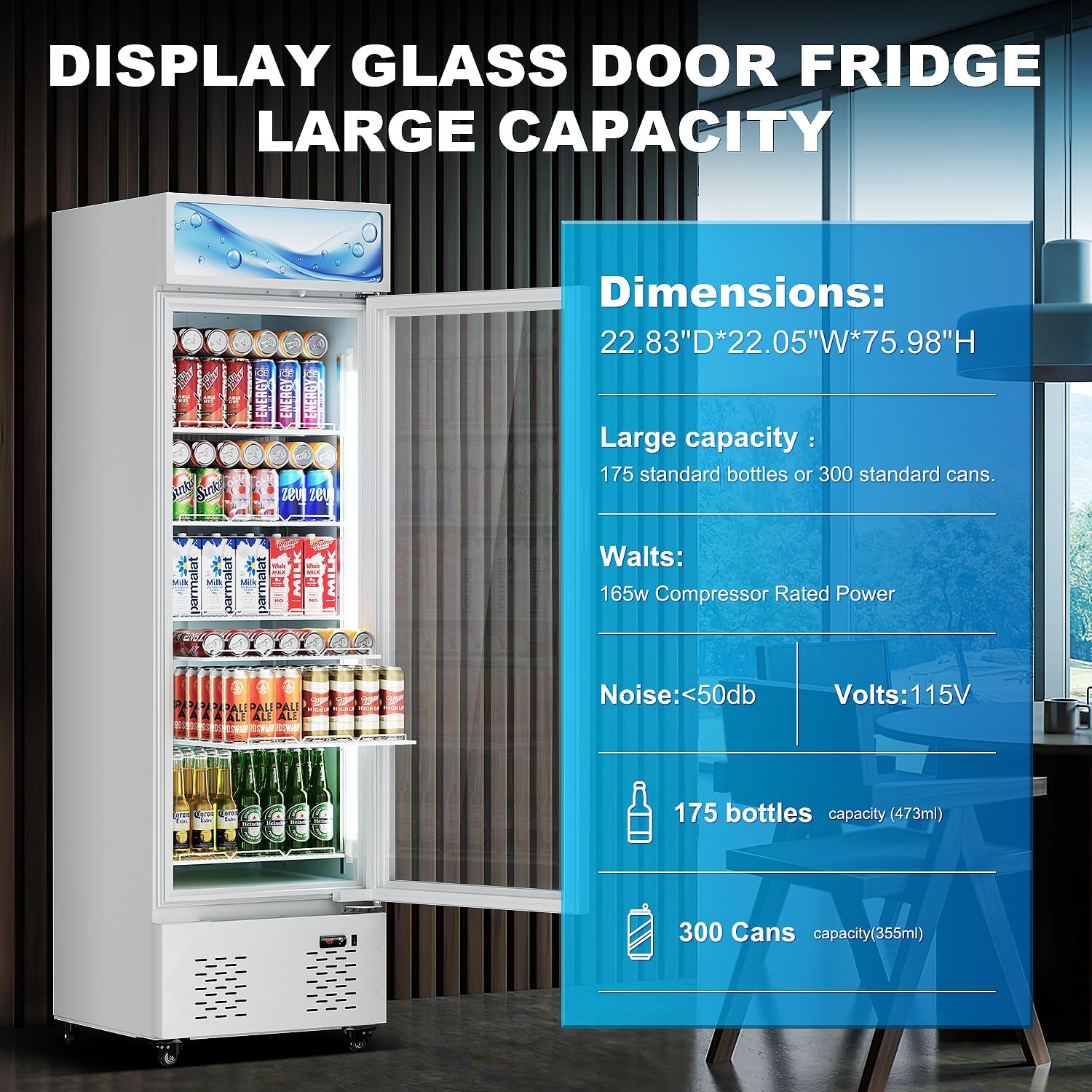
Image: ECEVT 11 Cu.Ft Commercial Beverage Refrigerator, showcasing its capacity and design.
2. Important Safety Information
To reduce the risk of fire, electric shock, or injury when using your refrigerator, follow these basic precautions:
- Read all instructions before using the appliance.
- Do not touch cold surfaces, especially when the appliance is operating.
- Ensure proper grounding. Connect only to properly grounded outlets.
- Do not use extension cords or ungrounded adapters.
- Unplug the refrigerator before cleaning or making any repairs.
- Keep ventilation openings clear of obstruction.
- Do not store explosive substances such as aerosol cans with a flammable propellant in this appliance.
- This appliance is not intended for use by persons (including children) with reduced physical, sensory or mental capabilities, or lack of experience and knowledge, unless they have been given supervision or instruction concerning use of the appliance by a person responsible for their safety.
- Children should be supervised to ensure that they do not play with the appliance.
3. Product Features
The ECEVT 11 Cu.Ft Commercial Beverage Refrigerator is equipped with several features designed for convenience and efficiency:
- Spacious Interior: 11 cubic feet capacity with 5 adjustable shelves for customized storage.
- Digital Temperature Control: User-friendly digital display and controls for temperature adjustment between 34°F to 46°F.
- Secure Locking Door: Features a secure locking door with a set of keys to protect contents.
- Dual-Layer Glass Door: Prevents condensation and maintains stable internal temperatures, enhancing product visibility.
- LED Lighting: Internal LED lighting ensures optimal visibility of displayed products.
- Mobility: Equipped with castor wheels for easy movement and stability.
- Efficient Cooling: Utilizes a compressor cooling method with R290 refrigerant for consistent performance.
- Automatic Defrost: Features an automatic defrost system for hassle-free maintenance.

Image: Overview of key features including digital control, lock, and casters.

Image: Explanation of the double-layer tempered glass door technology.
4. Setup and Installation
4.1. Unpacking
Carefully remove all packaging materials. It is recommended to tear off the plastic protective film from the refrigerator. After unpacking, allow the refrigerator to stand upright for at least 24 hours before connecting it to power. This allows the refrigerant to settle, preventing potential damage to the cooling system.
4.2. Placement
Place the refrigerator on a firm, level surface. Ensure there is adequate space around the unit for proper ventilation (at least 4 inches on the sides and back). Avoid placing the unit in direct sunlight or near heat sources, as this can affect cooling efficiency.
4.3. Shelf Installation and Adjustment
The refrigerator comes with 5 adjustable shelves. To install or adjust a shelf:
- Locate the shelf support clips on the interior side walls.
- Insert the clips into the desired slots at the same height on both sides.
- Slide the shelf onto the installed clips, ensuring it is level and secure.
The adjustable design allows you to customize the interior layout to accommodate various heights of cans or bottles.

Image: Refrigerator dimensions and capacity details.
5. Operating Instructions
5.1. Powering On
After allowing the refrigerator to stand for 24 hours, plug the power cord into a grounded electrical outlet. The unit will begin cooling automatically.
5.2. Temperature Control
The refrigerator features a digital temperature display and controls. You can adjust the internal temperature within the range of 34°F to 46°F (approximately 1°C to 8°C). Refer to the control panel for specific adjustment methods, typically involving up/down arrows or a dial to set the desired temperature.
5.3. Internal Lighting
The internal LED lighting can be controlled via a switch, usually located near the temperature controls. Flip the switch to turn the lights on or off, enhancing the visibility of your products.
5.4. Door Lock
Use the provided keys to lock and unlock the refrigerator door. This feature helps secure your products, especially in commercial or shared environments.
6. Maintenance and Care
6.1. Cleaning
Regular cleaning helps maintain the performance and appearance of your refrigerator. Always unplug the unit before cleaning.
- Interior: Clean the interior with a solution of mild detergent and warm water. Wipe dry with a soft cloth.
- Exterior: Wipe the exterior surfaces with a soft cloth dampened with water and a mild detergent.
- Glass Door: Use a glass cleaner for the dual-layer glass door to ensure maximum visibility.
- Shelves: Remove and wash shelves with warm, soapy water. Rinse thoroughly and dry before returning them to the unit.
6.2. Defrosting
This refrigerator is equipped with an automatic defrost system. This means that frost buildup on the evaporator coils is periodically melted and drained, eliminating the need for manual defrosting under normal operating conditions.
7. Troubleshooting
Before contacting customer service, please refer to the following table for common issues and their potential solutions:
| Problem | Possible Cause | Solution |
|---|---|---|
| Refrigerator does not operate | Not plugged in; Circuit breaker tripped/fuse blown; Power outage. | Ensure plug is secure; Reset circuit breaker/replace fuse; Check power supply. |
| Temperature is not cold enough | Temperature setting too high; Door not closed properly; Excessive door openings; Poor ventilation; Warm items placed inside. | Adjust temperature to a lower setting; Ensure door is sealed; Reduce frequency of door openings; Clear obstructions around unit; Allow warm items to cool before placing inside. |
| Excessive noise | Unit not level; Items vibrating inside; Compressor noise (normal). | Adjust leveling feet; Rearrange items; Compressor noise is normal during operation. |
| Condensation on glass door | High humidity; Frequent door openings. | This is normal in high humidity; Reduce door openings. |
8. Product Specifications
Below are the detailed specifications for the ECEVT 11 Cu.Ft Commercial Beverage Refrigerator (Model E-SW280D):
| Feature | Detail |
|---|---|
| Brand Name | ECEVT |
| Model Number | E-SW280D |
| Capacity | 11 Cubic Feet |
| Item Weight | 179.6 pounds |
| Product Dimensions | 21"D x 22"W x 75"H (53.34 cm D x 55.88 cm W x 190.5 cm H) |
| Installation Type | Freestanding |
| Form Factor | Stand Alone |
| Special Features | Adjustable Shelves |
| Color | White |
| Voltage | 115 Volts |
| Defrost System | Automatic |
| Door Hinges | Right |
| Door Material Type | Glass |
| Number of Shelves | 5 |
| Number Of Doors | 1 |
9. Warranty and Support
For warranty information and customer support, please refer to the documentation included with your product or contact ECEVT customer service directly. Keep your purchase receipt and model number (E-SW280D) handy when seeking support.
For further assistance, please visit the ECEVT Store on Amazon.