
1. Introduction
The Merrytek MC090SE is an advanced 5.8GHz microwave motion sensor designed for automatic light control in various indoor environments. It detects motion through thin walls, glass, and plastic, offering reliable and precise control for your lighting systems. This manual provides essential information for safe installation, configuration, and operation of your MC090SE sensor.

Figure 1: Merrytek MC090SE Microwave Motion Sensor. This image shows the compact design of the sensor, highlighting its suitability for integration into various lighting setups.
- Innovative 5.8GHz Microwave Technology: Detects motion through thin walls, glass, and plastic for reliable indoor light control.
- Flexible Adjustment Options: Features an adjustable daylight sensor (2-50 Lux or disabled) and variable hold time (5 seconds to 30 minutes) for optimal lighting control.
- Powerful & Versatile: Compatible with various lamp types, supporting 400W for LED/ESL and 800W for incandescent/resistive loads. Operates on 220-240V AC.
- Wide Detection Area: Offers a detection range of up to 12x7m and an angle of 150° (wall mount) or 360° (ceiling mount).
- Compact & Energy-Efficient: Compact design (72x36x24.5mm) for easy integration, with low power consumption (1W operating, 0.5W standby).
2. Safety Instructions
Please read these safety instructions carefully before installation and operation. Failure to follow these instructions may result in electric shock, fire, or other hazards.
- Electrical Safety: Installation must be performed by a qualified electrician in accordance with all local and national electrical codes.
- Power Disconnection: Always disconnect power at the circuit breaker before installing, servicing, or cleaning the device.
- Voltage: Ensure the supply voltage (220-240V AC, 50Hz) matches the sensor's requirements.
- Indoor Use Only: This device is designed for indoor use in dry locations. Do not expose to moisture or extreme temperatures outside the specified range.
- Load Capacity: Do not exceed the maximum load capacity of 400W for LED/ESL or 800W for incandescent/resistive loads.
- Mounting: Mount the sensor securely to prevent accidental dislodgement.
3. Product Overview
3.1 Components

Figure 2: Front view of the MC090SE sensor. This image displays the DIP switches (1-8) for configuration and the terminal block for electrical connections.

Figure 3: Back view of the MC090SE sensor. This view shows the product label with model number, electrical ratings, and compliance marks (CE, TUV).
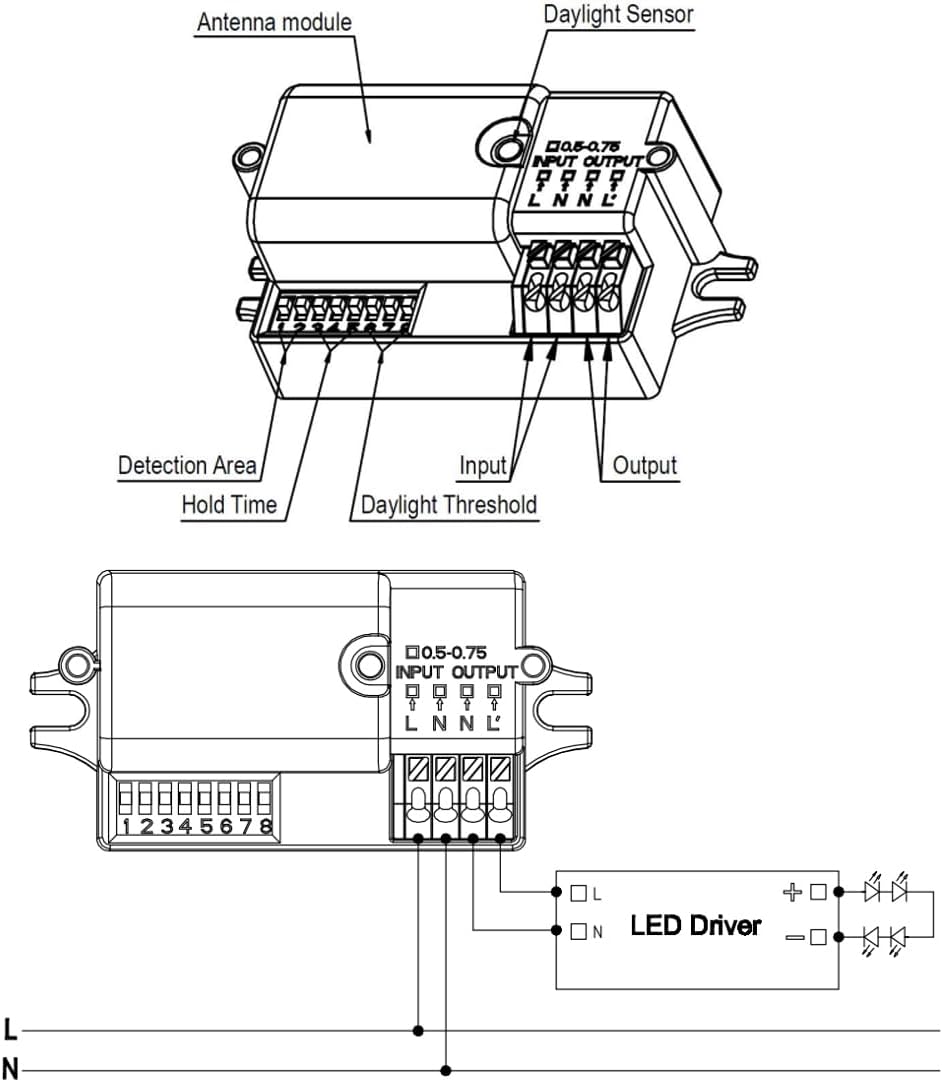
Figure 4: Labeled diagram of the MC090SE components and basic wiring. This diagram identifies the antenna module, daylight sensor, detection area DIP switches, hold time DIP switches, daylight threshold DIP switches, input terminals, and output terminals.
3.2 Package Contents
- 1x Merrytek MC090SE Microwave Motion Sensor (White)
4. Specifications
| Type | Motion Sensor |
| Technology | High-frequency 5.8GHz |
| Input Voltage | 220-240V AC, 50Hz |
| Switching Capacity (LED/ESL) | 400W |
| Switching Capacity (Incandescent/Resistive) | 800W |
| Power Consumption (Operating) | 1W |
| Power Consumption (Standby) | 0.5W |
| Detection Range (Diameter x Height) | 12m x 7m |
| Detection Angle (Wall Mount) | 150° |
| Detection Angle (Ceiling Mount) | 360° |
| Adjustable Daylight Sensor | 2lux / 10lux / 25lux / 50lux / Disable |
| Adjustable Hold Time | 5s / 30s / 1min / 3min / 5min / 10min / 20min / 30min |
| Temperature Range | -20°C to +60°C |
| Dimensions (L x W x H) | 72 x 36 x 24.5 mm |
| Weight | 10 g |
| Color | White |
| Model Number | MC090SE |
| UPC | 754708493304 |
5. Setup and Installation
The MC090SE sensor is designed for easy integration into existing lighting installations due to its compact size. Follow these steps for proper setup:
5.1 Wiring Diagram
Figure 5: Detailed wiring diagram for the MC090SE sensor. Connect the Live (L) and Neutral (N) input wires to the sensor's input terminals. Connect the sensor's output terminals (L' and N) to your LED driver or light fixture. Ensure all connections are secure.
- Input: Connect the main power supply (220-240V AC) to the 'L' (Live) and 'N' (Neutral) input terminals of the sensor.
- Output: Connect the load (e.g., LED driver, light fixture) to the 'L'' (Switched Live) and 'N' (Neutral) output terminals of the sensor.
- Grounding: Ensure proper grounding according to local electrical codes.
5.2 Mounting
The sensor can be mounted on walls or ceilings. Its compact dimensions (72x36x24.5mm) allow for discreet installation. Ensure the mounting location provides the desired detection coverage and is free from obstructions that could interfere with microwave signals.
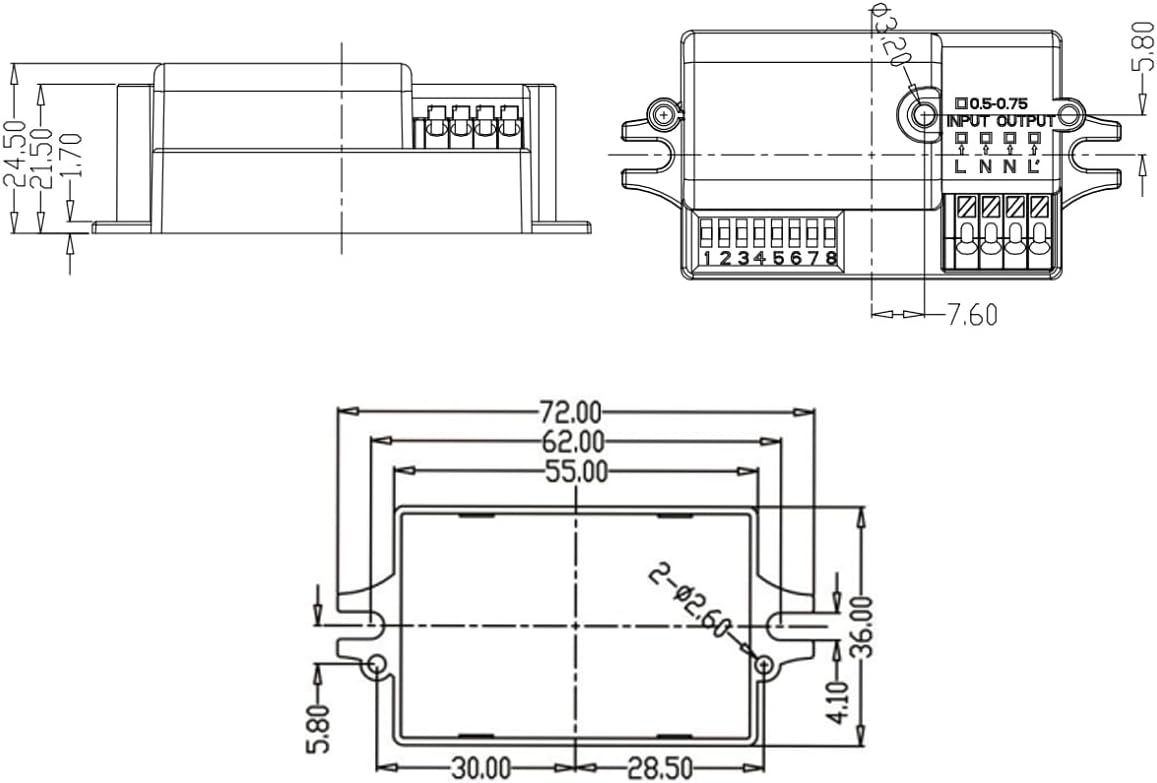
Figure 6: Technical drawing showing the dimensions of the MC090SE sensor in millimeters. This diagram is useful for planning installation and ensuring proper fit.
6. Operating Instructions
The MC090SE sensor's operational parameters are configured using the DIP switches located on the unit. Refer to Figure 2 for the location of these switches.
6.1 DIP Switch Settings
The DIP switches (1-8) control the Detection Area, Hold Time, and Daylight Sensor threshold. 'ON' typically means the switch is in the up position, and 'OFF' is in the down position.
6.1.1 Detection Area (DIP Switches 1 & 2)
| DIP 1 | DIP 2 | Detection Area |
|---|---|---|
| ON | ON | 100% |
| ON | OFF | 75% |
| OFF | ON | 50% |
| OFF | OFF | 25% |
6.1.2 Hold Time (DIP Switches 3, 4 & 5)
| DIP 3 | DIP 4 | DIP 5 | Hold Time |
|---|---|---|---|
| ON | ON | ON | 5 seconds |
| ON | ON | OFF | 30 seconds |
| ON | OFF | ON | 1 minute |
| ON | OFF | OFF | 3 minutes |
| OFF | ON | ON | 5 minutes |
| OFF | ON | OFF | 10 minutes |
| OFF | OFF | ON | 20 minutes |
| OFF | OFF | OFF | 30 minutes |
6.1.3 Daylight Sensor (DIP Switches 6, 7 & 8)
| DIP 6 | DIP 7 | DIP 8 | Daylight Threshold |
|---|---|---|---|
| ON | ON | ON | 2 lux |
| ON | ON | OFF | 10 lux |
| ON | OFF | ON | 25 lux |
| ON | OFF | OFF | 50 lux |
| OFF | ON | ON | Disable (Always ON with motion) |
7. Maintenance
The Merrytek MC090SE motion sensor requires minimal maintenance.
- Cleaning: Gently wipe the sensor's exterior with a soft, dry cloth. Do not use abrasive cleaners or solvents.
- Inspection: Periodically check the wiring connections to ensure they are secure.
- Obstructions: Ensure the detection area remains clear of new obstructions that could block microwave signals.
8. Troubleshooting
If you encounter issues with your MC090SE sensor, refer to the following common problems and solutions:
- Light does not turn ON with motion:
- Check power supply to the sensor.
- Verify wiring connections are correct and secure.
- Adjust Detection Area DIP switches to a higher sensitivity.
- Check Daylight Sensor setting; if set too high, the light may not activate in ambient light. Set to 'Disable' for testing.
- Ensure no obstructions are blocking the sensor's field of view.
- Light stays ON constantly:
- Check Hold Time setting; ensure it's not set to a very long duration.
- Ensure there is no continuous motion within the detection area.
- Reduce Detection Area sensitivity.
- Verify wiring; incorrect wiring can cause the light to remain on.
- Light turns ON/OFF too frequently (false triggers):
- Reduce Detection Area sensitivity.
- Ensure the sensor is not detecting motion from outside the intended area (e.g., through thin walls).
- Check for vibrations or air currents that might be interpreted as motion.
9. Warranty and Support
For warranty information or technical support regarding your Merrytek MC090SE Microwave Motion Sensor, please contact the retailer or the brand 'Bolwins' directly. Keep your purchase receipt as proof of purchase.