
1. Introduction
This manual provides instructions for the safe and effective use of your I-THERA-U Cold Laser Therapy Device, 2nd Generation. This handheld device combines 650nm red light and 808nm near-infrared light to support muscle and joint comfort. It is designed for use on both humans and pets.
Please read this manual thoroughly before operating the device and retain it for future reference.
2. Important Safety Information
WARNING: Always wear the provided safety goggles when operating the device to protect your eyes from direct laser exposure. The 808nm infrared light is invisible to the human eye but can still cause harm.
Statements regarding dietary supplements have not been evaluated by the FDA and are not intended to diagnose, treat, cure, or prevent any disease or health condition.
Consult a healthcare professional before using this device if you have any pre-existing medical conditions, are pregnant, or are taking medications. Do not use on open wounds or cancerous areas.
Use only the provided adapter and cable for charging. Other adapters or cables may not work properly and could damage the device or pose a safety risk.
3. Product Overview
The I-THERA-U Cold Laser Therapy Device is a portable unit featuring a combination of red and near-infrared light emitters, an intuitive control panel, and a rechargeable battery.
3.1 Components
- Therapy Device: Main handheld unit with light emitters.
- Safety Goggles: For eye protection during use.
- USB-C Charging Cable: For recharging the device.
- Tripod: For hands-free operation and adjustable positioning.
- User Manual: This document.
3.2 Device Features
The device incorporates 14 red lights (650nm) and 4 near-infrared lights (808nm). It features a built-in cooling fan for improved performance and extended service life.
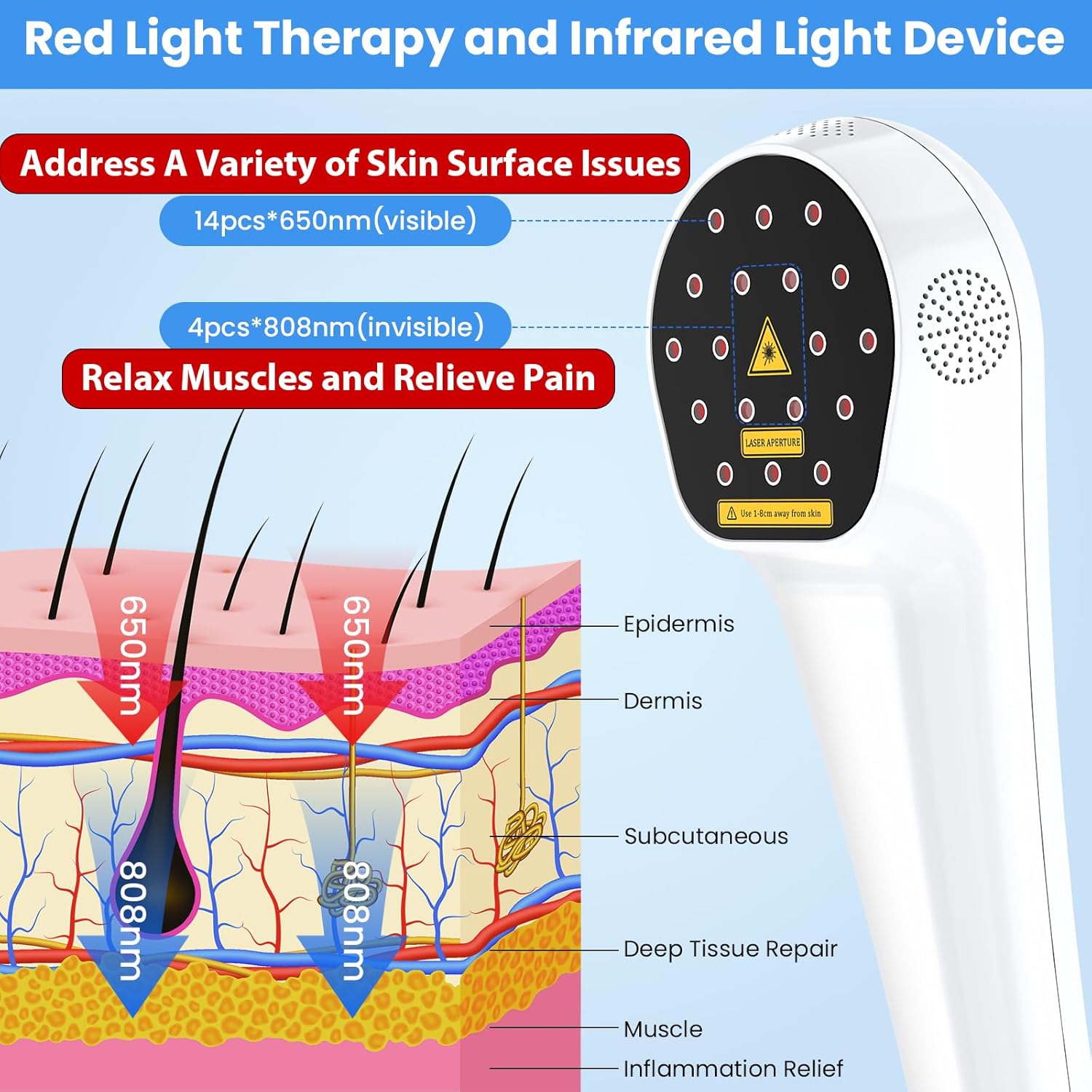
Image 3.2.1: Illustration of red light (650nm) penetrating the epidermis and dermis, and infrared light (808nm) penetrating deeper into subcutaneous tissue and muscle.
3.3 Control Panel
The device features an LED display screen and easy-to-use buttons for power, timer, and intensity adjustments.
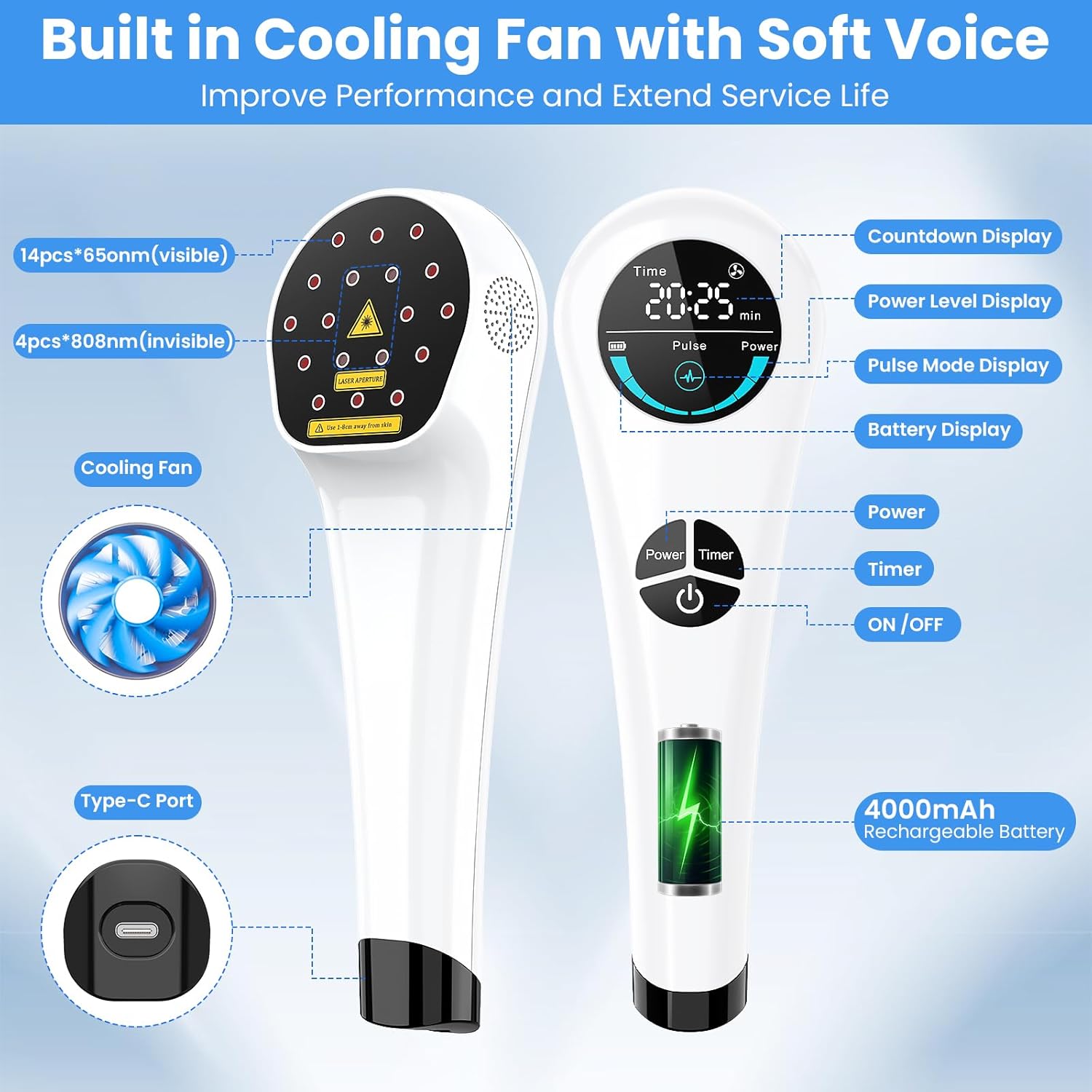
Image 3.3.1: Detailed view of the device's control panel and key components.
- ON/OFF Button: Press and hold for 3 seconds to turn the device on or off.
- Timer Button: Adjusts the treatment duration (5, 10, 15, 20, 25, 30 minutes).
- Power Button: Adjusts the light intensity level (P1-P4) and activates pulse mode.
- LED Display: Shows remaining time, power level, pulse mode status, and battery level.
4. Setup
4.1 Charging the Device
- Connect the provided USB-C charging cable to the device's Type-C port.
- Connect the other end of the cable to a suitable USB power adapter (not included).
- The battery indicator on the LED display will show charging status. Charge fully before first use.
4.2 Attaching the Tripod
- Screw the device onto the tripod mount.
- Adjust the tripod legs and height to achieve the desired angle and stability for hands-free use.
5. Operating Instructions
Follow these steps for safe and effective operation of your therapy device.
5.1 Basic Operation
- Wear Safety Goggles: Always put on the provided safety goggles before turning on the device.
- Power On: Press and hold the ON/OFF button for 3 seconds to turn on the device. The LED display will illuminate.
- Set Timer: Press the Timer button to cycle through available treatment durations (5, 10, 15, 20, 25, 30 minutes).
- Adjust Power Level: Press the Power button to select one of the four intensity levels (P1-P4). The green horseshoe indicator on the display will show the selected power level.
- Activate Pulse Mode: Continue pressing the Power button after P4 to activate pulse mode. An indicator for pulse mode will appear on the display.
- Begin Treatment: Position the device over the target area, maintaining a distance of 0.5-1.2 inches from the skin.
- Power Off: The device will automatically turn off after the set time. To manually turn off, press and hold the ON/OFF button for 3 seconds.
5.2 Visual Demonstration
For a visual guide on operating the device and utilizing its features, please watch the official product video below.
Video 5.2.1: Official demonstration of the I-THERA-U Therapy Wand, including setup, controls, and usage examples. Duration: 1 minute 46 seconds.
6. Usage Guidelines
6.1 Recommended Treatment
- Duration: 15-30 minutes per session.
- Frequency: 2-3 times per day.
- The treatment time and frequency can be adjusted based on individual needs and the specific condition being addressed.
6.2 Application Areas (Humans)
The device can be used on various body parts to help alleviate muscle and joint discomfort.

Image 6.2.1: Examples of human application areas for pain relief, including ankle, knee, elbow, shoulder, neck, and waist.
- Neck
- Shoulder
- Elbow
- Hand
- Ankle
- Knee
- Lower Back
6.3 Application Areas (Pets)
This device is also suitable for use on pets, such as dogs, cats, and horses, to support their mobility and comfort.

Image 6.3.1: The device being used on a dog, illustrating its application for pets.
When using on pets, ensure the animal is calm and comfortable. Maintain the recommended distance from the skin and monitor their reaction during treatment.
7. Maintenance
- Cleaning: Wipe the device with a soft, dry cloth after each use. Do not use abrasive cleaners or immerse the device in water.
- Storage: Store the device in a cool, dry place away from direct sunlight and extreme temperatures.
- Battery Care: To prolong battery life, avoid fully discharging the device frequently. Charge the device regularly, even if not in use for extended periods.
8. Troubleshooting
| Problem | Possible Cause | Solution |
|---|---|---|
| Device does not turn on. | Low battery or device not charged. | Charge the device fully using the provided USB-C cable. Ensure the ON/OFF button is pressed and held for 3 seconds. |
| Lights are not visible. | 808nm infrared lights are invisible to the human eye. | This is normal for the infrared lights. The 650nm red lights should be visible. Ensure the device is powered on and not in standby. |
| Device stops during treatment. | Treatment timer completed or low battery. | Check the timer setting. If the timer has not expired, check the battery level and recharge if necessary. |
9. Specifications
| Feature | Detail |
|---|---|
| Product Dimensions | 9.8 x 2.5 x 2.13 inches |
| Weight | 10.4 ounces |
| Battery | 1 Lithium Ion battery (included), 4000mAh Rechargeable |
| Red Light Wavelength | 650nm (14 LEDs) |
| Near-Infrared Light Wavelength | 808nm (4 LEDs) |
| Timer Settings | 5, 10, 15, 20, 25, 30 minutes |
| Intensity Levels | 4 levels + Pulse Mode |
| Charging Port | Type-C |
10. Warranty and Support
For warranty information and customer support, please refer to the documentation included with your product or contact I-THERA-U customer service directly. Keep your purchase receipt as proof of purchase.
Manufacturer: I-THERA-U