
1. Introduction
Thank you for choosing the PZDO Gaming Chair Model PZ001. This manual provides essential information for the safe and efficient use of your new chair. Please read it thoroughly before assembly and operation, and retain it for future reference.

Image 1.1: The PZDO Gaming Chair Model PZ001, showcasing its design with the footrest extended.
2. Safety Information
Adhere to the following safety guidelines to prevent injury and ensure the longevity of your chair:
- Weight Capacity: The chair is designed to support a maximum weight of 350 lbs (159 kg). For optimal comfort and product lifespan, a recommended user weight of 220 lbs or less is suggested.
- Environmental Factors: Keep the chair away from direct heat sources, open flames, and sharp objects to prevent damage to the fabric and structural components.
- Stability: Ensure all components are securely fastened before use. Avoid standing on the chair or using it for purposes other than sitting.
- Maintenance: Regularly inspect the chair for loose parts or damage. Do not use the product if any defects, malfunctions, or missing parts are identified. Contact customer service immediately for assistance.
3. Package Contents
Before beginning assembly, verify that all components are present and undamaged. While specific part names may vary, a typical package includes:
- Backrest
- Seat Cushion
- Armrests (2)
- Base with Casters
- Gas Lift Cylinder
- Mechanism Plate
- Lumbar Support Pillow
- Headrest Pillow
- Footrest Assembly
- Hardware Kit (screws, washers, Allen wrench)
4. Assembly Instructions
Follow these general steps for assembling your PZDO Gaming Chair. It is recommended to assemble the chair on a soft, clean surface to prevent damage.
- Attach Casters to Base: Insert the casters into the holes on the star base until they click into place.
- Insert Gas Lift: Place the gas lift cylinder into the center hole of the star base.
- Attach Mechanism Plate: Secure the mechanism plate to the underside of the seat cushion using the provided screws. Ensure the front of the mechanism faces the front of the seat.
- Attach Armrests: Fasten the armrests to the seat cushion using the designated screws.
- Connect Seat to Backrest: Attach the backrest to the seat cushion and armrests, securing with screws.
- Place Seat Assembly onto Gas Lift: Carefully place the assembled seat and backrest onto the gas lift cylinder.
- Install Footrest: Attach the footrest assembly to the designated slots under the seat.
- Attach Pillows: Secure the lumbar support and headrest pillows to the backrest using their straps.

Image 4.1: The PZDO Gaming Chair integrated into a workspace, demonstrating its functional design.
5. Operating Instructions
Your PZDO Gaming Chair offers multiple adjustment features for personalized comfort:
- Seat Height Adjustment: Use the lever located under the seat on the right side to raise or lower the seat. Pull the lever up while seated to lower, or pull up while standing to raise.
- Recline Function: The chair features three recline modes: 90° for focused work, 120° for relaxed viewing, and 135° for deep recline. Use the recline lever on the side of the chair to adjust the backrest angle.
- Extendable Footrest: Pull out the hidden footrest from beneath the seat for additional leg support when reclining. Push it back in when not in use.
- Adjustable Armrests: The four-way adjustable armrests can be moved up/down, forward/backward, inward/outward, and rotated to suit your preference.
- 360-Degree Swivel: The chair base allows for full 360-degree rotation.
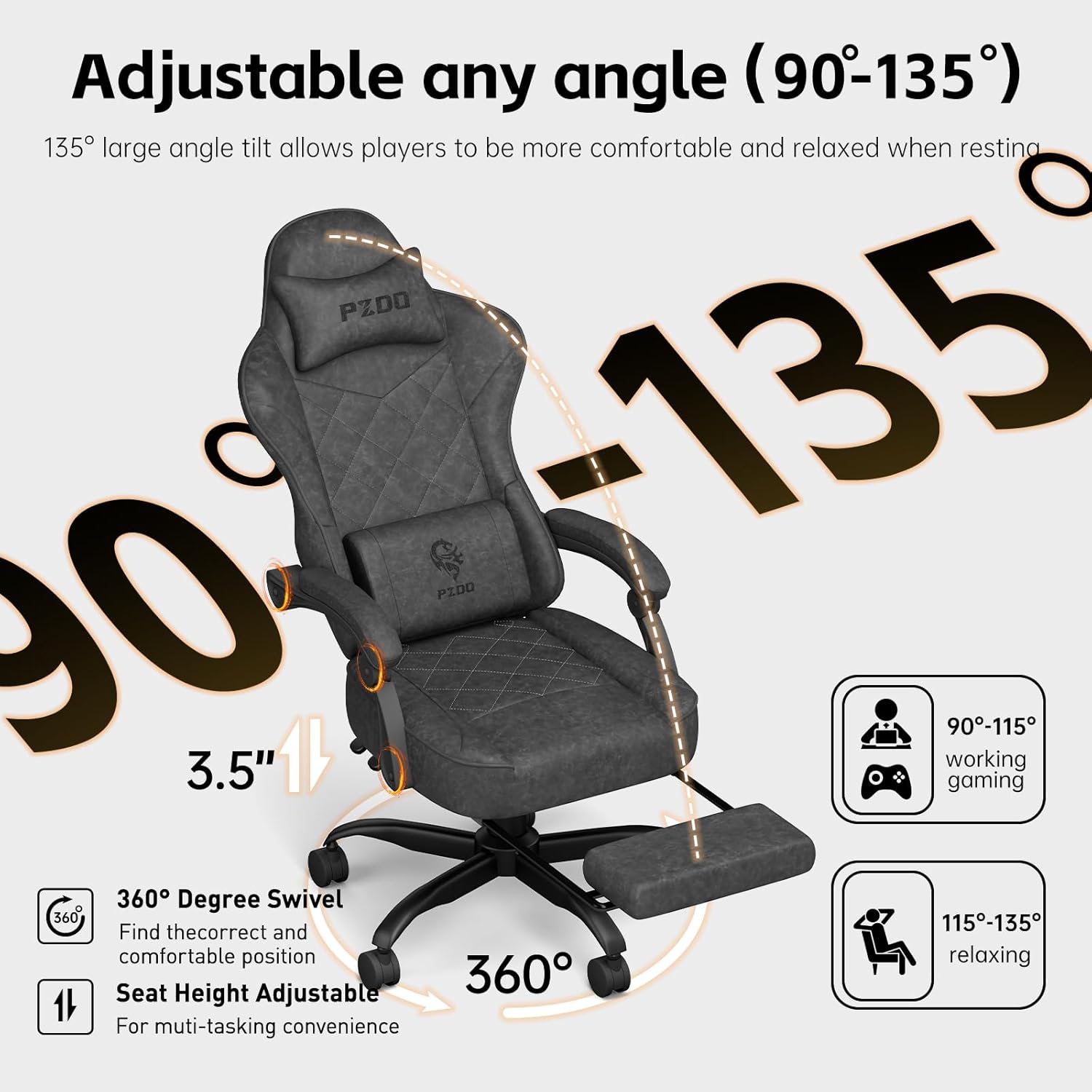
Image 5.1: Visual guide to the chair's adjustable angles and features, including recline, swivel, and height.

Image 5.2: Illustration of the chair's ergonomic adaptive design, highlighting the S-shaped backrest for spinal support.
6. Maintenance
Proper care will extend the life and appearance of your gaming chair:
- Cleaning Fabric: The chair is made of a high-tech micron-sized breathable fabric. For general cleaning, gently wipe with a damp cloth and mild soap. Avoid harsh chemicals or abrasive cleaners. Allow to air dry completely.
- Caster Care: Periodically check casters for accumulated dust or hair and clean as needed to ensure smooth movement.
- Hardware Check: Every few months, inspect all screws and bolts to ensure they are tight. Retighten if necessary.
- Avoid Direct Sunlight: Prolonged exposure to direct sunlight can cause fabric fading.

Image 6.1: Detailed view of the chair's five-layer cushion construction, emphasizing breathable fabric and spring support.
7. Troubleshooting
If you encounter issues with your PZDO Gaming Chair, refer to the following common problems and solutions:
- Chair Sinks or Loses Height: This indicates a potential issue with the gas lift cylinder. Ensure the height adjustment lever is not stuck. If the problem persists, the gas lift may need replacement.
- Squeaking Noises: Check for loose screws, especially where the backrest connects to the seat and the mechanism plate to the seat. Lubricate moving parts if necessary.
- Difficulty Rolling: Inspect casters for debris (hair, dust) and clean them thoroughly. Ensure casters are properly inserted into the base.
- Unstable Chair: Verify that all screws are tightened and the base is correctly assembled. Ensure the chair is on a flat, even surface.
For any persistent issues, product defects, malfunctions, or missing parts, please stop using the product immediately and contact PZDO customer service for assistance.
8. Specifications
| Brand | PZDO |
| Model Name | PZ001 |
| Product Dimensions (D x W x H) | 22.04" x 21.28" x 53.16" |
| Seat Depth | 21.26 inches |
| Back Style | Contoured Back (S-shaped) |
| Special Feature | Adjustable Backrest, Footrest, Lumbar Support, Headrest |
| Reclining Position Count | 3 (90°, 120°, 135°) |
| Tilting | Yes |
| Fill Material | Memory Foam, Natural Soft Latex, High Elasticity Spring |
| Maximum Weight Capacity | 350 lbs (159 kg) |
| Recommended User Height | 157cm to 196cm (approx. 5'2" to 6'5") |
| Room Type | Office, Gaming Room, Study Room, Living Room |
| Included Components | Casters, Lumbar Pillow, Headrest Pillow, Footrest |

Image 8.1: Detailed dimensions and recommended usage parameters for the PZDO Gaming Chair.
9. Customer Support
For any inquiries, technical assistance, or warranty claims, please contact PZDO customer service through the retailer where the product was purchased or visit the official PZDO website for support contact information. Please have your model number (PZ001) and purchase details ready when contacting support.
