
KHUKHU 66420027
User Manual for KHUKHU 100000 mAh Solar Power Bank
Model: 66420027
Product Overview
The KHUKHU 100000 mAh Solar Power Bank is a high-capacity portable charger designed for outdoor enthusiasts and daily use. It features wireless charging, multiple USB output ports, and a powerful LED flashlight with various modes. Its robust and durable design makes it suitable for various harsh environments.

Image: Front, back, and side views of the KHUKHU Solar Power Bank, highlighting its compact design and solar panel.
Key Features
- High Capacity: 100000 mAh battery for multiple device charges.
- Wireless Charging: Compatible with most Qi-enabled devices.
- Multiple Outputs: Four USB output ports (max. 5V/2.1A) allowing simultaneous charging of up to 5 devices (4 wired + 1 wireless).
- Integrated LED Flashlight: Features 3 high-brightness LED lights with Strong, Light, Flash, and SOS modes for emergency situations.
- Dual Charging Input: Can be recharged via solar power or USB cable.
- Durable Design: Dustproof, shockproof, and waterproof for outdoor use.
Setup and First Use
Charging the Power Bank
Before first use, it is recommended to fully charge the power bank using a USB cable. While solar charging is available, it is primarily for emergency use due to varying solar intensity and conversion rates.
- Connect the provided USB cable to the power bank's input port (Micro USB or Type-C, if available).
- Connect the other end of the USB cable to a USB wall adapter (not included) or a computer's USB port.
- The indicator lights will illuminate to show charging progress. All lights will be solid when fully charged.
Solar Charging
For solar charging, place the power bank in direct sunlight. The solar panel will convert sunlight into electricity to charge the internal battery. This method is slower than USB charging and is best used for maintaining charge or in emergency situations when no other power source is available.
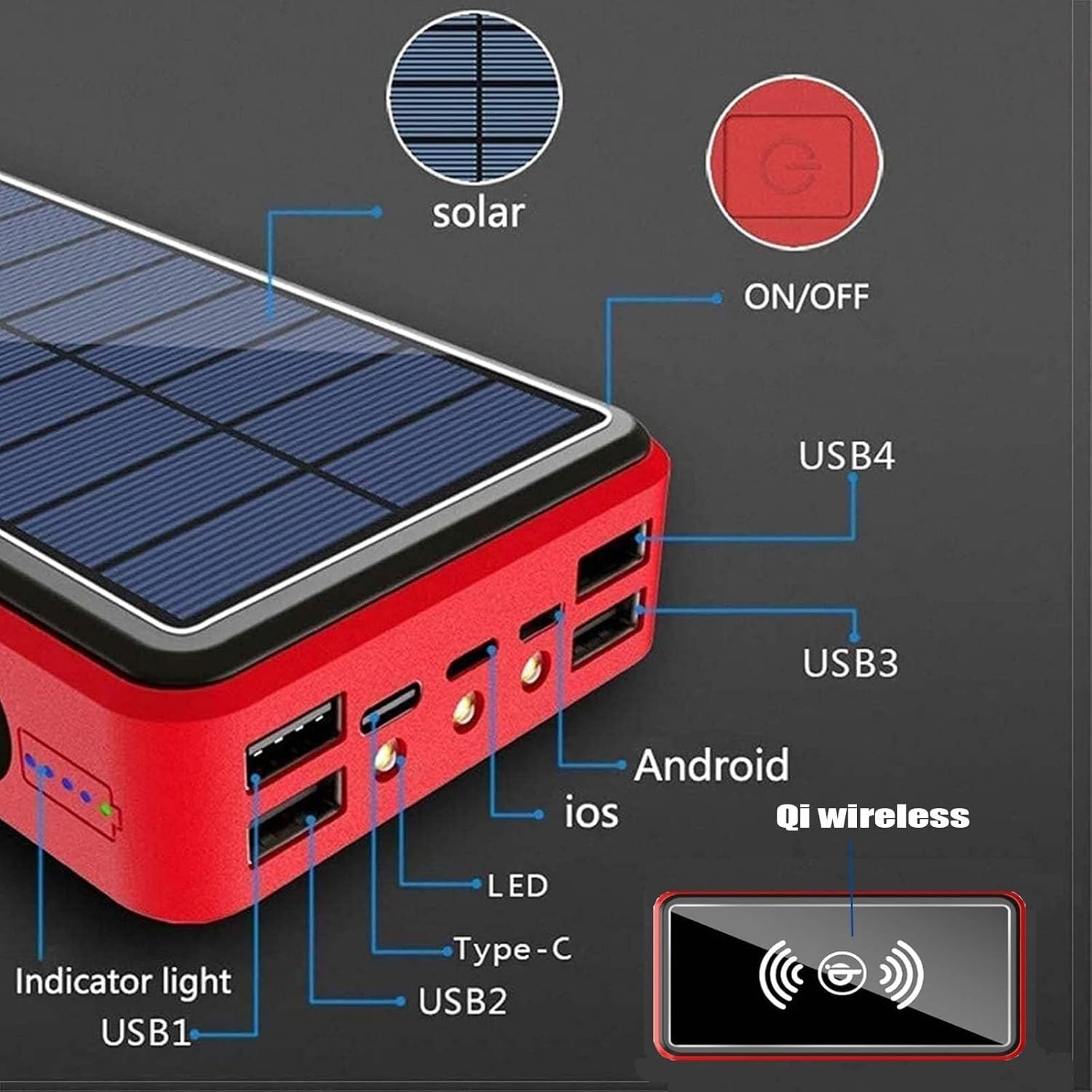
Image: Detailed diagram of the power bank's features, including the solar panel, power button, USB ports (USB1, USB2, USB3, USB4), Type-C and iOS input ports, LED indicators, and the Qi wireless charging area.
Operating Instructions
Charging Devices via USB
- Connect your device's USB charging cable to one of the power bank's USB output ports.
- The power bank will automatically begin charging your device. If not, press the power button once to activate charging.
- The indicator lights will show the remaining battery level of the power bank.
Wireless Charging
The power bank supports wireless charging for compatible devices (e.g., smartphones with Qi wireless charging capability).
- Ensure the power bank is sufficiently charged.
- Press the power button once to activate the wireless charging function.
- Place your Qi-enabled device directly onto the wireless charging pad area of the power bank. Ensure the device is centered for optimal charging.
- Your device should indicate that it is charging wirelessly.

Image: A smartphone placed on the power bank's wireless charging surface, demonstrating the wireless charging capability. The image also indicates 10W Android fast charge and 7.5W Apple mode.
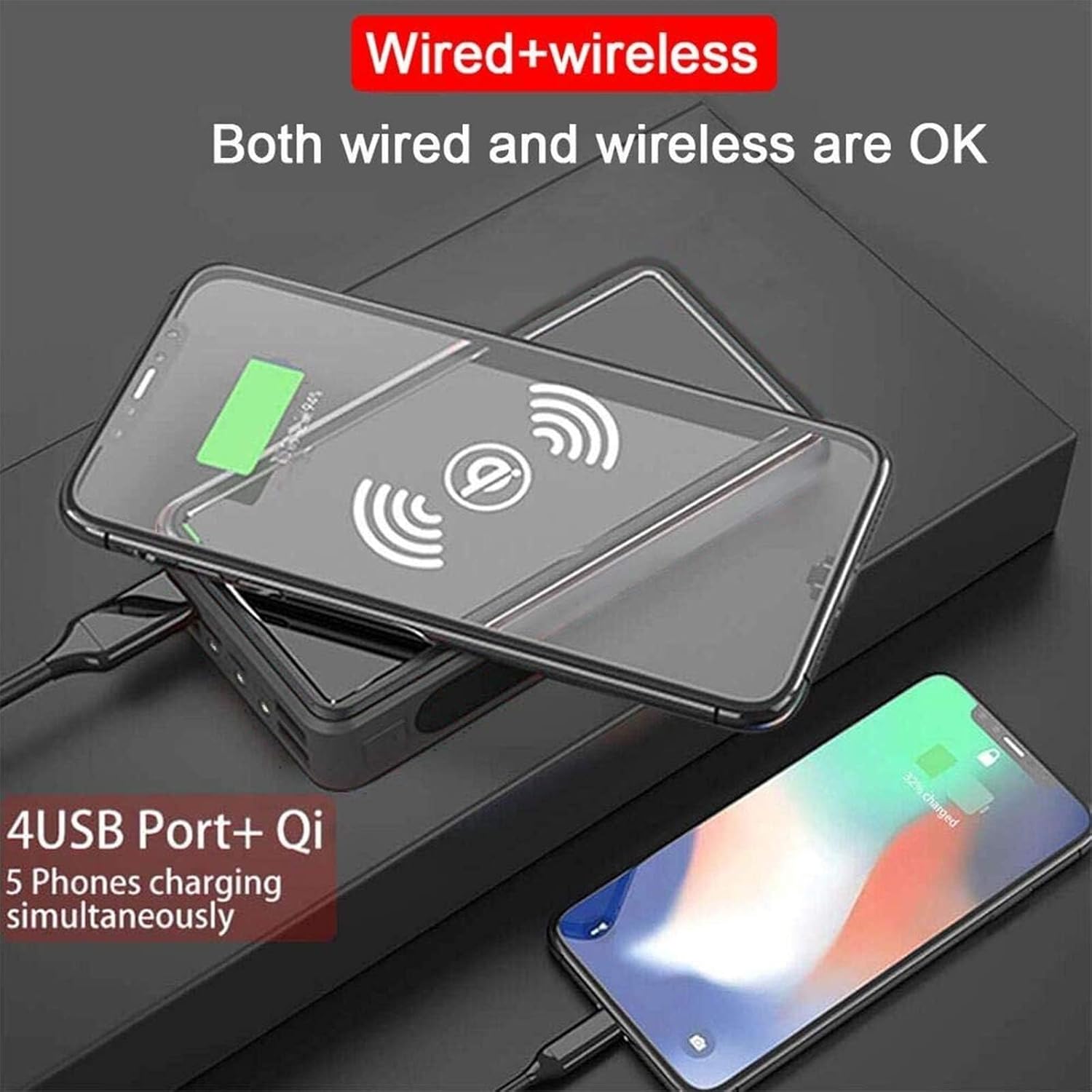
Image: Two smartphones charging simultaneously, one wirelessly on the pad and another via a USB cable connected to the power bank, illustrating its multi-device charging capability.
Using the LED Flashlight
The power bank includes a powerful LED flashlight with multiple modes for various situations.
- To turn on/off: Long press the power button for approximately 3 seconds.
- To cycle modes: Once the flashlight is on, short press the power button to switch between modes:
- Strong Light: Standard bright illumination.
- Flash (Strobe Light): Rapid flashing for signaling or warning.
- SOS: International distress signal (three short, three long, three short flashes).

Image: Visual representation of the power bank's LED flashlight modes (Flashlight, SOS Light, Strobe Light) and common use cases such as travel, leisure, mountaineering, camping, fishing, and as a gift.
Maintenance and Care
- Keep the power bank away from extreme temperatures (hot or cold) and direct sunlight for prolonged periods, especially when not in use.
- Avoid dropping or subjecting the power bank to strong impacts, despite its shockproof design.
- Do not disassemble or attempt to repair the device yourself. This will void the warranty and may cause damage or injury.
- Clean the power bank with a soft, dry cloth. Do not use harsh chemicals or abrasive materials.
- Store the power bank in a cool, dry place when not in use. For long-term storage, charge it to about 50-70% capacity every 3-6 months to preserve battery life.
Troubleshooting
| Problem | Possible Cause | Solution |
|---|---|---|
| Power bank not charging | Cable not connected properly; faulty cable/adapter; power bank fully charged. | Ensure cable is securely connected. Try a different USB cable or wall adapter. Check indicator lights; if all are solid, it's fully charged. |
| Device not charging from power bank | Power bank low on battery; cable not connected properly; device not compatible; power bank not activated. | Recharge the power bank. Ensure cables are securely connected. Press the power button once to activate output. Check device compatibility. |
| Wireless charging not working | Device not Qi-compatible; device not positioned correctly; power bank not activated; phone case too thick. | Ensure your device supports Qi wireless charging. Reposition the device on the charging pad. Press the power button to activate wireless charging. Remove thick phone cases. |
| Flashlight not turning on | Not long-pressing the button; power bank low on battery. | Long press the power button for 3 seconds. Recharge the power bank. |
Specifications
| Feature | Detail |
|---|---|
| Model Number | 66420027 |
| Battery Capacity | 100,000 mAh |
| Battery Type | Polymer Lithium Battery |
| Material | ABS + Aluminum Alloy |
| Input | 5V / 2.1A |
| Output | 5V / 2.1A (4 USB Ports) |
| Wireless Charging Output | 10W (Android Fast Charge), 7.5W (Apple Mode) |
| Solar Power | 1.8 W |
| Product Dimensions | 6.5 * 3.2 * 1.3 inches (approx. 16.5 x 8.1 x 3.3 cm) |
| Weight | Approx. 0.6 kg / 1.3 lb |

Image: Diagram illustrating the physical dimensions of the power bank in both centimeters and inches.
Warranty and Support
For any questions or concerns regarding your KHUKHU Solar Power Bank, please contact the seller directly through the platform where you purchased the product. The seller "YUSITA" can be contacted via the "Contact Sellers" option on Amazon. They aim to respond within 24 hours.
Please refer to your purchase documentation for specific warranty details.
Ask a question about this manual
Ask about setup, troubleshooting, compatibility, parts, safety, or missing instructions. Manuals+ will review the question and use this page’s manual context to help answer it.