
1. Introduction
Thank you for choosing the Refasy Electronic Piggy Bank. This product is designed to provide a secure and interactive way for children to save money, featuring electronic password protection, simulated fingerprint unlocking, and musical functions. Please read this manual carefully before use to ensure proper operation and longevity of the product.
2. Safety Information
- This product is intended for children aged 3 years and older. Adult supervision is recommended.
- Do not mix old and new batteries. Do not mix alkaline, standard (carbon-zinc), or rechargeable (nickel-cadmium) batteries.
- Remove batteries if the product is not used for an extended period to prevent leakage.
- Keep the product away from water and excessive moisture.
- Do not attempt to force the door open if it is locked.
3. Product Overview
Familiarize yourself with the components of your Refasy Electronic Piggy Bank:
- Coin Entrance: Slot on top for depositing coins.
- Cash Entrance: Front slot for automatically drawing in banknotes.
- Rotary Handwheel: Decorative and functional wheel that rotates upon successful unlocking.
- Simulated Fingerprint Sensor: Touch-sensitive area for fingerprint simulation unlocking.
- Password Buttons: Numbered keypad (0-9, *, #) for entering passwords and controlling music.
- Sound Speaker: Emits sounds and music.
- Battery Compartment: Located on the bottom of the unit.
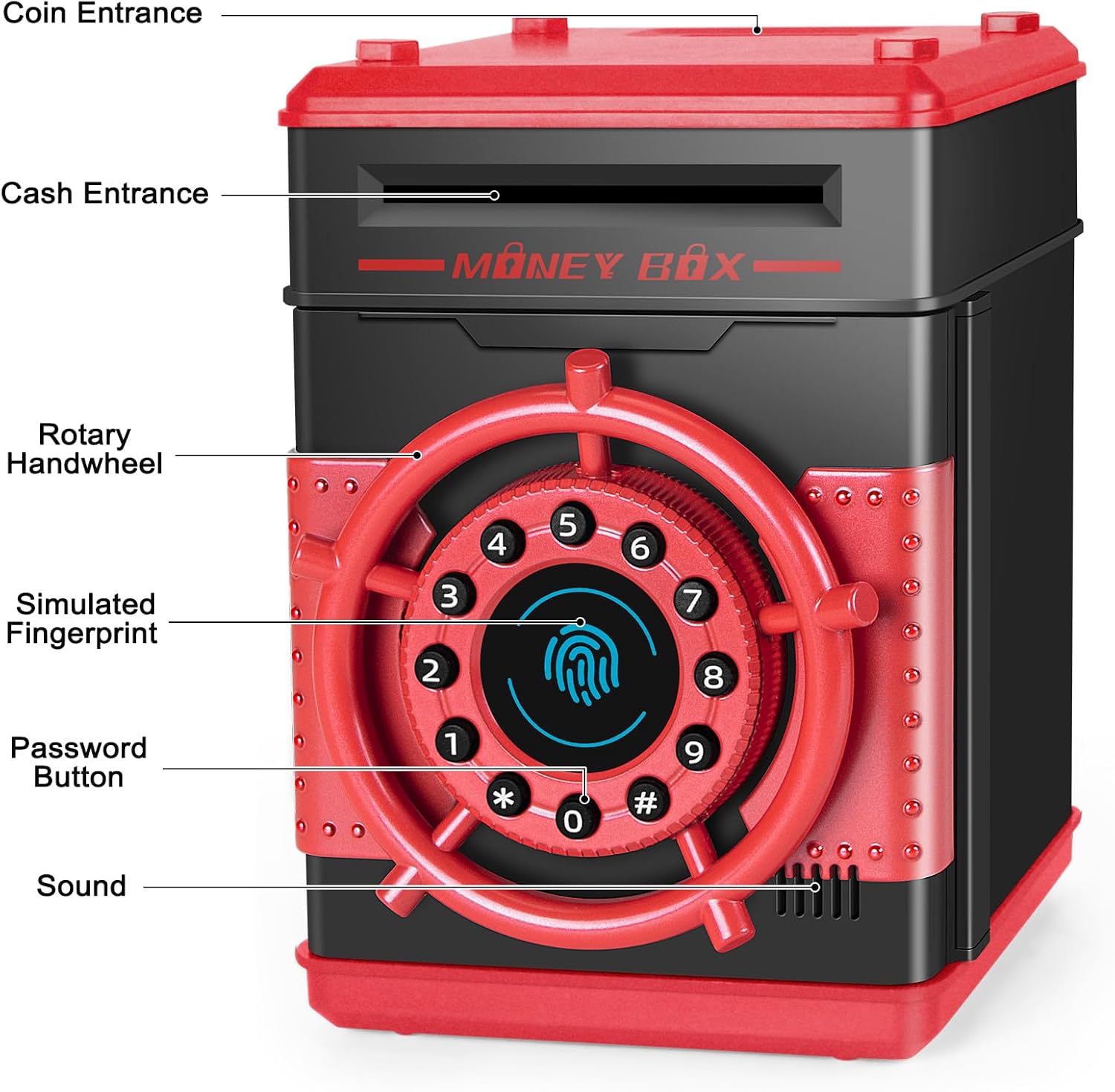
Image: Front view of the Refasy Electronic Piggy Bank, highlighting the coin entrance, cash entrance, rotary handwheel, simulated fingerprint sensor, password buttons, and sound speaker.
4. Setup
4.1 Battery Installation
- Locate the battery compartment on the bottom of the piggy bank.
- Use a screwdriver to open the battery compartment cover.
- Insert 3 x 1.5V AA batteries (not included), ensuring correct polarity (+/-).
- Replace the battery compartment cover and secure it with the screw.

Image: Step-by-step visual guide showing how to install batteries, enter the default password, and use the fingerprint sensor to open the safe.
5. Operating Instructions
5.1 Depositing Money
- For Coins: Insert coins into the coin entrance slot located on the top of the piggy bank.
- For Banknotes: Insert banknotes into the cash entrance slot on the front. The bank will automatically draw in the money.

Image: Illustration of two saving methods: inserting coins into the top slot and feeding banknotes into the front slot.
5.2 Unlocking the Piggy Bank
- The default password is 0000.
- Enter the 4-digit password using the number buttons.
- After entering the correct password, touch the simulated fingerprint sensor.
- The rotary handwheel will automatically rotate, and the door will open.
5.3 Changing the Password
- Open the piggy bank door using the current password and simulated fingerprint.
- While the door is open, press and hold the '*' key for approximately 1.5 seconds.
- You will hear a 'di' sound. Within 10 seconds, enter your new 4-digit password.
- Press the '#' button to confirm the new password.
- Close the door. The new password is now set.

Image: Visual steps for changing the password: 1. Enter default password, 2. Hold '*', 3. Enter new 4-digit password and '#', 4. Close door.
5.4 Music Mode
- To switch to music mode, press the '*' key.
- Use the number keys '0' to '9' to play different built-in songs.
- To stop the music, press the '#' key.
5.5 Mute Mode
- A physical switch on the top of the unit allows you to toggle between music/sound and mute modes. Slide the switch to the 'Mute' position to silence the sounds.

Image: The piggy bank with its door open, showing its internal storage. The mute/voice switch is visible on the top surface.
6. Maintenance
- Clean the exterior of the piggy bank with a soft, dry cloth.
- Do not use abrasive cleaners or solvents.
- Ensure the money slots are free from obstructions.
7. Troubleshooting
| Problem | Possible Cause | Solution |
|---|---|---|
| Door does not open. | Incorrect password entered. | Re-enter the correct 4-digit password (default is 0000). |
| Door does not open. | Fingerprint not recognized. | Ensure your finger is placed firmly and completely on the simulated fingerprint sensor after entering the password. |
| No sound or music. | Mute mode is activated. | Check the mute/voice switch on the top of the unit and slide it to the 'Voice' position. |
| No sound or music. | Low or dead batteries. | Replace the 3 x AA batteries. |
| Banknotes are not drawn in. | Obstruction in the cash entrance. | Ensure the banknote is straight and free from folds. Check for any foreign objects blocking the slot. |
8. Specifications
- Product Dimensions: 5.5 x 5.5 x 7.5 inches
- Item Weight: 1.34 pounds
- Power Source: 3 x 1.5V AA Batteries (not included)
- Material: Durable plastic
- Capacity: Stores up to 100 coins or 600 banknotes
9. Official Product Videos
Refasy Piggy Banks for Girls Electronic Password Money Bank
Video: An official product video from Refasy demonstrating the features and operation of the electronic piggy bank, including depositing money and using the password/fingerprint functions.
10. Warranty and Support
For warranty information or technical support, please refer to the contact details provided with your product packaging or visit the official Refasy website. Keep your purchase receipt as proof of purchase.