1. Product Overview
The MLLXUXANCC TCS115A Mini Circular Saw is a versatile and compact power tool designed for precision cutting of various materials. Its lightweight and portable design makes it ideal for both professional and DIY projects, offering ease of transport and storage.
Constructed from high-grade metal materials, including aluminum alloy and cold-rolled steel, this saw ensures long service life and stable performance. It is equipped with a powerful 5.8A motor, delivering a no-load speed of 3500 RPM, making it efficient for a wide range of cutting tasks.
Key features include:
- Portable and Compact Design: Light and space-saving, easy to transport and store.
- Reliable Quality: Made with high-grade metal materials and selected electronic components for durability.
- Wide Application Range: Suitable for cutting soft metals (like aluminum), wood, plastic, and acrylic. Note: Not suitable for HDF, iron, steel, or similar hard materials.
- Laser Guide: For precise and straight cuts.
- Vacuum Adapter: For effective dust removal and a cleaner working environment.
- Metal Handle: Provides a firm grip during operation.

Figure 1.1: The MLLXUXANCC TCS115A Mini Circular Saw, showcasing its compact design and laser guide feature.
2. Safety Instructions
Always follow basic safety precautions when using this electric saw to reduce the risk of fire, electric shock, and personal injury. Read all instructions carefully before operation.
- Work Area Safety: Keep your work area clean and well-lit. Cluttered or dark areas invite accidents. Do not operate power tools in explosive atmospheres, such as in the presence of flammable liquids, gases, or dust.
- Electrical Safety: Avoid body contact with grounded surfaces (e.g., pipes, radiators, ranges, refrigerators). Do not expose power tools to rain or wet conditions. Never abuse the cord; never use it for carrying, pulling, or unplugging the power tool.
- Personal Safety: Always wear eye protection (safety glasses or goggles). Use hearing protection when operating the tool for extended periods. Wear a dust mask if cutting operations create dust. Dress properly; avoid loose clothing or jewelry.
- Tool Use and Care: Do not force the power tool. Use the correct power tool for your application. Disconnect the plug from the power source before making any adjustments, changing accessories, or storing power tools.
- Blade Safety: Ensure the blade is correctly installed and secured before operation. Always use sharp, clean blades. Never attempt to cut materials for which the saw is not designed.
- Maintain Guard: Ensure all guards are in place and functioning correctly before each use. Never operate the saw without the blade guard.
- Secure Workpiece: Always clamp or otherwise secure the workpiece to a stable surface. Do not hold the workpiece by hand.
3. Package Contents
Upon opening the package, please verify that all items listed below are present and undamaged. If any items are missing or damaged, contact customer support immediately.
- MLLXUXANCC TCS115A Mini Circular Saw Unit
- 6 x Cutting Blades (various types for wood and soft metal)
- Metal Handle
- Laser Guide Module (pre-installed or separate)
- Vacuum Adapter
- Hex Key / Blade Wrench
- User Manual (this document)
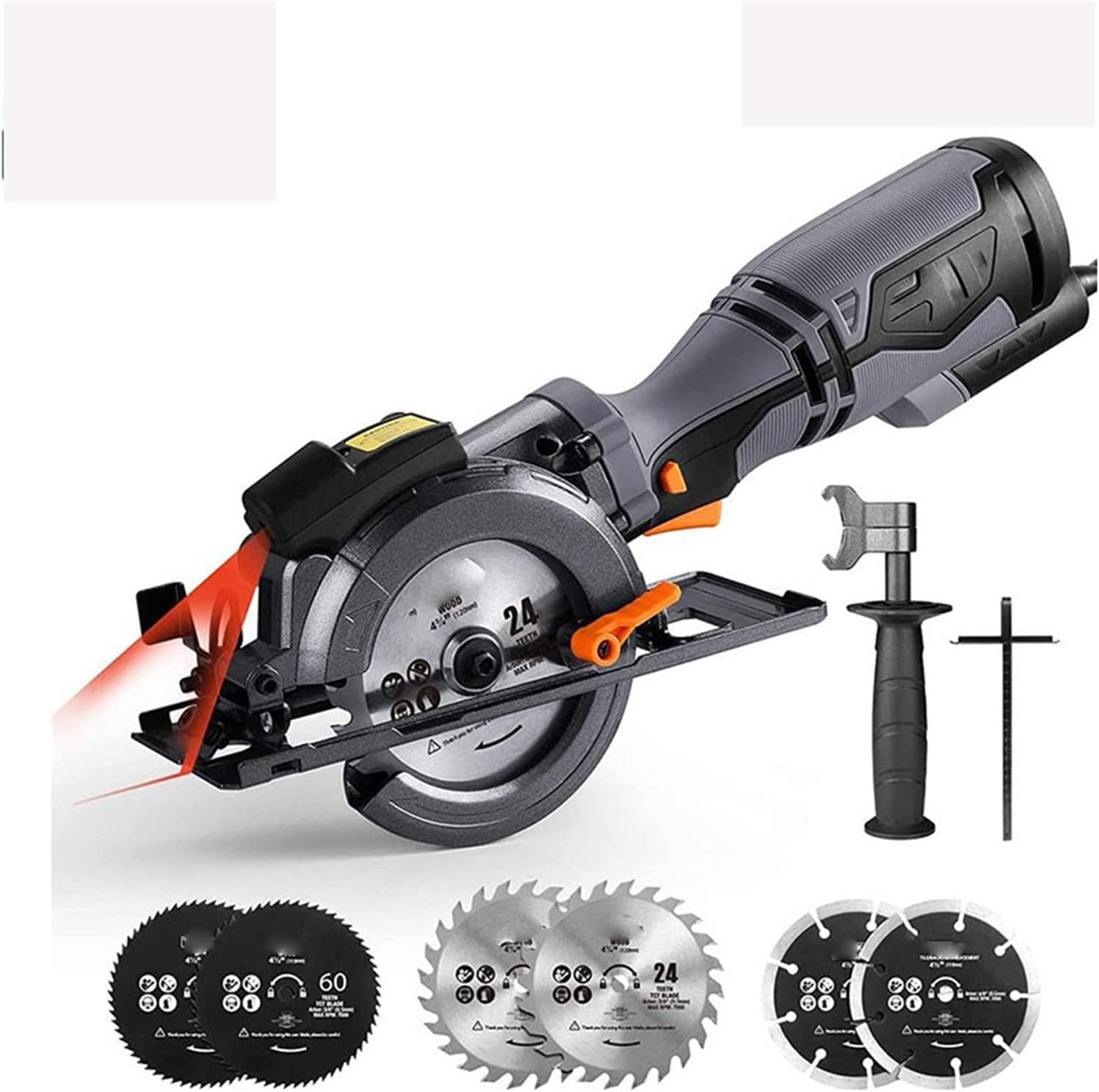
Figure 3.1: The mini circular saw along with its complete set of accessories, including various blades and the auxiliary handle.
4. Setup
4.1. Blade Installation
- Ensure the saw is unplugged from the power source.
- Locate the spindle lock button on the saw. Press and hold it to prevent the spindle from rotating.
- Using the provided hex key or blade wrench, loosen the blade retaining screw by turning it counter-clockwise.
- Remove the outer flange and the old blade (if applicable).
- Place the new blade onto the spindle, ensuring the teeth are pointing in the direction of rotation indicated by the arrow on the saw.
- Replace the outer flange and tighten the blade retaining screw clockwise until secure. Do not overtighten.
4.2. Adjusting Cutting Depth and Bevel Angle
The saw allows for precise adjustments to cutting depth and angle for various applications.
- Cutting Depth (90°): Loosen the depth adjustment lever. Adjust the base plate up or down to achieve the desired cutting depth. The maximum cutting depth at 90 degrees is up to 43mm. Secure the lever firmly.
- Bevel Angle (45°): Loosen the bevel adjustment lever. Tilt the base plate to the desired angle, up to 45 degrees. The maximum cutting depth at a 45-degree bevel is up to 35mm. Secure the lever firmly.

Figure 4.1: Illustrations showing how to adjust the cutting depth for 90-degree cuts and the bevel angle for 45-degree cuts.
4.3. Attaching Vacuum Adapter
For a cleaner work environment and to reduce dust exposure, attach the vacuum adapter to the saw's dust port and connect it to a suitable vacuum cleaner.
- Locate the dust extraction port on the saw.
- Firmly attach the provided vacuum adapter to the dust port.
- Connect the hose of your vacuum cleaner to the vacuum adapter.

Figure 4.2: The vacuum adapter connected to the saw, demonstrating its use for effective dust removal during operation.
5. Operating Instructions
5.1. General Operation
- Prepare Workpiece: Ensure the material to be cut is securely clamped to a stable surface.
- Power Connection: Plug the saw into a suitable power outlet.
- Starting the Saw: Press the safety lock button (if present) and then squeeze the trigger switch to start the saw. Allow the blade to reach full speed before beginning the cut.
- Making the Cut: Guide the saw smoothly and steadily through the material. Do not force the saw; let the blade do the work. Maintain a firm grip on the metal handle.
- Stopping the Saw: Release the trigger switch. Wait for the blade to come to a complete stop before setting the saw down.

Figure 5.1: Demonstrating the firm grip provided by the metal handle during cutting operations, ensuring stability and control.
5.2. Using the Laser Guide
The integrated laser guide provides a visual line for precise and straight cuts.
- Ensure the laser guide is clean and unobstructed.
- Align the laser line with your marked cutting line on the workpiece.
- Maintain alignment throughout the cut for optimal precision.

Figure 5.2: The laser guide projecting a red line onto the workpiece, aiding in achieving precise and straight cuts.
5.3. Applications and Material Compatibility
This mini circular saw is designed for cutting a variety of materials. Always select the appropriate blade for the material you are cutting.
- Wood: Use wood-specific blades for clean cuts in various wood types.
- Soft Metals: Suitable for cutting aluminum and similar soft metals. Use metal-cutting blades.
- Plastics & Acrylic: Can be used for cutting various plastic and acrylic sheets.
- Important Note: This saw is not suitable for cutting HDF, iron, steel, or other hard metals. Attempting to cut these materials can damage the saw and cause injury.

Figure 5.3: The saw in action, demonstrating its versatility across different materials such as wood and soft metals.
6. Maintenance
Regular maintenance ensures the longevity and optimal performance of your mini circular saw. Always unplug the tool before performing any maintenance.
6.1. Cleaning
- After each use, clear dust and debris from the saw, especially around the blade guard, motor vents, and base plate. Use a brush or compressed air.
- If using the vacuum adapter, ensure the dust collection system is emptied regularly.
- Wipe down the exterior with a damp cloth. Do not use harsh chemicals or abrasive cleaners.
6.2. Blade Care and Replacement
- Inspect blades regularly for sharpness and damage. Dull or damaged blades can cause kickback and poor cut quality.
- Replace blades as described in Section 4.1 when they become dull or damaged. Always use blades compatible with the saw's specifications.
6.3. Storage
- Store the saw in a clean, dry place, out of reach of children.
- Protect the power cord from damage.
7. Troubleshooting
This section addresses common issues you might encounter with your mini circular saw. If you experience a problem not listed here, or if the suggested solution does not resolve the issue, please contact customer support.
| Problem | Possible Cause | Solution |
|---|---|---|
| Saw does not start. | No power supply; faulty switch; motor issue. | Check power cord connection and outlet. Ensure safety lock and trigger are fully engaged. If problem persists, seek professional service. |
| Poor cut quality (rough edges, splintering). | Dull or incorrect blade; improper cutting technique; workpiece not secured. | Replace blade with a sharp, appropriate one for the material. Ensure workpiece is clamped firmly. Guide saw smoothly without forcing. |
| Saw overheats. | Overloading the motor; blocked ventilation slots. | Reduce cutting pressure. Allow saw to cool down. Clean ventilation slots. Do not use for extended periods without breaks. |
| Excessive vibration. | Loose blade; damaged blade; internal component issue. | Check blade for proper installation and tightness. Inspect blade for damage and replace if necessary. If vibration continues, discontinue use and contact support. |
8. Specifications
| Model Name | TCS115A |
| Part Number | UU1/30131 |
| Brand | MLLXUXANCC |
| Power Input | 5.8 Amps |
| No-Load Speed | 3500 RPM |
| Blade Diameter | (Information not explicitly provided, typically 4-1/2 inches or 115mm for mini circular saws, but not in JSON) |
| Max Cutting Depth (90°) | 43 mm |
| Max Cutting Depth (45° Bevel) | 35 mm |
| Number of Blades Included | 6 |
| ASIN | B0F6N4CF5H |
| Date First Available | April 28, 2025 |
9. Warranty and Support
9.1. Warranty Information
MLLXUXANCC products are manufactured to high-quality standards. While specific warranty details are not provided in this manual, most power tools come with a limited manufacturer's warranty covering defects in materials and workmanship for a specified period from the date of purchase. Please retain your proof of purchase for warranty claims.
For detailed warranty terms and conditions, please refer to the warranty card included with your product or visit the official MLLXUXANCC website.
9.2. Customer Support
If you have any questions, require technical assistance, or need to report a problem with your TCS115A Mini Circular Saw, please contact MLLXUXANCC customer support.
- Online Support: Visit the official MLLXUXANCC website for FAQs, product registration, and online support forms.
- Email Support: (Specific email address not provided, check product packaging or official website)
- Phone Support: (Specific phone number not provided, check product packaging or official website)
When contacting support, please have your product model number (TCS115A) and ASIN (B0F6N4CF5H) ready, along with a description of the issue.