
E T EASYTAO EB01
E T EASYTAO EB01 Solar Wireless Outdoor Security Camera User Manual
Model: EB01
1. Introduction
Thank you for choosing the E T EASYTAO EB01 Solar Wireless Outdoor Security Camera. This manual provides detailed instructions for the installation, operation, and maintenance of your new security camera. Please read this manual thoroughly before use to ensure proper functionality and safety.
Important Note: This camera operates only on 2.4 GHz Wi-Fi networks (5 GHz is not supported) and records clips only upon motion detection; it does not offer 24/7 continuous recording.
2. Package Contents
Please check the package to ensure all items are present:
- E T EASYTAO EB01 Solar Wireless Outdoor Security Camera
- Solar Panel
- Mounting Screws
- Instruction Manual
3. Product Overview
The E T EASYTAO EB01 camera is designed for outdoor surveillance, offering advanced features for comprehensive home security.
Key Features:
- 100% Wireless Solar Power: Equipped with two 8000 mAh high-capacity rechargeable batteries for continuous, year-round operation.
- 5MP/3K QHD Resolution: Delivers exceptional image quality for clear day and night viewing.
- Full-Color Night Vision: Advanced technology provides vivid and accurate colors even in low-light conditions.
- PIR Detection and Two-Way Audio: High-sensitivity PIR motion sensor reduces false alarms. Two-way audio allows real-time communication.
- IP66 Weather Resistance: Designed to withstand adverse weather conditions (rain, snow, extreme temperatures).
- 360° PTZ Functionality: Remote control of horizontal/vertical movement and lens zoom for flexible monitoring.
- Dual Storage Options: Supports local storage on a Micro SD card (up to 256 GB, not included) and cloud storage with bank-grade encryption.
- Smart Home Integration: Compatible with Alexa and Google Assistant for voice control and live video viewing.

Image 1: E T EASYTAO EB01 Solar Wireless Outdoor Security Camera. This image shows the main camera unit with its two antennas and the attached solar panel, ready for outdoor installation.
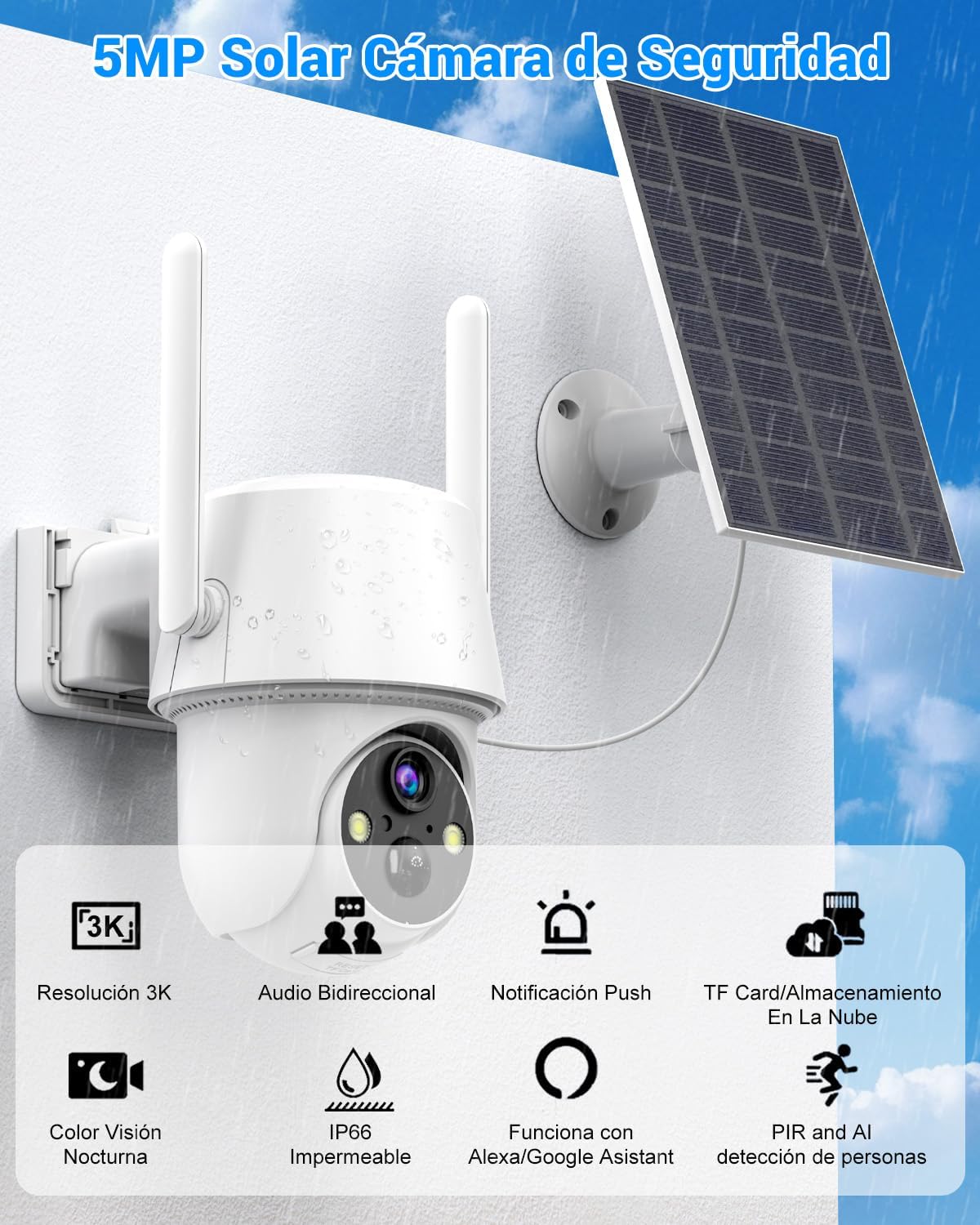
Image 2: Key Features of E T EASYTAO EB01 Camera. This graphic highlights the camera's main functionalities including 3K resolution, two-way audio, push notifications, TF card/cloud storage, color night vision, IP66 waterproofing, Alexa/Google Assistant compatibility, and PIR/AI human detection.
4. Setup
4.1 Charging the Camera
Before initial use, fully charge the camera's built-in batteries. Connect the camera to a standard 5V USB power adapter using a compatible cable. The charging indicator will show the charging status.
4.2 App Installation and Account Creation
- Download the recommended mobile application (e.g., 'Tris Home' or similar, as indicated in the quick start guide) from your device's app store.
- Register for a new account and log in.
4.3 Connecting to Wi-Fi
- Ensure your smartphone is connected to a 2.4 GHz Wi-Fi network.
- Follow the in-app instructions to add your camera. This typically involves scanning a QR code displayed on your phone with the camera lens.
- Once connected, the camera's status indicator will change, and you will receive an in-app confirmation.
4.4 Mounting the Camera
Select an outdoor location with good Wi-Fi signal and direct sunlight exposure for the solar panel. The camera is IP66 rated for outdoor use.
- Mark the drilling points on the wall using the camera's mounting bracket as a template.
- Drill holes and insert wall anchors if necessary.
- Secure the mounting bracket to the wall using the provided screws.
- Attach the camera and solar panel to the bracket, ensuring the solar panel is positioned to receive maximum sunlight.
- Adjust the camera angle for optimal viewing coverage.

Image 3: Solar Powered and Wireless Installation. This image illustrates the camera mounted outdoors with its solar panel, emphasizing its 100% wireless operation and 8000mAh battery capacity.
5. Operating Instructions
5.1 Live View and PTZ Control
Open the mobile application to access the live video feed. Use the on-screen controls to pan, tilt, and zoom the camera for a 360° view of your surroundings.
5.2 Two-Way Audio
Tap the microphone icon in the app to speak through the camera's speaker. Tap the speaker icon to listen to audio from the camera's vicinity. This feature allows for real-time communication.

Image 4: Two-Way Audio Functionality. This image depicts a scenario where a user communicates with a delivery person via the camera's two-way audio, demonstrating its practical use. The image also indicates support for up to 4 mobile users viewing simultaneously.
5.3 Motion Detection and Alerts
The camera uses a PIR sensor for human detection, reducing false alarms. When motion is detected, the camera will record a clip and send a push notification to your phone. You can adjust sensitivity settings in the app.

Image 5: Motion Detection and Alerts. This graphic illustrates the camera detecting a person, triggering an alarm light and sending a push notification to a smartphone, highlighting its ability to reduce false alarms through AI detection.
5.4 Night Vision
The camera automatically switches to night vision mode in low-light conditions. It supports both infrared night vision and full-color night vision, providing clear images even in darkness.

Image 6: Intelligent Night Vision Modes. This image compares the camera's color night vision with traditional infrared night vision, showing the enhanced detail and clarity provided by the color mode in low-light environments.
5.5 Storage Options
Recordings can be stored in two ways:
- Micro SD Card: Insert a Micro SD card (up to 256 GB, not included) into the designated slot on the camera for local storage.
- Cloud Storage: Subscribe to the cloud storage service through the app for secure, bank-grade encrypted storage of your recordings.
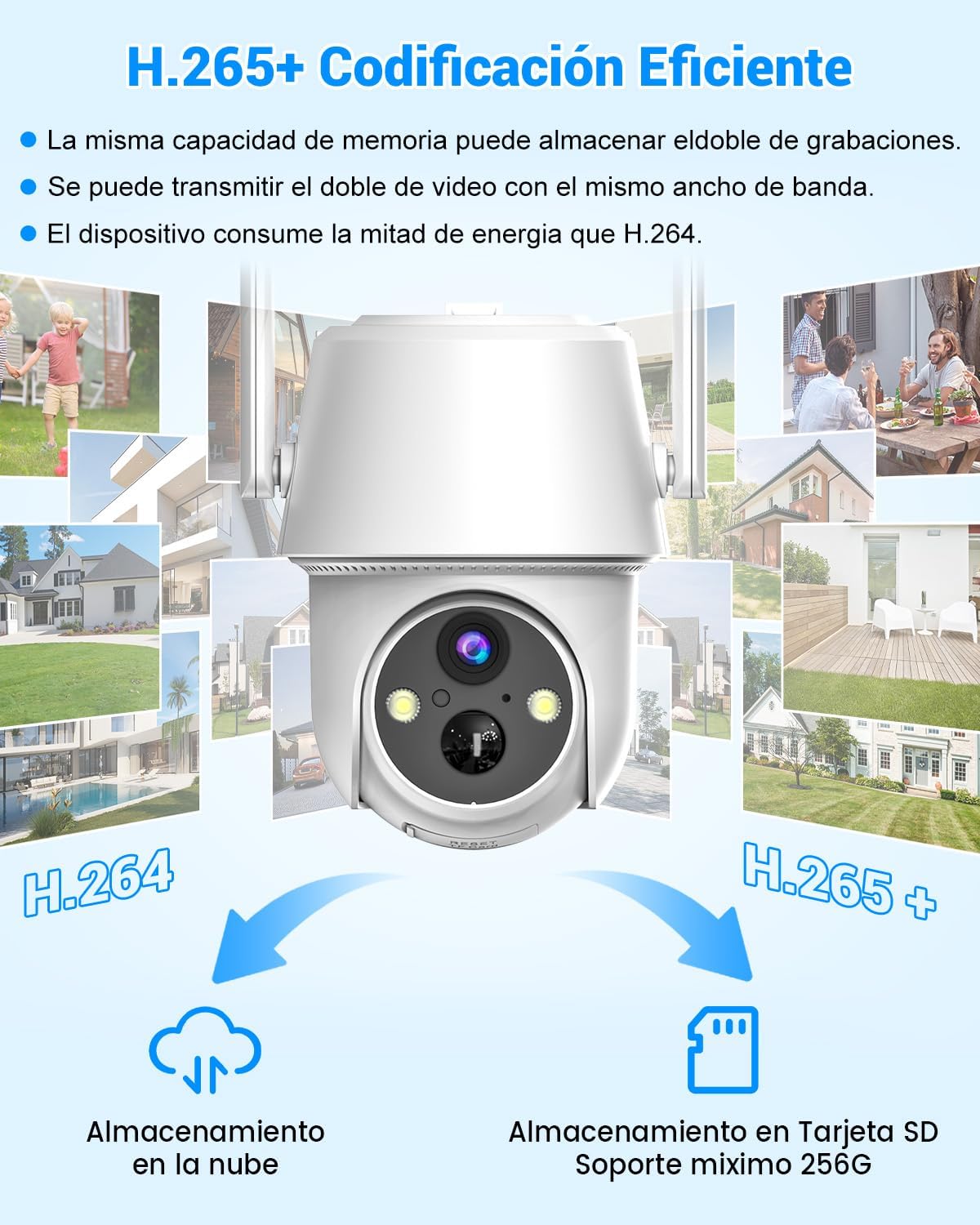
Image 7: H.265+ Efficient Encoding and Storage Options. This image highlights the benefits of H.265+ encoding, such as double storage capacity and reduced energy consumption, alongside the dual storage options of cloud and Micro SD card (up to 256GB).
5.6 Smart Assistant Integration
Connect your camera to Amazon Alexa or Google Assistant through the respective apps. Once linked, you can use voice commands to view the live feed on compatible smart displays.

Image 8: Voice Control with Alexa and Google Assistant. This image shows a user interacting with a smart assistant, demonstrating how to request live camera footage using voice commands.
6. Maintenance
- Cleaning: Periodically clean the camera lens and solar panel with a soft, damp cloth to ensure optimal performance. Avoid abrasive cleaners.
- Battery Care: The built-in batteries are designed for long-term use. Ensure the solar panel receives adequate sunlight to maintain charge. In prolonged periods of low sunlight, manual charging may be required.
- Firmware Updates: Check the app regularly for firmware updates to ensure your camera has the latest features and security enhancements.
7. Troubleshooting
- Camera Not Connecting to Wi-Fi:
- Ensure your Wi-Fi is 2.4 GHz. 5 GHz networks are not supported.
- Check Wi-Fi signal strength at the camera's location.
- Restart your router and the camera.
- Ensure the Wi-Fi password is entered correctly.
- No Motion Detection Alerts:
- Verify motion detection is enabled in the app settings.
- Adjust PIR sensitivity.
- Check notification settings on your phone.
- Poor Image Quality:
- Clean the camera lens.
- Ensure adequate lighting for optimal day vision.
- Check network bandwidth if streaming quality is low.
- Battery Draining Quickly:
- Ensure the solar panel is receiving sufficient direct sunlight.
- Reduce the frequency of live view access and motion detection events if possible.
- Check for excessive activity in the camera's field of view.
8. Specifications
| Brand | E T EASYTAO |
| Model Name | EB01 (AETE058NWT01) |
| Resolution | 5MP / 3K QHD |
| Connectivity Technology | Wireless (2.4 GHz Wi-Fi only) |
| Power Source | Solar Panel, 2x 8000mAh Rechargeable Batteries |
| Special Features | Two-way audio, Motion detector, Local recording, HD resolution, Night vision (color/infrared) |
| Indoor/Outdoor Use | Outdoor |
| Mounting Type | Wall Mount (Screw-in) |
| Storage Options | Micro SD card (up to 256GB), Cloud Storage |
| Dimensions (L x W x H) | 2.54 x 1.27 x 2.54 cm (Product); 25 x 13 x 25 mm (Item) |
| Weight | 870 g |
9. Warranty and Support
E T EASYTAO is committed to providing reliable smart surveillance cameras. For product support, please refer to the contact information provided with your purchase or visit the official E T EASYTAO website.
While this product includes built-in rechargeable batteries, no additional batteries are required. Extended protection plans for accidental damage may be available from third-party providers.
Related Documents - EB01
 |
Oukitel WP5 Rugged Smartphone: Specifications and Features Detailed specifications for the Oukitel WP5 rugged smartphone, including display, processor, battery, cameras, network bands, dimensions, and FCC compliance information. |
 |
OUKITEL WP5 Pro Rugged Smartphone Specifications and Overview Detailed specifications, features, and compliance information for the OUKITEL WP5 Pro rugged smartphone, including display, camera, battery, connectivity, and FCC/EU compliance. |
 |
OUKITEL WP5 Pro Rugged Smartphone - Specifications and Features Detailed specifications, features, and compliance information for the OUKITEL WP5 Pro rugged smartphone, including display, camera, battery, connectivity, and FCC compliance. |
 |
OUKITEL WP5 Smartphone: Specifications, Features, and Overview Detailed overview of the OUKITEL WP5 rugged smartphone, including technical specifications, camera details, battery information, connectivity, package contents, and FCC compliance. |
 |
Cozy Intelligent Electric Towel Rack Instruction Manual Installation and operation manual for Cozy Intelligent Electric Towel Rack (Models EB01-BR-190330, EB01-BL-190330, EB01-BG-190330). Includes safety precautions, wiring diagrams, and smart switch instructions. |
 |
EB01 Wireless Transmitter and Receiver - Operation Manual and Specifications Comprehensive operation manual for the EB01 Wireless Transmitter and Receiver. Learn how to set up, pair, and use its functions for audio transmission and reception. Includes indicator descriptions and FCC compliance information. |
Ask a question about this manual
Ask about setup, troubleshooting, compatibility, parts, safety, or missing instructions. Manuals+ will review the question and use this page’s manual context to help answer it.