
1. Product Overview
The Milwaukee M12 1/4-inch Hex Impact Driver (Model 2462-20) is a compact and powerful tool designed for driving fasteners efficiently. It delivers up to 1,000 inch-pounds of peak torque, making it suitable for various applications. This tool features variable speed control, allowing for precise operation from 0 to 2,500 RPM, and a keyless 1/4-inch hex chuck for quick and easy bit changes. An integrated LED light illuminates the work area, and an on-board fuel gauge displays the remaining battery charge. This product is a bare tool, meaning the battery and charger are sold separately.
2. Safety Information
Always read and understand all safety warnings, instructions, illustrations, and specifications provided with this power tool. Failure to follow all instructions listed below may result in electric shock, fire, and/or serious injury.
- Work Area Safety: Keep your work area clean and well-lit. Cluttered or dark areas invite accidents. Do not operate power tools in explosive atmospheres, such as in the presence of flammable liquids, gases, or dust.
- Electrical Safety: Power tool plugs must match the outlet. Never modify the plug in any way. Do not expose power tools to rain or wet conditions. Water entering a power tool will increase the risk of electric shock.
- Personal Safety: Always wear eye protection. Use appropriate personal protective equipment such as dust masks, non-skid safety shoes, hard hats, or hearing protection when necessary. Stay alert, watch what you are doing, and use common sense when operating a power tool.
- Tool Use and Care: Do not force the power tool. Use the correct power tool for your application. Disconnect the battery pack from the power tool before making any adjustments, changing accessories, or storing power tools.
- Battery Tool Use and Care: Recharge only with the charger specified by the manufacturer. Use power tools only with specifically designated battery packs.
3. Components and Features
Familiarize yourself with the various parts of your Milwaukee M12 Impact Driver to ensure proper and safe operation. Refer to the diagram below for a visual guide to the tool's key components.
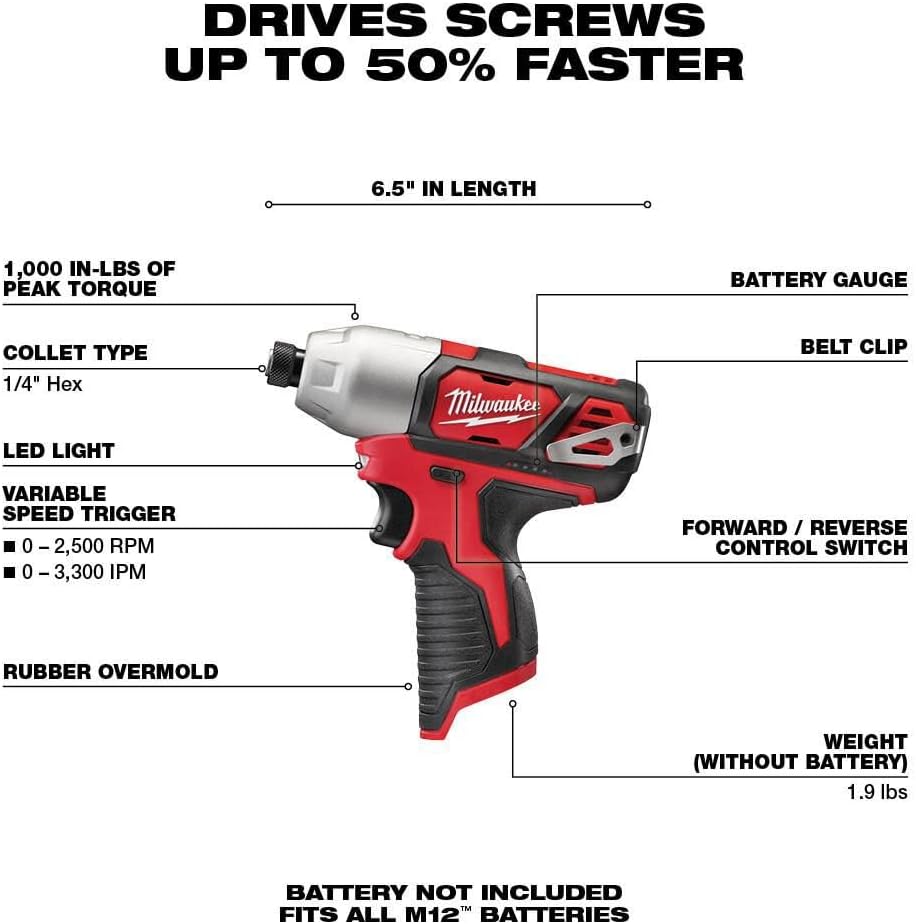
Figure 1: Labeled diagram of the Milwaukee M12 1/4-inch Hex Impact Driver, highlighting key features such as the 1/4" Hex Collet Type, LED Light, Variable Speed Trigger, Rubber Overmold, Battery Gauge, Belt Clip, and Forward/Reverse Control Switch. The diagram also indicates the tool's length (6.5 inches) and weight without battery (1.9 lbs).
- 1/4" Hex Collet: For quick and secure insertion of 1/4-inch hex shank bits.
- LED Light: Illuminates the work surface for improved visibility.
- Variable Speed Trigger: Allows for precise control over the tool's rotational speed (0-2,500 RPM) and impacts per minute (0-3,300 IPM).
- Rubber Overmold: Provides an ergonomic grip and reduces vibration.
- Battery Fuel Gauge: Displays the remaining charge level of the M12 REDLITHIUM battery.
- Belt Clip: For convenient carrying and access.
- Forward/Reverse Control Switch: Changes the direction of rotation and locks the trigger.
4. Setup
4.1 Battery Installation
This impact driver is a bare tool and requires a Milwaukee M12 REDLITHIUM battery pack (sold separately) for operation. Ensure the battery is fully charged before use.
- Align the battery pack with the battery port on the tool handle.
- Slide the battery pack into the tool until it clicks securely into place.
- To remove the battery, press the release button on the battery pack and slide it out of the tool.
4.2 Bit Installation
The impact driver features a keyless 1/4-inch hex chuck for quick and easy bit changes.
- Pull the chuck collar forward to open the bit receiving mechanism.
- Insert the 1/4-inch hex shank bit fully into the chuck.
- Release the chuck collar. The bit should be securely locked in place. Pull on the bit to ensure it is properly seated.
- To remove a bit, pull the chuck collar forward and pull the bit out.
5. Operating Instructions
5.1 Powering On/Off
To turn the tool on, depress the variable speed trigger. To turn the tool off, release the trigger.
5.2 Variable Speed Control
The variable speed trigger allows you to control the speed of the tool. The further the trigger is pressed, the faster the tool will operate. This provides greater control for starting fasteners and working with different materials.
5.3 Forward/Reverse Control
The forward/reverse control switch is located above the trigger. Push the switch to the left for forward rotation (driving fasteners) and to the right for reverse rotation (removing fasteners). When the switch is in the center position, the trigger is locked, preventing accidental activation.
5.4 LED Work Light
The integrated LED light activates when the trigger is pressed, illuminating the work area. It remains on for a short period after the trigger is released.
5.5 Battery Fuel Gauge
The battery fuel gauge, located on the side of the tool, displays the approximate remaining run time of the battery pack. Pressing the trigger will activate the gauge. Monitor this gauge to ensure you have sufficient power for your task.
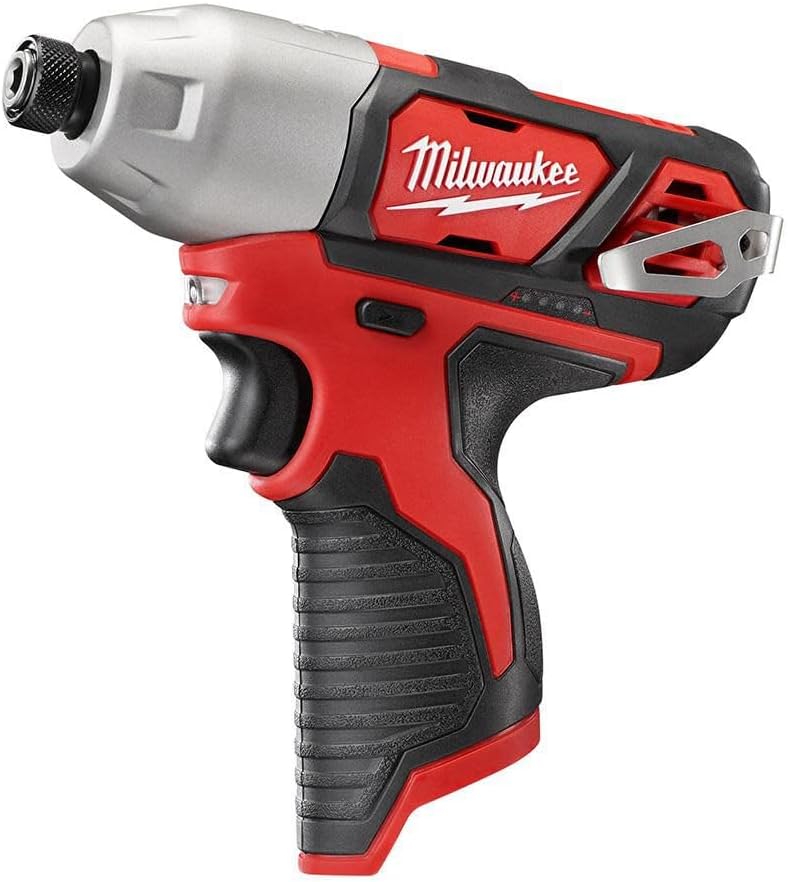
Figure 2: The Milwaukee M12 1/4-inch Hex Impact Driver, ready for use. This image shows the overall design and ergonomic handle of the tool.
6. Maintenance
6.1 Cleaning
Regular cleaning helps maintain the tool's performance and extends its lifespan.
- Always remove the battery pack before cleaning.
- Use a soft brush or compressed air to clear dust and debris from the ventilation openings.
- Wipe the tool's exterior with a soft, damp cloth. Do not use harsh chemicals or abrasive cleaners.
- Keep the chuck area clean and free of debris to ensure proper bit retention.
6.2 Storage
When not in use, store the impact driver in a clean, dry place, out of reach of children.
- Remove the battery pack from the tool before storing for extended periods.
- Store the tool and battery packs in a location where the temperature will not exceed 120°F (50°C) or drop below 0°F (-18°C).
7. Troubleshooting
This section addresses common issues you might encounter with your impact driver.
| Problem | Possible Cause | Solution |
|---|---|---|
| Tool does not start | Battery not installed correctly; Battery discharged; Forward/Reverse switch in center (locked) position; Tool malfunction. | Ensure battery is fully inserted; Charge battery; Move switch to forward or reverse; Contact service center. |
| Reduced power/performance | Battery low on charge; Incorrect bit for application; Overheating. | Recharge battery; Use appropriate bit; Allow tool to cool down. |
| Bit not holding securely | Chuck collar not fully released; Debris in chuck; Damaged bit shank. | Ensure collar snaps back; Clean chuck; Use undamaged bits. |
8. Specifications
| Feature | Specification |
|---|---|
| Model Number | 2462-20 |
| Voltage | 12 Volts (M12 Battery System) |
| Chuck Type | 1/4-inch Hex (Keyless) |
| Maximum Torque | 1,000 Inch Pounds |
| Maximum Rotational Speed | 0-2,500 RPM (Variable) |
| Impacts Per Minute (IPM) | 0-3,300 IPM |
| Power Source | Battery Powered (M12 REDLITHIUM) |
| Product Dimensions (L x W x H) | 6" x 2" x 5" |
| Item Weight (Tool Only) | 2 pounds (approx. 1.9 lbs without battery) |
9. Warranty and Support
Milwaukee Electric Tool Corporation provides a warranty for this product. For detailed warranty information, including terms, conditions, and registration, please refer to the official Milwaukee website or the warranty card included with your purchase.
For technical support, service, or to locate an authorized service center, please visit the official Milwaukee website or contact their customer service department. Keep your purchase receipt as proof of purchase for warranty claims.
Website: www.milwaukeetool.com
Customer Service: Refer to the website for regional contact information.