
Yardeen YL31012N
Yardeen Solar Motion Sensor Sprinkler User Manual
Model: YL31012N
Introduction
Thank you for choosing the Yardeen Solar Motion Sensor Sprinkler. This device is designed to protect your lawn, garden, and patio by safely deterring animals using a motion-activated water spray. It also functions as a regular lawn sprinkler for watering. This manual provides detailed instructions for setup, operation, maintenance, and troubleshooting to ensure optimal performance of your device.
Package Contents
Before beginning installation, please ensure all components are present:

Image: Overview of the Yardeen Solar Motion Sensor Sprinkler components, including the main sprinkler unit with integrated motion sensor, a solar panel, a metal spike for ground placement, an additional extension pipe, a quick connector for 3/4" water pipe, and PTFE tape for sealing connections.
- Main Sprinkler Unit with Motion Sensor
- Solar Panel (pre-attached or separate, for charging NIMH batteries)
- Metal Spike
- Additional Extension Pipe
- Quick Connector (for 3/4" water pipe)
- PTFE Tape
- User Manual (this document)
Setup and Installation
Follow these steps to set up your Yardeen Solar Motion Sensor Sprinkler:
- Assemble the Unit:
- Attach the additional extension pipe to the main sprinkler unit if desired for increased height.
- Securely connect the metal spike to the bottom of the extension pipe or directly to the main unit.
- Install Batteries:
- Ensure NIMH rechargeable batteries are installed in the designated compartment (usually near the solar panel or motion sensor base).
- Connect the solar panel to the unit if it is not pre-attached. The solar panel will charge these batteries.
- Connect to Water Source:
- Apply PTFE tape to the threads of your garden hose connection for a watertight seal.
- Connect your standard garden hose to the quick connector provided.
- Attach the quick connector to the inlet on the sprinkler unit.
- Alternatively, for US Standard Hose with 3/4" GHT Solid Brass Male Thread, remove the quick connector and connect directly.
- Ground Placement:
- Choose a location in your lawn or garden that requires protection or watering.
- Firmly push the metal spike into the ground until the unit is stable.
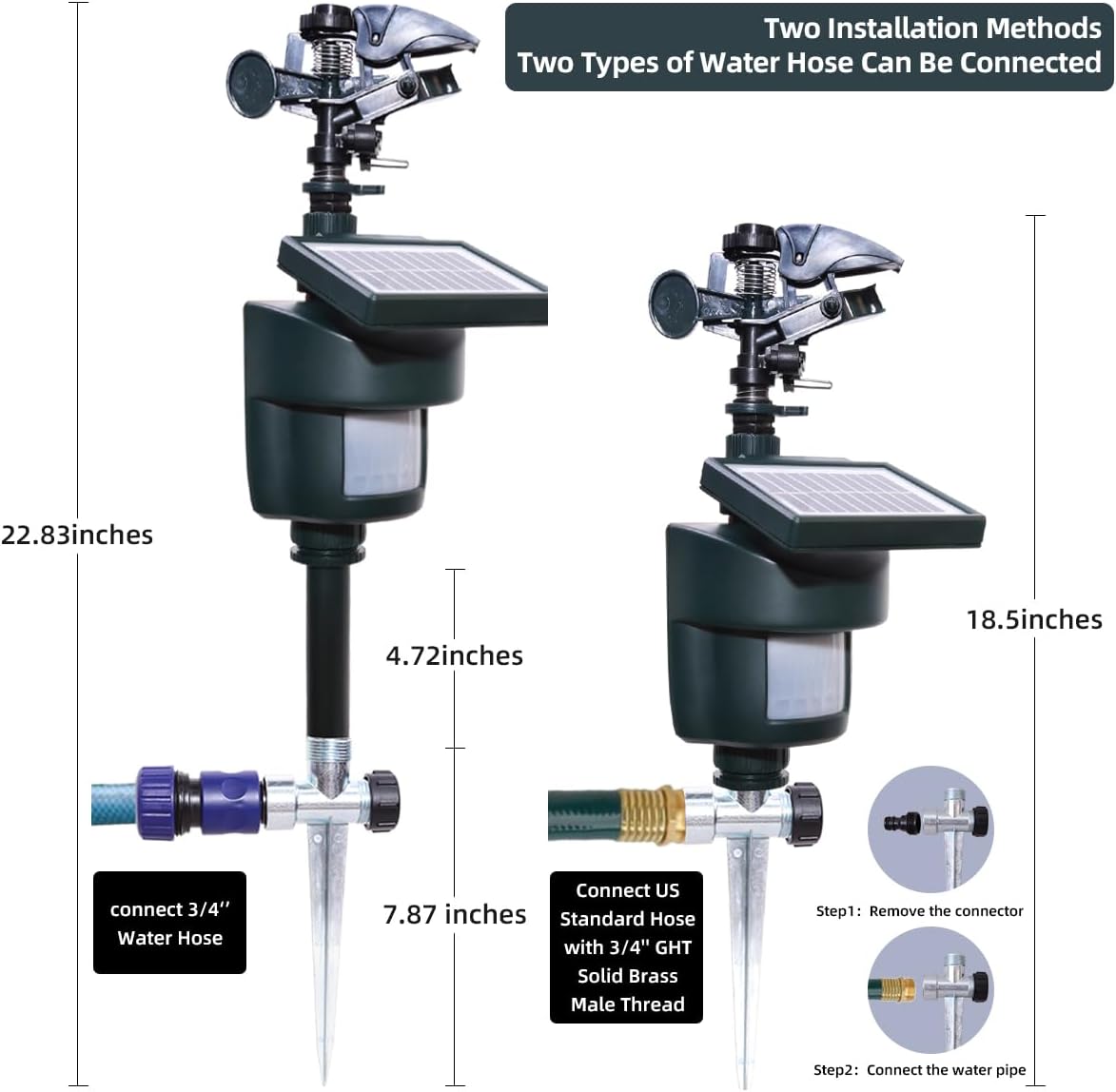
Image: Illustration of two different installation methods for the sprinkler. One method shows connection to a 3/4" water hose using the provided quick connector, resulting in a total height of 22.83 inches. The second method demonstrates connecting a US Standard Hose with 3/4" GHT Solid Brass Male Thread, achieving a height of 18.5 inches.
Operating Instructions
The Yardeen Solar Motion Sensor Sprinkler offers versatile operation modes and adjustments:
Operating Modes
The device features three distinct operating modes:

Image: Visual representation of the three operating modes. The "Daytime Mode" is illustrated with a rabbit, indicating the sprinkler activates only during daylight hours. The "Night Mode" is shown with a raccoon, signifying automatic operation at night. The third mode, "All-Day operation," combines both.
- Daytime Mode: The sprinkler will only activate during daylight hours when motion is detected. Ideal for deterring daytime pests.

Image: The sprinkler operating in Daytime Mode, effectively spraying water towards a deer in a green field under sunlight, demonstrating its use for daytime animal deterrence.
- Nighttime Mode: The sprinkler will automatically activate at night when motion is detected. Suitable for nocturnal animals.

Image: The sprinkler operating in Night Mode, shown spraying water towards a deer in a field under a starry sky, illustrating its effectiveness against nocturnal animal intrusions.
- All-Day Operation: The sprinkler will activate whenever motion is detected, regardless of day or night.
Adjustments
Customize the sprinkler's performance using the following adjustments:
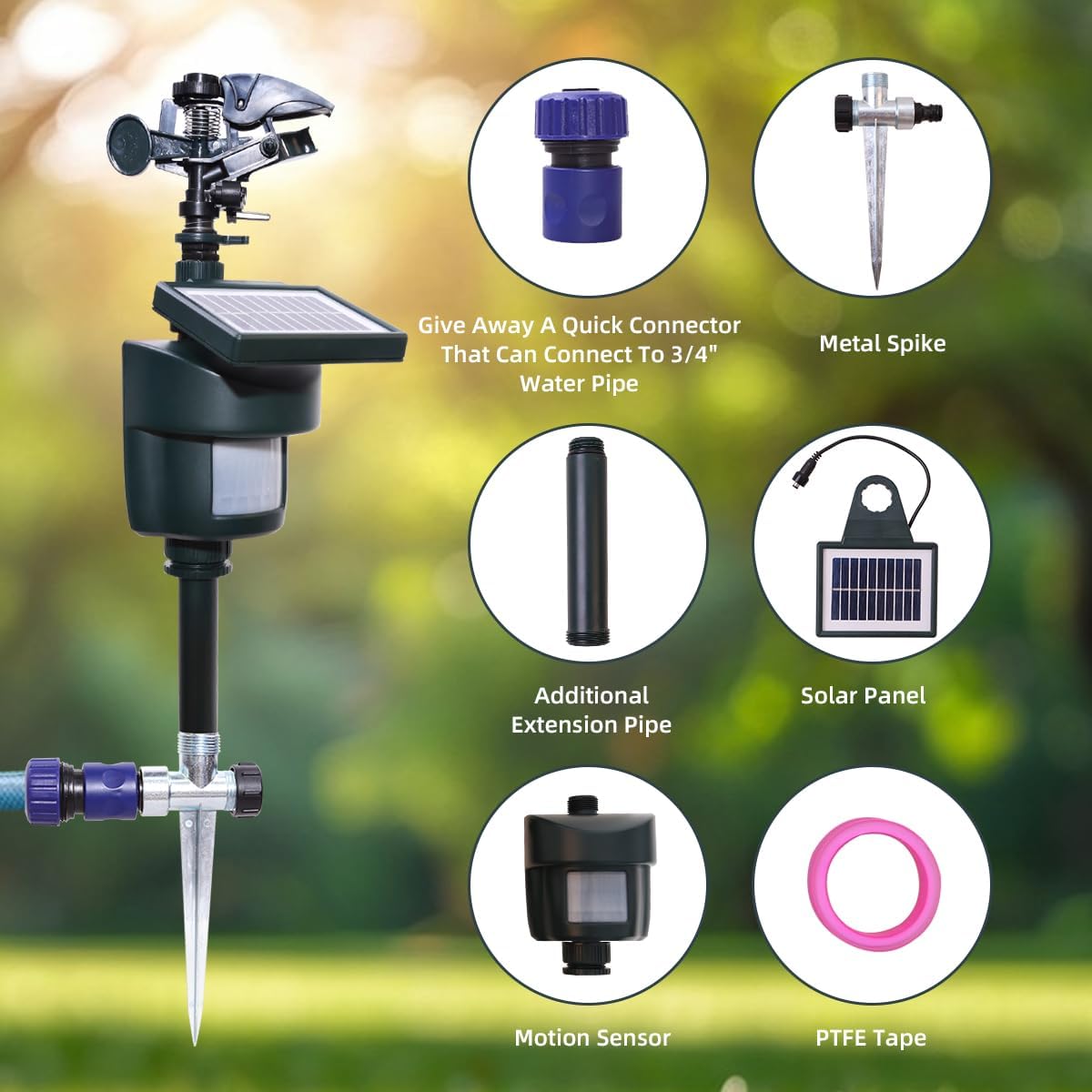
Image: A detailed view highlighting the adjustable features of the sprinkler. These include controls for adjusting spray distance, spray angle, water flow shape, sensor sensitivity, and the sensor mode (Daytime, Nighttime, All-Day). The integrated solar panel is also visible.
- Adjust Spray Distance: Rotate the knob on the sprinkler head to increase or decrease the water spray range.
- Adjust Spray Angle: Modify the angle of the sprinkler head to control the direction and spread of the water. Lowering the clasp can adjust the rotation angle for 360° coverage.

Image: The sprinkler demonstrating its 360° adjustable spray capability, with water covering a wide area. Various animals like a deer, rabbit, dog, squirrel, and cat are shown in the vicinity, indicating the broad coverage for deterrence.
- Adjust Water Flow Shape: Some models allow adjustment of the water stream from a jet to a fan spray.
- Adjust Sensor Sensitivity: Use the dedicated knob to set the motion sensor's sensitivity. Higher sensitivity detects motion from further away or smaller movements.
- Adjust Sensor Mode: Select between Daytime, Nighttime, or All-Day operation using the mode selector knob.
Dual Purpose Functionality
The Yardeen sprinkler serves two primary functions:
- Animal Deterrent: When motion is detected, the sprinkler releases a burst of water to safely and humanely deter animals from protected areas.

Image: The sprinkler actively spraying water, deterring a squirrel and a dog in a garden setting. Below the image, icons of various animals (cat, rabbit, crow, deer, squirrel, dog, fox, raccoon, hedgehog) are shown with a red cross, symbolizing the wide range of animals the device is designed to deter.
- Lawn Sprinkler: It can also be used as a conventional sprinkler for watering your lawn or garden by adjusting its settings to continuous spray or by manually activating it.
Maintenance
Proper maintenance ensures the longevity and optimal performance of your Yardeen Solar Motion Sensor Sprinkler:
- Solar Charging: The integrated solar panel charges the NIMH rechargeable batteries. Ensure the solar panel is clean and exposed to direct sunlight for several hours daily to maintain battery charge.

Image: The sprinkler positioned in a sunlit garden, with a prominent solar panel icon, emphasizing its ability to charge its batteries using solar power for extended operation.
- Cleaning: Periodically clean the motion sensor lens and solar panel with a soft, damp cloth to remove dirt, dust, or debris that may obstruct their function.
- Winter Storage: In freezing conditions, disconnect the sprinkler from the water source, drain all water, and store it indoors to prevent damage from ice expansion.
- Durability: The unit is designed with IP65 waterproof rating, built to withstand various weather conditions.

Image: The sprinkler shown outdoors during rainfall, with an "IP65 Waterproof" label, highlighting its robust construction designed to endure harsh weather conditions.
Troubleshooting
If you encounter issues with your sprinkler, refer to the following common problems and solutions:
| Problem | Possible Cause | Solution |
|---|---|---|
| Sprinkler not spraying water. |
|
|
| Sprinkler not detecting motion. |
|
|
| Batteries not holding charge. |
|
|
Specifications
| Feature | Detail |
|---|---|
| Brand | Yardeen |
| Model Number | YL31012N |
| Color | Dark green-1 |
| Material | Plastic |
| Style | Motion Activated |
| Product Dimensions (L x W x H) | 8.86 x 4.53 x 4.72 inches |
| Item Weight | 2 pounds |
| Maximum Pressure | 80 Pound per Square Inch |
| Maximum Flow Rate | 5 Gallons Per Minute |
| Power Source | Solar (NIMH rechargeable batteries) |
| Waterproof Rating | IP65 |
Warranty and Support
For warranty information, please refer to the documentation included with your purchase or contact the manufacturer directly. For technical support or further assistance, please visit the official Yardeen website or contact their customer service department.
Manufacturer: Yardeen
Brand Store: Visit the Yardeen Store on Amazon
Related Documents - YL31012N
 |
宁波亿林节水科技股份有限公司 2024年度企业质量诚信报告 宁波亿林节水科技股份有限公司发布的2024年度企业质量诚信报告,详细阐述了公司在质量管理、诚信经营、产品责任及客户服务方面的承诺与实践,旨在提升企业品牌价值与客户满意度。 |
Ask a question about this manual
Ask about setup, troubleshooting, compatibility, parts, safety, or missing instructions. Manuals+ will review the question and use this page’s manual context to help answer it.