Important Safety Information
Before using this product, please read all safety warnings and contraindications carefully.
- Do not use if you have an implanted defibrillator, cardiac pacemaker, spinal cord stimulators, or any other implanted metallic or electronic device.
- Do not use if you have heart rhythm problems, epilepsy, brain diseases, or neurological disorders.
- Do not use if you have undiagnosed chronic pain.
- Do not use if you are pregnant or in labor.
- Do not use if you have hypertension (high blood pressure) or thrombosis (blood clots).
- Do not use if you have cancer.
- Do not use if you are sensitive to electrotherapy.
- Do not use excessively.
- Do not use above the neck, especially on the head or neck area.
- Do not use if you are under 22 years of age.
Consult your physician or qualified healthcare provider regarding your condition and appropriate medical treatment.
What's Included
Your AUVON Wireless TENS Unit package contains the following items:
- 1 Wireless Charging Case
- 2 Pods
- 4 Small Electrode Pads (2.4"×1.7")
- 2 Large Electrode Pads (2.2"×5.1")
- 1 User Manual
- 1 Quick Guide
- 1 Type-C Cable
- 1 Pads Use Tips
- 1 Pouch
- 1 Gift Box

Figure 1: Package Contents

Figure 2: AUVON Wireless TENS Unit and Electrode Pads
Product Overview
The AUVON Wireless TENS Unit is designed for convenient and effective muscle stimulation and pain relief. It features a compact, wireless design with multiple modes and intensity levels.
Key Features
- Wireless All-in-One Design: Combines charging case, pods, and TENS pads for portability and ease of use.
- 24 Modes & 30 Intensities: Offers targeted relief with a variety of TENS, EMS, and massage therapy options.
- Fast Charging: 10-minute charge provides 1 hour of therapy; charging case provides up to 40 hours total.
- Medical-Grade Pads: Latex-free electrode pads with strong adhesion, reusable up to 45 times. Includes two large and four small pads.

Figure 3: Medical-Grade & Latex-Free Pads Structure

Figure 4: User-Friendly Interaction and Charging Case Layout
Setup and First Use
Charging the Device
The charging case has a 790 mAh rechargeable battery, providing up to 40 hours of use on a full charge. Each pod runs up to 8 hours. A 10-minute charge in the case provides 1 hour of therapy.
- Ensure the charging case has sufficient power.
- Place the pods into the charging case. The red light on the pods indicates charging.
- Recharge the case via the included Type-C cable using a wall adapter, power bank, or laptop.

Figure 5: Charging the AUVON TENS Unit
Attaching Electrode Pads
- Clean your skin thoroughly before applying the electrode pads.
- Take out the pods and electrode pads from the charging case. You can use one or two pods as needed.
- After 3 seconds, the blue lights on the pods will turn steady, indicating Bluetooth is connected and controllable via the case.
- Choose large or small pads as needed for the targeted area.
- Peel off the plastic shields from the electrode pads.
- Apply the electrode pads to the targeted area, ensuring they are securely connected to the pods via magnets.
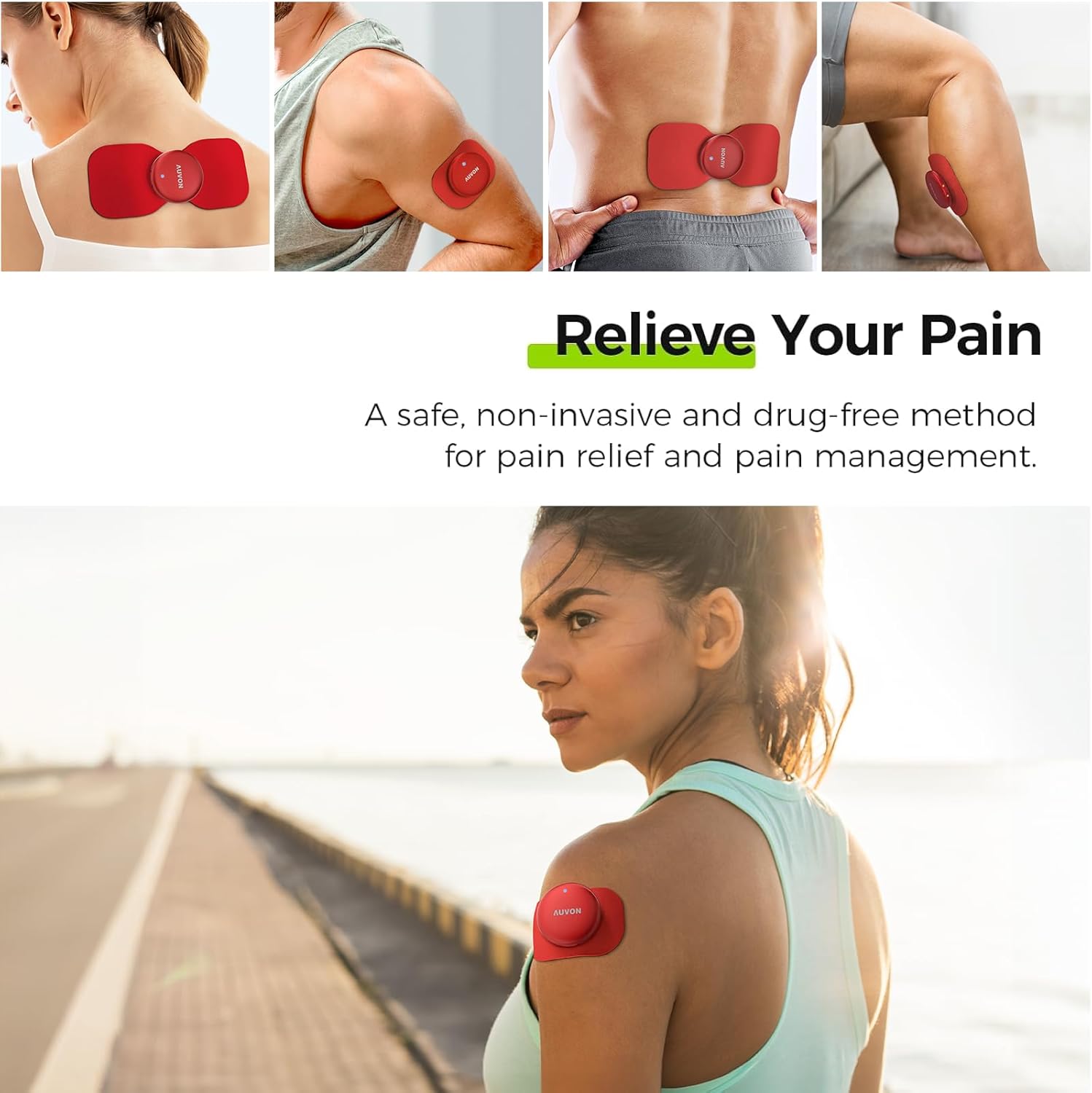
Figure 6: Electrode Pad Placement Examples
Operating Instructions
The AUVON Wireless TENS Unit offers 24 modes and 30 intensity levels for personalized therapy.
- Take out the Wireless Pods from the charging case.
- Long press the "P" button on the charging case to select a program (1-24). Refer to the "Pads Placement & Program Recommendation" guide for suggested programs for different body areas.
- Press the "-" or "+" buttons to adjust the current intensity level (1-30).
- Press the "Time" button to set a timer for 10 to 90 minutes (default is 30 minutes).
- To stop the session, long press the "-" key to set the current level to "0" before removing pads.

Figure 7: Setting Up Your TENS Unit
Video: Getting Started is Easy
Video 1: This video demonstrates the initial steps to get started with the AUVON Wireless TENS Unit, including basic operation.
Video: Wireless TENS Unit Full Functionality
Video 2: This video provides a comprehensive overview of the AUVON Wireless TENS Unit's full functionality, including its 30 intensity levels.
Maintenance
- After each use, long press the "-" key to set the current intensity level to "0" before removing the pads from your skin.
- Carefully peel off the electrode pads from your skin.
- Cover the cleaned pads with their plastic shields to maintain adhesion and prevent contamination.
- Return the pods to the charging case for storage and to recharge if the battery is low.

Figure 8: Before, During, and After Use Guidelines
Troubleshooting
Why Is the Whole Screen Flashing?
This issue can occur due to Bluetooth pairing errors, the device not being connected to the body, lost Bluetooth pairing information, or the timer flashing.
Video 3: This video explains common reasons why the screen might be flashing and provides solutions for Bluetooth pairing errors, device connection issues, and timer flashing.
Why Is One Pod Not Working?
A single pod might not be working if it's out of power, not properly connected, not firmly connected to the pad, or not connected via Bluetooth.
Video 4: This video addresses common reasons why one pod might not be working, including power issues, connection problems, and Bluetooth connectivity.
Specifications
| Feature | Detail |
|---|---|
| Model Number | T24AB3 |
| Package Dimensions | 7.56 x 5.2 x 2.56 inches |
| Item Weight | 0.33 Kilograms (11.64 ounces) |
| Power Source | Battery Powered |
| Battery Type | 1 A battery required (included) |
| Material | Plastic |
| Use For | Arm, Back, Leg, Neck, Shoulder |
Warranty and Support
AUVON provides 24-month quality coverage and lifetime customer support for this product.
If you experience any issues or have questions, please contact our customer support team:
- Email: support@iauovon.com
- Telephone: +1(678)829-7256
Figure 9: AUVON Customer Support Contact Information


