
1. Overview
The Yifecial 4K 64MP Waterproof Digital Camera (Model UP014) is designed for capturing high-resolution photos and videos in various environments, including underwater. It features a 4K video recording capability, 64-megapixel photo resolution, and is waterproof up to 16 feet (5 meters). The camera is also floatable, ensuring it remains accessible if dropped in water.

Image 1.1: Front and back view of the Yifecial UP014 camera, showcasing its compact design and controls.
Its compact and lightweight design, weighing approximately 0.29 pounds (130 grams) and measuring 3.9 x 2.5 x 1.2 inches, makes it suitable for travel and outdoor activities. The camera is equipped with an IPS HD screen for clear viewing and offers a 16X digital zoom function.

Image 1.2: The camera's portable size compared to a smartphone, highlighting its lightweight design for easy carrying.
The camera is suitable for various activities such as snorkeling, swimming, surfing, and drifting.

Image 1.3: Examples of activities where the camera can be used, including snorkeling, swimming, surfing, and drifting.
2. Included Components
The camera package includes the following items:
- Yifecial 4K 64MP Waterproof Digital Camera (Model UP014)
- 32GB SD Card (pre-installed or included separately)
- Removable 650mAh Lithium-Ion Battery
- Type-C USB Cable
- Lanyard
- Storage Bag

Image 2.1: Visual representation of the camera and its standard accessories.
3. Setup
3.1 Battery Installation
- Locate the battery compartment on the camera.
- Open the compartment cover.
- Insert the 650mAh lithium-ion battery, ensuring the correct orientation according to the polarity indicators.
- Close the battery compartment cover securely.
3.2 Memory Card Installation
The camera supports SD cards up to 256GB. A 32GB card is included.
- Locate the SD card slot, typically near the battery compartment.
- Insert the SD card with the metal contacts facing the correct direction (refer to the diagram inside the slot if available) until it clicks into place.
- To remove, gently push the card until it springs out.
3.3 Charging the Battery
Before first use, fully charge the camera battery.
- Connect the camera to a power source using the provided Type-C USB cable.
- The charging indicator light will illuminate.
- Charging typically takes 1-2 hours. The indicator light will change or turn off when charging is complete.
- The camera can be used while charging.

Image 3.1: Illustration of the removable battery and charging method.
4. Operating Instructions
4.1 Power On/Off
- To power on, press and hold the Power button (usually marked with an ON/OFF symbol).
- To power off, press and hold the Power button again.
4.2 Taking Photos
The camera captures photos at up to 64 megapixels.
- Turn on the camera.
- Press the Mode button to select photo mode.
- Frame your shot using the IPS HD screen.
- Press the Shutter button to take a photo.

Image 4.1: Comparison of image resolutions, highlighting the detail captured at 64MP.
4.3 Recording Videos
The camera supports 4K UHD video recording.
- Turn on the camera.
- Press the Mode button to select video recording mode.
- Press the Shutter button to start recording. A red indicator will typically appear on the screen.
- Press the Shutter button again to stop recording.
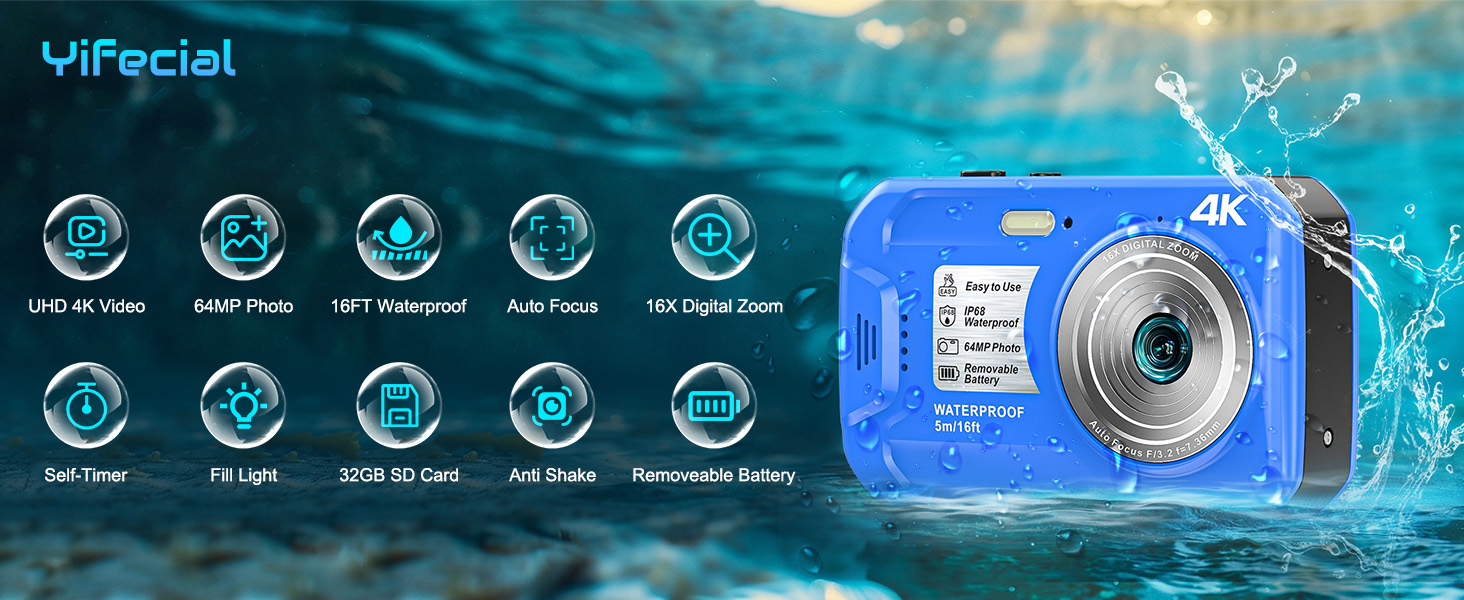
Image 4.2: The camera displaying 4K UHD video recording, with controls for pause, restart, and file saving.
4.4 Autofocus Function
The camera features autofocus to ensure clear images. To use autofocus:
- Point the camera at your subject.
- Press the Shutter button halfway down. The camera will attempt to focus, indicated by a green frame on the screen.
- Once focus is achieved, press the Shutter button fully to capture the image or start recording.

Image 4.3: The camera's innovative autofocus system, showing a green frame indicating focus activation.
4.5 Digital Zoom
The camera offers 16X digital zoom to magnify your subject.
- In photo or video mode, use the W/T buttons (Wide/Telephoto) to zoom in or out.
- Press 'T' to zoom in and 'W' to zoom out.

Image 4.4: Demonstration of the 16X digital zoom capability, showing increased magnification.
4.6 Underwater Usage Guidelines
The camera is waterproof up to 16 feet (5 meters) and has an IP68 rating.
- Ensure all compartment covers (battery, memory card, USB port) are securely closed before submerging the camera.
- Do not exceed the maximum waterproof depth of 16 feet (5 meters).
- After use in saltwater, rinse the camera with fresh water and dry thoroughly.
- The camera is floatable, providing an extra layer of security against loss in water.

Image 4.5: The camera's IP68 waterproof rating and ability to function up to 16 feet underwater.

Image 4.6: The camera's floatable design, which helps prevent loss in water.
4.7 Special Features
- Fill Light: Use the built-in fill light for improved illumination in low-light conditions.
- Self-Timer: Set a delay of 2, 5, or 10 seconds before a photo is taken.
- Continuous Shooting: Capture a rapid sequence of photos.
- Face/Smile Detection: The camera can detect faces and smiles to optimize focus and capture.
- IPS HD Screen: The IPS screen provides clear and vivid color display, maintaining visibility even in bright outdoor and underwater conditions.
- Digital Image Stabilization: The camera features digital image stabilization to help reduce blur from camera movement.
Image 4.7: Demonstration of the fill light feature, enhancing visibility in low-light environments.
Image 4.8: The self-timer function with options for 2, 5, or 10-second delays.
Image 4.9: Continuous shooting mode capturing a series of actions.
Image 4.10: The camera's ability to detect faces and smiles for optimized photography.
Image 4.11: The IPS HD screen offers a wide perspective and clear visibility.
Image 4.12: Digital image stabilization helps prevent blurred images during movement.
5. Maintenance
5.1 Cleaning the Camera
- After underwater use, especially in saltwater, rinse the camera thoroughly with fresh water.
- Wipe the camera dry with a soft, lint-free cloth.
- Do not use harsh chemicals or abrasive materials for cleaning.
- Clean the lens with a specialized lens cleaning cloth.
5.2 Battery Care
- Store the battery in a cool, dry place when not in use.
- Avoid exposing the battery to extreme temperatures.
- If the camera will not be used for an extended period, remove the battery.
5.3 Storage
- Store the camera in its protective storage bag when not in use.
- Keep the camera away from direct sunlight, high humidity, and dust.
6. Troubleshooting
This section addresses common issues you might encounter with your Yifecial UP014 camera.
- Camera Not Turning On:
Ensure the battery is fully charged and correctly inserted. If the issue persists, try charging the camera for a longer period. - Blurred Shooting:
Check if autofocus is enabled and functioning correctly (half-press the shutter button to confirm focus). Ensure the lens is clean. For fast-moving subjects, consider using continuous shooting mode. - Storage Card Not Recognized:
Ensure the SD card is inserted correctly and fully. Try reinserting the card. If the problem persists, try a different compatible SD card to rule out a card issue. Ensure the card is not locked. - Short Battery Life:
Battery life can vary based on usage (e.g., continuous video recording, frequent use of fill light). Ensure the battery is fully charged before use. Consider carrying a spare charged battery for extended use. - Poor Image Quality Underwater:
Ensure the lens is clean and free of water droplets. Use the fill light in darker underwater conditions. The camera's white balance settings may need adjustment for underwater environments.
For further assistance, consult the user manual or reach out to the seller through the Amazon platform.
7. Specifications
Detailed technical specifications for the Yifecial 4K 64MP Waterproof Digital Camera (Model UP014).
| Feature | Specification |
|---|---|
| Brand | Yifecial |
| Model Name | UP014 |
| Maximum Photo Resolution | 64 MP |
| Video Resolution | 4K (2160p) |
| Water Resistance Level | Waterproof (IP68) |
| Water Resistance Depth | 16 Feet (5 meters) |
| Digital Zoom | 16x |
| Photo Sensor Technology | CMOS |
| Screen Size | 2.8 Inches |
| Display Type | IPS HD LCD |
| Battery Type | Removable Lithium Ion |
| Battery Capacity | 650 mAh |
| Average Battery Life | 70 minutes (video recording) |
| Memory Storage | 32GB SD Card included (expandable up to 256GB) |
| Supported File Formats | JPEG (photos), MP4 (videos) |
| Autofocus | Yes (Contrast Detection) |
| Image Stabilization | Digital |
| Flash Modes | Fill Flash (Built-In) |
| Item Weight | 0.26 Kilograms (approx. 0.57 lbs) |
| Dimensions | 3.9 x 2.5 x 1.2 inches |
| UPC | 717504963228 |

Image 7.1: Certifications for battery and waterproof testing.
8. Warranty and Support
8.1 Warranty Information
The Yifecial UP014 camera comes with a 1-year free replacement warranty.
8.2 Customer Support
For any questions, technical assistance, or warranty claims, please contact Yifecial customer support through the Amazon platform. Lifetime technical support is provided for this product.
Common issues such as charging problems, blurred images, or memory card recognition can often be resolved by consulting this manual. If further assistance is required, please reach out to the seller directly via Amazon's official communication channels.