
Introduction
This manual provides detailed instructions for the assembly, operation, maintenance, and troubleshooting of your Generic Electric Standing Desk (Model NSY-SD12). Please read this manual thoroughly before assembly and use to ensure safe and efficient operation.
The Generic Electric Standing Desk is designed to offer a versatile workspace, allowing seamless transitions between sitting and standing positions. It features a quiet electric motor, programmable memory presets, and a sturdy construction suitable for home office or professional environments.
Important Safety Information
- Ensure all components are present and undamaged before assembly.
- Do not exceed the maximum weight capacity of 250 pounds (113 kg).
- Keep children and pets away from the desk during operation.
- Ensure there are no obstructions in the desk's path during height adjustments.
- Avoid harsh chemicals for cleaning. Wipe with a damp cloth.
- Periodically check all screws and fasteners to ensure they are tight.
- This product is for indoor use only.
Package Contents
Before beginning assembly, verify that all parts listed below are included in your package:
- Desktop (48" x 24")
- Desk Frame (Alloy Steel)
- Control Panel
- Power Supply
- Hardware Kit (screws, bolts, tools)
- Instruction Manual
If any parts are missing or damaged, please contact customer support.
Setup and Assembly
Assembly typically requires two people and takes approximately 30-60 minutes. Recommended tools: screwdriver and wrench (included in hardware kit).
Step-by-Step Assembly Guide:
- Unpack Components: Carefully remove all parts from the packaging and lay them out on a clean, soft surface to prevent scratches.
- Assemble Desk Legs: Attach the desk legs to the crossbar using the provided screws. Ensure all connections are secure.
- Attach Feet: Secure the feet to the bottom of the desk legs.
- Mount Desktop: Place the desktop upside down on the soft surface. Carefully align the assembled frame with the pre-drilled holes on the desktop. Secure the frame to the desktop using the provided screws.
- Install Control Panel: Mount the control panel to the underside of the desktop in a convenient location using the small screws.
- Connect Wiring: Connect the motor cables from the legs to the control box, and then connect the control panel cable to the control box. Finally, connect the power supply to the control box. Ensure all connections are firm.
- Cable Management: Use the included cable ties or clips to organize and secure all cables to prevent snagging during height adjustments.
- Flip the Desk: With assistance, carefully flip the desk upright and place it in its desired location. Ensure it is stable and level.

Image: An assembled electric standing desk, showcasing the desktop and frame in a home office setting. This image illustrates the general appearance of the desk after assembly.

Image: A diagram showing the dimensions of the standing desk, including desktop width (1200mm/47.2"), depth (600mm/23.6"), and adjustable height range (720-1180mm/28.3-46.4").
Operating Instructions
Control Panel Functions:
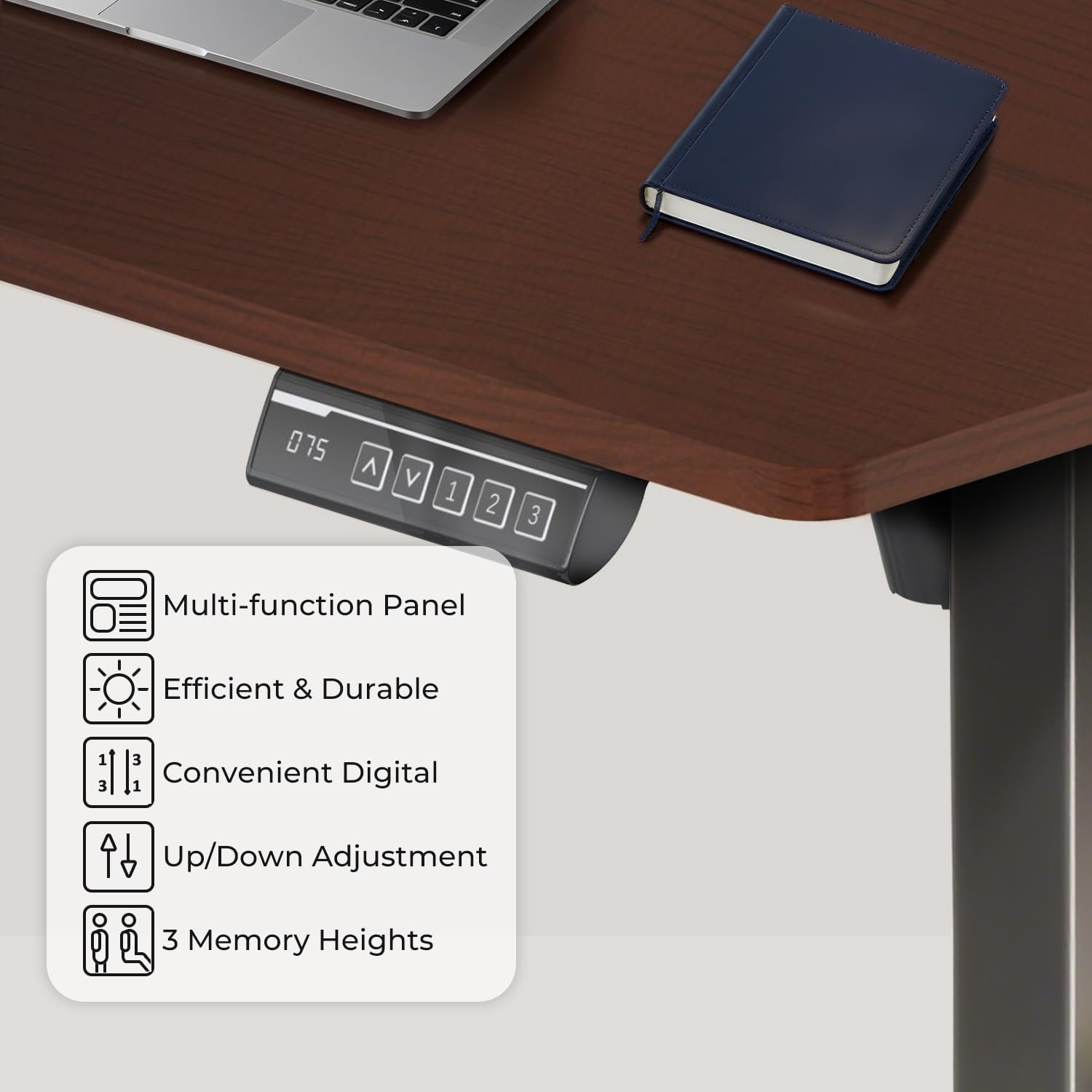
Image: A close-up view of the desk's control panel, featuring a digital display, up/down arrows, and three memory preset buttons (1, 2, 3).
- Up/Down Arrows (▲ / ▼): Press and hold to adjust the desk height manually. Release to stop at the desired height.
- Digital Display: Shows the current height of the desk in inches or centimeters.
- Memory Presets (1, 2, 3):
- To Save a Height: Adjust the desk to your desired height using the up/down arrows. Press the 'M' button (or similar memory button, if present, otherwise assume direct press). Then, press the desired preset button (1, 2, or 3) until you hear a beep or see the display flash, indicating the height is saved.
- To Use a Saved Height: Simply press the corresponding preset button (1, 2, or 3). The desk will automatically move to the saved height.
First Use and Calibration:
Upon first power-up or after a power interruption, the desk may need to be calibrated. To calibrate, press and hold the down arrow until the desk reaches its lowest point and then slightly rises. Release the button. The desk is now calibrated.

Image: Two individuals demonstrating the adjustable height range of the desk. One person is seated at the desk set to 28 inches, and another is standing at the desk set to 46 inches, illustrating the versatility for different working postures.
Maintenance
- Cleaning: Use a soft, damp cloth to clean the desktop and frame. Avoid abrasive cleaners or harsh chemicals that could damage the finish.
- Regular Checks: Periodically inspect all screws and bolts to ensure they are tight. Loose fasteners can affect stability and operation.
- Cable Management: Ensure cables remain neatly organized and are not pinched or tangled, especially during height adjustments.
- Weight Distribution: Distribute weight evenly on the desktop to prevent strain on the motor and frame.
Troubleshooting
| Problem | Possible Cause | Solution |
|---|---|---|
| Desk does not move. | Power cable disconnected, motor cable loose, overload. | Check power connection. Ensure all motor cables are securely plugged in. Reduce weight on the desk. |
| Desk moves unevenly or makes unusual noise. | Uneven weight distribution, loose fasteners, obstruction. | Redistribute weight. Tighten all screws and bolts. Check for obstructions under the desk. |
| Error code on display. | Specific system error. | Refer to the specific error code in a more detailed technical manual (if available) or contact customer support. Often, a power cycle (unplug for 10 seconds, then plug back in) can resolve minor errors. |
| Memory presets not working. | Presets not saved correctly. | Re-save the desired heights following the "To Save a Height" instructions. |
If troubleshooting steps do not resolve the issue, please contact customer support for further assistance.
Specifications
- Model: NSY-SD12
- Brand: Generic
- Desktop Dimensions: 48 inches (W) x 24 inches (D)
- Height Range: 28 inches to 46 inches (710mm to 1170mm)
- Maximum Weight Capacity: 250 lbs (113 kg)
- Motor Type: Electric, Quiet Operation
- Material: Engineered Wood (Desktop), Alloy Steel (Frame)
- Color: Black Top & Black Frame
- Special Features: Adjustable Height, Anti-collision System, Memory Settings
- Assembly Required: Yes (Recommended 2 people)
- UL Listed: Yes
Warranty Information
This Generic Electric Standing Desk (Model NSY-SD12) comes with a limited warranty. Please refer to the warranty card included in your package for specific terms, conditions, and duration of coverage. The warranty typically covers manufacturing defects in materials and workmanship under normal use.
Keep your purchase receipt as proof of purchase for any warranty claims.
Customer Support
For technical assistance, missing parts, or warranty inquiries, please contact Generic customer support. Contact information can typically be found on the product packaging or the brand's official website.
When contacting support, please have your model number (NSY-SD12) and purchase date ready.