
Introduction
This manual provides instructions for the XINFUTE TT-TF010 remote control, designed specifically for use with the TT-TF010 Oscillating Fan. Please read this manual thoroughly before using the remote control to ensure proper operation and longevity.
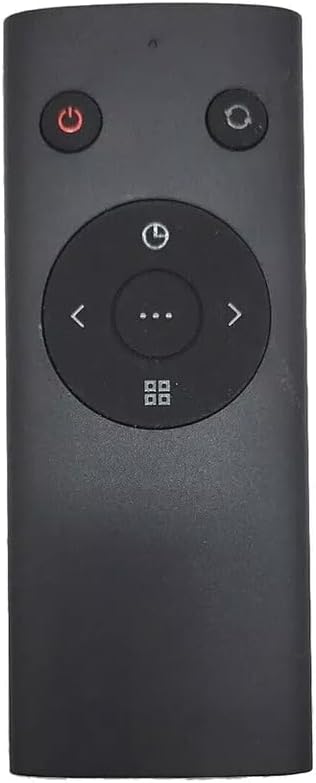
Figure 1: Front view of the TT-TF010 Remote Control. This image displays the sleek, dark gray design of the remote with clearly visible buttons for power, oscillation, timer, and directional control, centered around a multi-function button.
Safety Information
Please observe the following safety precautions:
- Keep batteries away from children. Swallowing batteries can cause chemical burns and potential perforation of the esophagus.
- Do not mix old and new batteries, or different types of batteries.
- Remove batteries if the remote control will not be used for an extended period to prevent leakage.
- Dispose of used batteries properly according to local regulations.
- Do not expose the remote control to direct sunlight, heat sources, or excessive moisture.

Figure 2: Back view of the TT-TF010 Remote Control. This image shows the smooth back surface of the remote, featuring a clear warning label regarding chemical burn hazard from batteries and advising to keep them away from children.
Package Contents
The package includes:
- 1 x XINFUTE TT-TF010 Remote Control
Note: Batteries are not included and must be purchased separately. One AAA battery is required.
Setup
Battery Installation
- Locate the battery compartment on the back of the remote control.
- Slide open the battery compartment cover.
- Insert one (1) AAA battery, ensuring the positive (+) and negative (-) terminals align correctly with the markings inside the compartment.
- Close the battery compartment cover securely until it clicks into place.
The remote control is now ready for use with your TT-TF010 Oscillating Fan.
Operating Instructions
The TT-TF010 remote control features several buttons for convenient operation of your oscillating fan:
| Button Icon | Function | Description |
|---|---|---|
| ⏻ (Power) | Power On/Off | Press to turn the fan on or off. |
| ↻ (Oscillation) | Oscillation Control | Activates or deactivates the fan's oscillation feature. |
| ⏱ (Timer) | Timer Setting | Sets the fan's automatic shut-off timer. Refer to your fan's manual for specific timer intervals. |
| < / > (Directional Arrows) | Speed/Mode Adjustment | Adjusts fan speed or cycles through different fan modes (e.g., normal, natural, sleep). |
| ⋯ (Ellipsis) | Multi-function / Confirm | May serve as a confirmation button or activate additional fan features depending on the fan model. |
| ⌖ (Grid/Menu) | Menu / Preset | Accesses fan menu options or activates preset settings. |
Ensure the remote control is pointed towards the fan's receiver for optimal signal transmission.
Maintenance
- Cleaning: Wipe the remote control with a soft, dry cloth. Do not use abrasive cleaners, solvents, or harsh chemicals.
- Storage: Store the remote control in a cool, dry place when not in use for extended periods.
- Battery Replacement: Replace the battery when the remote's range decreases or it stops responding.
Troubleshooting
| Problem | Possible Cause | Solution |
|---|---|---|
| Remote not responding. | Dead or incorrectly installed battery. | Replace the AAA battery, ensuring correct polarity. |
| Remote range is poor. | Low battery power; Obstruction between remote and fan. | Replace battery; Ensure clear line of sight to the fan's receiver. |
| Specific buttons not working. | Internal malfunction; Compatibility issue. | Ensure the remote is compatible with your specific fan model (TT-TF010 Oscillating Fan). If issues persist, contact customer support. |
Specifications
| Feature | Detail |
|---|---|
| Model Number | TT-TF010 |
| Compatible Devices | TT-TF010 Oscillating Fan |
| Power Source | 1 x AAA Battery (not included) |
| Material | ABS Material |
| Color | As Shown (Dark Gray) |
| Product Dimensions | 8 x 4 x 2 inches |
| Item Weight | 2.11 ounces |
| Special Feature | Ergonomic |
Warranty and Support
Warranty: Enjoy a one-year warranty on all purchases of this product.
Customer Support: All goods are inspected before shipment. If you are not satisfied with your purchase, please contact us within 24 hours of receipt. For further assistance or inquiries, please refer to the contact information provided with your product or visit the XINFUTE official website.