
Introduction
Thank you for purchasing the MOREKA Bocina 415 Bluetooth Speaker. This manual provides detailed instructions for the proper setup, operation, and maintenance of your speaker. Please read this manual carefully before use to ensure optimal performance and longevity of your device. Keep this manual for future reference.
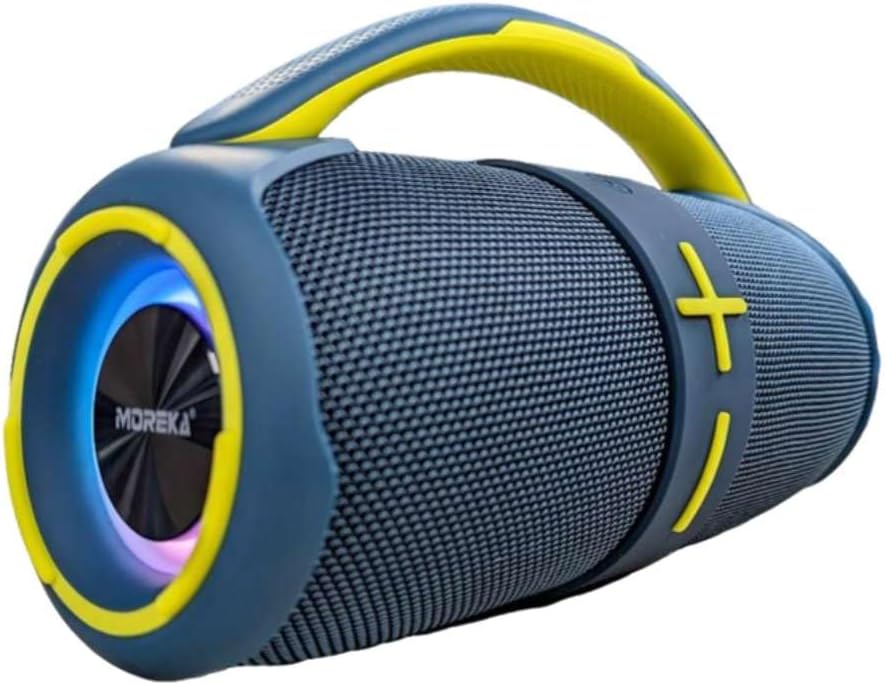
Image: The MOREKA Bocina 415 Bluetooth Speaker in blue and yellow, showcasing its portable design and integrated handle.
Product Overview
The MOREKA Bocina 415 is a portable Bluetooth speaker designed for robust audio performance and versatility. It features a durable, water-resistant design (IPX6), multiple playback options, and a built-in rechargeable battery.
Key Features:
- 20W Audio Output
- Bluetooth 5.0 Connectivity
- IPX6 Water Resistance
- Multiple Playback Modes: Bluetooth, TF Card, USB, FM Radio
- True Wireless Stereo (TWS) Functionality
- Built-in Microphone for Hands-free Calls
- Integrated Rechargeable Battery (2400mAh)

Image: A visual representation of the MOREKA Bocina 415 speaker highlighting its technical specifications and features.
Setup
Charging the Speaker:
- Locate the charging port on the speaker.
- Connect the provided USB charging cable to the speaker's charging port.
- Connect the other end of the USB cable to a compatible USB power adapter (not included) or a computer's USB port.
- The charging indicator light will illuminate, typically red, during charging.
- Once fully charged, the indicator light will change color or turn off (refer to specific LED behavior in the full product guide if available). A full charge takes approximately 3-4 hours.
Note: For first-time use, ensure the speaker is fully charged.
Operating Instructions
Power On/Off:
- To power on, press and hold the power button for a few seconds until you hear an audible prompt or see the LED indicator light up.
- To power off, press and hold the power button again for a few seconds until you hear an audible prompt or the LED indicator turns off.
Bluetooth Pairing:
- Ensure the speaker is powered on and in Bluetooth pairing mode (indicated by a flashing LED light and/or an audible prompt).
- On your mobile device (smartphone, tablet, etc.), enable Bluetooth and search for available devices.
- Select "MOREKA Bocina 415" from the list of found devices.
- Once paired, the speaker will provide an audible confirmation, and the LED indicator will typically stop flashing and remain solid.
- The speaker will automatically reconnect to the last paired device when powered on, if the device's Bluetooth is active and within range.
FM Radio Mode:
- Press the "Mode" button (if available, or refer to specific button layout) to switch to FM Radio mode.
- Press the "Play/Pause" button to automatically scan and save available FM stations.
- Use the "Next Track" and "Previous Track" buttons to navigate between saved stations.
TF Card / USB Playback:
- Insert a TF (microSD) card or a USB flash drive into the respective slot on the speaker.
- The speaker will automatically detect the storage device and switch to the appropriate playback mode.
- Music playback will begin automatically. Use the control buttons (Play/Pause, Next/Previous Track) to manage playback.
True Wireless Stereo (TWS) Function:
The TWS function allows you to pair two MOREKA Bocina 415 speakers together for a stereo sound experience.
- Ensure both speakers are powered on and not connected to any Bluetooth device.
- On one speaker, press and hold the TWS button (or a designated button, refer to speaker controls) until you hear a pairing prompt.
- The two speakers will automatically search and pair with each other. Once paired, you will hear a confirmation sound.
- Connect your mobile device to one of the paired speakers via Bluetooth as described in the "Bluetooth Pairing" section. Both speakers will now play audio in stereo.
Answering Calls:
- When a call comes in while connected via Bluetooth, the music will pause.
- Press the "Play/Pause" button once to answer the call.
- To end the call, press the "Play/Pause" button once again.
- To reject an incoming call, press and hold the "Play/Pause" button for approximately 2 seconds.
Maintenance
- Cleaning: Use a soft, dry cloth to clean the speaker's exterior. Do not use abrasive cleaners or solvents.
- Water Resistance: The speaker is IPX6 water-resistant, meaning it can withstand strong jets of water. Do not submerge the speaker in water. Ensure all port covers are securely closed before exposure to water.
- Storage: Store the speaker in a cool, dry place away from direct sunlight and extreme temperatures.
- Battery Care: To prolong battery life, fully charge the speaker before long periods of inactivity and recharge it at least once every three months.

Image: Multiple MOREKA Bocina 415 speakers displayed in an outdoor setting, emphasizing their IPX6 water resistance feature.
Troubleshooting
| Problem | Possible Solution |
|---|---|
| Speaker does not power on. | Ensure the battery is charged. Connect the speaker to a power source and try again. |
| Cannot pair via Bluetooth. |
|
| No sound or low volume. |
|
| FM Radio reception is poor. |
|
Specifications
| Model Name: | Bocina 415 |
| Brand: | MOREKA |
| Output Power: | 20W |
| Battery Capacity: | 2400mAh |
| Battery Life: | Up to 5 hours (at 60% volume) |
| Bluetooth Version: | 5.0 |
| Wireless Range: | Up to 10 meters (33 feet) |
| Water Resistance: | IPX6 |
| Supported Playback: | Bluetooth, TF Card, USB, FM Radio |
| Dimensions (L x W x H): | Approximately 30 cm x 30 cm x 25 cm |
| Weight: | Approximately 1 Kilogram |
| Material: | Plastic |
Warranty and Support
The MOREKA Bocina 415 speaker comes with a 1-year warranty from the date of purchase, as indicated by the "1 año Garantía" on product images. This warranty covers manufacturing defects. For warranty claims or technical support, please contact your retailer or the MOREKA customer service department through their official channels. Please retain your proof of purchase for warranty validation.
Image: The MOREKA Bocina 415 speaker, featuring a badge indicating a 1-year warranty.