
D491.822
Rapitest D491.822 4-Way Soil Analyzer User Manual
Model: D491.822
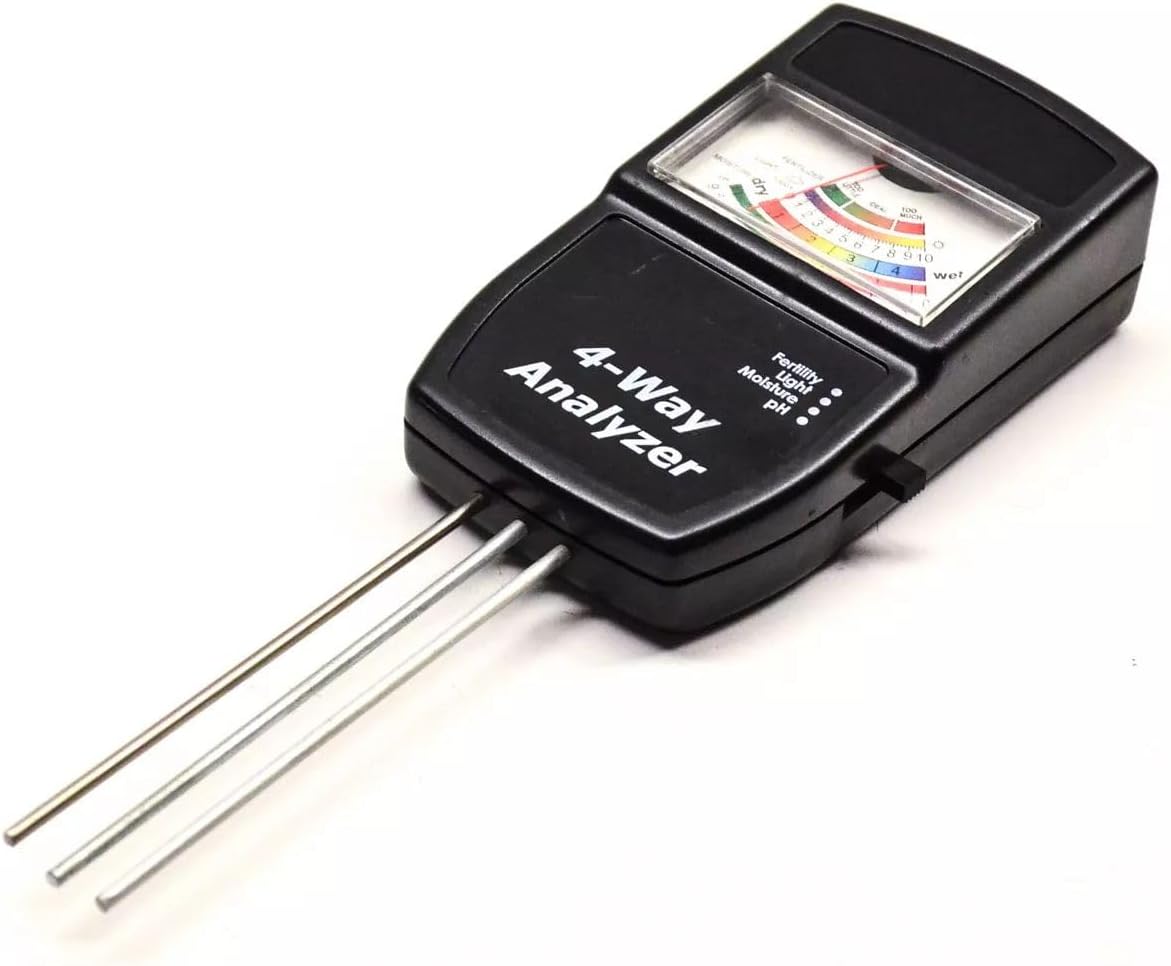
Image: The Rapitest D491.822 4-Way Soil Analyzer, a compact black device with three metal probes extending from the bottom and a clear display window on top showing scales for Fertility, Light, Moisture, and pH. The device is designed for quick and easy soil condition assessment.
Introduction
The Rapitest D491.822 4-Way Soil Analyzer is a versatile tool designed to help gardeners and plant enthusiasts understand their soil conditions better. This device provides quick and accurate readings for four critical soil parameters: soil moisture, pH level, light intensity, and soil fertility. By regularly monitoring these factors, you can optimize growing conditions for your plants, leading to healthier growth and better yields.
Setup
- Unpacking: Carefully remove the soil analyzer from its packaging. Inspect the device for any visible damage.
- Probe Preparation: Ensure the three metal probes at the bottom of the unit are clean and free from debris. For initial use, gently wipe them with a clean, dry cloth.
- No Batteries Required: This analyzer operates without batteries for moisture, pH, and fertility measurements, utilizing the soil's natural properties. The light sensor is also passive.
Operating Instructions
For accurate readings, always ensure the probes are clean before each use. Avoid forcing the probes into hard soil, which could damage them.
General Use:
- Insert the probes vertically into the soil to a depth of approximately 2/3 of their length. Ensure full contact with the soil.
- Compact the soil gently around the probes to ensure good contact.
- Wait for a few minutes (typically 1-5 minutes, depending on the test) for the needle to stabilize before taking a reading.
1. Moisture Test:
- Set the selector switch (if present, or simply observe the moisture scale).
- Insert probes into the soil.
- Read the moisture level on the scale, typically ranging from "Dry" to "Wet".
- Tip: Test at various depths and locations for a comprehensive understanding of soil moisture.
2. pH Test:
- Set the selector switch to pH.
- Insert probes into moist soil. Ensure the soil is adequately moist for an accurate pH reading.
- Wait for 1-5 minutes for the needle to stabilize.
- Read the pH value on the scale, typically from 3.5 (acidic) to 9.0 (alkaline).
- Tip: For best results, test soil that has been watered 24 hours prior.
3. Light Test:
- Point the light sensor (located on the top of the unit) towards the light source.
- Read the light intensity on the scale, typically indicating "Low", "Nor" (Normal), or "High" light levels.
- Tip: This test does not require probes to be in the soil.
4. Fertility Test:
- Set the selector switch to Fertility.
- Insert probes into moist soil.
- Wait for 1-5 minutes for the needle to stabilize.
- Read the fertility level on the scale, typically indicating "Too Little", "Ideal", or "Too Much".
- Note: This test measures the total nitrogen, phosphorus, and potassium (NPK) content in the soil.
Maintenance
- Cleaning Probes: After each use, wipe the metal probes thoroughly with a clean, dry cloth to remove any soil residue. Do not use abrasive materials or harsh chemicals.
- Storage: Store the analyzer in a cool, dry place, away from direct sunlight and extreme temperatures. Keep the probes clean and protected.
- Avoid Water Immersion: Do not immerse the main unit in water or any other liquid. The device is not waterproof.
Troubleshooting
| Problem | Possible Cause | Solution |
|---|---|---|
| Inaccurate or fluctuating readings. | Probes are dirty or corroded; insufficient soil contact; soil too dry (for pH/fertility); air pockets around probes. | Clean probes thoroughly. Ensure probes are fully inserted and soil is compacted around them. Moisten soil before testing pH or fertility. |
| No reading or needle doesn't move. | Probes not making proper contact; soil too dry (for moisture/pH/fertility); damaged probes. | Re-insert probes firmly into moist soil. Ensure the soil is not too dry. If probes are visibly damaged, the unit may require replacement. |
| Light reading seems off. | Sensor obstructed; incorrect angle to light source. | Ensure the light sensor is clean and unobstructed. Point the sensor directly towards the light source for an accurate reading. |
Specifications
- Product Type: 4-Way Soil Analyzer
- Functions: Measures Soil Moisture, pH, Light Intensity, and Soil Fertility (NPK)
- Moisture Range: 1 (Dry) - 10 (Wet)
- pH Range: 3.5 (Acidic) - 9.0 (Alkaline)
- Light Range: Low, Normal, High
- Fertility Range: Too Little, Ideal, Too Much
- Probe Length: Approximately 20 cm (7.9 inches)
- Power Source: Passive (no batteries required)
- Material: Durable plastic casing, metal probes
Warranty and Support
This product is manufactured to high-quality standards. For information regarding warranty coverage, technical support, or replacement parts, please refer to the original product packaging or contact the retailer from whom the product was purchased. Keep your purchase receipt as proof of purchase.
For further assistance, you may also visit the manufacturer's official website or contact their customer service department, if available, using the contact details provided with your product.
Ask a question about this manual
Ask about setup, troubleshooting, compatibility, parts, safety, or missing instructions. Manuals+ will review the question and use this page’s manual context to help answer it.