1. Introduction
Thank you for choosing the roborock QV 35A Robot Vacuum and Mop. This advanced cleaning device is designed to provide a truly hands-free cleaning experience, combining powerful vacuuming with effective mopping capabilities. Equipped with 8000Pa HyperForce suction and an all-in-one docking station, it effortlessly handles dirt, debris, and sticky messes across various floor types. This manual will guide you through the setup, operation, and maintenance of your new robot vacuum to ensure optimal performance and longevity.
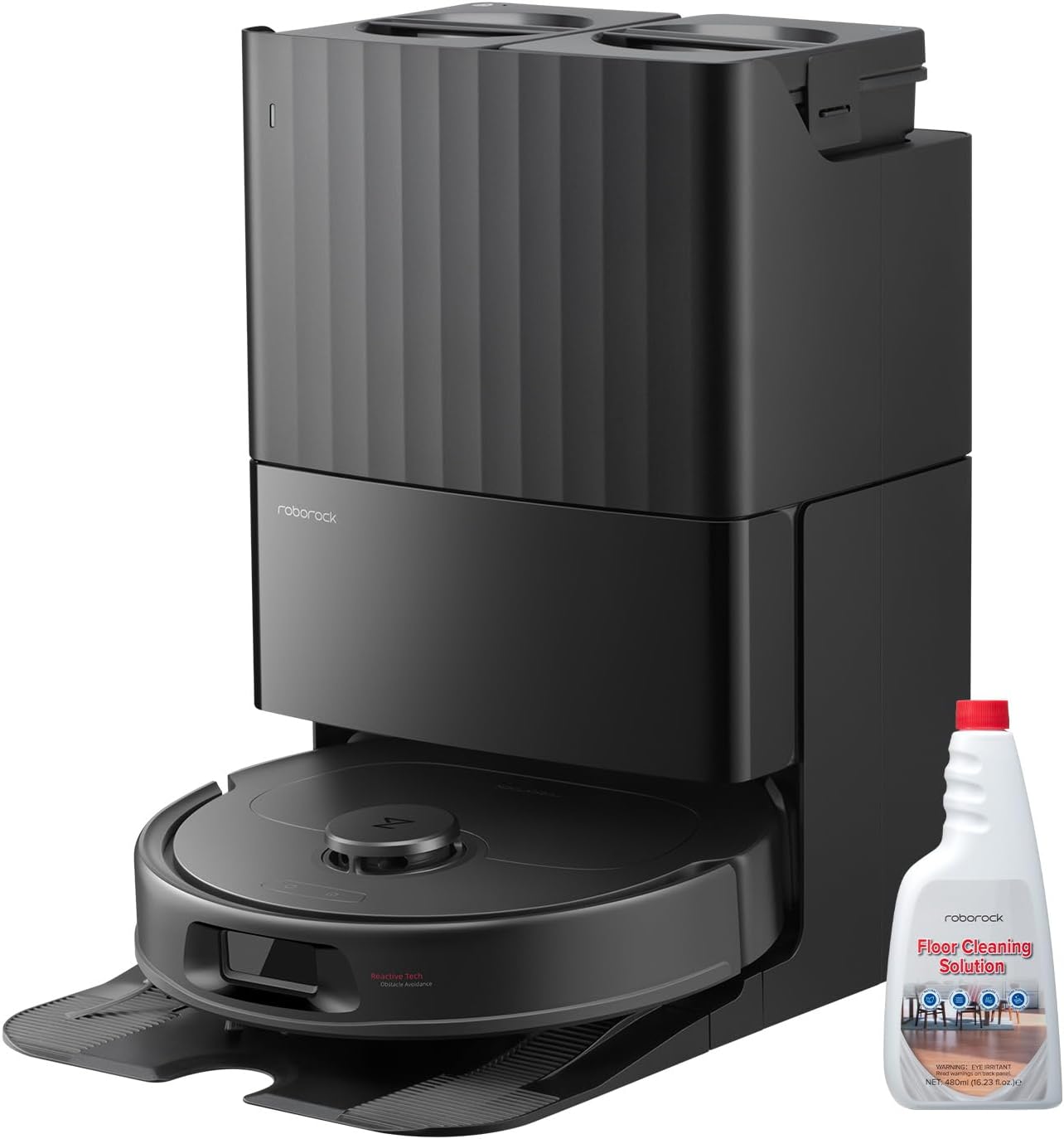
Image: The roborock QV 35A robot vacuum, its all-in-one docking station, and a bottle of roborock Floor Cleaning Solution.
2. Safety Information
Please read all safety instructions carefully before using the appliance and keep them for future reference. Failure to follow these instructions may result in electric shock, fire, or serious injury.
- This appliance is for indoor use only. Do not use outdoors or on commercial surfaces.
- Do not allow children to play with the appliance. Supervise children and pets when the robot is operating.
- Ensure the power voltage matches the voltage specified on the charging dock.
- Do not use the robot in areas with open flames, flammable liquids, or explosive materials.
- Keep hair, loose clothing, fingers, and all parts of the body away from openings and moving parts.
- Do not operate the robot without the dustbin and filters in place.
- If the power cord is damaged, it must be replaced by the manufacturer, its service agent, or similarly qualified persons to avoid a hazard.
- Only use the official roborock Floor Cleaning Solution with this device.
3. Package Contents
Verify that all components are present and in good condition upon unpacking.
- 1 x roborock QV 35A Robot Vacuum
- 1 x All-in-One Docking Station
- 1 x Power Cable
- 1 x roborock Floor Cleaning Solution Bottle
- 2 x Mopping Pads (pre-installed or separate)
- 1 x User Manual (this document)
4. Product Components
4.1 Robot Vacuum
The roborock QV 35A robot vacuum features an advanced design for efficient cleaning. Key components include the main brush, side brush, omnidirectional wheel, cliff sensors, and the dustbin/water tank module. Its powerful 8000Pa HyperForce suction system is designed to capture embedded dirt, stubborn debris, and pet hair from various surfaces.

Image: An illustration of the robot vacuum's underside, highlighting its 8000Pa HyperForce suction capability, effectively pulling in buried hair, pet food, and cereal crumbs.
4.2 All-in-One Docking Station
The docking station is the central hub for your roborock QV 35A, providing automated functions for a truly hands-free cleaning experience. It automatically empties the robot's dustbin, refills its water tank, washes the mopping pads, and dries them to prevent odors and mildew. It also features a detachable base for easy cleaning and offers 30% faster charging.

Image: A detailed diagram showcasing the features of the All-in-One Multifunctional Station, including mop self-washing, air drying, auto dust emptying, auto tank refilling, detachable base, and 30% faster charging.
4.3 Floor Cleaning Solution
The included roborock Floor Cleaning Solution is specifically formulated to work with your QV 35A, effectively removing dust, dirt, grime, and sticky messes from various hard floor surfaces. It is safe for use on wood, vinyl, ceramic tile, laminate, and marble floors.

Image: A bottle of roborock Floor Cleaning Solution, designed to be used with the robot vacuum for enhanced mopping performance.
5. Setup
5.1 Unpacking
- Remove all packaging materials from the robot and the docking station.
- Ensure all protective films and stickers are removed from the robot and sensors.
5.2 Docking Station Placement
- Place the docking station on a hard, level surface against a wall.
- Ensure there is at least 0.5 meters (1.6 feet) of clear space on both sides and 1.5 meters (4.9 feet) in front of the docking station.
- Keep the docking station away from direct sunlight and heat sources.
- Plug the power cable into the docking station and then into a wall outlet.
5.3 Initial Charging
Place the robot vacuum onto the docking station. Ensure the charging contacts on the robot align with those on the dock. The robot will automatically begin charging. For first-time use, it is recommended to fully charge the robot before its initial cleaning cycle.
5.4 App Connection
Download the roborock app from your mobile device's app store. Follow the in-app instructions to connect your robot vacuum to your home Wi-Fi network. The app allows for remote control, scheduling, map management, and access to advanced features.
6. Operating the Robot Vacuum
6.1 Cleaning Modes
The roborock QV 35A offers various cleaning modes to suit your needs, accessible via the mobile app:
- Auto Cleaning: The robot intelligently maps and cleans your entire home.
- Spot Cleaning: Cleans a specific small area with concentrated effort.
- Zone Cleaning: Allows you to define specific areas on the map for the robot to clean.
- Custom Cleaning: Adjust suction power, water flow, and cleaning frequency for specific rooms.
6.2 Suction Power and Mopping
The robot features 8000Pa HyperForce suction for deep cleaning carpets and hard floors. Its advanced mopping system includes high-speed rotation, 30-level water flow control, and a 10mm mop lifting function to prevent wetting carpets and ensure thorough cleaning on hard surfaces.

Image: The roborock QV 35A robot vacuum actively mopping a kitchen floor, demonstrating its excellent mopping capability with features like 10mm mop lifting, 200RPM dual spinning mops, and 30-level water flow.
6.3 Reactive Tech Obstacle Avoidance
Equipped with Reactive Tech, the QV 35A intelligently detects and avoids common household obstacles such as furniture, power cords, and shoes. This technology helps prevent the robot from getting stuck and ensures an uninterrupted cleaning path. You can also set virtual walls and no-go zones within the app to restrict the robot from certain areas.

Image: The roborock QV 35A robot vacuum navigating a living room, demonstrating its Reactive Tech obstacle avoidance by detecting and bypassing slippers and a blanket on the floor.
6.4 Using the Mobile App
The roborock app provides full control over your robot vacuum. Features include:
- Starting/Pausing/Stopping cleaning cycles.
- Scheduling cleaning times.
- Viewing and editing cleaning maps.
- Setting no-go zones and invisible walls.
- Adjusting suction power and water flow levels.
- Checking maintenance status of components.
7. Maintenance
Regular maintenance ensures your roborock QV 35A operates at peak performance.
7.1 Robot Vacuum Maintenance
- Dustbin: Empty the dustbin after each cleaning cycle or as indicated by the app. Clean the filter regularly by tapping out debris or rinsing with water (allow to air dry completely before reinserting).
- Main Brush: Remove hair and debris tangled around the main brush regularly. Use the cleaning tool provided.
- Side Brush: Check for tangled hair or debris and clean as needed.
- Sensors: Wipe all sensors (cliff sensors, wall sensor, charging contacts) with a soft, dry cloth periodically.
- Mopping Pads: Remove and wash the mopping pads after each use. They can be hand-washed or machine-washed.
7.2 Docking Station Maintenance
- Dust Bag: The 2.7L dust bag in the docking station typically lasts up to 7 weeks. Replace it when full, as indicated by the app or the station's indicator light.
- Clean/Dirty Water Tanks: Regularly empty the dirty water tank and refill the clean water tank. Clean both tanks periodically to prevent buildup.
- Docking Station Base: The base is detachable for easy cleaning. Wipe down the charging contacts and the mop washing area.
7.3 Using the Floor Cleaning Solution
The roborock Floor Cleaning Solution is designed for effective cleaning on multiple hard floor surfaces, including wood, hard floor, tile, marble, and stone. It is excellent for tackling grease, tough odors, and stains.

Image: The roborock Floor Cleaning Solution bottle alongside examples of various floor surfaces it can effectively clean: wood, hard floor, tile, marble, and stone.

Image: Demonstrates the effectiveness of roborock Floor Cleaning Solution in cleaning up various spills and stains, including spilled drinks, food, and general grime on different floor types.
Dilution Ratio: The recommended dilution ratio is 1:200. Use approximately 2/3 of a cap (about 5 ml) of solution per 1 liter of water in the clean water tank of the docking station.

Image: A visual guide illustrating the dilution ratio for the roborock Floor Cleaning Solution: approximately 2/3 of a cap (5 ml) of solution mixed with 1 liter of water.
8. Troubleshooting
If you encounter issues with your roborock QV 35A, refer to the table below for common problems and solutions. For persistent issues, contact customer support.
| Problem | Possible Cause | Solution |
|---|---|---|
| Robot does not turn on | Low battery; Power button not pressed | Place robot on charging dock; Press and hold power button for 3 seconds |
| Robot cannot charge | Charging contacts dirty; Docking station not powered | Clean charging contacts on robot and dock; Ensure dock is plugged in |
| Robot gets stuck frequently | Too many obstacles; Sensors dirty | Clear clutter from floor; Clean all sensors |
| Poor cleaning performance | Dustbin full; Brushes tangled; Filter clogged | Empty dustbin; Clean brushes; Clean/replace filter |
| Mopping not effective | Water tank empty; Mopping pads dirty; No cleaning solution | Refill water tank; Wash mopping pads; Add diluted cleaning solution |
| Docking station not emptying dustbin | Dust bag full; Suction port blocked | Replace dust bag; Clear any blockages in the dock's suction port |
9. Specifications
Detailed technical specifications for the roborock QV 35A Robot Vacuum and Mop.
| Feature | Detail |
|---|---|
| Model | QV 35A |
| Brand | roborock |
| Suction Power | 8000Pa HyperForce |
| Control Method | App |
| Power Source | Battery Powered |
| Included Components | 1 x Vacuum Cleaner, 1 x Bottle (Floor Cleaning Solution) |
| Filter Type | Cloth, Cartridge, Foam |
| Dock Dust Bag Capacity | 2.7L (up to 7 weeks duration) |
| Dock Water Tank Capacity | 4L (for 3552 sqft coverage) |
| Mopping Features | 10mm Mops Lifting, 200RPM Dual Spinning Mops, 30-level Water Flow |
| Obstacle Avoidance | Reactive Tech System |
10. Warranty and Support
Your roborock QV 35A Robot Vacuum and Mop comes with a standard manufacturer's warranty. Please refer to the warranty card included in your package or visit the official roborock website for detailed warranty terms and conditions.
For technical support, troubleshooting assistance, or to inquire about replacement parts, please contact roborock customer service through their official website or the contact information provided in your product packaging. When contacting support, please have your product model number (QV 35A) and purchase information ready.
For more information, visit the official roborock Store on Amazon.


